We Use CookiesWe use cookies to enhance the security, performance, functionality and for analytical and promotional activities. By continuing to browse this site you are agreeing to our privacy policy

10 Best Multifunction Inkjet Printers 2026 in the United States
How do we rank products for you?

Our technology thoroughly searches through the online shopping world, reviewing hundreds of sites. We then process and analyze this information, updating in real-time to bring you the latest top-rated products. This way, you always get the best and most current options available.

headphones-stars

Our Top Picks

#1

Winner

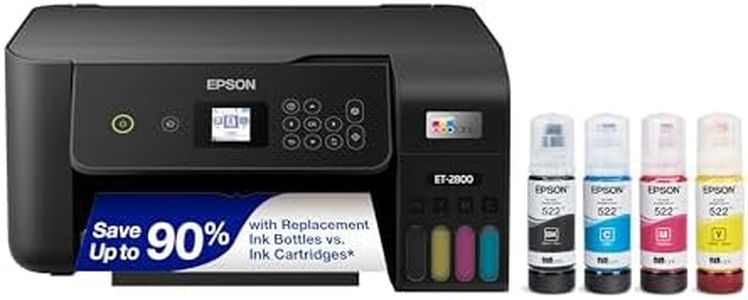
Epson EcoTank ET-2800 Wireless Color All-in-One Cartridge-Free Ink Supertank Printer with Scan and Copy for Home Use, Black

Rating
10.0
Chosen by1,400
Ink Cost and Yield
Print Quality (Resolution)
Connectivity Options

Most important from
7845 reviews

Ink Cost and Yield
The cartridge-free ink tank system delivers exceptional ink longevity, allowing hundreds of high-quality photos to be printed without refilling.
Print Quality (Resolution)
Prints come out sharp and vivid, especially photos, with no smudging or color distortion.
Connectivity Options
Wi-Fi connectivity enables printing from anywhere in the home, making wireless use convenient despite occasional connection hiccups.
Paper Handling
Frequent error messages about paper type mismatches require bypassing prompts, adding unnecessary steps to the printing process.
Automatic Document Feeder (ADF)
Scanning multi-page documents is cumbersome due to the absence of an automatic document feeder, necessitating manual page placement.
Duplex Printing
Manual duplexing is manageable, though the lack of automatic double-sided printing may slow down heavy two-sided print jobs.

The Epson EcoTank ET-2800 is designed with home users in mind, especially those who want a simple, low-maintenance all-in-one printer. Its standout feature is the cartridge-free ink tank system, which uses refillable bottles that last much longer than traditional cartridges—enough to print thousands of pages before needing a refill. This can save money on ink and reduce waste, making it an eco-friendlier choice. Print quality is quite good, offering sharp black-and-white prints with a high resolution and decent color print quality suitable for everyday documents and casual photos. It prints black-and-white pages at about 10 pages per minute, which is reasonable for home use, though color printing is slower at 5 pages per minute.

Connectivity options include USB and Wi-Fi, allowing easy printing from computers and mobile devices. Paper handling is basic but practical, with a single tray holding up to 100 sheets and support for various paper sizes, though it doesn't support automatic duplex (double-sided) printing, which could be a drawback if you print a lot of two-sided documents. The scanner is a flatbed type with modest resolution, good enough for scanning documents and photos at typical home use quality. However, it lacks an automatic document feeder (ADF), so scanning or copying multi-page documents means placing each page manually.

This printer is a solid choice for those who prioritize low ink costs, straightforward operation, and reliable print quality for everyday home tasks. It may not be the best fit if you require fast color printing, duplexing, or frequent multi-page scanning.

Rating
10.0
Chosen by1,400
Ink Cost and Yield
Print Quality (Resolution)
Connectivity Options

Most important from
7845 reviews

Ink Cost and Yield
The cartridge-free ink tank system delivers exceptional ink longevity, allowing hundreds of high-quality photos to be printed without refilling.
Print Quality (Resolution)
Prints come out sharp and vivid, especially photos, with no smudging or color distortion.
Connectivity Options
Wi-Fi connectivity enables printing from anywhere in the home, making wireless use convenient despite occasional connection hiccups.
Paper Handling
Frequent error messages about paper type mismatches require bypassing prompts, adding unnecessary steps to the printing process.
Automatic Document Feeder (ADF)
Scanning multi-page documents is cumbersome due to the absence of an automatic document feeder, necessitating manual page placement.
Duplex Printing
Manual duplexing is manageable, though the lack of automatic double-sided printing may slow down heavy two-sided print jobs.
#2

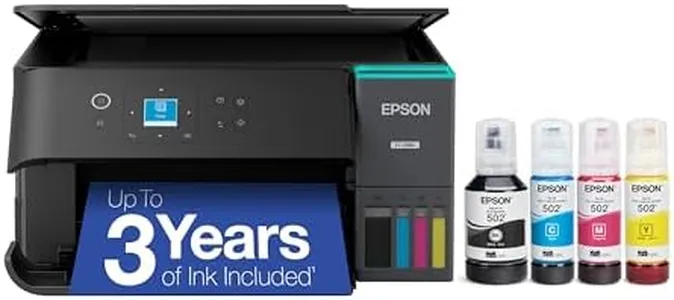
Epson EcoTank ET-2980 Wireless All-in-One Color Supertank Printer with Refillable Ink Tanks, 3 Years of Ink, Mobile Printing, 15 ISO PPM, Color Touchscreen, Auto 2-Sided, Black

Rating
8.5
Print Speed
Ink Cost and Yield
Print Quality (Resolution)

Most important from
825 reviews

Print Speed
Prints come out quickly and perfectly, with fast-drying pages that don’t smear.
Ink Cost and Yield
The refillable ink system is surprisingly clean and simple, avoiding the mess often associated with ink refills.
Print Quality (Resolution)
Print quality is solid for everyday documents and office use, delivering sharp and reliable results.
Connectivity Options
Wireless printing via phone apps is easier and faster than using a PC, enhancing convenience for mobile users.

The Epson EcoTank ET-2980 is a solid choice for home or small office users who want an all-in-one printer with low running costs and decent print quality. It offers sharp prints with a maximum resolution of 4800 x 1200 dpi, making it suitable for everyday documents and colorful images. The print speed is reasonable, delivering up to 15 pages per minute in black and 8 pages per minute in color, which works well for moderate printing needs.

A standout feature is its refillable ink tank system, which comes with enough ink to last up to three years or thousands of pages, reducing the hassle and expense of frequent cartridge replacements. Refilling is straightforward thanks to user-friendly EcoFit bottles. The printer supports wireless connectivity, including mobile printing via the Epson Smart Panel app, allowing you to print and scan directly from smartphones or tablets.

Paper handling is basic but functional, with a single tray that holds up to 100 sheets and supports various paper sizes up to legal (8.5 x 14 inches). It includes automatic duplex (double-sided) printing, helping save paper. The scanner is a flatbed type but lacks an automatic document feeder (ADF), so scanning multi-page documents manually can be time-consuming. While the printer covers essential functions like copying and scanning, it doesn’t have multiple trays or advanced paper handling options, which might be a drawback for heavier users. Epson recommends using genuine ink to maintain print quality and avoid damage, which is an important consideration for ongoing costs. This model suits users who prioritize economical printing with good color output and wireless convenience, but it may not be ideal if you need fast scanning of many pages or advanced paper handling features.

Rating
8.5
Print Speed
Ink Cost and Yield
Print Quality (Resolution)

Most important from
825 reviews

Print Speed
Prints come out quickly and perfectly, with fast-drying pages that don’t smear.
Ink Cost and Yield
The refillable ink system is surprisingly clean and simple, avoiding the mess often associated with ink refills.
Print Quality (Resolution)
Print quality is solid for everyday documents and office use, delivering sharp and reliable results.
Connectivity Options
Wireless printing via phone apps is easier and faster than using a PC, enhancing convenience for mobile users.
#3

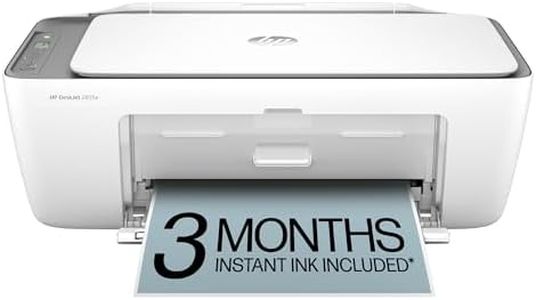
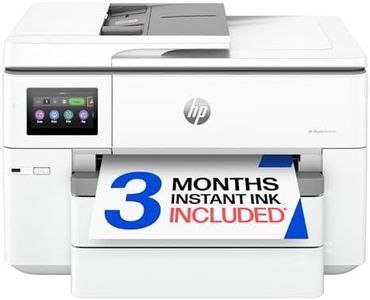
HP DeskJet 2855e Wireless All-in-One Color Inkjet Printer, Scanner, Copier, Best-for-home, 3 month Instant Ink trial included. This printer is only 2.4 ghz capable. (588S5A)

The HP DeskJet 2855e is a compact and budget-friendly all-in-one inkjet printer designed mainly for light office use or home users who need basic printing, scanning, and copying. It offers decent print quality with a maximum color resolution of 4800 x 1200 dpi, which is quite good for photos and color documents, while black-and-white prints max out at 600 dpi. Print speeds are moderate, with about 7.5 pages per minute for black and white and 5.5 ppm in color, suitable for occasional use but not ideal if you need fast, high-volume printing.

Connectivity is straightforward with USB and single-band Wi-Fi (2.4 GHz only), allowing wireless printing from smartphones or computers, though it lacks dual-band or Ethernet options which may limit network stability or speed in some settings. Paper handling is basic with a single 60-sheet tray and support for standard paper sizes up to legal (8.5 x 14 inches), but the maximum copies per run is limited to nine, and there is no automatic document feeder (ADF), which means scanning or copying multiple pages requires manual intervention. Duplex printing is manual, so you need to flip pages yourself for double-sided prints.

The scanner is a flatbed type suitable for everyday scanning needs but not professional-grade. Ink uses HP 67 cartridges, which are widely available but may have moderate running costs. It comes with a one-year warranty and supports app-based control, making setup and use fairly user-friendly. This printer covers essential functions well and is best suited for users with light to moderate printing demands who want wireless convenience at a low entry cost, but it may not satisfy those looking for faster speeds, automatic duplexing, or advanced paper handling.

Buying Guide for the Best Multifunction Inkjet Printers

Choosing the right multifunction inkjet printer can be a bit overwhelming given the variety of models and features available. However, by understanding your specific needs and the key specifications of these printers, you can make an informed decision. Multifunction inkjet printers are versatile devices that combine printing, scanning, copying, and sometimes faxing capabilities into one machine. They are ideal for home offices, small businesses, and even personal use. Here are the key specifications you should consider when selecting a multifunction inkjet printer.
Print Quality (Resolution)Print quality is measured in dots per inch (DPI). This spec indicates how many dots of ink the printer can place on a square inch of paper. Higher DPI means better print quality, which is important for printing detailed images and professional documents. For general home use, a resolution of 600 x 600 DPI is usually sufficient. For high-quality photo printing, look for a printer with at least 1200 x 1200 DPI or higher. Consider your primary use: if you need to print high-resolution photos or detailed graphics, opt for a higher DPI.
Print SpeedPrint speed is measured in pages per minute (PPM). This spec tells you how quickly the printer can produce pages. Faster print speeds are important for high-volume printing tasks, such as in a busy office environment. For occasional home use, a speed of 10-20 PPM is generally adequate. For more demanding environments, look for printers with speeds of 20 PPM or higher. Assess how often and how much you print to determine the right speed for your needs.
Connectivity OptionsConnectivity options determine how you can connect your printer to your devices. Common options include USB, Wi-Fi, Ethernet, and Bluetooth. Wi-Fi connectivity allows for wireless printing from multiple devices, which is convenient for home and office use. Ethernet is useful for wired network connections in office settings. USB is a standard option for direct connections to a single computer. Bluetooth is handy for printing from mobile devices. Consider your setup and how you prefer to connect your devices to choose the right connectivity options.
Paper HandlingPaper handling refers to the types and sizes of paper the printer can accommodate, as well as the capacity of the paper tray. This is important if you need to print on different media types, such as envelopes, labels, or photo paper. A larger paper tray capacity is beneficial for high-volume printing, reducing the need for frequent refills. For general use, a tray that holds 100-250 sheets is usually sufficient. If you print a lot or use various paper types, look for a printer with multiple trays and higher capacity.
Ink Cost and YieldInk cost and yield refer to the price of replacement ink cartridges and how many pages they can print. This is crucial for understanding the long-term cost of owning the printer. High-yield cartridges print more pages and can be more cost-effective in the long run. Check the cost of the cartridges and the estimated page yield to calculate the cost per page. If you print frequently, look for printers with affordable high-yield cartridges to keep your printing costs down.
Scanner ResolutionScanner resolution, like print quality, is measured in DPI. This spec indicates the level of detail the scanner can capture. Higher resolution is important for scanning detailed images or documents that need to be enlarged. For general document scanning, a resolution of 600 x 1200 DPI is usually sufficient. For high-quality image scanning, look for a scanner with at least 1200 x 2400 DPI. Consider what you will be scanning most often to determine the appropriate resolution.
Automatic Document Feeder (ADF)An Automatic Document Feeder (ADF) allows you to scan, copy, or fax multiple pages without manually feeding each one. This is a valuable feature for handling multi-page documents efficiently. ADF capacity varies, with some holding 20 pages and others up to 50 or more. If you frequently work with multi-page documents, an ADF can save you a lot of time and effort. Choose a printer with an ADF that matches the volume of your typical tasks.
Duplex PrintingDuplex printing refers to the printer's ability to print on both sides of a sheet of paper automatically. This feature is important for saving paper and creating professional-looking double-sided documents. It is especially useful for businesses and home offices that print a lot of reports or booklets. If you need to print double-sided documents regularly, look for a printer with automatic duplex printing. For occasional use, manual duplex printing (where you flip the paper yourself) may be sufficient.

FAQ

Most Popular Categories Right Now