We Use CookiesWe use cookies to enhance the security, performance, functionality and for analytical and promotional activities. By continuing to browse this site you are agreeing to our privacy policy

10 Best Laptops 2026 in the United States

How do we rank products for you?

Our technology thoroughly searches through the online shopping world, reviewing hundreds of sites. We then process and analyze this information, updating in real-time to bring you the latest top-rated products. This way, you always get the best and most current options available.

headphones-stars

Our Top Picks

#1

Winner

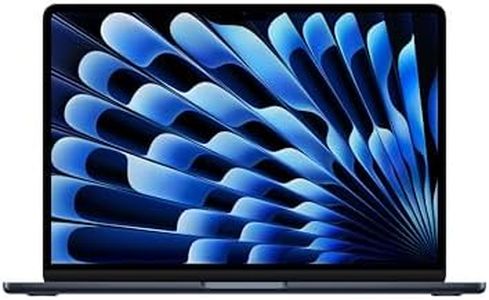
Apple 2026 MacBook Air 15-inch Laptop with M5 chip: Built for AI, 15.3-inch Liquid Retina Display, 24GB Unified Memory, 1TB SSD, 12MP Center Stage Camera, Touch ID, Wi-Fi 7; Midnight

Rating
10.0
Chosen by1,261
Processor (CPU)
Display (Size & Resolution)
Battery Life

Most important from
158 reviews

Processor (CPU)
Performance is remarkably fast and smooth, handling multitasking, creative work, and demanding applications effortlessly thanks to the M5 chip and 24GB unified memory.
Display (Size & Resolution)
The balance between a large 15.3-inch display and exceptional portability creates a slim, lightweight laptop that’s easy to carry without compromising screen real estate.
Battery Life
Battery life is outstanding, comfortably lasting all day and encouraging use without constantly needing to recharge.
Weight & Portability
The balance between a large 15.3-inch display and exceptional portability creates a slim, lightweight laptop that’s easy to carry without compromising screen real estate.
Keyboard & Touchpad Quality
The keyboard is comfortable to type on, and the overall setup is quick and effortless, making it a reliable choice for both work and leisure.
Ports and Connectivity
Connectivity options including two Thunderbolt 4 ports, MagSafe charging, Wi-Fi 7, and Bluetooth 6 are well judged for modern use, supporting up to two external displays.

The Apple 2026 MacBook Air 15-inch with the M5 chip is a strong pick if you want a lightweight but powerful laptop. It features a fast 10-core CPU and 10-core GPU that handle multitasking and creative work smoothly, especially with 24GB of unified memory that boosts fluidity. The 1TB SSD offers plenty of fast storage for apps and files. The large 15.3-inch Liquid Retina display is impressive, showing crisp text and vivid colors, making it great for watching videos or photo editing. Battery life is excellent, lasting up to 18 hours, so you can use it all day without needing to recharge. Weighing just over 3 pounds, it’s portable enough for regular travel or commuting.

The keyboard and touchpad are well-designed, with backlighting and Touch ID for security, providing a comfortable typing experience. Connectivity includes two Thunderbolt 4 ports, MagSafe charging, Wi-Fi 7, and Bluetooth 6, covering most modern needs, but it has a limited number of ports which might require adapters for some users. The 12MP Center Stage camera and six-speaker setup enhance video calls and audio quality. This MacBook Air runs macOS, known for smooth app performance and tight integration with iPhones and other Apple devices.

The integrated graphics might not be ideal for heavy gaming or intensive 3D work. The price tends to be higher than many Windows alternatives with similar specs. If you value portability, strong performance, and working within the Apple ecosystem, this MacBook Air is an excellent choice. However, if you need many ports or plan to do specialized gaming or graphics work, you might want to consider other options.

Rating
10.0
Chosen by1,261
Processor (CPU)
Display (Size & Resolution)
Battery Life

Most important from
158 reviews

Processor (CPU)
Performance is remarkably fast and smooth, handling multitasking, creative work, and demanding applications effortlessly thanks to the M5 chip and 24GB unified memory.
Display (Size & Resolution)
The balance between a large 15.3-inch display and exceptional portability creates a slim, lightweight laptop that’s easy to carry without compromising screen real estate.
Battery Life
Battery life is outstanding, comfortably lasting all day and encouraging use without constantly needing to recharge.
Weight & Portability
The balance between a large 15.3-inch display and exceptional portability creates a slim, lightweight laptop that’s easy to carry without compromising screen real estate.
Keyboard & Touchpad Quality
The keyboard is comfortable to type on, and the overall setup is quick and effortless, making it a reliable choice for both work and leisure.
Ports and Connectivity
Connectivity options including two Thunderbolt 4 ports, MagSafe charging, Wi-Fi 7, and Bluetooth 6 are well judged for modern use, supporting up to two external displays.
#2

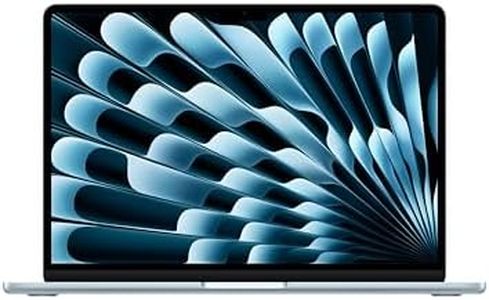
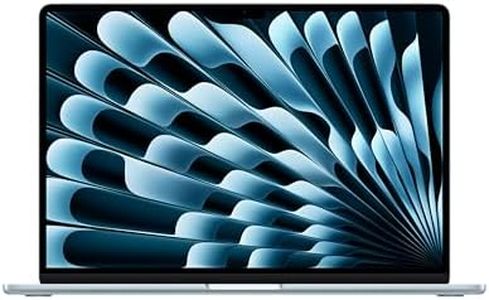
Apple 2026 MacBook Air 13-inch Laptop with M5 chip: Built for AI, 13.6-inch Liquid Retina Display, 16GB Unified Memory, 512GB SSD, 12MP Center Stage Camera, Touch ID, Wi-Fi 7; Sky Blue

The Apple 2026 MacBook Air with the M5 chip is a sleek, lightweight laptop weighing just about 2.7 pounds, making it very portable for daily use and travel. Its 13.6-inch Liquid Retina display offers sharp, vibrant visuals with support for a billion colors, which is great for watching videos or photo editing. Powered by Apple’s M5 chip, it delivers fast performance and impressive AI features, helping with multitasking and creative tasks. The 16GB of unified memory ensures smooth operation even when running multiple apps at once, while the 512GB SSD provides quick storage access and enough space for many files and programs.

Battery life is strong, lasting up to 18 hours, so you can use it throughout the day without needing to recharge frequently. The keyboard and touchpad are comfortable and responsive, including Touch ID for quick, secure logins. The laptop includes two Thunderbolt 4 ports, a MagSafe charging port, and a headphone jack; some users might find the port options somewhat limited compared to other laptops with more USB-A or HDMI ports. Built-in Wi-Fi 7 and Bluetooth 6 ensure fast and stable wireless connections.

This MacBook Air runs macOS, which is optimized to work seamlessly with other Apple devices like the iPhone, enhancing productivity and convenience if you’re already in the Apple ecosystem. Its integrated graphics are powerful enough for everyday tasks and light creative work but may not suit heavy gaming or advanced 3D rendering needs. For anyone seeking a highly portable, stylish laptop with excellent battery life, strong AI abilities, and tight integration with Apple services, this model presents a solid choice. If your work requires many ports or specialized graphics power, exploring other options might be advisable.

#3

Apple 2026 MacBook Neo 13-inch Laptop with A18 Pro chip: Built for AI and Apple Intelligence, Liquid Retina Display, 8GB Unified Memory, 512GB SSD Storage, 1080p FaceTime HD Camera, Touch ID; Blush

Rating
9.7
Processor (CPU)
Memory (RAM)
Storage (SSD/HDD)

Most important from
962 reviews

Processor (CPU)
This MacBook handles a full workday effortlessly, running multiple apps and creative software like GarageBand without any slowdowns.
Memory (RAM)
The fixed 8GB RAM suits everyday tasks perfectly but may limit performance for heavy multitasking or professional-grade creative work.
Storage (SSD/HDD)
The storage is sufficient for typical use, but adding extra space is recommended for those with larger files.
Display (Size & Resolution)
The 13-inch Liquid Retina display delivers crisp, vibrant visuals with impressive brightness that outshines many competitors in its price range.
Battery Life
Battery life easily lasts through an entire workday with some charge remaining, supporting long hours away from the outlet.
Keyboard & Touchpad Quality
Lack of keyboard backlighting and Touch ID on the base model are notable trade-offs to keep the price affordable.

The Apple 2026 MacBook Neo 13-inch is a lightweight and stylish laptop, weighing just 2.7 pounds, making it very portable for students and everyday users on the go. It has a bright and sharp 13-inch Liquid Retina display with excellent color support, which is great for watching videos, editing photos, or just browsing comfortably. Powered by Apple’s new A18 Pro chip with 6 CPU cores and a 5-core GPU, it handles daily tasks like web browsing, document editing, and light gaming smoothly while also offering advanced AI features to help with note summarizing and other smart functions. The 8GB unified memory is enough for typical multitasking, though power users who run many heavy apps at once might find it a bit limiting.

Storage of 512GB SSD provides fast data access and decent space for files and apps, suitable for most users but those with large media collections may need external storage. Battery life is impressive, promising up to 16 hours of video playback or all-day use, which supports long work or study sessions without frequent charging. The keyboard and touchpad are designed for comfort and come in four vibrant colors, adding a personal touch. However, the laptop has only two USB-C ports and a headphone jack, which might require adapters for connecting older USB devices or multiple peripherals.

This MacBook also offers excellent integration with other Apple devices, strong privacy and security features, and a high-quality 1080p webcam with clear audio, making it a solid choice for video calls and remote learning. The MacBook Neo is well suited for users seeking a stylish, portable, and AI-enhanced laptop for everyday tasks, media, and light creative work, but it may not meet the needs of heavy multitaskers or those needing extensive port options.

Rating
9.7
Processor (CPU)
Memory (RAM)
Storage (SSD/HDD)

Most important from
962 reviews

Processor (CPU)
This MacBook handles a full workday effortlessly, running multiple apps and creative software like GarageBand without any slowdowns.
Memory (RAM)
The fixed 8GB RAM suits everyday tasks perfectly but may limit performance for heavy multitasking or professional-grade creative work.
Storage (SSD/HDD)
The storage is sufficient for typical use, but adding extra space is recommended for those with larger files.
Display (Size & Resolution)
The 13-inch Liquid Retina display delivers crisp, vibrant visuals with impressive brightness that outshines many competitors in its price range.
Battery Life
Battery life easily lasts through an entire workday with some charge remaining, supporting long hours away from the outlet.
Keyboard & Touchpad Quality
Lack of keyboard backlighting and Touch ID on the base model are notable trade-offs to keep the price affordable.

Buying Guide for the Best Laptops

Choosing a laptop is all about understanding what you plan to do with it. Whether you’re using it for work, school, entertainment, gaming, or creative projects, each use case can steer you toward different features and designs. Start by thinking about how portable you want your laptop to be, how much power you need for your tasks, and how long the battery should last. Always balance performance needs with what feels comfortable in size and usability for you.
Processor (CPU)The processor, or CPU, is the brain of the laptop. It determines how fast your computer can run applications and handle multitasking. Typical processors range from basic ones suitable for web browsing and office work, to high-end chips made for gaming, design, or heavy multitasking. If you mainly use your laptop for email, browsing, or streaming, an entry-level or mainstream processor will work just fine. If you’re into programming, video editing, or playing the latest games, look for a more powerful processor, as it will keep your laptop feeling fast and responsive for longer.
Memory (RAM)RAM is the short-term memory your laptop uses to keep things running smoothly while you open apps or web tabs. More RAM helps the laptop juggle multiple tasks. Laptops generally come with anywhere from 4GB to 32GB or more of RAM. For basic tasks like word processing and browsing, 8GB is usually sufficient. If you edit photos or videos, or like to keep dozens of tabs open while working, aim for 16GB or higher.
Storage (SSD/HDD)This is where your files, programs, and system data live. Most modern laptops use SSDs (solid-state drives), which are much faster and more reliable than older HDDs (hard drives). SSD sizes typically range from 128GB up to 2TB or more. If you mostly use cloud storage or only save documents, a smaller SSD (256GB) works fine. But if you keep lots of photos, videos, or large programs on your laptop, look for 512GB or higher.
Display (Size & Resolution)The screen size affects portability and how comfortable it is to view or work for long periods. Common sizes are 13, 14, and 15.6 inches. Smaller screens are lighter and easier to carry, while larger ones are better for multitasking or watching movies. Resolution matters too; higher resolution (like Full HD or higher) makes text and images look sharper. If you need more workspace or plan to use the laptop for detailed work, a larger, higher-resolution screen can be a smart pick.
Battery LifeBattery life shows how long you can use your laptop away from a power outlet. Some laptops last only a few hours, while others can easily handle a full day’s work or more. If you travel, attend classes, or work far from a plug, aim for a model with longer advertised battery life. Remember, brighter screens and heavier workloads drain batteries faster, so always look for real-world reviews, not just the manufacturer's numbers.
Weight & PortabilityHow light or heavy a laptop is will affect how easy it is to carry daily. Ultraportable models can weigh just over 2 pounds, while larger ones may top 5 or 6 pounds. If you’ll mostly keep your laptop at a desk, weight can be less important. But for commuting, traveling, or moving between classrooms, the lighter the better.
Keyboard & Touchpad QualityComfortable typing and a smooth touchpad affect how pleasant it is to use your laptop, especially if you write a lot or work long hours. Keyboards come in different layouts and builds—try them in person if you can. Some offer backlighting for better visibility in dim light. A responsive, precise touchpad is also important for easy navigation, so check reviews or test for comfort before deciding.
Ports and ConnectivityPorts let you plug in devices like USB drives, external monitors, or SD cards. Some laptops offer lots of variety, while thinner models might limit you to just a few (like USB-C). Think about what you regularly connect—external displays, wired internet, older accessories—and make sure your laptop has the ports you need, or consider if you’re okay using adapters.

FAQ

Most Popular Categories Right Now