10 Best Wifi Adapters 2026 in the United States

Related Products
Up to 20% off
Recommended lists

Usb Wifi Adapters
Our technology thoroughly searches through the online shopping world, reviewing hundreds of sites. We then process and analyze this information, updating in real-time to bring you the latest top-rated products. This way, you always get the best and most current options available.

Our Top Picks
Winner
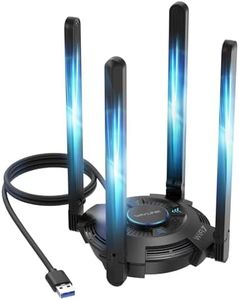
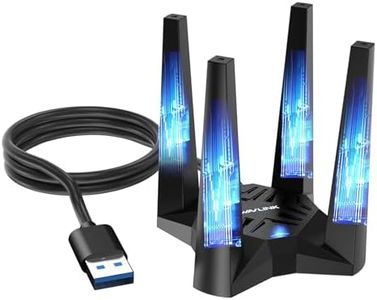
USB WiFi 7 Adapter for Desktop PC, WAVLINK BE6500 Tri-Band Wireless USB 3.0 Adapter with 4x5dBi High Gain Antenna, 2.4+5+6GHz, Multicolor Status LED, WPA3, MLO, OFDMA, 4K-QAM, Windows 11/10 Only
Most important from
257 reviews
The WAVLINK Tri-Band BE6500 USB WiFi 7 adapter is designed for desktop users wanting to upgrade their internet connection to the latest WiFi 7 standard. It supports three frequency bands—2.4GHz, 5GHz, and the new ultra-fast 6GHz—offering speeds up to 2882Mbps on 5GHz and 6GHz bands and 688Mbps on 2.4GHz. This makes it suitable for high-bandwidth activities like 8K video streaming, online gaming, and large file transfers. The adapter uses a USB 3.0 interface, which ensures faster data transfer compared to older USB versions, helping to reduce lag and improve connection stability. Four high-gain 5dBi antennas boost signal strength and stability, and their foldable design helps with flexible placement to get the best coverage. The device also includes a colorful status LED for easy network monitoring and uses advanced security standards like WPA3, enhancing protection for your data.
This adapter supports only Windows 10 and Windows 11, with full benefits of the 6GHz band available on Windows 11 version 21H2 or later. It is not a WiFi signal booster or extender, so it doesn’t amplify weak router signals but provides a strong connection when paired with a compatible WiFi 7 router. The installation process is mostly plug-and-play due to a built-in driver, though manual installation might occasionally be required.
Weighing 550 grams and being fairly large, the adapter is better suited for desktop setups rather than portable use. For users with a modern Windows PC and a WiFi 7 router, this adapter offers fast, reliable wireless connectivity along with advanced features.
Most important from
257 reviews
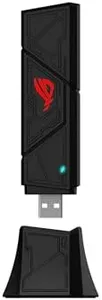
ASUS ROG USB-BE92 Tri-Band BE6500 WiFi 7 USB Adapter, 6GHz Band, Support 4096-QAM, Multi-Link Operation (MLO), Compatible with Type A and C, WPA3 Network Security
Most important from
90 reviews
The ASUS ROG USB-BE92 is a modern WiFi adapter featuring the latest WiFi 7 (802.11be) standard, allowing very fast wireless speeds up to 6,500 Mbps. It operates on three frequency bands—2.4 GHz, 5 GHz, and the new 6 GHz band—providing less crowded and faster connections, especially on the 6 GHz band where interference is minimal. This makes it a solid choice for smoother video streaming, gaming, or transferring large files wirelessly.
The adapter uses a USB 3.0 form factor with support for both Type A and Type C ports, making it easy to connect to most modern computers without needing extra adapters. Its design supports advanced features like MU-MIMO and OFDMA, which help maintain strong connections in busy WiFi environments, such as offices or apartments with many devices. Security is up-to-date with WPA3 support, offering better protection against unauthorized access.
This adapter is ideal for users who want fast, future-proof wireless on desktops with USB ports and are ready to take advantage of WiFi 7 technology. While USB dongles may not have the same antenna strength as larger PCIe cards inside desktops, the ASUS ROG USB-BE92 provides a convenient and high-performance wireless solution.
Most important from
90 reviews
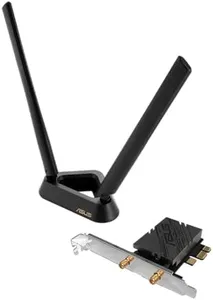
ASUS PCE-BE92BT WiFi 7 PCI-E Adapter with 2 External Antennas. Supporting 6GHz Band, 320MHz, Bluetooth 5.4, WPA3 Network Security, OFDMA and MU-MIMO, only Compatible with Intel motherboards
Most important from
2634 reviews
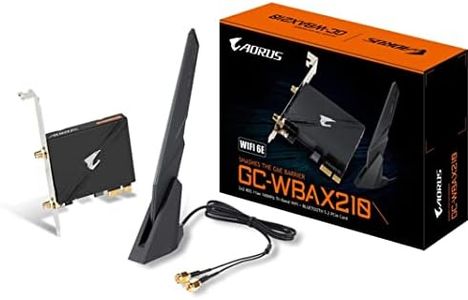
The ASUS PCE-BE92BT is a PCI-E WiFi adapter designed for desktop users looking to upgrade to the latest WiFi 7 standard. It supports the new 6 GHz frequency band and offers a fast speed of up to 9.12 Gbps, which means it can handle heavy internet use with less congestion and interference compared to older WiFi versions. The adapter comes with two external antennas that help reduce dead zones by allowing you to position them for better signal reception. It also includes Bluetooth 5.4, which is energy-efficient and supports connecting several devices easily.
One of the adapter’s strengths is its support for advanced technologies like WPA3 for improved security, as well as OFDMA and MU-MIMO for better network efficiency when multiple devices are connected. The form factor as a PCI-E card means it's installed inside a desktop computer, which is a good choice for stable and fast connections compared to USB adapters.
However, a notable limitation is its compatibility: it only works with Intel motherboards, so users with AMD or other systems won’t be able to use this adapter. Also, since it’s meant for desktops and requires a PCI-E slot, it’s not suitable for laptops or those without available PCI-E connections. While it provides a very high-speed connection, users should ensure their router also supports WiFi 7 to fully benefit from this adapter. This adapter is ideal for Intel-based desktop users seeking cutting-edge WiFi 7 speeds and strong security, especially in environments with many devices or signal interference. Those with non-Intel setups or looking for simpler plug-and-play solutions might want to consider other options.
Most important from
2634 reviews
Buying Guide for the Best Wifi Adapters
Choosing the right WiFi adapter can make a big difference in your internet experience, especially if you want fast, stable, and reliable wireless connections for your devices. There are many options available, so it's important to focus on your specific needs, the devices you use, and the environment in which you'll be connecting. Think about factors such as the type of WiFi you have at home, how far you are from your router, and what sort of activities (like streaming, gaming, or browsing) you mostly do. By understanding the main specifications of WiFi adapters, you’ll be able to find one that fits your usage and avoids common frustrations like slow speeds or dropped connections.FAQ
Most Popular Categories Right Now


