10 Best USB-C Hubs 2026 in the United States


Related Products
Up to 24% off





Recommended lists
USB Hubs
Our technology thoroughly searches through the online shopping world, reviewing hundreds of sites. We then process and analyze this information, updating in real-time to bring you the latest top-rated products. This way, you always get the best and most current options available.

Our Top Picks
Winner
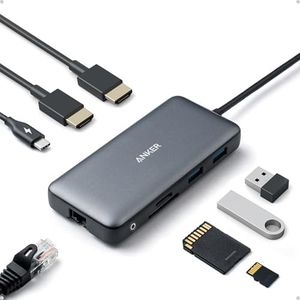
Anker Laptop Docking Station Dual Monitor, 8-in-1 USB C Hub, 4K Dual Monitor with 2 HDMI, 1 Gbps Ethernet Hub, 85W Power Delivery, SD Card Reader, for XPS and More (Charger not Included)
Most important from
6574 reviews
The Anker 8-in-1 USB-C Hub is a strong choice for anyone needing to connect multiple devices through a single USB-C port, especially if you use a MacBook Pro, Dell XPS, or similar laptops. It offers a good variety of ports: two HDMI outputs that support 4K dual monitor setups, two standard USB-A ports for accessories, an Ethernet port for wired internet, and both SD and microSD card readers. This makes it versatile for work, streaming, or photo editing.
The hub supports Power Delivery charging with up to 85W pass-through, which means it can keep your laptop charged while in use, provided you have the right 100W charger and USB-C cable. Data transfer speeds are solid thanks to USB 3.0, and the build quality is reliable with a clean gray design typical of Anker’s products. Compatibility covers most modern systems including macOS (12+), Windows 10/11, and ChromeOS, though it does not support Linux, which could be a drawback for some users. Note that the charger and cable are not included, so you need to supply your own high-wattage charger and cable to get the best charging speed.
This hub is ideal for users who want a single compact device to support multiple displays, wired internet, and various peripherals, making it a practical and well-rounded expansion solution for everyday laptop use.
Most important from
6574 reviews
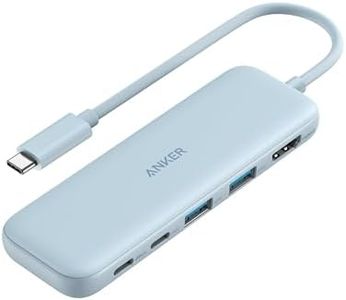
Anker USB C Hub, 5-in-1 USBC to HDMI Hub with 4K Display, 5Gbps USB-C and 2 5Gbps USB-A Data Ports for MacBook Pro, MacBook Air, Dell XPS, Lenovo Thinkpad, HP Laptops and More (Blue)
Most important from
18310 reviews
The Anker 5-in-1 USB-C Hub offers a solid mix of ports for users needing to expand their laptop connectivity, especially suited for MacBook Pro/Air, Dell XPS, Lenovo Thinkpad, HP laptops, and others. It includes one 4K HDMI port for connecting to an external display at up to 4K resolution (30Hz), one USB-C data port, two USB-A data ports—all supporting fast 5Gbps transfer speeds—and a 100W power delivery (PD) pass-through charging port. This means you can charge your laptop while using the hub, though it supports up to 85W pass-through, slightly below the PD port's max rating, which is generally enough for most laptops but might be limiting for very power-hungry devices.
The hub's compact and lightweight design (just under 5 inches long and weighing about 1.4 ounces) makes it easy to carry around. The build quality from Anker is reliable, and the hub comes with an 18-month warranty and decent customer support. On the downside, the USB-C data port does not support video output, limiting video connection options to HDMI only. Also, the HDMI port maxes out at 4K 30Hz, which is fine for most casual use but not ideal for high-refresh 4K monitors. Additionally, you need to supply your own charger for pass-through charging, which is standard but worth noting.
This hub is a great choice for users who want a straightforward, portable solution to add multiple ports with reliable data speeds and decent charging support, especially if you don’t require higher-end video output capabilities or multiple video ports.
Most important from
18310 reviews
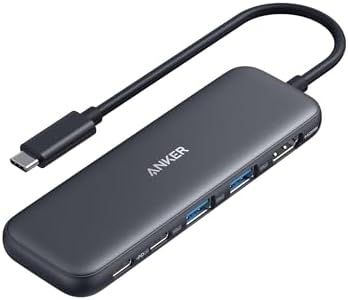
Anker USB C Hub, 5-in-1 USBC to HDMI Splitter with 4K Display, 1 x Powered USB-C 5Gbps & 2×Powered USB-A 3.0 5Gbps Data Ports for MacBook Pro, MacBook Air, Dell and More
Most important from
18310 reviews
The Anker USB C Hub, 5-in-1, offers a practical solution for users looking to expand connectivity options on their devices. With its HDMI port capable of 4K display, it allows users to connect their laptops to external monitors with ease, a feature especially beneficial for those who require high-resolution output for presentations or entertainment.
The hub includes one USB-C and two USB-A ports, all supporting data transfer speeds up to 5 Gbps, making it suitable for quick file transfers and connecting peripherals like external hard drives or keyboards. However, it's important to note that the USB-C data port is strictly for data transfer and does not support video output, which could be a limitation for those anticipating versatile use. The USB C 100W PD-IN port is designed for pass-through charging up to 85W, ensuring your laptop stays powered while using other devices, although it does require an external charger that isn’t included.
Its compatibility spans across various operating systems, including macOS, Windows, and ChromeOS, but it lacks support for Linux, which is crucial information for Linux users. Designed with portability in mind, this hub is compact and lightweight, weighing only 1.4 ounces, making it easy to carry around. Its build quality is robust, and the brand Anker is well-regarded for reliability, reflected in its positive consumer reviews. While it ranks highly in sales and docking stations, users should consider their need for video output capabilities when choosing this hub. This USB-C hub is an excellent choice for those needing extra ports for data transfer and charging, provided their primary requirement isn’t additional video output through USB-C ports.
Most important from
18310 reviews
Buying Guide for the Best USB-C Hubs
When choosing a USB-C hub, it's important to consider your specific needs and how you plan to use the hub. USB-C hubs can expand the functionality of your device by providing additional ports and connectivity options. To make the best choice, you should understand the key specifications and how they relate to your requirements. Here are the main specs to consider when selecting a USB-C hub.FAQ
Most Popular Categories Right Now


