We Use CookiesWe use cookies to enhance the security, performance, functionality and for analytical and promotional activities. By continuing to browse this site you are agreeing to our privacy policy

10 Best Ultra Thin Monitors 2026 in the United States
How do we rank products for you?

Our technology thoroughly searches through the online shopping world, reviewing hundreds of sites. We then process and analyze this information, updating in real-time to bring you the latest top-rated products. This way, you always get the best and most current options available.

headphones-stars

Our Top Picks

#1

Winner

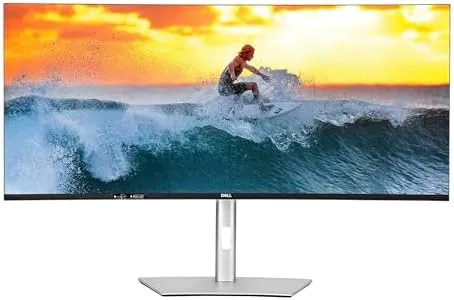
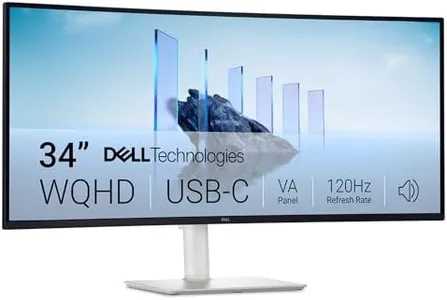
Dell 34 Plus USB-C Curved Monitor - S3425DW - 34-inch (3440 x 1440) up to 120 Hz 21:9 Display, VA Panel, AMD FreeSync Premium, 99% sRGB, 95% DCI-P3, Integrated Speakers, 3000:1 Contrast Ratio

Rating
10.0
Chosen by1,168
Refresh Rate
Color Accuracy
Panel Type

Most important from
459 reviews

Refresh Rate
The 120Hz refresh rate transforms desktop navigation into a smooth, responsive experience that feels far superior to the standard 60Hz displays.
Color Accuracy
Colors are vibrant and accurate, with excellent contrast that noticeably enhances text clarity and UI sharpness, making it great for productivity and creative work.
Panel Type
Gaming performance is solid for casual play and console gaming, though noticeable ghosting appears for fast-paced mouse-driven FPS games due to the VA panel's response time.
Connectivity
USB-C connectivity with power delivery up to 65W helps maintain a clean, clutter-free workspace and simplifies setup with devices like the Mac mini.
Ergonomics
Ergonomics include height adjustment and tilt, allowing comfortable positioning, though users should verify these features based on their desk setup.

The Dell 34 Plus USB-C Curved Monitor is a solid choice if you're looking for a large, immersive screen with a 34-inch size and an ultrawide 21:9 aspect ratio. Its 3440 x 1440 resolution offers sharp, detailed images, making it well suited for multitasking, work, and enjoying movies or games in a wider field of view. The VA panel delivers rich colors and deep blacks thanks to a high 3000:1 contrast ratio, while 99% sRGB and 95% DCI-P3 color coverage means colors appear vibrant and accurate, benefiting tasks like photo editing or media consumption.

The 120Hz refresh rate combined with AMD FreeSync Premium support ensures smooth visuals with minimal screen tearing, making this monitor good for casual gaming or fast-moving content. It also boasts an ultra-low 0.03ms response time, which is impressive for a VA panel. Connectivity is streamlined with USB-C offering power delivery up to 65W, helping reduce cable clutter on your desk. The built-in speakers have been improved for clearer, more powerful sound, though they may not replace dedicated external speakers for audiophiles.

The matte screen surface reduces glare, enhancing comfort during long use, and the ComfortView Plus feature lowers blue light without hurting color quality, which is a thoughtful touch for eye health. The monitor’s size and curvature might require a spacious desk and some adjustment if you're used to flat screens. Ergonomics details like height adjustment or swivel haven’t been explicitly provided, so it is advisable to check these features if precise positioning is important to you. This monitor balances style, performance, and eye comfort, making it a versatile option for professionals, creatives, and everyday users seeking a sleek, ultrawide display with solid color and smooth motion.

Rating
10.0
Chosen by1,168
Refresh Rate
Color Accuracy
Panel Type

Most important from
459 reviews

Refresh Rate
The 120Hz refresh rate transforms desktop navigation into a smooth, responsive experience that feels far superior to the standard 60Hz displays.
Color Accuracy
Colors are vibrant and accurate, with excellent contrast that noticeably enhances text clarity and UI sharpness, making it great for productivity and creative work.
Panel Type
Gaming performance is solid for casual play and console gaming, though noticeable ghosting appears for fast-paced mouse-driven FPS games due to the VA panel's response time.
Connectivity
USB-C connectivity with power delivery up to 65W helps maintain a clean, clutter-free workspace and simplifies setup with devices like the Mac mini.
Ergonomics
Ergonomics include height adjustment and tilt, allowing comfortable positioning, though users should verify these features based on their desk setup.
#2

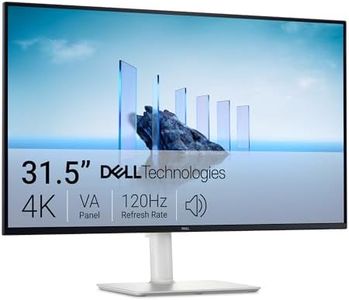
Dell 32 Plus 4K Monitor - S3225QS - 31.5-inch 4K (3840 x 2160) up to 120Hz 16:9 Display, VA Panel, AMD FreeSync Premium, 99% sRGB, 95% DCI-P3, 1500:1 Contrast Ratio, Comfortview - Ash White

Rating
9.1
Refresh Rate
Panel Type
Ergonomics

Most important from
464 reviews

Refresh Rate
The 4K 120Hz refresh rate delivers stunning smoothness that transforms everyday desktop navigation into a highly responsive experience.
Panel Type
The VA panel’s contrast ratio significantly improves depth and shadow detail compared to typical LCDs, contributing to a more immersive viewing experience.
Ergonomics
The stand is sturdy and offers comprehensive ergonomic adjustments including height, tilt, and rotation, enhancing comfort during extended use.
Color Accuracy
Colors are vibrant and true-to-life, with deep contrast that makes images and videos really pop, perfect for editing and multimedia use.

The Dell 32 Plus 4K Monitor (S3225QS) offers a large 32-inch screen with sharp 4K resolution, ideal for detailed work or enjoying ultra-clear visuals. Its VA panel delivers deep contrast, making colors and shadows pop, which is great for movies and general use. Color accuracy is strong, covering 99% of sRGB and 95% of DCI-P3, making it suitable for photo or video editing where accurate colors matter.

The refresh rate can go up to 120Hz with AMD FreeSync Premium, providing smoother motion and less screen tearing, which benefits light gaming or video playback. Dell’s ComfortView Plus feature reduces blue light, helping reduce eye strain during long sessions. The ultra-thin bezels and sleek ash white design enhance its visual appeal on any desk.

Because it uses a VA panel rather than IPS, viewing angles and color consistency may be less strong from wide angles. The stand's ergonomic adjustability is limited compared to some other monitors, which could impact comfort if you require frequent height or tilt adjustments. This monitor suits users seeking a versatile 4K display balancing good color, smooth motion, and eye comfort with a modern look, especially creatives and casual gamers.

Rating
9.1
Refresh Rate
Panel Type
Ergonomics

Most important from
464 reviews

Refresh Rate
The 4K 120Hz refresh rate delivers stunning smoothness that transforms everyday desktop navigation into a highly responsive experience.
Panel Type
The VA panel’s contrast ratio significantly improves depth and shadow detail compared to typical LCDs, contributing to a more immersive viewing experience.
Ergonomics
The stand is sturdy and offers comprehensive ergonomic adjustments including height, tilt, and rotation, enhancing comfort during extended use.
Color Accuracy
Colors are vibrant and true-to-life, with deep contrast that makes images and videos really pop, perfect for editing and multimedia use.
#3

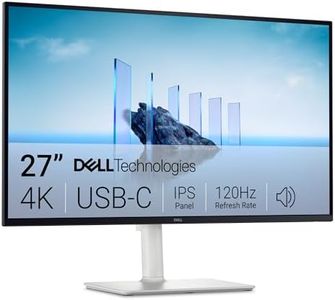
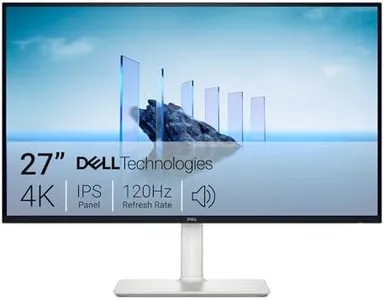
Dell 27 Plus 4K USB-C Monitor - S2725QC - 27-inch 4K (3840 x 2160) 120Hz 16:9 Display, AMD FreeSync Premium, sRGB 99%, Integrated Speakers, 1500:1 Contrast Ratio, Comfortview - Ash White

Rating
8.8
Screen Size
Resolution
Refresh Rate

Most important from
701 reviews

Screen Size
The 27-inch 4K display delivers crisp, vibrant images with impressive color accuracy and wide viewing angles.
Resolution
The 27-inch 4K display delivers crisp, vibrant images with impressive color accuracy and wide viewing angles.
Refresh Rate
The 120Hz refresh rate combined with AMD FreeSync ensures smooth motion, suitable for casual gaming and fast video content.
Panel Type
The 27-inch 4K display delivers crisp, vibrant images with impressive color accuracy and wide viewing angles.
Connectivity
Connectivity options are abundant and versatile, including multiple HDMI ports and USB-C with charging and data transfer, simplifying multi-device setups.
Ergonomics
Ergonomic adjustments like height, swivel, tilt, and pivot make it easy to find a comfortable viewing position for long hours.
Color Accuracy
The 27-inch 4K display delivers crisp, vibrant images with impressive color accuracy and wide viewing angles.

The Dell 27 Plus 4K USB-C Monitor is a solid choice if you're looking for a sharp, vibrant 27-inch screen with 4K resolution, giving you detailed images and plenty of workspace. Its IPS panel ensures wide viewing angles and accurate colors, covering 99% of the sRGB spectrum, which is great for photo and video editing. The 120Hz refresh rate combined with AMD FreeSync Premium helps deliver smooth motion, suitable for casual gaming and fast video content. Connectivity is straightforward with two HDMI ports and a USB-C that can both transmit video and charge your laptop, helping reduce cable clutter.

Ergonomically, it offers adjustable height, swivel, tilt, and pivot, so you can find a comfortable viewing position. Dell also includes ComfortView Plus technology to reduce blue light, helping reduce eye strain during long hours in front of the screen. The built-in speakers have improved sound quality but might not replace a dedicated audio setup if you need rich sound. A contrast ratio of 1500:1 and matte finish help maintain clear images with reduced glare, although the brightness level of 350 nits is average and may struggle in very bright rooms.

The 4ms response time is decent but not the fastest, so if you are a hardcore gamer, you might want to look elsewhere. This monitor suits professionals and everyday users who want a high-resolution, color-accurate display with flexible connectivity and ergonomic features, though serious gamers or users needing ultra-high brightness might find some limitations.

Rating
8.8
Screen Size
Resolution
Refresh Rate

Most important from
701 reviews

Screen Size
The 27-inch 4K display delivers crisp, vibrant images with impressive color accuracy and wide viewing angles.
Resolution
The 27-inch 4K display delivers crisp, vibrant images with impressive color accuracy and wide viewing angles.
Refresh Rate
The 120Hz refresh rate combined with AMD FreeSync ensures smooth motion, suitable for casual gaming and fast video content.
Panel Type
The 27-inch 4K display delivers crisp, vibrant images with impressive color accuracy and wide viewing angles.
Connectivity
Connectivity options are abundant and versatile, including multiple HDMI ports and USB-C with charging and data transfer, simplifying multi-device setups.
Ergonomics
Ergonomic adjustments like height, swivel, tilt, and pivot make it easy to find a comfortable viewing position for long hours.
Color Accuracy
The 27-inch 4K display delivers crisp, vibrant images with impressive color accuracy and wide viewing angles.

Buying Guide for the Best Ultra Thin Monitors

Choosing the right ultra-thin monitor can significantly enhance your computing experience, whether for work, gaming, or general use. Ultra-thin monitors are known for their sleek design and space-saving benefits, but there are several key specifications you should consider to ensure you get the best fit for your needs. Understanding these specs will help you make an informed decision and find a monitor that meets your requirements.
Screen SizeScreen size is the diagonal measurement of the monitor's display area, usually measured in inches. This spec is important because it affects how much screen real estate you have for your tasks. Smaller screens (20-24 inches) are suitable for basic tasks and small spaces, while medium screens (25-29 inches) offer a balance between size and desk space. Larger screens (30 inches and above) are ideal for multitasking, gaming, and professional work like graphic design. Choose a size that fits your desk space and meets your usage needs.
ResolutionResolution refers to the number of pixels on the screen, typically represented as width x height (e.g., 1920x1080). Higher resolution means more detail and sharper images. Common resolutions include Full HD (1920x1080), Quad HD (2560x1440), and 4K (3840x2160). Full HD is sufficient for general use and basic tasks, Quad HD offers more detail for professional work and gaming, and 4K provides the highest clarity for detailed work and immersive experiences. Choose a resolution that matches your usage and the capabilities of your computer.
Refresh RateRefresh rate is the number of times the screen updates per second, measured in Hertz (Hz). This spec is important for smoothness in motion, especially in gaming and video playback. Standard monitors have a refresh rate of 60Hz, which is adequate for general use. Higher refresh rates like 120Hz, 144Hz, or even 240Hz are beneficial for gaming and fast-paced video content, as they reduce motion blur and provide a smoother experience. Choose a refresh rate based on your primary activities; higher rates are better for gaming, while 60Hz is fine for everyday tasks.
Panel TypePanel type affects the monitor's color accuracy, viewing angles, and response time. The most common types are TN (Twisted Nematic), IPS (In-Plane Switching), and VA (Vertical Alignment). TN panels have fast response times and are good for gaming but have poorer color accuracy and viewing angles. IPS panels offer the best color accuracy and wide viewing angles, making them ideal for professional work and general use. VA panels provide good color accuracy and contrast but have slower response times. Choose a panel type based on your priorities: TN for gaming, IPS for color accuracy, and VA for a balance of both.
ConnectivityConnectivity options determine how you can connect your monitor to your computer and other devices. Common ports include HDMI, DisplayPort, USB-C, and VGA. HDMI and DisplayPort are widely used for high-definition video and audio. USB-C is becoming popular for its ability to transmit data, video, and power through a single cable, making it ideal for modern laptops. VGA is an older standard and is less common in new monitors. Ensure the monitor has the ports you need for your devices and consider future-proofing with versatile options like USB-C.
ErgonomicsErgonomics refers to the monitor's adjustability features, such as tilt, swivel, height adjustment, and pivot. These features are important for creating a comfortable and healthy workspace, reducing strain on your neck and eyes. Monitors with good ergonomic options allow you to position the screen at the optimal height and angle for your posture. If you spend long hours in front of the screen, look for a monitor with adjustable stands or VESA mount compatibility to customize your setup for maximum comfort.
Color AccuracyColor accuracy is crucial for tasks that require precise color representation, such as photo editing, graphic design, and video production. Monitors with high color accuracy reproduce colors more faithfully to the original source. Look for monitors with a high percentage of sRGB or Adobe RGB color gamut coverage. For professional work, consider monitors that are factory-calibrated or have calibration tools. If color accuracy is not a priority, standard monitors will suffice for general use.

FAQ

Most Popular Categories Right Now