10 Best Thermal Printers 2026 in the United States

Related Products
Up to 35% off

Recommended lists



Our technology thoroughly searches through the online shopping world, reviewing hundreds of sites. We then process and analyze this information, updating in real-time to bring you the latest top-rated products. This way, you always get the best and most current options available.

Our Top Picks
Winner
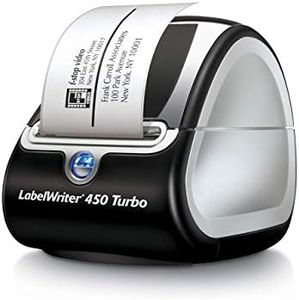
DYMO Label Printer | LabelWriter 450 Turbo Direct Thermal Label Printer, Fast Printing, Great for Labeling, Filing, Shipping, Mailing, Barcodes and More, Home & Office Organization (Renewed)
Most important from
64 reviews
The DYMO LabelWriter 450 Turbo is a solid choice if you need a fast and reliable thermal label printer for home or office use. Its standout feature is the speed—it can print up to 71 labels per minute, making it great for quickly creating shipping, filing, or barcode labels without long waits. The print resolution of 203 dpi provides clear, readable labels, suitable for most everyday labeling tasks. Since it uses direct thermal printing, you won't need to buy ink or toner, which cuts down on ongoing costs and mess. However, this also means labels can fade over time if exposed to heat or sunlight, so it’s best for short- to medium-term labeling.
Connectivity is straightforward but limited to USB, so it’s not ideal if you want wireless printing or network sharing. It works best with DYMO’s own label rolls, so you’ll want to stick to their media for smooth operation. The build feels solid enough for regular office use, and setting it up is fairly easy, especially with software that integrates with programs like Microsoft Word and Excel for quick label creation.
The 2.3-inch maximum media size restricts label width, which may not be suitable if you need larger labels. Also, the printer only prints in black and white. While it’s not packed with advanced features, it covers all basics well, making it a practical tool for organizing, shipping, and filing tasks where speed and convenience matter most.
Most important from
64 reviews
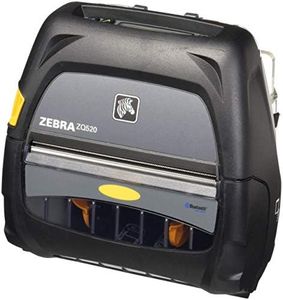
Zebra Technologies ZQ52-AUE0000-00 Thermal Printer, Portable, ZQ520, 4" Size, Bluetooth 4.0, 203 DPI (Renewed)
Most important from
35 reviews
The Zebra ZQ52 is a compact, portable thermal printer designed primarily for users who need reliable on-the-go printing, such as in offices or mobile work environments. It offers a decent print speed of up to 5 inches (127 mm) per second, which is fast enough for most label printing tasks. The print resolution is standard at 203 dpi, suitable for clear, readable barcodes and labels but not for detailed graphics.
Connectivity is a strong point, featuring Bluetooth 4.0 that works well with iOS, Android, Windows Mobile, and BlackBerry devices, allowing wireless printing from smartphones and tablets with ease. This makes it flexible for various mobile setups. Media compatibility is focused on 4-inch wide labels or receipts, which fits common needs but limits larger format printing. The printer is built with portability in mind, being lightweight and compact.
It is fairly straightforward to operate, with quick start times and support for common printer languages (CPCL and ZPL), which helps in integrating with existing systems. It only prints in monochrome and handles single-sided printing, so it's geared toward simple label or receipt printing rather than full document production. If you need a durable, handheld printer that quickly connects to mobile devices for standard label printing, the Zebra ZQ52 is a solid choice. For heavier or more graphic-rich printing, or larger media sizes, other options might be better.
Most important from
35 reviews
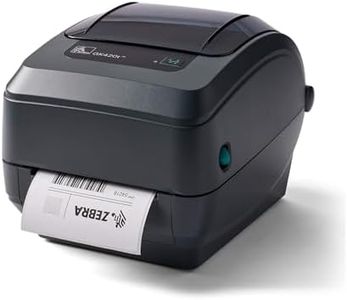
Zebra GK420T 4 Inch Thermal Label Printer USB and Ethernet, Renewed
Most important from
54 reviews
The Zebra GK420t is a solid choice if you need a thermal transfer printer for labels, barcodes, wristbands, and tags. It prints at a decent speed of up to 5 inches per second and offers a standard resolution of 203 dpi, which is good enough for clear, readable labels but not for very detailed images. It supports both USB and Ethernet connections, giving you flexibility in setting it up either as a direct connection or on a network. This makes it suitable for small to medium business environments that need reliable label printing.
The printer is compatible with most major label software and shipping platforms, which helps it fit well into existing workflows. Its build quality is typical for Zebra products—durable enough for regular office or warehouse use, though it’s a refurbished unit with a 90-day warranty, so some buyers may prefer a new model for longer-term assurance. The printer handles media sizes up to 4.25 inches wide and works with thermal transfer labels, which are more durable than direct thermal labels. It prints only in black and white and does not support double-sided printing, which is standard for this category.
Users have given it an average rating around 4 stars, reflecting reliable performance but some minor drawbacks like limited warranty and straightforward features. If you need a straightforward, dependable label printer with flexible connectivity and decent speed, the Zebra GK420t is a suitable option, especially for businesses focused on shipping, inventory, or barcode labeling.
Most important from
54 reviews
Buying Guide for the Best Thermal Printers
When choosing a thermal printer, it's important to consider several key specifications to ensure you select the best model for your needs. Thermal printers are widely used for printing receipts, labels, and barcodes due to their speed and efficiency. Understanding the different features and how they align with your requirements will help you make an informed decision.FAQ
Most Popular Categories Right Now


