10 Best Razer Gaming Laptops 2026 in the United States
Related Products
Up to 37% off





Recommended lists

Gaming Laptops
Our technology thoroughly searches through the online shopping world, reviewing hundreds of sites. We then process and analyze this information, updating in real-time to bring you the latest top-rated products. This way, you always get the best and most current options available.

Our Top Picks
Winner
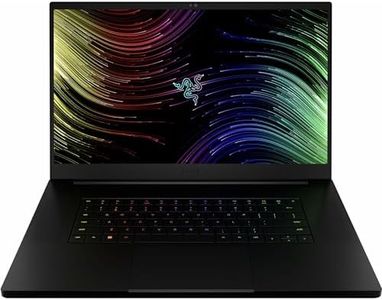
Razer Blade 18 (2026) Gaming Laptop — NVIDIA GeForce RTX 5090 Laptop GPU, Intel Core Ultra 9 290HX, 18” UHD+ 240Hz / FHD+ 440Hz Dual Mode Display, 64GB DDR5 RAM, 2TB SSD, Wi-Fi 7, TB5, Windows 11
The Razer Blade 18 (2026) is a high-end gaming laptop designed to handle top-tier gaming and demanding creative tasks. Its Intel Core Ultra 9 290HX processor with 24 cores and the NVIDIA GeForce RTX 5090 GPU deliver desktop-level performance, making it great for running AAA games smoothly and managing streaming or AI workloads. It comes with a massive 64GB DDR5 RAM and a fast 2TB SSD, both of which support quick multitasking and plenty of storage space, and you can upgrade the RAM up to 128GB if needed.
One standout feature is its unique 18-inch dual-mode display: you can switch between a sharp 4K UHD+ screen at 240Hz for immersive visuals or a faster FHD+ 440Hz panel for competitive esports, which means you can prioritize either stunning graphics or super smooth gameplay. The screen is bright and color-accurate, ideal for both gaming and content creation. The laptop’s cooling system uses an advanced vapor chamber to keep temperatures under control during long gaming sessions, which helps maintain performance without overheating. It also offers next-gen connectivity with Thunderbolt 5 and Wi-Fi 7, making it easy to connect multiple devices and enjoy fast data transfers.
Build quality is premium, featuring a sturdy CNC aluminum chassis that’s both durable and stylish, with a comfortable per-key RGB backlit keyboard and a precise glass touchpad. However, it weighs over 7 pounds, which makes it less convenient for frequent travel compared to lighter gaming laptops. Battery life is solid but not exceptional, typical for such powerful hardware. The Razer Blade 18 is best suited for gamers and creators who want top performance, superior display options, and high build quality, and are okay with a heavier, premium device. If portability or budget is a priority, there are lighter or more affordable options to consider.
Razer Blade 18 (2026) Gaming Laptop — NVIDIA GeForce RTX 5090 Laptop GPU, Intel Core Ultra 9 290HX, 18” UHD+ 240Hz / FHD+ 440Hz Dual Mode Display, 32GB DDR5 RAM, 2TB SSD, Wi-Fi 7, TB5, Windows 11
The Razer Blade 18 (2026) is a top-tier gaming laptop designed to deliver desktop-level power in a portable form. It features an Intel Core Ultra 9 290HX with 24 cores and Nvidia’s latest GeForce RTX 5090 GPU with 24GB of high-speed memory, making it excellent for demanding AAA games, streaming, and creative work. The 32GB DDR5 RAM and fast 2TB SSD provide plenty of room for multitasking and large game or project files, with easy future upgrades available.
A standout feature is its unique dual-mode 18-inch display that can switch between ultra-high resolution UHD+ at 240Hz for stunning visuals and FHD+ at an ultra-fast 440Hz for competitive gaming, catering to different gaming preferences. The advanced vapor chamber cooling helps keep the laptop running smoothly during long gaming sessions, though the powerful hardware and large screen mean the laptop is on the heavier side at over 7 pounds and may not offer the longest battery life compared to lighter models.
The CNC aluminum chassis feels premium and durable, with a vibrant per-key RGB keyboard and a quality glass touchpad enhancing the gaming experience. Connectivity is robust with Thunderbolt 5 and 4 ports, HDMI 2.1, and Ethernet, supporting multi-monitor setups and fast data transfer. While its price and size may be high for casual gamers, serious players and creative professionals looking for a versatile, high-performance gaming laptop with excellent visuals and upgrade paths will find the Razer Blade 18 hard to beat.
Razer Blade 14 (2025) Gaming Laptop: NVIDIA GeForce RTX 5070 - AMD Ryzen AI 9 365 CPU - 3K 120Hz OLED Display - 32GB LPDDR5X RAM - 1TB SSD - Thin & Lightweight - Chroma RGB - Windows - Mercury
Most important from
18 reviews
The Razer Blade 14 (2025) is a strong choice for gamers wanting a powerful yet portable laptop. It features a fast AMD Ryzen AI 9 365 processor and an NVIDIA GeForce RTX 5070 graphics card, which together handle modern games smoothly and support advanced visuals with AI enhancements. The 32GB of LPDDR5X RAM is generous for gaming and multitasking, helping run games and apps smoothly without slowing down. Storage-wise, the 1TB SSD provides plenty of space and quick loading times for games and files.
The 14-inch 3K OLED display offers vibrant colors, sharp details, and a smooth 120Hz refresh rate, making gameplay visually impressive and responsive. Battery life is decent for a gaming laptop, reaching up to 11 hours, which is helpful for gaming or working on the go. The laptop’s cooling system uses a custom vapor chamber to keep temperatures in check despite its slim and lightweight design, which is about 11% smaller than the previous model and easy to carry.
The build quality feels premium with a sturdy aluminum case and customizable Chroma RGB keyboard that’s comfortable for long sessions. The 7.83-pound weight is on the heavier side for ultraportables, so it’s better suited for those who need a balance between power and portability rather than an ultra-light machine. This laptop is ideal for gamers and creators seeking high performance in a sleek package but who are willing to invest in a premium device.
Most important from
18 reviews
Buying Guide for the Best Razer Gaming Laptops
Choosing the right gaming laptop can be a daunting task, especially with the myriad of options available. It's important to understand the key specifications that will impact your gaming experience. By focusing on these specs, you can ensure that you pick a laptop that meets your needs and provides the best performance for your favorite games.FAQ
Most Popular Categories Right Now


