We Use CookiesWe use cookies to enhance the security, performance, functionality and for analytical and promotional activities. By continuing to browse this site you are agreeing to our privacy policy

10 Best Printer And Scanners 2026 in the United States

How do we rank products for you?

Our technology thoroughly searches through the online shopping world, reviewing hundreds of sites. We then process and analyze this information, updating in real-time to bring you the latest top-rated products. This way, you always get the best and most current options available.

headphones-stars

Our Top Picks

#1

Winner

Epson EcoTank ET-2800 Wireless Color All-in-One Cartridge-Free Supertank with Scan and Copy, The Ideal Basic Home Printer - White

Rating
10.0
Chosen by1,406
Print Resolution
Connectivity Options
Ink or Toner Type

Most important from
20317 reviews

Print Resolution
Print quality is impressive, with no ink smudges, vibrant colors, and good photo quality.
Connectivity Options
Installation is straightforward, with excellent Mac compatibility and easy integration.
Ink or Toner Type
Filling the ink tank is easy and satisfying, with the ink lasting significantly longer than traditional cartridges and reducing plastic waste.

The Epson EcoTank ET-2800 is designed to cater to basic home printing needs, offering a convenient all-in-one solution with printing, scanning, and copying capabilities. One of its standout features is the innovative cartridge-free printing system. Instead of traditional ink cartridges, it utilizes refillable ink tanks, leading to significant savings on replacement ink—up to 90% less compared to standard cartridges. Users can print a remarkable number of pages (around 4,500 black and 7,500 color) before needing to refill the tanks, which is perfect for families or home offices that print regularly.

The print quality is impressive thanks to Epson's Micro Piezo technology, producing sharp text and vibrant color images on various paper types. Moreover, with up to two years of ink supplied in the box, users will experience fewer interruptions due to running out of ink.

However, there are some limitations to consider. The print speed is relatively slow for both black and color prints at 10 ppm and 5 ppm, respectively, which may not meet the needs of users requiring high-volume printing. Additionally, duplex printing is manual, meaning users have to flip the pages themselves, which can be a hassle for those who frequently print double-sided documents. The connectivity options include wired and wireless, making it versatile for different setups. The scanner is a flatbed type with decent resolution, but it may not offer the speed and efficiency that a dedicated high-volume scanner would provide. With a modest weight of 8.8 pounds and compact dimensions, it fits well in most home environments.

Rating
10.0
Chosen by1,406
Print Resolution
Connectivity Options
Ink or Toner Type

Most important from
20317 reviews

Print Resolution
Print quality is impressive, with no ink smudges, vibrant colors, and good photo quality.
Connectivity Options
Installation is straightforward, with excellent Mac compatibility and easy integration.
Ink or Toner Type
Filling the ink tank is easy and satisfying, with the ink lasting significantly longer than traditional cartridges and reducing plastic waste.
#2

Epson EcoTank ET-2803 Wireless Color All-in-One Cartridge-Free Supertank Printer with Scan, Copy and AirPrint Support

Rating
9.7
Print Resolution
Scanner Resolution
Connectivity Options

Most important from
20317 reviews

Print Resolution
The printer impresses with surprisingly vivid and sharp photo prints, delivering bright colors without smudging.
Scanner Resolution
Scanning and copying functions provide good quality suitable for everyday use in a home or small office environment.
Connectivity Options
Connectivity via the Epson app can be inconsistent, occasionally requiring troubleshooting to maintain a stable connection and bypass error messages.
Ink or Toner Type
Refilling the ink tanks is satisfying and cost-effective, offering significantly longer ink life compared to traditional cartridges.

The Epson EcoTank ET-2803 is a wireless color all-in-one printer designed for users who want an affordable and eco-friendly printing solution without dealing with cartridges. It features a high print resolution of up to 5760 x 1440 dpi for both black and color prints, delivering sharp and vibrant images. The print speed is moderate, with about 10 pages per minute in black and 5 pages per minute for color, suitable for home or small office use but not ideal for heavy printing tasks.

Scanning is done via a flatbed scanner with decent quality, offering up to 600 x 1200 dpi resolution, which works well for everyday document and photo scanning. Connectivity options include USB and Wi-Fi, allowing easy wireless printing from smartphones or computers, and it supports AirPrint for Apple devices. One downside is the lack of duplex (double-sided) printing, meaning you have to manually flip pages if you want double-sided prints. Also, there is no automatic document feeder (ADF), so scanning or copying multiple pages requires placing each page manually.

The printer uses refillable ink bottles instead of cartridges, which can save money and reduce waste but may require careful handling during refills. It handles standard paper sizes including photo sizes and legal documents, with a single paper tray that holds up to 100 sheets. The printer is lightweight and compact, making it easy to fit in small spaces. This model suits users needing reliable, cost-effective color printing with occasional scanning and copying, especially if lower running costs and wireless convenience are priorities and advanced features like duplex printing or multi-page scanning are not required.

Rating
9.7
Print Resolution
Scanner Resolution
Connectivity Options

Most important from
20317 reviews

Print Resolution
The printer impresses with surprisingly vivid and sharp photo prints, delivering bright colors without smudging.
Scanner Resolution
Scanning and copying functions provide good quality suitable for everyday use in a home or small office environment.
Connectivity Options
Connectivity via the Epson app can be inconsistent, occasionally requiring troubleshooting to maintain a stable connection and bypass error messages.
Ink or Toner Type
Refilling the ink tanks is satisfying and cost-effective, offering significantly longer ink life compared to traditional cartridges.
#3

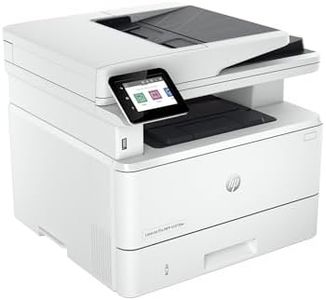
HP Laserjet Pro MFP 4101fdw Wireless Black & White All-in-One Laser Printer, Scanner, Copier, Fax, Best-for-Office (2Z619F)

Rating
8.8
Print Speed
Connectivity Options
ADF (Automatic Document Feeder)

Most important from
563 reviews

Print Speed
The printer delivers impressively fast output with sharp, professional-quality text and excellent black-and-white contrast.
Connectivity Options
Wireless setup is straightforward, enabling seamless printing from laptops, phones, and tablets through a simple app connection.
ADF (Automatic Document Feeder)
The automatic document feeder efficiently scans both sides, and the front panel allows copying and printing without a PC.
Duplex Printing
Automatic duplex printing significantly reduces paper use by printing on both sides without manual intervention.
Ink or Toner Type
Original HP toner cartridges provide consistent deep blacks and vibrant colors, ensuring long-lasting quality.

The HP LaserJet Pro MFP 4101fdw is a strong choice for small office teams needing a reliable black-and-white laser printer with scanning, copying, and faxing capabilities. It prints quickly—up to 42 pages per minute—making it efficient for busy workloads. The print resolution of 1200 x 1200 dpi ensures clear, professional-looking text documents, which is ideal for reports and official paperwork.

Scanning is versatile with both flatbed and automatic document feeder (ADF), supporting double-sided scanning and copying to save time. Connectivity options are broad, including Wi-Fi, Ethernet, USB, and Bluetooth, allowing easy printing from laptops, smartphones, and tablets across different operating systems. The auto duplex printing and a large 350-sheet paper capacity help reduce the need for frequent paper refills and allow automatic double-sided print jobs, which is a great time saver and eco-friendly. Security features like HP Wolf Pro protect sensitive data, which is important for office environments.

On the downside, this printer only works with original HP toner cartridges featuring HP chips, which might limit cartridge choices and could lead to higher running costs. It also prints only in black and white, so it's not suitable if color printing is needed. This printer fits best in offices that require fast, dependable monochrome printing with solid scanning and copying, especially for teams up to about 10 people.

Rating
8.8
Print Speed
Connectivity Options
ADF (Automatic Document Feeder)

Most important from
563 reviews

Print Speed
The printer delivers impressively fast output with sharp, professional-quality text and excellent black-and-white contrast.
Connectivity Options
Wireless setup is straightforward, enabling seamless printing from laptops, phones, and tablets through a simple app connection.
ADF (Automatic Document Feeder)
The automatic document feeder efficiently scans both sides, and the front panel allows copying and printing without a PC.
Duplex Printing
Automatic duplex printing significantly reduces paper use by printing on both sides without manual intervention.
Ink or Toner Type
Original HP toner cartridges provide consistent deep blacks and vibrant colors, ensuring long-lasting quality.

Buying Guide for the Best Printer And Scanners

Choosing the right printer and scanner can significantly impact your productivity and the quality of your work. Whether you need it for home, office, or professional use, understanding the key specifications will help you make an informed decision. Consider what you will primarily use the device for, such as printing documents, photos, or scanning high-resolution images, and match the specifications to your needs.
Print ResolutionPrint resolution, measured in dots per inch (DPI), determines the clarity and detail of the printed output. Higher DPI values mean better print quality. For general document printing, 300-600 DPI is usually sufficient. For high-quality photo printing, look for printers with 1200 DPI or higher. Choose a resolution based on whether you need crisp text or detailed images.
Print SpeedPrint speed, measured in pages per minute (PPM), indicates how quickly a printer can produce documents. This is important if you need to print large volumes of documents regularly. For home use, a speed of 10-20 PPM is typically adequate. For office environments, look for printers with speeds of 20-40 PPM or higher. Consider your typical print volume to determine the right speed for you.
Scanner ResolutionScanner resolution, also measured in DPI, affects the detail and clarity of scanned images. For general document scanning, 300 DPI is usually enough. For scanning photos or detailed images, look for scanners with 600 DPI or higher. Choose a resolution based on whether you need to capture fine details or just basic document information.
Connectivity OptionsConnectivity options determine how you can connect your printer or scanner to your devices. Common options include USB, Wi-Fi, Ethernet, and Bluetooth. Wi-Fi and Ethernet are ideal for networked environments, allowing multiple users to access the device. USB is straightforward for direct connections to a single computer. Bluetooth is useful for mobile printing. Choose based on your setup and how you plan to use the device.
Duplex PrintingDuplex printing allows a printer to automatically print on both sides of a sheet of paper. This feature is important for saving paper and reducing printing costs. If you frequently print double-sided documents, look for a printer with automatic duplexing. For occasional use, manual duplexing (where you flip the paper yourself) might be sufficient.
ADF (Automatic Document Feeder)An Automatic Document Feeder (ADF) allows a scanner or all-in-one printer to automatically feed multiple pages for scanning or copying. This is particularly useful for scanning large documents or multiple pages at once. If you frequently scan multi-page documents, an ADF can save you a lot of time. For occasional scanning, a flatbed scanner without ADF might be enough.
Ink or Toner TypePrinters use either inkjet cartridges or laser toner. Inkjet printers are generally better for high-quality photo printing and color documents, while laser printers are more efficient for high-volume text printing and have lower cost per page. Choose inkjet if you need vibrant color prints and photos, and laser if you need fast, high-volume document printing.
Paper HandlingPaper handling refers to the types and sizes of paper a printer can handle, as well as the capacity of its paper trays. Consider the maximum paper size you need (e.g., A4, A3) and the types of media (e.g., photo paper, envelopes). Also, check the input and output tray capacities to ensure they meet your volume needs. Choose based on the variety and volume of your printing tasks.

FAQ

Most Popular Categories Right Now