4 Best Portable Photo Scanners 2026 in the United States
Related Products
Recommended lists
Portable Scanners
Our technology thoroughly searches through the online shopping world, reviewing hundreds of sites. We then process and analyze this information, updating in real-time to bring you the latest top-rated products. This way, you always get the best and most current options available.

Our Top Picks
Winner
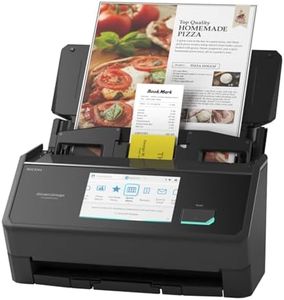
ScanSnap iX2500 Wireless or USB High-Speed Cloud Enabled Document, Photo & Receipt Scanner with Large 5" Touchscreen and 100 Page Auto Document Feeder for Mac or PC, Black
The ScanSnap iX2500 is a versatile portable scanner designed for quick and efficient scanning of photos, documents, receipts, and business cards. It offers a solid 600 dpi resolution, which provides good detail for most photo scanning needs without becoming overly complex. One of its strengths is speed—scanning up to 45 pages per minute double-sided, which is impressive for a portable model and saves time when handling large batches. It features a generous 100-sheet automatic document feeder, making it convenient for users who regularly scan multiple pages or photos. Connectivity options are flexible, including fast and secure Wi-Fi 6 and USB-C, allowing easy connection to computers, mobile devices, or cloud services without hassle.
The large 5-inch touchscreen simplifies operation by letting you customize scan profiles and quickly send files where you need them. The scanner also includes smart software features that automatically enhance images, organize files, and prevent common paper jams or scan errors using sensors and a special roller system. Weighing about 7.7 pounds, it is portable enough for use in different locations but not as light as some pocket-sized scanners, so it’s best suited for users who need a balance between portability and high performance.
Supporting a variety of operating systems and file management options, the device may feel a bit bulky if your priority is extreme portability or casual photo scanning. The ScanSnap iX2500 is a reliable, fast, and feature-rich scanner that handles photos alongside documents efficiently, making it an excellent choice especially for home office or professional settings.
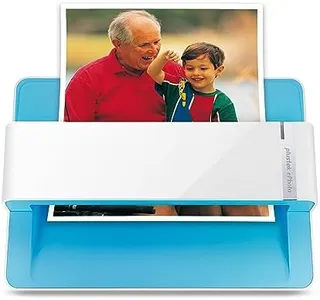
Plustek Photo Scanner ePhoto Z300, Scans 4x6 inch Photos in 2 Seconds, Auto crop and deskew with CCD Sensor, Supports Mac and PC
Most important from
9810 reviews
The Plustek Photo Scanner ePhoto Z300 is a convenient option for scanning photos and documents. It offers a decent resolution of up to 600 dpi, which is suitable for most personal photo scanning needs. The scanner is quite fast, taking only 2 seconds to scan a 4x6 inch photo and 5 seconds for an 8x10 photo at 300 dpi. This speed allows you to digitize a large number of photos quickly, making it a time-efficient choice compared to traditional flatbed scanners.
Portability is a strong point for the ePhoto Z300, as it is relatively lightweight at 1.5 kilograms and compact in size, making it easy to transport and store. However, it relies on USB connectivity, which might limit its use with devices lacking USB ports or requiring additional adaptors. The scanner supports common photo sizes and even letter and A4 sizes for documents, providing versatility in what it can handle. Its powerful image enhancement features can help restore faded photos, making it a good tool for preserving memories.
The ePhoto Z300 is compatible with both Mac and PC, ensuring broad usability. On the downside, some users might find the need to feed photos one by one less convenient compared to batch-feeding options. It also does not specify support for wireless connectivity, which could be a drawback for those seeking a more versatile connection option. The Plustek ePhoto Z300 is an efficient and user-friendly option for personal photo and document scanning, especially for those who prioritize speed and ease of use over advanced connectivity features.
Most important from
9810 reviews
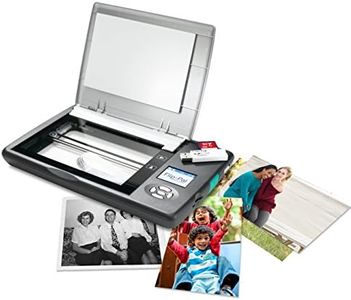
Flip-Pal mobile scanner with 4GB SD card and USB adapter. EasyStitch and StoryScans talking images software
The Flip-Pal mobile scanner is designed for people who want a simple, portable way to digitize photos, documents, and keepsakes without needing a computer nearby. Its standout feature is the patented flip-and-scan method, which gently scans fragile or large items by placing the scanner face-down, avoiding damage from feeders. This makes it great for delicate albums or oversized originals like artwork or quilts. It offers a resolution of 600 dpi, which is decent for everyday photo scanning but might fall short for very high-detail needs. Scanning speed is fairly quick—about 7 seconds to scan a 4x6 photo at 300 dpi—helping you digitize batches efficiently. The device is battery-powered and stores images directly onto a 4GB SD card, enhancing portability and convenience. Optional Wi-Fi adds some flexibility but isn’t the primary connection method.
Included software like EasyStitch helps automatically combine multiple scans of large items, which is useful since the scanner handles up to letter-size (8.5x11 inches) originals. Another nice touch is the StoryScans software, which lets you add voice recordings to your scanned images, turning them into multimedia memories. On the downside, the Flip-Pal’s file formats, color depth (24-bit), and resolution are fairly standard but not cutting-edge, so if you need extremely sharp or professional-quality scans, it might not meet those needs. Also, the scanner lacks direct computer connection during scanning, which some might find limiting.
With a moderate weight (1.3 pounds), it’s truly portable and user-friendly, especially for those who want a quick, gentle scanning solution without technical hassle. It is best suited for home users preserving family photos and memorabilia rather than for professional photo archivists or those needing very high-resolution scans.
Buying Guide for the Best Portable Photo Scanners
Choosing the right portable photo scanner can be a game-changer for preserving your precious memories and important documents. A portable photo scanner allows you to digitize photos, documents, and other materials on the go, making it a convenient tool for both personal and professional use. To make an informed decision, it's important to understand the key specifications and how they align with your needs.FAQ
Most Popular Categories Right Now


