10 Best Photo Scanner For Macs 2026 in the United States
Related Products

Our technology thoroughly searches through the online shopping world, reviewing hundreds of sites. We then process and analyze this information, updating in real-time to bring you the latest top-rated products. This way, you always get the best and most current options available.

Our Top Picks
Winner
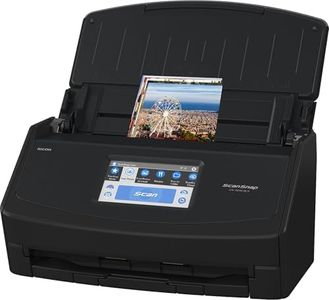
ScanSnap iX1600 Wireless or USB High-Speed Cloud Enabled Document, Photo & Receipt Scanner with Large Touchscreen and Auto Document Feeder for Mac or PC, 17 watts, Black
Most important from
3109 reviews
The ScanSnap iX1600 is a versatile photo and document scanner well suited for Mac users who want a reliable, easy-to-use device for home or small business use. It offers a solid 600 dpi resolution, which is good for scanning photos and documents with clear detail. While the color depth isn’t specified, its support for photos and receipts suggests it handles color well enough for everyday needs. The scanning speed is quite fast at 40 pages per minute with duplex (double-sided) capability, saving you time when working with multiple pages.
Connectivity options include both Wi-Fi and USB, giving you flexibility to connect directly to your Mac, mobile devices, or cloud services without hassle. The large touchscreen makes it simple to select scanning profiles and destinations, which is handy if you regularly scan different types of documents or photos. ScanSnap’s software is compatible with Mac and offers easy organization, editing, and access to scanned files, helping manage everything from receipts to business cards.
In terms of size and portability, the iX1600 is relatively compact and lightweight (7.5 pounds), but it’s designed more as a desktop scanner rather than a portable option. It handles sheets up to 8.5" by 14", which covers standard photo and document sizes but may not work for larger formats. If your priority is a fast, user-friendly scanner that integrates well with Macs and supports wireless cloud workflows, this model is a great fit. However, if you need ultra-high photo resolution or a very portable device, you might want to consider specialized photo scanners or smaller, more mobile options.
Most important from
3109 reviews
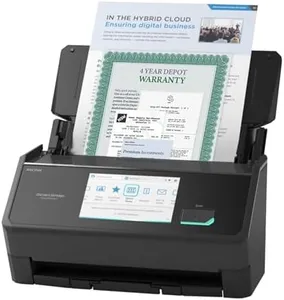
ScanSnap iX2500 Premium Wireless or USB High-Speed Cloud Enabled Document, Photo & Receipt Scanner with Large 5" Touchscreen for Mac or PC, Includes 4-Year Protection Plan
Most important from
72 reviews
The ScanSnap iX2500 Premium is a versatile and user-friendly photo and document scanner compatible with Macs, catering to the needs of photo scanning enthusiasts and general users. It offers a solid 600 dpi resolution, sufficient for clear photo scans and detailed documents. With a fast 45 pages per minute double-sided scanning speed and a 100-sheet feeder, it efficiently handles batches of photos or documents, saving time.
The scanner features Wi-Fi 6 and USB-C connectivity, allowing easy wireless or wired connections to Macs and other devices. It supports direct uploads to cloud services, facilitating organization and sharing of scans. A large, intuitive 5-inch touchscreen enables customization of scanning profiles and quick file distribution without the need for a computer, making the scanning process streamlined and easy. The included software supports macOS Monterey and later, ensuring compatibility with recent Mac systems.
While the scanner is not the smallest or lightest at 7.7 pounds and about the size of a small desktop printer, it fits comfortably on most desks without occupying excessive space. The color depth details are not specified, so users requiring professional-grade photo color accuracy may want to consider this. Although optimized more for document and mixed media scanning, it still performs well with photos but does not include advanced photo editing features. The 4-year protection plan provides added peace of mind for long-term use. This scanner is a strong choice for Mac users seeking a reliable, fast, and easy-to-use device for scanning photos, receipts, and documents with good quality and robust connectivity options.
Most important from
72 reviews
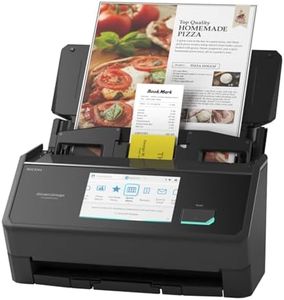
ScanSnap iX2500 Wireless or USB High-Speed Cloud Enabled Document, Photo & Receipt Scanner with Large 5" Touchscreen and 100 Page Auto Document Feeder for Mac or PC, Black
Most important from
319 reviews
The ScanSnap iX2500 is a solid choice for Mac users needing a versatile photo and document scanner. With a sharp 600 dpi resolution, it captures detailed images suitable for photos and documents, though it may not match the color richness of high-end photo-only scanners. It scans quickly at up to 45 pages per minute double-sided, which is great if you have many photos or documents to digitize.
Connectivity is flexible, offering both Wi-Fi 6 for smooth wireless scanning and USB-C for stable wired connections. The large 5-inch touchscreen makes it easy to select custom scan profiles, and its compatibility with Mac, PC, mobile devices, and various cloud services adds convenience. The 100-sheet auto feeder and features like jam prevention and multi-feed detection make scanning hassle-free and protect your originals.
While it's fairly compact and lightweight at 7.7 pounds, it’s not designed for portability like a handheld scanner—you’ll want a dedicated space for it. If you mainly scan photos and receipts and appreciate smart organization and cloud integration, this scanner handles those tasks well. For professional photography projects requiring very high color accuracy or exceptional color depth, specialized photo scanners might be more suitable. The iX2500 provides fast, reliable scanning with user-friendly features that fit well for everyday photo scanning and document management on a Mac.
Most important from
319 reviews
Buying Guide for the Best Photo Scanner For Macs
When choosing a photo scanner for your Mac, it's important to consider several key specifications to ensure you get the best fit for your needs. A photo scanner can help you digitize your old photos, preserve memories, and even enhance image quality. Understanding the different features and how they align with your requirements will help you make an informed decision.FAQ
Most Popular Categories Right Now


