We Use CookiesWe use cookies to enhance the security, performance, functionality and for analytical and promotional activities. By continuing to browse this site you are agreeing to our privacy policy

10 Best Motherboards 2026 in the United States
How do we rank products for you?

Our technology thoroughly searches through the online shopping world, reviewing hundreds of sites. We then process and analyze this information, updating in real-time to bring you the latest top-rated products. This way, you always get the best and most current options available.

headphones-stars

Our Top Picks

#1

Winner

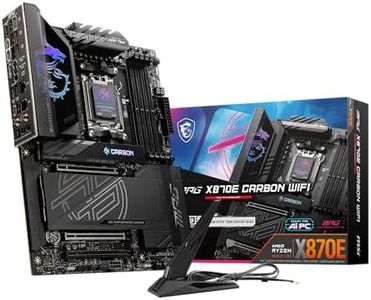
MSI MPG X870E Carbon WiFi Gaming Motherboard (AMD Ryzen 9000/8000/7000 Series Processors, AM5, DDR5, PCIe 5.0, M.2 Gen5, SATA 6Gb/s, USB 40Gbps, HDMI, Wi-Fi 7, Bluetooth 5.4, 5Gbps LAN, ATX)

Rating
10.0
Chosen by1,185
RAM Slots
Expansion Slots
Connectivity

Most important from
343 reviews

RAM Slots
Memory training is significantly faster and more stable compared to other AM5 boards, making it a standout choice for high-performance builds.
Expansion Slots
The additional PCIe 8 Pin Power connector provides extra power delivery, catering to users planning on installing multiple expansion cards.
Connectivity
Realtek LAN and Qualcomm WiFi provide reliable and high-speed connectivity, enhancing the overall user experience.
BIOS/UEFI
Weekly BIOS updates ensure stability and rapid fixes for new product launches, which is crucial for maintaining optimal performance.

The MSI MPG X870E Carbon WiFi Gaming Motherboard is designed for gamers and high-performance enthusiasts, supporting AMD Ryzen 9000/8000/7000 series processors. It uses the Socket AM5 and AMD X870 chipset, ensuring compatibility with the latest CPUs. Its ATX form factor provides ample space for a variety of components and makes it suitable for standard gaming builds. With DDR5 RAM slots and a memory speed of up to 7800 MHz, it offers significant performance boosts and future-proofing for demanding applications.

The PCIe 5.0 expansion slots deliver exceptional bandwidth, allowing for faster data transfer and enhanced gaming experiences. Storage options include M.2 Gen5 and SATA 6Gb/s, which cater to both traditional and high-speed storage solutions. Connectivity is robust, featuring USB 40Gbps, HDMI, Wi-Fi 7, Bluetooth 5.4, and 5Gbps LAN, ensuring versatile and high-speed connections for peripherals and networks.

The premium thermal design, including heavy plated MOSFET heatsink and M.2 Shield Frozr, ensures efficient heat management, which is crucial for maintaining optimal performance during intensive use. The motherboard's weight at 5.63 pounds may be a consideration for some users. Advanced features like the EZ PCIe Release button simplify hardware installation and upgrades, catering to users looking for ease of use. This motherboard is well-suited for gamers and high-performance users looking for cutting-edge specs and reliable connectivity, though potential buyers should consider its weight and cost.

Rating
10.0
Chosen by1,185
RAM Slots
Expansion Slots
Connectivity

Most important from
343 reviews

RAM Slots
Memory training is significantly faster and more stable compared to other AM5 boards, making it a standout choice for high-performance builds.
Expansion Slots
The additional PCIe 8 Pin Power connector provides extra power delivery, catering to users planning on installing multiple expansion cards.
Connectivity
Realtek LAN and Qualcomm WiFi provide reliable and high-speed connectivity, enhancing the overall user experience.
BIOS/UEFI
Weekly BIOS updates ensure stability and rapid fixes for new product launches, which is crucial for maintaining optimal performance.
#2

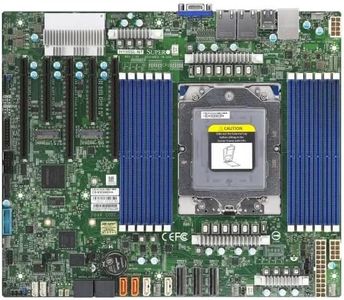
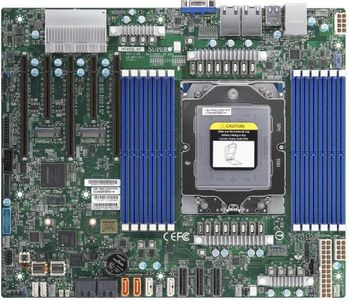
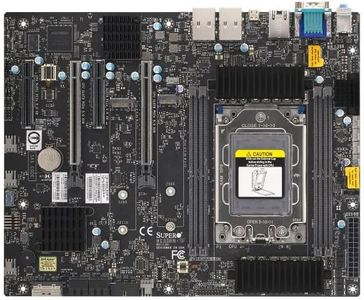
Supermicro H13SRA-TF Motherboard

The Supermicro H13SRA-TF is a high-end motherboard designed for powerful workstations and servers using AMD Ryzen Threadripper PRO 7000 WX-Series and Ryzen Threadripper 7000 Series processors. It supports a single socket LGA-4844 (sTR5) with up to 350W CPU power, making it suitable for demanding tasks and some overclocking. The board uses the AMD TRX50 chipset and comes with four RAM slots that can handle a massive 4TB of DDR5 memory, running at speeds over 5200 MT/s with overclocking, which is excellent for heavy multitasking or memory-intensive applications.

For storage, it offers two M.2 slots supporting PCIe 4.0 with RAID options, providing fast and flexible SSD setups. Expansion-wise, it includes four PCIe 4.0 slots, suitable for adding graphics cards or other expansion cards. Connectivity options are somewhat modest, with a total of 8 ports including 4 USB ports, which might be limiting if you need multiple peripherals. The BIOS/UEFI is tailored for professional use, supporting advanced configurations but may require some technical knowledge to navigate.

While the motherboard excels in memory capacity and CPU support, its niche CPU socket and modest USB connectivity make it best suited for users building specialized high-performance workstations or servers rather than general-purpose PCs.

#3

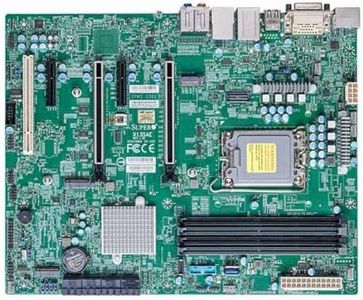
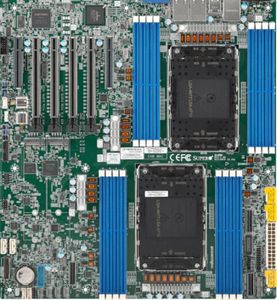
SP3 Supermicro MBD-H13SSL-NT-B

The Supermicro MBD-H13SSL-NT-B motherboard is designed mainly for servers or workstations, focusing on stability and expandability rather than gaming or general consumer use. It supports Intel's LGA 1700 socket. The board comes with 2 RAM slots supporting up to 32 GB of DDR3 memory at 1333 MHz, which is quite outdated and limited compared to modern standards where DDR4 or DDR5 and higher capacities are common.

For expansion, it offers 8 PCIe ports, which is generous and good for adding multiple cards like network adapters or RAID controllers. Storage options are strong with 8 SATA 3 ports, allowing plenty of room for hard drives or SSDs, but it does not include newer M.2 slots for NVMe drives, which are faster and more popular today. Connectivity is minimal, with only one USB 2.0 port and a single HDMI port, which might be restrictive if you need multiple peripherals or higher-speed USB connections.

The motherboard includes a standard 24-pin main power connector. A notable advantage is the Supermicro brand's reputation for reliability and a solid 3-year warranty. This board is best suited for older or specialized server setups rather than mainstream or gaming PCs. If you need a stable board for a workstation with legacy DDR3 support and lots of SATA drives, this could work, but you will miss out on newer features and faster memory or storage options.

Buying Guide for the Best Motherboards

Choosing the right motherboard is crucial for building a computer that meets your needs. The motherboard is the main circuit board that connects all the components of your computer, so it needs to be compatible with your other hardware and support the features you want. When selecting a motherboard, consider the type of processor you plan to use, the amount of memory you need, and the expansion options for future upgrades. Here are some key specifications to consider when choosing a motherboard.
Form FactorThe form factor of a motherboard refers to its size and shape, which determines the type of case it will fit into. Common form factors include ATX, Micro-ATX, and Mini-ITX. ATX motherboards are larger and offer more expansion slots, making them suitable for high-performance builds. Micro-ATX boards are smaller but still provide a good balance of features and expandability. Mini-ITX boards are the smallest and are ideal for compact builds where space is limited. Choose a form factor based on the size of your case and your need for expansion slots.
Socket TypeThe socket type of a motherboard determines which processors it can support. Common socket types include LGA, AM4, and TR4. LGA sockets are used by Intel processors, while AM4 and TR4 sockets are used by AMD processors. It's important to choose a motherboard with a socket type that matches your processor. If you're planning to upgrade your processor in the future, make sure the socket type will support newer models.
ChipsetThe chipset is a crucial component that determines the motherboard's capabilities and features. It controls communication between the processor, memory, and other peripherals. Different chipsets offer varying levels of performance, connectivity, and features. For example, high-end chipsets provide better overclocking support and more USB ports, while budget chipsets may have fewer features. Choose a chipset based on your performance needs and the features you require, such as overclocking, multiple graphics card support, or advanced connectivity options.
RAM SlotsRAM slots on a motherboard determine how much memory you can install and the type of RAM it supports. Most motherboards have two to four RAM slots, with high-end models offering up to eight. The type of RAM supported is also important, with DDR4 being the most common. More RAM slots allow for greater memory capacity, which is beneficial for tasks like gaming, video editing, and multitasking. Choose a motherboard with enough RAM slots to meet your current and future memory needs.
Expansion SlotsExpansion slots allow you to add additional components to your motherboard, such as graphics cards, sound cards, and network cards. Common types of expansion slots include PCIe x16, PCIe x1, and M.2. PCIe x16 slots are used for graphics cards, while PCIe x1 slots are used for smaller cards like network adapters. M.2 slots are used for high-speed storage devices. Consider the number and type of expansion slots you need based on the components you plan to install and any future upgrades.
Storage OptionsStorage options on a motherboard include the types and number of connections available for hard drives and SSDs. Common storage connections include SATA and M.2. SATA ports are used for traditional hard drives and SSDs, while M.2 slots are used for high-speed NVMe SSDs. Having multiple storage options allows for greater flexibility and performance. Choose a motherboard with enough storage connections to meet your current and future storage needs.
ConnectivityConnectivity options on a motherboard include USB ports, Ethernet ports, and audio jacks. The number and type of USB ports are important for connecting peripherals like keyboards, mice, and external drives. Ethernet ports provide wired network connectivity, while audio jacks allow for sound output. Some motherboards also offer Wi-Fi and Bluetooth connectivity. Choose a motherboard with the connectivity options that match your needs for peripherals, networking, and audio.
BIOS/UEFIThe BIOS (Basic Input/Output System) or UEFI (Unified Extensible Firmware Interface) is the software that initializes and manages the hardware components of your computer. UEFI is the newer and more advanced version, offering a graphical interface and more features. The BIOS/UEFI allows you to configure settings like boot order, overclocking, and hardware monitoring. Choose a motherboard with a user-friendly BIOS/UEFI that offers the features you need for system configuration and optimization.

FAQ

Most Popular Categories Right Now