We Use CookiesWe use cookies to enhance the security, performance, functionality and for analytical and promotional activities. By continuing to browse this site you are agreeing to our privacy policy

10 Best Mini Pcs 2026 in the United States
How do we rank products for you?

Our technology thoroughly searches through the online shopping world, reviewing hundreds of sites. We then process and analyze this information, updating in real-time to bring you the latest top-rated products. This way, you always get the best and most current options available.

headphones-stars

Our Top Picks

#1

Winner

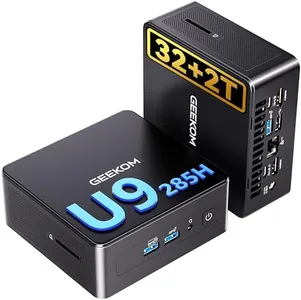
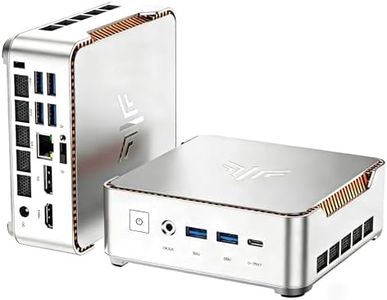
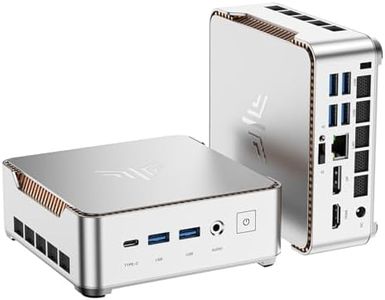
GEEKOM IT15, The Most Powerful AI Mini PC with Intel Ultra 9 285H(15th Gen) 99 Tops | 32GB DDR5, 2TB SSD | Arc 140T GPU | WiFi 7, 8K Quad Display, Win11 Pro, Video Editing, Coding, and Multitasking

Rating
10.0
Chosen by1,273
Processor (CPU)
Storage
Connectivity

Most important from
491 reviews

Processor (CPU)
A compact powerhouse that handles multitasking across multiple monitors with lightning-fast response and solid build quality.
Storage
Fast storage and ample USB connectivity support numerous peripherals without performance dips.
Connectivity
The HDMI ports can be sensitive to cable quality, so using recommended cables ensures stable multi-monitor connectivity.
Size and Form Factor
The device fits neatly into tight spaces or can be mounted behind a monitor, maximizing desk real estate.

The GEEKOM IT15 Mini PC is designed as a high-performance, compact desktop, packing impressive power in a small form factor. Its 15th Gen Intel Core Ultra 9 285H processor with 16 cores and speeds up to 5.4GHz provides smooth and fast performance, especially for demanding tasks like 4K video editing, 3D rendering, and live streaming. The 32GB DDR5 RAM and 2TB PCIe Gen4 NVMe SSD offer plenty of memory and super quick storage, ensuring multitasking and large file handling feel seamless.

For graphics, the Intel Arc 140T GPU is integrated but still capable, supporting up to four displays including two 8K screens, which is excellent for multitasking or creative work. Connectivity is a strong point, with WiFi 7, Bluetooth 5.4, 2.5Gbps Ethernet, and multiple USB ports including fast USB4 Type-C. This makes the IT15 well-suited for modern wireless and wired setups. Its sturdy metal frame and efficient cooling system keep the device quiet and protected, although the size is on the larger side compared to some ultra-compact mini PCs, which might limit extreme portability.

Running Windows 11 Pro, the IT15 is ready for professional and everyday use right out of the box. It represents an ideal choice for users needing a powerful, versatile mini-PC for creative, professional, or multitasking needs, while those looking for a very small or budget-friendly option might find it less suitable.

Rating
10.0
Chosen by1,273
Processor (CPU)
Storage
Connectivity

Most important from
491 reviews

Processor (CPU)
A compact powerhouse that handles multitasking across multiple monitors with lightning-fast response and solid build quality.
Storage
Fast storage and ample USB connectivity support numerous peripherals without performance dips.
Connectivity
The HDMI ports can be sensitive to cable quality, so using recommended cables ensures stable multi-monitor connectivity.
Size and Form Factor
The device fits neatly into tight spaces or can be mounted behind a monitor, maximizing desk real estate.
#2

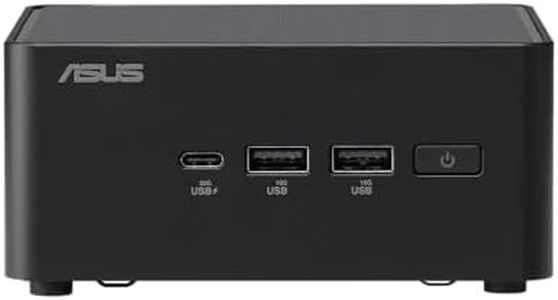
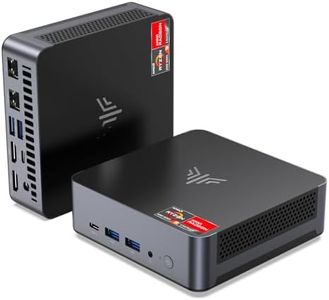
ASUS NUC 14 Pro Tall Full System Mini PC with Intel 14th Gen Core Ultra 7 155H, 32GB DDR5 RAM, 1TB PCIe G4x4 NVMe SSD, Thunderbolt 4,Win 11 Pro, Toolless Chassis Access, VESA Mount Included

Rating
10.0
Processor (CPU)
Graphics
Connectivity

Most important from
28 reviews

Processor (CPU)
The mini PC delivers extremely fast performance, handling virtual machines and multitasking with ease.
Graphics
The integrated Intel Arc Graphics support general multimedia and light creative tasks effectively.
Connectivity
Strong connectivity options ensure compatibility with a wide range of peripherals and fast wireless internet.
Size and Form Factor
Its compact design and included VESA mount make it ideal for saving desk space and discreet placement.

The ASUS NUC 14 Pro Tall is a powerful mini PC designed for users who need a compact yet high-performing machine for everyday, personal, or business use. It is equipped with the latest Intel 14th Gen Core Ultra 7 processor running at 3.8 GHz, paired with 32GB of fast DDR5 RAM, which means it can handle multitasking and demanding applications smoothly. Storage-wise, the 1TB PCIe Gen 4 NVMe SSD offers both speed and plenty of space for files and programs, helping the system boot and load software quickly.

Graphics are handled by integrated Intel Arc Graphics, which is suitable for general multimedia use, office work, and light creative tasks but not intended for serious gaming or heavy 3D work. Connectivity is strong with Thunderbolt 4, multiple USB ports (including four USB 3.0 and one USB 2.0), Wi-Fi 6 (802.11ax), and Bluetooth support, making it easy to connect peripherals and enjoy fast wireless internet.

Its small size (about 4.6 x 4.4 x 2.1 inches) and included VESA mount make it easy to place discreetly on or behind a monitor, saving desk space. The toolless chassis design is a nice feature for users who may want to upgrade RAM or storage later without fuss. Running Windows 11 Pro, it’s ready for business environments with professional software compatibility. The integrated graphics limit its use for gaming or graphic-intensive software, and while 32GB RAM is ample, users wanting more memory can upgrade but must do so within the two available slots. Some might find the price a bit higher compared to entry-level mini PCs, but the build quality and specs justify it. This mini PC is an excellent choice for professionals, remote workers, and everyday users who want a compact, efficient computer with solid performance and easy upgrade options.

Rating
10.0
Processor (CPU)
Graphics
Connectivity

Most important from
28 reviews

Processor (CPU)
The mini PC delivers extremely fast performance, handling virtual machines and multitasking with ease.
Graphics
The integrated Intel Arc Graphics support general multimedia and light creative tasks effectively.
Connectivity
Strong connectivity options ensure compatibility with a wide range of peripherals and fast wireless internet.
Size and Form Factor
Its compact design and included VESA mount make it ideal for saving desk space and discreet placement.
#3

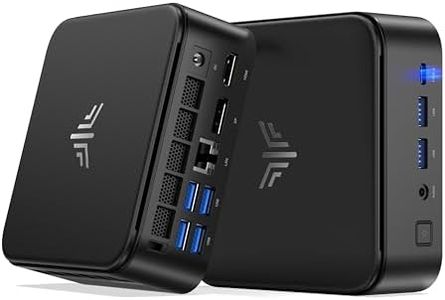
KAMRUI Pinova P2 Mini PC, AMD Ryzen 4300U(Beats 3500U/3200U/N150,Up to 3.7 GHz) Mini Computers, 16GB RAM 512GB SSD Mini Desktop Computers, Triple 4K Display/HDMI+DP+Type-C/WiFi/BT for Home/Business

Rating
9.1
Processor (CPU)
Storage
Graphics

Most important from
1924 reviews

Processor (CPU)
A delightful surprise coming from an older desktop; the speed is very manageable and it's the fastest Windows machine I've owned.
Storage
Great storage, connects easily to webcams and speakers, and remains crash-free with automatic updates.
Graphics
Handles YouTube videos crystal clear without freezing, buffering, or distortion, making it perfect for media consumption.
Connectivity
All peripherals, including DVD/RW, keyboard, mouse, monitor, external hard drive, and printer, work flawlessly.
Size and Form Factor
Quiet and small enough to tuck away behind a monitor with the included VESA mount, but ensure it has air space for cooling.
Operating System
Easy to set up, with Windows updates running smoothly without any peripherals attached except a keyboard.

The KAMRUI GK3Plus Mini PC is a compact yet powerful device, ideal for various uses from home entertainment to office work. It features the latest 12th Gen Intel Alder Lake N95 processor with speeds up to 3.4GHz, ensuring smooth performance for everyday tasks and even some professional applications like photo editing.

The 16GB of DDR4 RAM and a 512GB M.2 SSD provide ample memory and storage, making it capable of handling multitasking and demanding applications efficiently. Additionally, the storage can be expanded up to 2TB with an additional SSD, offering flexibility for future upgrades. The integrated Intel UHD Graphics supports 4K UHD resolution, making it suitable for high-definition video playback and multi-monitor setups, which is great for productivity and entertainment alike.

Connectivity options are robust, with Gigabit Ethernet, dual-band Wi-Fi, and Bluetooth 4.2, ensuring stable and fast connections to networks and peripherals. The small form factor (5.1 x 5.1 x 1.96 inches) makes it easy to fit in any workspace, and the VESA mount compatibility allows it to be attached to the back of a monitor, saving desk space. The integrated graphics may not be sufficient for high-end gaming or extremely graphic-intensive tasks. Additionally, while it has multiple USB ports, some users might find the number of ports limited if they need to connect many devices simultaneously. The operating system is Windows 11 Pro, which is user-friendly and supports a wide range of applications, making it a versatile choice for most users.

The KAMRUI GK3Plus Mini PC is a well-rounded device offering a good balance of performance, storage, and connectivity in a compact design, suitable for both home and business environments.

Rating
9.1
Processor (CPU)
Storage
Graphics

Most important from
1924 reviews

Processor (CPU)
A delightful surprise coming from an older desktop; the speed is very manageable and it's the fastest Windows machine I've owned.
Storage
Great storage, connects easily to webcams and speakers, and remains crash-free with automatic updates.
Graphics
Handles YouTube videos crystal clear without freezing, buffering, or distortion, making it perfect for media consumption.
Connectivity
All peripherals, including DVD/RW, keyboard, mouse, monitor, external hard drive, and printer, work flawlessly.
Size and Form Factor
Quiet and small enough to tuck away behind a monitor with the included VESA mount, but ensure it has air space for cooling.
Operating System
Easy to set up, with Windows updates running smoothly without any peripherals attached except a keyboard.

Buying Guide for the Best Mini Pcs

Mini-PCs are compact computers that fit into small spaces but can still handle everyday tasks and even some more demanding uses. Choosing the right mini-PC involves thinking about how you'll use it—such as for browsing, office work, streaming, light gaming, or creative tasks—and which features matter most to you. It's important to understand key specifications, as these determine how well the mini-PC will perform for your needs. By considering things like the processor, memory, storage, and connectivity, you can find a model that matches your requirements and fits seamlessly into your space.
Processor (CPU)The processor is the brain of the mini-PC, handling all major calculations and tasks. Its speed and core count affect things like how quickly programs open and how strongly the PC can multitask. Basic CPUs work fine for browsing and office work, while mid-range and high-end CPUs are better for advanced multitasking, light gaming, and editing photos or videos. If you mostly use simple applications, a lower-tier processor is often enough. For heavier multitasking or creative work, choose a device with a more powerful CPU.
Memory (RAM)RAM is the short-term memory that helps your mini-PC juggle multiple tasks smoothly. The more RAM, the better your device can keep several apps open without slowing down. Mini-PCs commonly come with between 4GB and 16GB of RAM. For casual use and web browsing, 4GB to 8GB is usually sufficient. If you work with large files, do a lot of multitasking, or need a system to last for years, 16GB or more can be helpful. Think about your typical workload and whether you tend to use several programs at once.
StorageStorage is where all your files, programs, and system data live even when the PC is turned off. Mini-PCs are commonly equipped with SSDs (which are fast and shock-resistant) or sometimes traditional hard drives (which offer more space for the price). 128GB to 256GB SSDs are good for basic needs; if you keep lots of large files, like videos or games, or plan to install many programs, look for higher capacity—512GB or more. Your storage choice should reflect whether you prioritize speed (SSD) or maximum space.
Graphics (GPU)The graphics processor, or GPU, handles visual tasks from displaying web pages to playing videos or games. Most mini-PCs use integrated graphics, which are built into the processor and fit basic needs and light gaming or HD video. If you want to do photo editing, casual gaming, or drive multiple high-resolution monitors, look for models with better or dedicated graphics. Match your choice to how visually intensive your tasks are.
Ports and ConnectivityPorts and connectivity options determine how you plug in monitors, keyboards, drives, and access the internet. Check for the types and number of USB ports (for accessories), HDMI or DisplayPort (for monitors), and whether there’s Ethernet (for wired internet) or Wi-Fi/Bluetooth (for wireless use). Make sure your chosen mini-PC supports all devices you want to connect, and also consider if you’ll need more advanced ports like Thunderbolt or SD card readers.
Size and Form FactorThe size and shape of a mini-PC affect where you can place it—some are tiny enough to mount behind a monitor, while others take a little more space but offer better cooling or expandability. If your workspace is crowded or you want a nearly invisible setup, choose the smallest form factor. If you prefer better airflow or plan to add components, a slightly larger box might be better. Consider the space you have and how important discreet placement is to you.
UpgradabilityUpgradability means how easily you can improve parts of your mini-PC in the future, such as adding more RAM or storage. Some mini-PCs are sealed and can’t be opened, while others allow access to key components. If you want your device to last for years and grow with your needs, pick a model that lets you upgrade at least the memory or storage. If you don’t foresee changing your setup, a sealed model can be simpler and sleeker.
Cooling and NoiseMini-PCs manage heat with fans or passive cooling, and that affects how noisy they are. Small, fanless designs are completely silent but may not handle heavy workloads well. Mini-PCs with small fans might get loud when working hard. If you need a quiet workspace (like in a living room or bedroom), look for fanless or low-noise models. For demanding tasks, accept a little bit of fan noise in exchange for better cooling.

FAQ

Most Popular Categories Right Now