10 Best Mac Webcam 2026 in the United States



Related Products
Recommended lists

Mac Webcams
Our technology thoroughly searches through the online shopping world, reviewing hundreds of sites. We then process and analyze this information, updating in real-time to bring you the latest top-rated products. This way, you always get the best and most current options available.

Our Top Picks
Winner
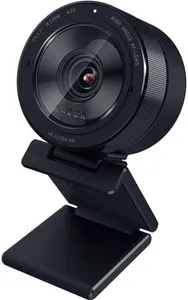
Razer Kiyo Pro Ultra 4K Webcam: Large Sensor - Auto Light Correction - Built-in Mic and Shutter - Pro Grade Content Creation, Streaming, Gaming, Video Calls - Works with OBS, Xsplit, PC, Zoom, Teams
Most important from
233 reviews
The Razer Kiyo Pro Ultra 4K Webcam offers impressive image quality thanks to its large Sony STARVIS 2 sensor and 4K resolution, making it a great choice for users who want sharp, detailed video for streaming, professional content, or video calls. Its custom F/1.7 aperture lens and AI-powered lighting adjustments help maintain clear and vibrant visuals even in low-light settings, which is a big plus if you don’t have perfect lighting.
The webcam supports HDR at 30 FPS, enhancing color accuracy and dynamic range to make your image look more natural. Autofocus is reliable and the webcam can softly blur your background without additional software, adding a polished, portrait-like effect. The frame rates are good, offering 4K at 24 FPS and 1080p at 60 FPS options, which suit both detailed video and smoother motion.
The built-in microphone provides audio suitable for casual calls and streams but is not a replacement for a dedicated microphone if you need professional sound. Compatibility-wise, it works best with Windows where you get full control over advanced settings; on Mac, it functions plug-and-play but lacks software customization, which might limit fine-tuning. The webcam is slightly heavier and larger than average, which might affect portability or setup in tight spaces. This webcam is a solid option for Mac users who prioritize premium video quality and simplicity, though they should consider the limited software features on Mac and possibly use an external mic for better audio performance.
Most important from
233 reviews
Razer Kiyo V2 Streaming Webcam: 4K 30 FPS, 1080p 60 FPS - AI Powered Auto-Framing - Built-in Microphone - Ultrawide Angle Lens - Privacy Cover - Works with OBS, Xsplit, Discord, Zoom, Teams - Black
Most important from
144 reviews
The Razer Kiyo V2 is a strong choice if you want a high-quality webcam for Mac, especially if you’re into streaming or video calls where image clarity and smoothness matter. It offers impressive 4K video at 30 frames per second and 1080p at 60 FPS, which means your video will look sharp and fluid. The 93-degree ultrawide lens gives a good field of view, allowing you to show more of your surroundings without distortion. Autofocus is included, making sure you stay clear even if you move around a bit.
One standout feature is the AI-powered auto-framing, which keeps you centered with smart pan and zoom adjustments, great if you’re on the move or want a professional look without manual tweaking. Low-light performance is handled well thanks to one-click image enhancement, including noise reduction and automatic exposure, so you’ll look good even in dim rooms. The built-in microphone is convenient for everyday use, but for professional audio, a dedicated mic might still be better.
Compatibility with macOS 14 and higher, plus popular streaming apps like OBS, Zoom, and Teams, means it fits easily into your current setup. The universal pivoting mount works on monitors or tripods, offering flexibility for your preferred shooting angle. The webcam is relatively compact and not water-resistant, so it’s best for indoor desktop use. It also includes a privacy shutter and HDR support to improve video quality, though some users might find the software customization a bit complex at first. If you’re looking for a versatile webcam that delivers excellent video quality with helpful AI features and works smoothly on Mac, the Razer Kiyo V2 is a solid pick that balances professional-level features with ease of use.
Most important from
144 reviews
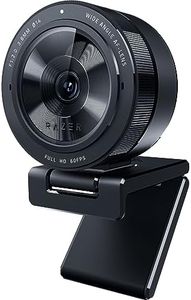
Razer Kiyo Pro Webcam for Streaming, Gaming, Video Calls: Full HD 1080p 60FPS - Adaptive Light Sensor - HDR Enabled - Wide Angle Lens with Adjustable FOV - Works with OBS, Xsplit, Twitch, Zoom, Teams
Most important from
5709 reviews
The Razer Kiyo Pro is a strong choice if you're looking for a high-quality Mac webcam for streaming, gaming, or video calls. It delivers smooth and clear video at Full HD 1080p resolution and a fast 60 frames per second, which means your video will look fluid and sharp. This is especially good for gamers and streamers who need reliable, detailed visuals. You can adjust the field of view (FOV) among three options (103°, 90°, 80°), letting you control how much of your background shows up in the frame, which is a nice flexible feature. Its standout feature is its excellent low light performance thanks to an adaptive light sensor, so even if your room isn’t brightly lit, your image will stay clear and less grainy than many other webcams. The HDR mode at 30 FPS also helps make colors look more vibrant and balanced.
It has a built-in microphone with decent quality, capturing clear audio for calls and streams, though it may not replace a dedicated microphone if you want professional sound. The USB 3.0 connection ensures fast and uncompressed video data, which avoids lag and quality loss. Compatibility is broad, working smoothly with popular apps like Zoom, Teams, OBS, and Twitch, making it Mac-friendly. Mounting options are standard with a flexible clip for monitors or laptops.
The webcam doesn’t have explicit autofocus mentioned, so focusing might not be as quick or precise as some other models. Also, while it performs well in low light, the HDR feature only works at 30 FPS, not 60 FPS. If you want a versatile, high-resolution webcam that works well in various lighting conditions and offers adjustable viewing angles, the Razer Kiyo Pro is a strong contender for Mac users who stream or video chat often.
Most important from
5709 reviews
Buying Guide for the Best Mac Webcam
Choosing the right webcam for your Mac can significantly enhance your video calling, streaming, or content creation experience. To make an informed decision, it's important to understand the key specifications and how they align with your needs. Here are the main specs to consider when selecting a webcam for your Mac.FAQ
Most Popular Categories Right Now


