We Use CookiesWe use cookies to enhance the security, performance, functionality and for analytical and promotional activities. By continuing to browse this site you are agreeing to our privacy policy

10 Best Label Printer Machine 2026 in the United States
How do we rank products for you?

Our technology thoroughly searches through the online shopping world, reviewing hundreds of sites. We then process and analyze this information, updating in real-time to bring you the latest top-rated products. This way, you always get the best and most current options available.

headphones-stars

Our Top Picks

#1

Winner

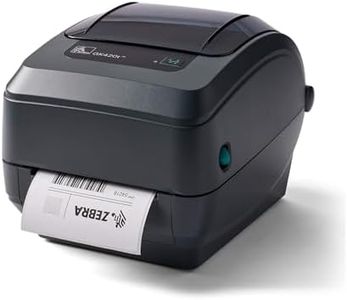
Zebra GK420T 4 Inch Thermal Label Printer USB and Ethernet, Renewed

Rating
10.0
Chosen by1,366
Print Resolution
Durability and Build Quality

Most important from
54 reviews

Print Resolution
Delivers solid and dependable printing performance, fulfilling everyday labeling needs effectively.
Durability and Build Quality
The build quality is robust and reliable, matching expectations for consistent use in small to medium workspaces.

The Zebra GK420t is a thermal transfer label printer designed for printing various types of labels, including barcodes, shipping tags, and wristbands. It offers a print resolution of 203 dpi, which is suitable for clear, readable text and barcodes but not for high-detail images. With a print speed of up to 5 inches per second, it handles everyday labeling tasks efficiently without long waits. Connectivity options include USB and Ethernet ports, allowing it to fit into both standalone setups and networked office environments, which adds flexibility.

The printer supports label sizes up to about 4.25 inches wide, covering most common label needs for shipping, mailing, and inventory. Users find its build quality solid and reliable, typical of Zebra products, making it a good choice for regular use in small to medium workspaces. It’s fairly easy to use, especially when paired with common label software, but being a renewed product, the warranty is limited to 90 days, which might be shorter than expected for some buyers. The cost and availability of thermal transfer ribbons and labels, required consumables, can add to ongoing expenses depending on your printing volume.

The resolution and speed are modest compared to some newer models, so it may not be ideal if you need ultra-fast or ultra-high-resolution prints. This printer is a dependable and versatile option well suited for business users who need consistent quality for basic labeling tasks without high costs. It is especially beneficial if you want a network-ready device with straightforward operation, while accepting some limitations in print detail and warranty length due to its renewed status.

Rating
10.0
Chosen by1,366
Print Resolution
Durability and Build Quality

Most important from
54 reviews

Print Resolution
Delivers solid and dependable printing performance, fulfilling everyday labeling needs effectively.
Durability and Build Quality
The build quality is robust and reliable, matching expectations for consistent use in small to medium workspaces.
#2

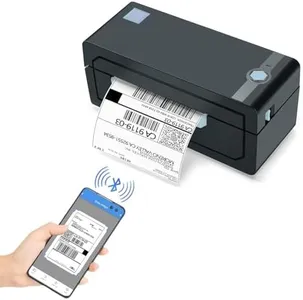
JADENS Bluetooth Thermal Shipping Label Printer – Wireless 4x6 Shipping Label Printer, Compatible with Android, iPhone, Windows & Mac, Widely Used for, Amazon, Shopify, Etsy, USPS(Blue)

Rating
8.5
Print Resolution
Print Speed
Connectivity Options

Most important from
9114 reviews

Print Resolution
Print quality is sharp and clear, with crisp barcodes and text.
Print Speed
Handles 4x6 shipping labels quickly without any lag or delays, saving time during busy shipping days.
Connectivity Options
Setup was a breeze, connecting seamlessly to both iPhone and Windows laptop via Bluetooth.
Durability and Build Quality
Exceeded all expectations with its reliability, speed, and ease of use.
Ease of Use
Easy installation process, taking less than 5 minutes to set up and print a test page.
Cost of Consumables
Thermal printing technology eliminates the need for ink, offering significant cost savings.

The JADENS Bluetooth Thermal Shipping Label Printer is a versatile label printer that fits well for small businesses requiring efficient shipping label printing. It boasts a print resolution of 203 DPI, offering clear and readable labels, which is sufficient for most shipping needs. The print speed is decent at 72 labels per minute, ensuring a quick turnaround when printing in bulk.

One of its standout features is the variety of connectivity options: it supports wireless printing via Bluetooth for Windows (8 or later) and mobile devices (iOS/Android), as well as USB connection for Windows, Chrome OS, and Mac OS (though Mac OS supports only USB and not Bluetooth). This flexibility makes it a convenient choice for users with different operating systems and devices. The printer accommodates label widths from 1.57

Rating
8.5
Print Resolution
Print Speed
Connectivity Options

Most important from
9114 reviews

Print Resolution
Print quality is sharp and clear, with crisp barcodes and text.
Print Speed
Handles 4x6 shipping labels quickly without any lag or delays, saving time during busy shipping days.
Connectivity Options
Setup was a breeze, connecting seamlessly to both iPhone and Windows laptop via Bluetooth.
Durability and Build Quality
Exceeded all expectations with its reliability, speed, and ease of use.
Ease of Use
Easy installation process, taking less than 5 minutes to set up and print a test page.
Cost of Consumables
Thermal printing technology eliminates the need for ink, offering significant cost savings.
#3

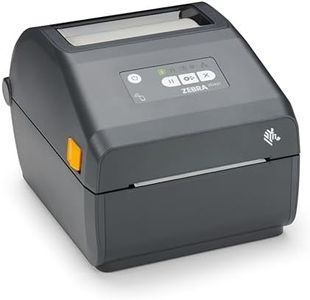
ZEBRA ZD421 Direct Thermal Desktop Printer 203 dpi Print Width 4-inch Wired USB and Ethernet Connectivity ZD4A042-D01E00EZ, No Thermal Ribbon Required

Rating
8.2
Connectivity Options
Ease of Use

Most important from
55 reviews

Connectivity Options
The label printer delivers excellent print quality and works seamlessly when connected via USB or network.
Ease of Use
The printer is straightforward to operate and integrates well into small to medium office workflows.

The Zebra ZD421 is a compact direct thermal label printer designed for office use, printing labels up to 4 inches wide. It offers a good print resolution of 203 dpi, producing clear and readable labels and barcodes suitable for everyday labeling needs. Since it uses direct thermal technology, you won't need to buy ribbons or ink cartridges, which helps reduce ongoing costs. The printer connects via USB or Ethernet, giving flexible options to fit different setups, whether you’re using it alone or on a network.

In terms of speed, it handles standard label jobs efficiently, though it’s not the fastest model available, so it might not be ideal for very high-volume printing. Its build is sturdy yet lightweight, making it portable and convenient to place in small workspaces. The printer supports common label sizes with a maximum width of about 4.25 inches, covering most typical labeling tasks. While it includes advanced security features to keep your connection safe, the single USB port might limit connectivity options if you need multiple direct connections. Also, since it only prints in black and white, it’s best suited for basic labeling rather than color-coded or more complex designs.

The lack of thermal ribbons reduces supplies cost, but the price of Zebra’s labels themselves can be moderate. Ease of use is good, with simple controls and remote management capability, making it friendly for users without technical expertise. This printer fits well for small to medium office environments needing reliable, straightforward label printing without extra consumable hassles.

Rating
8.2
Connectivity Options
Ease of Use

Most important from
55 reviews

Connectivity Options
The label printer delivers excellent print quality and works seamlessly when connected via USB or network.
Ease of Use
The printer is straightforward to operate and integrates well into small to medium office workflows.

Buying Guide for the Best Label Printer Machine

Choosing the right label printer machine can be a game-changer for your business or personal needs. Whether you need it for shipping labels, product labels, or organizational purposes, understanding the key specifications will help you make an informed decision. Here’s a guide to help you navigate through the essential features and pick the best label printer for your needs.
Print ResolutionPrint resolution, measured in dots per inch (DPI), determines the clarity and detail of the printed labels. Higher DPI means sharper and more detailed prints. For basic labeling needs, a resolution of 203 DPI is usually sufficient. However, if you need high-quality graphics or small text, consider a printer with 300 DPI or higher. Your choice should depend on the level of detail required for your labels.
Print SpeedPrint speed, measured in millimeters per second (mm/s) or inches per second (ips), indicates how quickly the printer can produce labels. Faster print speeds are beneficial for high-volume printing tasks, reducing wait times and increasing efficiency. For occasional or low-volume use, a lower print speed may be adequate. Assess your printing volume and choose a speed that matches your productivity needs.
Connectivity OptionsConnectivity options such as USB, Ethernet, Wi-Fi, and Bluetooth determine how the printer connects to your devices. USB is standard for direct connections, while Ethernet is useful for networked environments. Wi-Fi and Bluetooth offer wireless convenience, allowing you to print from multiple devices without physical connections. Consider your workspace setup and the devices you plan to use with the printer to choose the right connectivity options.
Label Size CompatibilityLabel size compatibility refers to the range of label widths and lengths the printer can handle. Some printers are designed for specific label sizes, while others offer adjustable settings for various dimensions. If you need to print different label sizes, look for a versatile printer that supports multiple dimensions. Match the printer’s capabilities with the label sizes you plan to use.
Durability and Build QualityDurability and build quality are important for ensuring the printer can withstand regular use and last over time. Industrial-grade printers are built for heavy-duty use and can handle high volumes, while desktop models are more suited for moderate use. Consider the environment in which the printer will be used and the expected workload to choose a model with appropriate durability.
Ease of UseEase of use encompasses the user interface, software compatibility, and overall setup process. A user-friendly printer with intuitive controls and compatible software can save time and reduce frustration. Look for features like easy label loading, clear display screens, and compatibility with your existing systems. Choose a printer that aligns with your technical comfort level and workflow.
Cost of ConsumablesThe cost of consumables, such as labels and ink or thermal ribbons, can impact the overall cost of ownership. Some printers use more affordable consumables, while others may have higher ongoing costs. Consider the availability and price of consumables for the printer models you are considering. Balance the initial purchase price with the long-term cost of consumables to find the most cost-effective option.

FAQ

Most Popular Categories Right Now