We Use CookiesWe use cookies to enhance the security, performance, functionality and for analytical and promotional activities. By continuing to browse this site you are agreeing to our privacy policy

10 Best Iphone Photo Printers 2026 in the United States
How do we rank products for you?

Our technology thoroughly searches through the online shopping world, reviewing hundreds of sites. We then process and analyze this information, updating in real-time to bring you the latest top-rated products. This way, you always get the best and most current options available.

headphones-stars

Our Top Picks

#1

Winner

Epson EcoTank Photo ET-8550 Wireless Wide-Format Color All-in-One Supertank Printer with High Resolution Scanner, Ethernet, USB, and Color Touchscreen

Rating
10.0
Chosen by1,152
Print Quality
Connectivity
Print Speed

Most important from
2530 reviews

Print Quality
This printer is an absolute joy to use, and the gloss prints on Epson ultra premium paper are simply the finest gloss prints ever seen.
Connectivity
You can print from your phone in just a few clicks, thanks to the wireless print function.
Print Speed
Prints come out fast and don’t smudge, with lines crisp and accurate to the original.
Ink and Paper Compatibility
The ink tanks are huge and transparent, making it easy to see ink levels and they last a long time.
Additional Features
The touch screen works well, allowing for quick and easy copying.

The Epson EcoTank Photo ET-8550 is a versatile printer tailored for those looking to print vibrant photos directly from their devices, including iPhones. A standout feature is its cartridge-free system, which uses high-capacity ink bottles, significantly reducing printing costs—4 cents for a 4" x 6" photo compared to 40 cents with traditional cartridges. This economic advantage means users can print large volumes without worrying about frequent replacements, making it ideal for photography enthusiasts and creative projects.

Print quality is impressive, with a 6-color ink system that ensures sharp images and colors, alongside the ability to print borderless photos up to 13" x 19". The print speed is decent too, completing a 4" x 6" print in about 15 seconds. Additional features like auto-duplex printing and a 4.3" color touch display enhance usability.

The ET-8550 is relatively heavy at 24.5 pounds and may not be the most portable option for users who frequently move their printers. It’s designed for home or office settings rather than on-the-go printing. Connectivity options are strong, supporting wireless printing through the Epson Smart Panel app, but reliance on genuine ink is a drawback for those hoping to save even more on supplies, as non-genuine inks can void the warranty.

Rating
10.0
Chosen by1,152
Print Quality
Connectivity
Print Speed

Most important from
2530 reviews

Print Quality
This printer is an absolute joy to use, and the gloss prints on Epson ultra premium paper are simply the finest gloss prints ever seen.
Connectivity
You can print from your phone in just a few clicks, thanks to the wireless print function.
Print Speed
Prints come out fast and don’t smudge, with lines crisp and accurate to the original.
Ink and Paper Compatibility
The ink tanks are huge and transparent, making it easy to see ink levels and they last a long time.
Additional Features
The touch screen works well, allowing for quick and easy copying.
#2

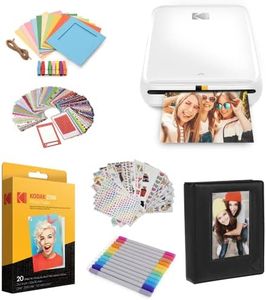
KODAK Step Printer Wireless Mobile Photo Printer with Zink Zero Ink Technology & Kodak App for iOS & Android (White) Gift Bundle

Rating
9.1
Print Quality
Connectivity
Portability

Most important from
2754 reviews

Print Quality
Printing is quick and easy, with vibrant colors that stand out impressively for the price.
Connectivity
Setup and Bluetooth connection are straightforward, ensuring a hassle-free start right from your phone.
Portability
Its sleek, lightweight design makes it highly portable—perfect for travel, parties, or scrapbooking on the go.
Print Speed
Print speed is surprisingly fast for a compact device, making it convenient for instant photo sharing.
Ink and Paper Compatibility
Sticky-back photo paper is durable, resisting moisture, rips, and smudges, which adds to its versatility for crafts and personal projects.
Additional Features
The app offers a full suite of editing tools including frames, stickers, and collage options, making customization effortless and fun.

The Kodak Step Printer is a compact and lightweight mobile photo printer designed specifically for users who want to print photos directly from their iPhone or Android devices. Its standout feature is the Zink zero-ink technology, which means you don't need to worry about buying or replacing ink cartridges. The prints come out on 2" x 3" sticky-back paper that resists moisture, rips, and smudges, making them great for decorating personal items or scrapbooking.

Connecting to your phone is simple via Bluetooth or NFC, and the Kodak app offers a full editing suite to add filters, text, and stickers before printing. This gives you creative control to personalize your photos easily. The printer is very portable, weighing just a pound and running on a rechargeable battery that can print about 25 photos per charge, which is convenient for casual use on the go.

The print resolution is 300 dpi, which is decent for small photo prints but not comparable to high-end photo printers. The print speed is about one photo per minute, so it’s not suited for large batches. The 2" x 3" print size is compact but limits the size of your photos, ideal for quick snapshots rather than enlarged prints. This printer excels in portability and ease of use with some trade-offs in speed and print size. It’s best for users who want instant, fun photo prints for personal use, social events, or crafts rather than professional-quality or large prints. The zero-ink system and app integration make it a user-friendly choice for iPhone owners who value convenience and creativity.

Rating
9.1
Print Quality
Connectivity
Portability

Most important from
2754 reviews

Print Quality
Printing is quick and easy, with vibrant colors that stand out impressively for the price.
Connectivity
Setup and Bluetooth connection are straightforward, ensuring a hassle-free start right from your phone.
Portability
Its sleek, lightweight design makes it highly portable—perfect for travel, parties, or scrapbooking on the go.
Print Speed
Print speed is surprisingly fast for a compact device, making it convenient for instant photo sharing.
Ink and Paper Compatibility
Sticky-back photo paper is durable, resisting moisture, rips, and smudges, which adds to its versatility for crafts and personal projects.
Additional Features
The app offers a full suite of editing tools including frames, stickers, and collage options, making customization effortless and fun.
#3

Liene M100 4x6'' Photo Printer, Phone Printer 100 Sheets & 3 Cartridges, Full-Color Photo, Portable Instant Photo Printer for iPhone Android, Thermal Dye Sublimation, Wi-Fi Picture Printer 100 Papers

Rating
8.8
Print Quality
Connectivity
Portability

Most important from
4193 reviews

Print Quality
The quality of printed photos is better than expected, with correct colors and a balanced finish.
Connectivity
The Wi-Fi Direct feature allows the printer to create its own Wi-Fi network for seamless printing.
Portability
The compact size of the printer makes it highly convenient and easy to set up and use.
Additional Features
The printer is super easy to use, especially when printing from your phone.

The Liene 4x6'' Photo Printer stands out as a solid choice for anyone looking to quickly print high-quality photos from their smartphone or PC. Its thermal dye sublimation technology ensures vibrant prints that resist water, scratches, and fading, making it ideal for preserving memories. The portability of this printer is also a major plus, with a compact design that allows for easy storage and travel. Thanks to its built-in Wi-Fi hotspot, users can print photos directly from their devices without needing additional network connections, which simplifies the printing process.

In terms of compatibility, the Liene printer can connect with multiple devices simultaneously, allowing family and friends to join in on the fun of instant printing. The accompanying app enhances the experience by offering customization options like adding borders or filters to photos before printing.

There are a few drawbacks to consider. The maximum print speed of 1 photo per minute might be slow for users looking to print multiple images quickly. Additionally, the printer only supports a specific cartridge type, which could be a limitation for those seeking flexibility in ink supplies. Lastly, while the print quality is excellent, the resolution sits at a maximum of 300 x 300 dpi, which may not meet the expectations of users looking for ultra-high-resolution prints.

The Liene 4x6'' Photo Printer is particularly well-suited for casual photographers and families who want to easily print and share memories. It offers impressive print quality and user-friendly features, but those needing faster printing speeds or higher resolution prints may want to explore other options.

Rating
8.8
Print Quality
Connectivity
Portability

Most important from
4193 reviews

Print Quality
The quality of printed photos is better than expected, with correct colors and a balanced finish.
Connectivity
The Wi-Fi Direct feature allows the printer to create its own Wi-Fi network for seamless printing.
Portability
The compact size of the printer makes it highly convenient and easy to set up and use.
Additional Features
The printer is super easy to use, especially when printing from your phone.

Buying Guide for the Best Iphone Photo Printers

Choosing the right iPhone photo printer can be a bit overwhelming with the variety of options available. The key is to understand your needs and how different features of the printer can meet those needs. Whether you want to print high-quality photos for a scrapbook, quick snapshots for a party, or professional prints for a portfolio, knowing what to look for will help you make the best choice.
Print QualityPrint quality is determined by the resolution and color accuracy of the printer. Higher resolution means more detail in the printed photos. If you want professional-grade prints, look for a printer with a high DPI (dots per inch), typically 300 DPI or more. For casual use, a lower DPI might be sufficient. Consider what you will be using the prints for; if they are for display or keepsakes, higher quality is important.
Print SizePrint size refers to the dimensions of the photos the printer can produce. Some printers are designed for small, wallet-sized prints, while others can handle larger formats like 4x6 inches or even 8x10 inches. Think about what size prints you need most often. If you want to create a photo album or scrapbook, smaller prints might be ideal. For framing or larger displays, ensure the printer can handle bigger sizes.
ConnectivityConnectivity options determine how you can connect your iPhone to the printer. Common options include Bluetooth, Wi-Fi, and direct USB connections. Wireless options like Bluetooth and Wi-Fi offer more convenience and flexibility, allowing you to print from anywhere in the room. If you prefer a stable and direct connection, a USB option might be better. Consider your typical usage scenario and choose the connectivity that fits your lifestyle.
PortabilityPortability is about how easy it is to carry the printer around. Some photo printers are compact and lightweight, making them perfect for travel or events. Others are bulkier and better suited for home use. If you plan to take your printer to parties, vacations, or other events, look for a portable model. For home use, portability might be less of a concern, and you can opt for a larger, more feature-rich printer.
Print SpeedPrint speed indicates how quickly the printer can produce a photo. This can be important if you need to print a large number of photos in a short time, such as during events or parties. Faster printers can save you time, but they might be more expensive. If you only print occasionally or in small batches, a slower print speed might not be an issue. Consider how often and how many photos you typically print at once.
Ink and Paper CompatibilityInk and paper compatibility refers to the types of ink cartridges and photo paper the printer uses. Some printers use proprietary ink and paper, which can be more expensive but ensure the best quality. Others might be compatible with a variety of third-party options. Think about the availability and cost of consumables in your area. If you want to keep costs down, look for a printer with more flexible compatibility.
Additional FeaturesAdditional features can include things like built-in editing tools, borderless printing, or the ability to print from social media apps. These features can enhance your printing experience and offer more creative options. Consider what extra features might be useful for you. If you enjoy editing photos before printing, built-in tools can be handy. If you frequently print photos from social media, look for a printer that supports this functionality.

FAQ

Most Popular Categories Right Now