We Use CookiesWe use cookies to enhance the security, performance, functionality and for analytical and promotional activities. By continuing to browse this site you are agreeing to our privacy policy

10 Best Ipad Docking Stations 2026 in the United States
How do we rank products for you?

Our technology thoroughly searches through the online shopping world, reviewing hundreds of sites. We then process and analyze this information, updating in real-time to bring you the latest top-rated products. This way, you always get the best and most current options available.

headphones-stars

Our Top Picks

#1

Winner

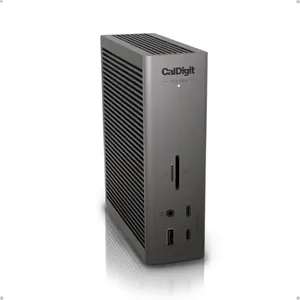
CalDigit TS5 PLUS - Thunderbolt 5 Dock - 20 Port, 10Gb Ethernet, 140W dedicated host Charging, TBT-5 x 3, USB 10Gb/s x10, Dual USB Controllers, Up to Two 8K 60Hz Displays, 1.0m Braided Cable, 330W PSU

Rating
10.0
Chosen by1,477
Compatibility
Port Selection
Power Delivery

Most important from
282 reviews

Compatibility
Compatibility is generally excellent across Mac and Windows devices, but some laptops like Dell may not charge at full advertised power due to proprietary protocols.
Port Selection
The 10Gb Ethernet port provides blazing fast LAN speeds, making it an exceptional value compared to standalone adapters.
Power Delivery
This dock delivers full charging power on every port simultaneously, unlike any other Thunderbolt dock that reduces charging speed when multiple devices are connected.
Build Quality
The aluminum build quality is solid and helps dissipate heat effectively, though the dock can still run quite hot during heavy use.
Additional Features
The audio port stands out by transmitting high-quality sound, a rare feature in docking stations.

The CalDigit TS5 PLUS is a powerful and versatile docking station designed primarily for Thunderbolt 5 and USB4 devices, including some tablets and laptops. It offers an impressive 20 ports, including 3 Thunderbolt 5 ports, 10 USB ports (both USB-A and USB-C at 10Gb/s), 10Gb Ethernet, DisplayPort 2.1, and card readers, making it a great choice for users who need to connect many devices at once. Its 140W power delivery is strong enough to charge larger laptops like the MacBook Pro 16” with ease, while also supporting charging of accessories with up to 36W on other ports.

The dock supports dual 8K displays on compatible Macs and Windows machines, or even triple 4K displays on Windows Thunderbolt 5 hosts, which is excellent for multitasking and high-resolution workflows. The build quality is solid, with an aluminum chassis that helps dissipate heat efficiently, keeping the dock cool during heavy use. Its size is relatively compact given the number of ports it offers, though it’s not designed to be very portable for on-the-go use. One standout feature is the dual USB controllers that prevent slowdowns when multiple USB devices are connected simultaneously.

This dock requires a Thunderbolt or USB4 host to unlock its full potential and is not compatible with non-Thunderbolt hosts. Also, Windows users need to manually install drivers for the 10Gb Ethernet port, which might be a minor inconvenience for some. For those looking for a robust docking station with extensive connectivity and strong power delivery for a Thunderbolt-equipped iPad or laptop, the CalDigit TS5 PLUS is a solid choice. It excels in port variety, charging power, and display support but might be more dock than needed if your device or setup is simpler.

Rating
10.0
Chosen by1,477
Compatibility
Port Selection
Power Delivery

Most important from
282 reviews

Compatibility
Compatibility is generally excellent across Mac and Windows devices, but some laptops like Dell may not charge at full advertised power due to proprietary protocols.
Port Selection
The 10Gb Ethernet port provides blazing fast LAN speeds, making it an exceptional value compared to standalone adapters.
Power Delivery
This dock delivers full charging power on every port simultaneously, unlike any other Thunderbolt dock that reduces charging speed when multiple devices are connected.
Build Quality
The aluminum build quality is solid and helps dissipate heat effectively, though the dock can still run quite hot during heavy use.
Additional Features
The audio port stands out by transmitting high-quality sound, a rare feature in docking stations.
#2

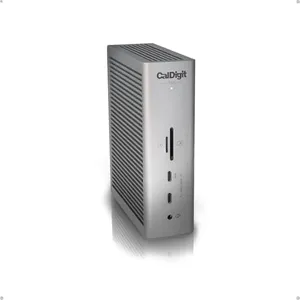
CalDigit TS5 Thunderbolt 5 Dock - 15 Port, 140W Charging, 80Gb/s TBT 5 x 4, USB-C 10Gb x 3, USB-A x2, 2.5Gb Ethernet, Dual 8K@60Hz Displays, SD & microSD UHS-II, 1m Braided Cable, Space Gray 240W PSU

Rating
10.0
Compatibility
Port Selection
Power Delivery

Most important from
282 reviews

Compatibility
Compatibility is generally reliable for both Mac and Windows laptops, though some Dell models only charge at 90W due to proprietary protocols.
Port Selection
The Thunderbolt 5 ports perform exceptionally well, supporting multiple 4K displays and offering DisplayPort 2.1 compatibility for nearly any monitor.
Power Delivery
This dock delivers full charging power on every port simultaneously, including a 140W laptop charge, without any slowdown—a unique feature unmatched by other Thunderbolt docks.
Build Quality
Build quality is solid with an aluminum design that feels sturdy and premium, though the dock can run quite hot under normal use.
Additional Features
The integrated 10GbE Thunderbolt 5 Ethernet port provides LAN speeds close to 10 Gbps, offering exceptional value compared to separate adapters.

The CalDigit TS5 Thunderbolt 5 Dock is a powerful and versatile option for users needing a comprehensive docking solution, especially if you have a newer MacBook Pro or high-end laptop with Thunderbolt 5 or USB4 v2 support. It offers an impressive 15 ports, including ultra-fast Thunderbolt 5 connections, multiple USB-C and USB-A ports, SD and microSD card readers, a 2.5Gb Ethernet port, and audio jacks. This wide variety makes it easy to connect many devices at once, from external displays to storage drives and wired networks.

One of its standout features is the high power delivery of up to 140W, which means it can charge power-hungry laptops without issues. The included 240W power supply ensures stable power to all connected devices. For display needs, it supports dual 6K or even dual 8K monitors on compatible Macs, making it great for professionals who need sharp, high-resolution screens. Windows users with Thunderbolt 5 can also enjoy multiple high-resolution displays.

Build quality is solid, with a compact, sleek aluminum design that also helps with heat dissipation during heavy use. The dock is small and lightweight enough to be portable, but still sturdy enough for a desk setup. However, to get the best performance, your computer must support Thunderbolt 5 or USB4 v2; older Thunderbolt or USB-C devices will see reduced speeds and functionality. Advanced features like bandwidth boost and multi-8K displays are only useful if your devices support them. While it’s a strong choice for Mac and Windows users with newer tech, it might be overkill for casual or older device users. If you need a high-powered, future-ready dock with a wide port selection and excellent display support, the CalDigit TS5 is a great pick, but its full potential requires compatible devices.

Rating
10.0
Compatibility
Port Selection
Power Delivery

Most important from
282 reviews

Compatibility
Compatibility is generally reliable for both Mac and Windows laptops, though some Dell models only charge at 90W due to proprietary protocols.
Port Selection
The Thunderbolt 5 ports perform exceptionally well, supporting multiple 4K displays and offering DisplayPort 2.1 compatibility for nearly any monitor.
Power Delivery
This dock delivers full charging power on every port simultaneously, including a 140W laptop charge, without any slowdown—a unique feature unmatched by other Thunderbolt docks.
Build Quality
Build quality is solid with an aluminum design that feels sturdy and premium, though the dock can run quite hot under normal use.
Additional Features
The integrated 10GbE Thunderbolt 5 Ethernet port provides LAN speeds close to 10 Gbps, offering exceptional value compared to separate adapters.
#3

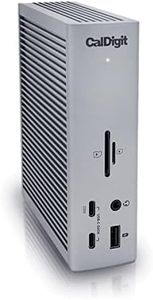
CalDigit TS4 18 Port Thunderbolt 4 Dock, 98W Charging, 3X TBT4 (40Gb/s), 3X USB-C + 5X USB-A (10Gb/s), 2.5GbE LAN, 8K@30Hz or 2X 6K@60Hz Displays, Mac/Windows/Chrome, Space Gray, 0.8m Certified Cable

Rating
8.8
Compatibility
Port Selection
Power Delivery

Most important from
1740 reviews

Compatibility
Offers excellent compatibility across different laptop brands, including MacBooks, Dell, and Surface devices.
Port Selection
Supports a wide range of peripherals simultaneously, including multiple SSDs, monitors, Ethernet, and USB devices, with extra ports left open for future needs.
Power Delivery
Provides powerful charging capabilities, delivering up to 98W to keep laptops fully powered without needing separate power supplies.
Build Quality
Build quality and design are solid and visually appealing, fitting well into professional desk environments.
Additional Features
Transforms a MacBook Pro into a full desktop setup with just one cable, making transitions effortless between laptop and desktop modes.

The CalDigit TS4 is a powerful docking station with 18 ports, making it excellent for users who want to connect multiple devices like monitors, external drives, and Ethernet to their iPads or laptops. It supports Thunderbolt 4 and USB-C, so it works well with iPads that have USB-C ports, including recent iPad Pro and Air models, as well as Macs and Windows PCs. The wide selection of ports includes three Thunderbolt 4 ports, multiple USB-A and USB-C ports, SD card readers, and a fast 2.5 Gigabit Ethernet port, which is great if you need reliable wired internet. It can deliver up to 98W of power, meaning it can charge your iPad or laptop while connected to all these devices through just one cable, keeping your workspace tidy.

For displays, it supports very high resolutions, including a single 8K or two 6K screens, though some iPad and Mac models may have limits on how many external monitors they can use at once. The build quality is solid with a compact, space-gray design, making it portable enough for a desk setup but less so for on-the-go use. To get the most out of this dock, your device should support Thunderbolt 4 or a fully featured USB4 port; otherwise, some performance and port speeds will be limited. It also requires using the supplied certified cable for best results.

This versatile and well-built dock suits iPad users who need a hub for multiple peripherals and fast charging, especially if they work with high-resolution displays or require speedy network connections. However, if only a simple or very portable solution is needed, this dock might be more than necessary.

Rating
8.8
Compatibility
Port Selection
Power Delivery

Most important from
1740 reviews

Compatibility
Offers excellent compatibility across different laptop brands, including MacBooks, Dell, and Surface devices.
Port Selection
Supports a wide range of peripherals simultaneously, including multiple SSDs, monitors, Ethernet, and USB devices, with extra ports left open for future needs.
Power Delivery
Provides powerful charging capabilities, delivering up to 98W to keep laptops fully powered without needing separate power supplies.
Build Quality
Build quality and design are solid and visually appealing, fitting well into professional desk environments.
Additional Features
Transforms a MacBook Pro into a full desktop setup with just one cable, making transitions effortless between laptop and desktop modes.

Buying Guide for the Best Ipad Docking Stations

Choosing the right iPad docking station can significantly enhance your productivity and convenience. A docking station allows you to connect your iPad to various peripherals, such as keyboards, monitors, and external storage devices, transforming it into a more versatile workstation. To make an informed decision, you need to consider several key specifications that will determine how well the docking station meets your needs.
CompatibilityCompatibility refers to whether the docking station is designed to work with your specific iPad model. This is crucial because not all docking stations support every iPad model. To navigate this, check the product description for a list of compatible iPad models. If you have a newer iPad, ensure the docking station supports the latest USB-C or Lightning connectors. For older models, you might need a docking station with a 30-pin connector. Your iPad model and its connector type will guide you to the right docking station.
Port SelectionPort selection refers to the types and number of ports available on the docking station. This is important because it determines what peripherals you can connect. Common ports include USB-A, USB-C, HDMI, Ethernet, and SD card slots. If you need to connect multiple devices like a keyboard, mouse, and external monitor, look for a docking station with a variety of ports. For basic use, a docking station with a few USB ports might suffice. Your specific use case, such as whether you need to connect to a monitor or transfer data from an SD card, will help you decide the right port selection.
Power DeliveryPower delivery refers to the docking station's ability to charge your iPad while it is connected. This is important because it ensures your iPad stays powered during use. Docking stations with higher wattage power delivery can charge your iPad faster and more efficiently. Typically, power delivery ranges from 18W to 100W. If you use your iPad for power-intensive tasks, opt for a docking station with higher wattage. For general use, a docking station with standard power delivery should be sufficient. Consider your charging needs and how often you use your iPad while connected to the docking station.
Build QualityBuild quality refers to the materials and construction of the docking station. This is important for durability and longevity. High-quality docking stations are often made from metal or high-grade plastic, which can withstand daily use and travel. To navigate this, look for reviews and product descriptions that mention the materials used. If you plan to use the docking station frequently or take it on the go, invest in one with robust build quality. For occasional use, a docking station with standard build quality may be adequate. Your usage pattern will help you determine the right build quality.
Size and PortabilitySize and portability refer to the physical dimensions and weight of the docking station. This is important if you need to carry the docking station with you or have limited desk space. Docking stations range from compact, lightweight models to larger, more stationary ones. If you travel frequently or need a docking station for on-the-go use, choose a compact and lightweight model. For a more permanent setup at home or the office, a larger docking station with more ports might be preferable. Your lifestyle and workspace will guide you in choosing the right size and portability.
Additional FeaturesAdditional features refer to any extra functionalities that the docking station may offer, such as built-in speakers, wireless charging, or integrated stands. These features can enhance your user experience and add convenience. To navigate this, consider what additional features would be beneficial for your use case. For example, if you often use your iPad for video calls, a docking station with built-in speakers and a stand might be useful. If you prefer a clutter-free desk, a docking station with wireless charging could be advantageous. Your specific needs and preferences will help you decide which additional features are worth considering.

FAQ

Most Popular Categories Right Now