10 Best Instant Photo Printers For Iphones 2026 in the United States



Related Products
Up to 20% off


Our technology thoroughly searches through the online shopping world, reviewing hundreds of sites. We then process and analyze this information, updating in real-time to bring you the latest top-rated products. This way, you always get the best and most current options available.

Our Top Picks
Winner
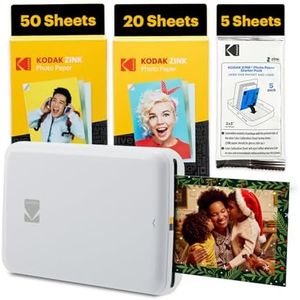
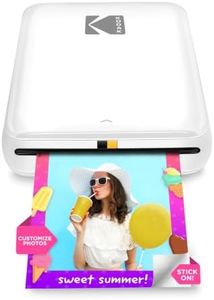
Kodak Step Instant Smartphone Photo Printer - 75 Sheets Bundle - Portable Mini Color Wireless Mobile Printer - Zink 2x3” Sticky-Back Photos - Bluetooth Compatible with Smart Devices - Fun App -White
Most important from
401 reviews
The Kodak Step Instant Smartphone Photo Printer is a compact and lightweight device designed to print small, 2x3 inch photos directly from your iPhone or other smart devices via Bluetooth. Its standout feature is the use of ZINK Zero Ink technology, which means you don’t have to worry about purchasing ink cartridges or toners. The photos come out with decent 300 dpi resolution in full color, and the sticky-backed paper lets you turn your prints into fun, peel-and-stick stickers. This makes it great for casual photo fans, scrapbookers, or anyone who enjoys decorating with their photos.
The printer connects easily through Bluetooth and pairs well with the free Kodak app, which offers a good range of editing options like filters, borders, and text to personalize your photos before printing. It prints each photo in less than a minute, which is convenient, but the speed is relatively slow if you want to print many photos in one go. Battery life allows for about 25 prints per charge, which is fine for on-the-go use but might be limiting for longer outings.
Since the print size is small and limited to 2x3 inch photos, it is best suited for casual snapshots rather than larger, high-detail prints. Additionally, the cost of consumables (the special ZINK photo paper) can add up over time if you print frequently. While it doesn’t offer dual-sided printing or advanced printing options, its portability, ease of use, and fun app features make it a solid choice for anyone wanting quick, colorful photo stickers straight from their iPhone.
Most important from
401 reviews
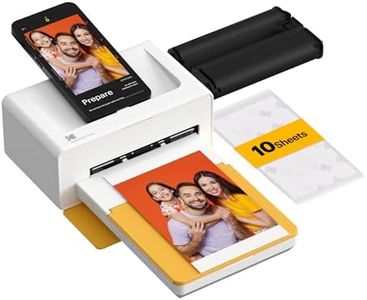
KODAK Dock Plus 4x6 Photo Printer, Smartphone Docking, 4PASS, 50 Sheets
Most important from
19389 reviews
The KODAK Dock Plus 4PASS Instant Photo Printer is a great choice for anyone looking to print high-quality photos directly from their iPhones or other devices. One of its standout features is the use of 4PASS Technology, which results in vibrant, detailed prints that are both fingerprint-proof and water-resistant. The prints are designed to last over 100 years, making them a great way to preserve cherished memories.
In terms of convenience, the printer allows you to dock and charge your phone while printing, which is a handy feature for those who may be low on battery. With wireless Bluetooth connectivity, it’s easy to print from anywhere in your home or on the go. The included Kodak app enhances the experience with fun features like filters and decorative frames, allowing you to customize your prints.
Print speed could be a drawback for some users, as it operates at 1 page per minute for both color and monochrome prints. While this might not be a dealbreaker for casual users, those looking to print multiple photos in a short time may find it slow. Also, keep in mind that while the upfront cost is manageable, consider the cost of consumables, as the price can add up over time if you plan to print frequently. The option to print both border and borderless photos gives flexibility, but the printer is limited to 4x6 inch prints, which may not suit everyone's needs if larger photos are desired. On the plus side, the printer's compact design (4.4 lbs) makes it portable, which is great for events or family gatherings.
The KODAK Dock Plus is an excellent choice for casual users who prioritize quality and ease of use in an instant photo printer. However, those who need faster print speeds or larger formats might want to explore other options.
Most important from
19389 reviews
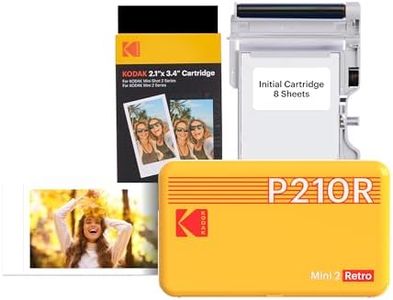
KODAK Mini 2 Retro 2x3 Portable Photo Printer, 4PASS, 38 Sheets, White
Most important from
11864 reviews
The KODAK Mini 2 Retro is a portable instant photo printer designed for those who love capturing and printing memories on the go. Its standout feature is the 4Pass Technology, which ensures high-quality prints that are both fingerprint-proof and waterproof. This makes it an attractive option for individuals looking to create durable keepsakes from their favorite moments. The printer's compact size and lightweight design (just 200 grams) make it easy to carry along for events or vacations.
Connectivity is user-friendly, with Bluetooth allowing for quick pairing with smartphones or tablets. The free Kodak mobile app enhances usability, offering a straightforward way to select and print photos. Users can print 2.1 x 3.4-inch photos, ideal for sharing or adding to scrapbooks.
However, there are some limitations. The print speed is 1 photo per minute, which might feel slow if you're looking to print multiple images quickly. Additionally, the cost of consumables, such as the special photo paper and ink ribbons, can add up over time, so it's important to consider this for ongoing use. The initial bundle provides 8 sheets plus an extra 60, which is great for starting, but you'll need to plan for future purchases.
In terms of battery life, the printer uses D batteries, which are included, but users should be aware they might need to replace them regularly, depending on usage. This printer is ideal for casual users wanting to print photos quickly and enjoyably, particularly for events, parties, or personal projects. Those who prioritize print quality and portability will likely appreciate its design and features, while those needing faster printing or lower long-term costs might want to explore other options.
Most important from
11864 reviews
Buying Guide for the Best Instant Photo Printers For Iphones
When choosing an instant photo printer for your iPhone, it's important to consider several key specifications to ensure you get the best fit for your needs. Instant photo printers are great for quickly printing photos directly from your iPhone, making them perfect for capturing memories on the go. To make an informed decision, you should understand the various features and how they align with your personal preferences and usage scenarios.FAQ
Most Popular Categories Right Now


