We Use CookiesWe use cookies to enhance the security, performance, functionality and for analytical and promotional activities. By continuing to browse this site you are agreeing to our privacy policy

10 Best Home Office Printer Scanner 2026 in the United States


How do we rank products for you?

Our technology thoroughly searches through the online shopping world, reviewing hundreds of sites. We then process and analyze this information, updating in real-time to bring you the latest top-rated products. This way, you always get the best and most current options available.

headphones-stars

Our Top Picks

#1

Winner

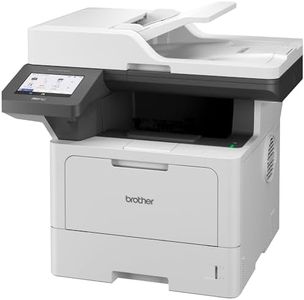
Brother DCP-L2640DW Wireless Compact Monochrome Multi-Function Laser Printer with Copy and Scan, Duplex, Mobile, Black & White | Includes Refresh Subscription Trial(1), Works with Alexa

Rating
10.0
Chosen by1,321
Print Quality (Resolution)
Print Speed
Connectivity Options

Most important from
3546 reviews

Print Quality (Resolution)
The print quality is crisp and far superior to any ink printer I've used before.
Print Speed
It's fast, quiet, and reliable, making it perfect for those who need a dependable printer and scanner setup.
Connectivity Options
The printer communicates flawlessly over Wi-Fi, with easy setup and driver installation.
Ink or Toner Cost and Yield
Toner replacement is affordable, especially when purchased in multipacks.

The Brother DCP-L2640DW Wireless Compact Monochrome Multi-Function Laser Printer is a solid choice for small businesses or a home office needing a reliable and efficient multi-functional device. It excels in print speed with up to 36 pages per minute, which is quite impressive for handling large document batches quickly. The print quality is also commendable for black and white prints, making it suitable for text-heavy documents.

The efficient scanning capability, with scan speeds up to 23.6 ipm for black and 7.9 ipm for color, along with the 50-page auto document feeder, makes it a time-saver for multi-page jobs. However, it only supports monochrome printing, which may be a limitation if color prints are required. The device offers versatile connectivity options including dual-band wireless, Ethernet, and USB, which adds flexibility for various setups. The Brother Mobile Connect App enhances convenience by allowing users to manage printing tasks from their mobile devices.

The inclusion of auto-duplex printing and scanning adds to its efficiency and paper-saving capabilities. On the downside, the toner replacement can be costly, although the Refresh EZ Print Subscription Service can help mitigate this with potential savings and automatic replenishment. The printer's compact design at 15.7.

Rating
10.0
Chosen by1,321
Print Quality (Resolution)
Print Speed
Connectivity Options

Most important from
3546 reviews

Print Quality (Resolution)
The print quality is crisp and far superior to any ink printer I've used before.
Print Speed
It's fast, quiet, and reliable, making it perfect for those who need a dependable printer and scanner setup.
Connectivity Options
The printer communicates flawlessly over Wi-Fi, with easy setup and driver installation.
Ink or Toner Cost and Yield
Toner replacement is affordable, especially when purchased in multipacks.
#2

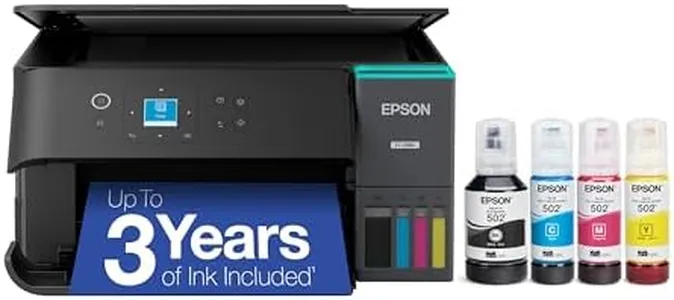
Epson EcoTank ET-2803 Wireless Color All-in-One Cartridge-Free Supertank Printer with Scan, Copy and AirPrint Support

Rating
9.4
Print Quality (Resolution)
Connectivity Options
Ink or Toner Cost and Yield

Most important from
3695 reviews

Print Quality (Resolution)
Print quality is excellent for both black-and-white documents and vibrant, detailed photos without smudges or off colors.
Connectivity Options
Wireless connectivity via Wi-Fi works well overall but can occasionally experience app connection issues and error messages related to paper settings.
Ink or Toner Cost and Yield
The refillable ink tank system is easy to fill, mess-free, and significantly extends ink longevity, reducing the need for frequent replacements.
Size and Design
The printer’s compact and lightweight design fits comfortably on a desk and is much easier to move compared to older, bulkier models.

The Epson EcoTank ET-2803 is a solid choice for an inkjet all-in-one printer suitable for home office use. It delivers sharp print quality with a high maximum resolution of 5760 x 1440 dpi for both black and color prints, ensuring documents and photos appear detailed and vibrant. Its print speed is moderate—up to 10 pages per minute in black and 5 in color—making it well suited for typical home office tasks though potentially slow for large print jobs.

The scanner is a flatbed type with resolutions up to 600 x 1200 dpi in color, suitable for scanning documents and photos clearly, but not designed for professional photo quality. Connectivity options include USB and Wi-Fi, facilitating easy wireless printing from various devices, with support for AirPrint benefiting Apple product users. However, the printer does not support automatic duplex printing or scanning, which might be a limitation for frequent two-sided document handling. Paper handling consists of a single tray holding up to 100 sheets, adequate for light to moderate use but less ideal for heavy workloads.

A key feature is the refillable ink tank system, which significantly reduces ink costs compared to cartridge-based printers, making it economical over time. The printer is compact and lightweight, weighing about 9 pounds, and fits comfortably on a desk without occupying much space. If low ink expenses and good print quality for everyday home office tasks are priorities over fast duplex printing, the Epson ET-2803 provides a well-balanced combination of features and value.

Rating
9.4
Print Quality (Resolution)
Connectivity Options
Ink or Toner Cost and Yield

Most important from
3695 reviews

Print Quality (Resolution)
Print quality is excellent for both black-and-white documents and vibrant, detailed photos without smudges or off colors.
Connectivity Options
Wireless connectivity via Wi-Fi works well overall but can occasionally experience app connection issues and error messages related to paper settings.
Ink or Toner Cost and Yield
The refillable ink tank system is easy to fill, mess-free, and significantly extends ink longevity, reducing the need for frequent replacements.
Size and Design
The printer’s compact and lightweight design fits comfortably on a desk and is much easier to move compared to older, bulkier models.
#3

Epson EcoTank ET-2800 Wireless Color All-in-One Cartridge-Free Ink Supertank Printer with Scan and Copy for Home Use, White

Rating
9.4
Print Quality (Resolution)
Print Speed
Paper Handling Capacity

Most important from
9895 reviews

Print Quality (Resolution)
Prints come out crisp and vibrant, delivering sharp color and clear text suitable for documents and creative projects alike.
Print Speed
The printing speed is moderate but perfectly adequate for everyday home office needs and casual printing tasks.
Paper Handling Capacity
The printer handles paper smoothly with an easy-loading tray that holds a decent amount for typical home use.
Ink or Toner Cost and Yield
Refilling ink tanks is incredibly easy and mess-free, with color-coded bottles that snap directly into place, significantly reducing ink costs.

The Epson EcoTank ET-2800 is a solid choice for home office users who want to avoid frequent ink cartridge changes. Its standout feature is the cartridge-free design with large refillable ink tanks, which means you can print thousands of pages before needing to refill, saving money and reducing waste. Print quality is good, offering sharp text and vibrant color prints at a high resolution (up to 5760 x 1440 dpi), making it suitable for documents and casual photo printing. The print speed is moderate, with about 10 black-and-white pages and 5 color pages per minute, fitting typical home use rather than heavy-duty office work.

Scanning is handled by a flatbed scanner with decent resolution, suitable for everyday document and photo scanning. Connectivity options include both USB and wireless, so you can print from your computer or mobile devices easily. However, duplex printing is manual, which means you’ll need to flip pages yourself if you want double-sided prints, which may be inconvenient if you print a lot. The paper tray holds up to 100 sheets, enough for most home tasks but smaller than some office models. The printer is relatively compact and lightweight, fitting comfortably on a desk without taking up much space.

Some downsides include slower color print speeds compared to black-and-white, and the absence of automatic duplexing which may slow down workflows. It also only supports one paper tray and manual control, limiting handling multiple paper types at once. If you prioritize low ink costs, quality prints, and easy wireless use without heavy volume needs, the Epson ET-2800 makes a practical, eco-friendly option for home offices.

Rating
9.4
Print Quality (Resolution)
Print Speed
Paper Handling Capacity

Most important from
9895 reviews

Print Quality (Resolution)
Prints come out crisp and vibrant, delivering sharp color and clear text suitable for documents and creative projects alike.
Print Speed
The printing speed is moderate but perfectly adequate for everyday home office needs and casual printing tasks.
Paper Handling Capacity
The printer handles paper smoothly with an easy-loading tray that holds a decent amount for typical home use.
Ink or Toner Cost and Yield
Refilling ink tanks is incredibly easy and mess-free, with color-coded bottles that snap directly into place, significantly reducing ink costs.

Buying Guide for the Best Home Office Printer Scanner

Choosing the right home office printer and scanner can significantly enhance your productivity and ensure that your documents are handled efficiently. When selecting a printer-scanner combo, it's important to consider several key specifications that will determine how well the device meets your needs. Understanding these specs will help you make an informed decision and find the best fit for your home office setup.
Print Quality (Resolution)Print quality is measured in dots per inch (DPI). Higher DPI means better print quality, which is important if you need to print detailed images or professional documents. For general home office use, a resolution of 600 x 600 DPI is usually sufficient. If you need to print high-quality photos or graphics, look for a printer with at least 1200 x 1200 DPI.
Print SpeedPrint speed is measured in pages per minute (PPM). This spec indicates how quickly the printer can produce documents. If you frequently print large documents or need to print quickly, look for a printer with a higher PPM. For occasional printing, a lower PPM may be acceptable. Typical home office printers range from 20 to 30 PPM for black and white prints and 15 to 25 PPM for color prints.
Scanner ResolutionScanner resolution, also measured in DPI, determines the clarity and detail of scanned documents. Higher resolution is important if you need to scan detailed images or documents that require high clarity. For most home office needs, a scanner with 600 x 600 DPI is adequate. For professional-quality scans, consider a scanner with 1200 x 1200 DPI or higher.
Connectivity OptionsConnectivity options include USB, Wi-Fi, Ethernet, and Bluetooth. These options determine how you can connect the printer-scanner to your computer or network. Wi-Fi connectivity is convenient for wireless printing and scanning from multiple devices. USB connections are reliable for direct connections to a single computer. Choose the connectivity options that best fit your home office setup and workflow.
Duplex Printing and ScanningDuplex printing and scanning allow the device to print or scan both sides of a document automatically. This feature is important for saving paper and time, especially if you frequently handle double-sided documents. If you need to print or scan double-sided documents regularly, look for a printer-scanner with automatic duplex capabilities.
Paper Handling CapacityPaper handling capacity refers to the number of sheets the printer can hold in its input and output trays. A larger capacity is useful if you print large volumes of documents and want to reduce the frequency of refilling the paper tray. For a home office, a capacity of 100-250 sheets is usually sufficient. If you print frequently, consider a model with a higher capacity.
Ink or Toner Cost and YieldInk or toner cost and yield refer to the price of replacement cartridges and the number of pages they can print. This is important for understanding the long-term cost of operating the printer. Look for printers with affordable cartridges and high yield to minimize ongoing expenses. Consider your printing volume to determine the best balance between initial cost and long-term savings.
Size and DesignThe size and design of the printer-scanner are important for fitting into your home office space. Compact models are ideal for small spaces, while larger models may offer more features. Consider the available space in your home office and choose a model that fits comfortably without compromising on the features you need.

FAQ

Most Popular Categories Right Now