We Use CookiesWe use cookies to enhance the security, performance, functionality and for analytical and promotional activities. By continuing to browse this site you are agreeing to our privacy policy

10 Best Garageband Audio Interface 2026 in the United States
How do we rank products for you?

Our technology thoroughly searches through the online shopping world, reviewing hundreds of sites. We then process and analyze this information, updating in real-time to bring you the latest top-rated products. This way, you always get the best and most current options available.

headphones-stars

Our Top Picks

#1

Winner

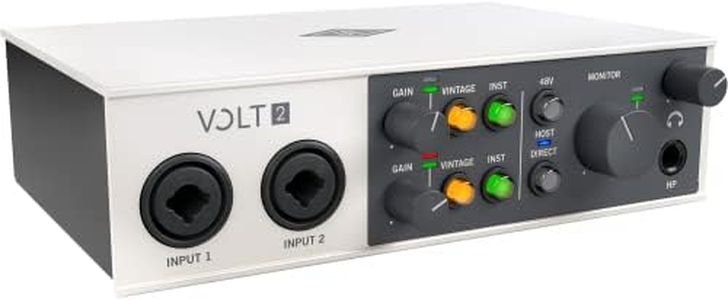
Universal Audio Volt 476p USB Audio Interface

Rating
10.0
Chosen by1,279
Audio Quality (Bit Depth and Sample Rate)
Latency
Build Quality and Portability

Most important from
131 reviews

Audio Quality (Bit Depth and Sample Rate)
The preamps deliver a warm, pleasing sound that noticeably enhances recordings compared to entry-level interfaces.
Latency
Setup is straightforward, and the interface runs smoothly without latency, even when connected via USB-C adapters.
Build Quality and Portability
Build quality feels premium and durable, making it a reliable choice for both home and project studios.
Software Compatibility
Real-time plugins integrated with the interface provide a powerful creative boost during recording sessions.
Connectivity
Although not strictly plug-and-play, investing a little time in setup ensures a stable and high-quality recording experience.

The Universal Audio Volt 476p is a solid choice if you're looking for a USB audio interface to use with GarageBand or similar recording software. It offers 4 input channels, which is great for recording multiple instruments or microphones simultaneously. The sound quality is impressive, supporting up to 24-bit/192 kHz recording, so your music will capture fine details with professional clarity. It features classic Universal Audio preamps and compressors, known for giving recordings a warm, analog feel — a nice bonus if you want that vintage studio vibe. The interface connects via USB 2.0, which is compatible with most computers, and it includes phantom power needed for condenser microphones.

The build feels sturdy yet portable, weighing just a little over two pounds, making it easy to move between home and project studios. It comes bundled with the LUNA Digital Audio Workstation and various useful plugins, which can help beginners as they learn to mix and produce music. Compatibility is broad, supporting both Windows and macOS, including GarageBand on Mac.

While USB 2.0 is widely supported, newer interfaces use USB-C which can offer faster data transfer and easier connectivity with modern laptops. Additionally, the unit is priced toward the higher end, which might not suit casual hobbyists on a tight budget. Musicians and home producers seeking high-quality sound, classic analog tones, and a rich software package that grows with their skills will find the Volt 476p a compelling option.

Rating
10.0
Chosen by1,279
Audio Quality (Bit Depth and Sample Rate)
Latency
Build Quality and Portability

Most important from
131 reviews

Audio Quality (Bit Depth and Sample Rate)
The preamps deliver a warm, pleasing sound that noticeably enhances recordings compared to entry-level interfaces.
Latency
Setup is straightforward, and the interface runs smoothly without latency, even when connected via USB-C adapters.
Build Quality and Portability
Build quality feels premium and durable, making it a reliable choice for both home and project studios.
Software Compatibility
Real-time plugins integrated with the interface provide a powerful creative boost during recording sessions.
Connectivity
Although not strictly plug-and-play, investing a little time in setup ensures a stable and high-quality recording experience.
#2

RØDE RØDECaster Duo Compact All-in-One Audio Production Solution for Podcasting, Streaming, Music Production and Content Creation (Black)

Rating
9.7
Audio Quality (Bit Depth and Sample Rate)
Build Quality and Portability
Connectivity

Most important from
677 reviews

Audio Quality (Bit Depth and Sample Rate)
The audio quality is clean, clear, and professional, making recordings sound polished and studio-grade.
Build Quality and Portability
Its compact and well-designed layout allows for an intuitive, streamlined workflow without juggling multiple devices.
Connectivity
Setup can be challenging for beginners, especially when connecting to certain devices like iPhones, sometimes requiring extra adapters and patience.

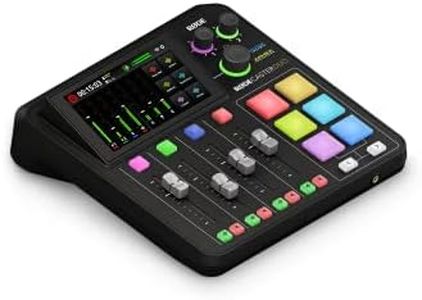
The RØDE RØDECaster Duo is a compact, all-in-one audio interface designed for podcasting, streaming, music production, and content creation. It features two Neutrik combo inputs with high-quality, ultra-low-noise preamps, which support microphones and instruments, delivering clear and detailed sound. The unit offers four channels and four broadcast-quality faders, helping you control multiple audio sources simultaneously. Its high-resolution touchscreen with haptic feedback and six customizable SMART pads make it easy to manage effects and recordings.

In terms of audio quality, it supports studio-grade effects including APHEX processing with Aural Exciter and Big Bottom effects, enhancing your recordings without needing extra gear. Connectivity is straightforward via USB-C, and the interface includes a 3.5mm TRRS input for headset monitoring or recording, which adds flexibility. Phantom power is available for condenser microphones, an essential feature for many users. At about 2 kilograms and roughly 9 x 9 x 3 inches, the device is portable enough for home studios or mobile setups. It runs on corded power, so it’s less suited for situations needing battery operation. While latency isn't explicitly stated, RØDE devices typically offer low latency suitable for real-time monitoring and recording.

Software compatibility is broad, working well with GarageBand and most major digital audio workstations, making it user-friendly for beginners and professionals alike. One potential drawback is the relatively limited number of inputs (two main mic/instrument jacks), which might not fit larger recording sessions. Also, the noise level at 76 decibels should not impact recordings but is worth noting. This interface is ideal for podcasters, streamers, and musicians looking for a straightforward, high-quality audio production solution without needing multiple devices.

Rating
9.7
Audio Quality (Bit Depth and Sample Rate)
Build Quality and Portability
Connectivity

Most important from
677 reviews

Audio Quality (Bit Depth and Sample Rate)
The audio quality is clean, clear, and professional, making recordings sound polished and studio-grade.
Build Quality and Portability
Its compact and well-designed layout allows for an intuitive, streamlined workflow without juggling multiple devices.
Connectivity
Setup can be challenging for beginners, especially when connecting to certain devices like iPhones, sometimes requiring extra adapters and patience.
#3

RØDE RØDECaster Pro All-in-One Production Solution for Podcasting

Rating
9.4
Number of Inputs and Outputs
Audio Quality (Bit Depth and Sample Rate)
Connectivity

Most important from
1796 reviews

Number of Inputs and Outputs
Multitrack recording with polywav files and flexible USB input/output options provide professional-level control over audio production.
Audio Quality (Bit Depth and Sample Rate)
The RØDECaster Pro delivers exceptional sound quality with clean preamps and powerful onboard processing that significantly reduces post-editing time.
Connectivity
Bluetooth connectivity seamlessly integrates phone calls, enhancing live podcasting and remote guest participation without hassle.
Phantom Power
It works exceptionally well with various microphones, including popular models like the Shure SM7b, without requiring additional equipment such as Cloudlifters.
Build Quality and Portability
The build quality feels solid and durable, designed to withstand frequent use in both studio and home environments.
Software Compatibility
Its intuitive interface and straightforward setup make it accessible right out of the box, yet it offers deep customization for users willing to explore its extensive features.

The RØDE RØDECaster Pro is designed as an all-in-one audio interface and recording solution ideal for podcasters and live streamers, including beginners and professionals. It offers four microphone inputs with high-quality preamps, supporting clear and rich audio recording, which is great if you plan to record multiple voices simultaneously. Audio quality is strong, with studio-grade components and onboard processing effects that enhance sound without needing complicated setups.

Connectivity is versatile, featuring USB for computer use, smartphone input, Bluetooth for wireless guests, and RCA outputs, making it easy to connect to various devices and integrate with GarageBand or other recording software. It also provides phantom power for condenser microphones, expanding your mic options. Latency is kept low, which means you can monitor your audio live without annoying delays.

The device is solidly built but a bit on the larger and heavier side, so while it’s portable enough for home or studio use, it’s not the most compact option for travel. The included software compatibility and regular firmware updates help keep the system current and user-friendly, with simple controls and helpful features like sound pads for instantly playing effects or music. One notable plus is its ability to record directly to a microSD card or your computer, giving you flexibility in how you save your work and making it easier to share or edit later. If you want a robust, feature-rich setup that handles multiple inputs and live streaming with ease, the RØDECaster Pro stands out as a top choice.

Rating
9.4
Number of Inputs and Outputs
Audio Quality (Bit Depth and Sample Rate)
Connectivity

Most important from
1796 reviews

Number of Inputs and Outputs
Multitrack recording with polywav files and flexible USB input/output options provide professional-level control over audio production.
Audio Quality (Bit Depth and Sample Rate)
The RØDECaster Pro delivers exceptional sound quality with clean preamps and powerful onboard processing that significantly reduces post-editing time.
Connectivity
Bluetooth connectivity seamlessly integrates phone calls, enhancing live podcasting and remote guest participation without hassle.
Phantom Power
It works exceptionally well with various microphones, including popular models like the Shure SM7b, without requiring additional equipment such as Cloudlifters.
Build Quality and Portability
The build quality feels solid and durable, designed to withstand frequent use in both studio and home environments.
Software Compatibility
Its intuitive interface and straightforward setup make it accessible right out of the box, yet it offers deep customization for users willing to explore its extensive features.

Buying Guide for the Best Garageband Audio Interface

Choosing the right audio interface for GarageBand can significantly enhance your music production experience. An audio interface is a device that allows you to connect various audio equipment, such as microphones and instruments, to your computer. It converts analog signals into digital data that GarageBand can process. When selecting an audio interface, it's important to consider several key specifications to ensure it meets your needs and provides the best sound quality for your projects.
Number of Inputs and OutputsThe number of inputs and outputs on an audio interface determines how many devices you can connect simultaneously. Inputs are used for connecting microphones, instruments, and other audio sources, while outputs are for connecting speakers or headphones. If you plan to record multiple instruments or vocals at once, look for an interface with more inputs. For solo recording or simple setups, fewer inputs may suffice. Consider your recording needs and future expansion when choosing the right number of inputs and outputs.
Audio Quality (Bit Depth and Sample Rate)Audio quality is defined by the bit depth and sample rate of the interface. Bit depth affects the dynamic range of your recordings, with higher bit depths providing more detail. Sample rate determines how many times per second the audio is sampled, with higher rates capturing more detail. Common bit depths are 16-bit and 24-bit, while sample rates range from 44.1 kHz to 192 kHz. For most users, 24-bit/48 kHz is sufficient for high-quality recordings. If you require professional-grade audio, consider higher values.
ConnectivityConnectivity refers to how the audio interface connects to your computer. Common connection types include USB, Thunderbolt, and FireWire. USB interfaces are widely compatible and easy to use, making them a popular choice for most users. Thunderbolt offers faster data transfer rates and lower latency, ideal for professional setups. FireWire is less common but still used in some professional environments. Choose a connection type that matches your computer's ports and your performance needs.
Phantom PowerPhantom power is a feature that supplies power to condenser microphones, which require an external power source to operate. If you plan to use condenser microphones, ensure your audio interface has phantom power (usually 48V). This feature is essential for capturing high-quality vocal and instrument recordings. If you only use dynamic microphones or instruments that don't need external power, phantom power may not be necessary.
LatencyLatency is the delay between the input signal and the output sound. Low latency is crucial for real-time monitoring and recording, as high latency can cause noticeable delays that disrupt your performance. Look for an audio interface with low-latency drivers and direct monitoring features to minimize delay. If you plan to record live performances or need precise timing, prioritize interfaces with low latency.
Build Quality and PortabilityBuild quality and portability are important considerations, especially if you plan to use your audio interface in different locations. A sturdy, well-built interface will withstand regular use and transport. Portable interfaces are compact and lightweight, making them easy to carry. If you need a mobile setup, look for interfaces designed for portability without compromising on features. For studio use, a more robust and feature-rich interface may be preferable.
Software CompatibilityEnsure the audio interface is compatible with GarageBand and any other software you plan to use. Most interfaces are designed to work with major digital audio workstations (DAWs), but it's always good to check compatibility. Some interfaces come with bundled software or drivers that enhance functionality. Verify that the interface supports your operating system and integrates smoothly with GarageBand for a seamless recording experience.

FAQ

Most Popular Categories Right Now