We Use CookiesWe use cookies to enhance the security, performance, functionality and for analytical and promotional activities. By continuing to browse this site you are agreeing to our privacy policy

10 Best Gaming Desktop Computers 2026 in the United States
How do we rank products for you?

Our technology thoroughly searches through the online shopping world, reviewing hundreds of sites. We then process and analyze this information, updating in real-time to bring you the latest top-rated products. This way, you always get the best and most current options available.

headphones-stars

Our Top Picks

#1

Winner

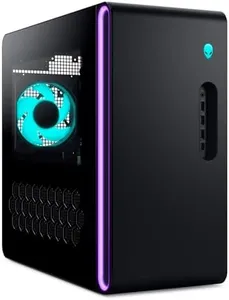
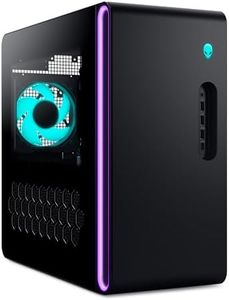
Alienware Aurora Gaming Desktop ACT1250 - Intel Core Ultra 7 265KF Processor, Liquid Cooled, NVIDIA GeForce RTX 5070, 32GB DDR5 RAM, 2TB SSD, 1000W Platinum Rated PSU, Windows 11 Home - Clear Panel

Rating
10.0
Chosen by1,309
Processor (CPU)
Cooling System
Motherboard

Most important from
71 reviews

Processor (CPU)
The PC is incredibly fast and quiet, delivering stellar gaming performance right out of the box.
Cooling System
Offers smooth and silent operation even during extended gaming sessions, enhancing overall user comfort.
Motherboard
A concerning hardware issue was reported involving motherboard errors after initial use, leading to a return; such problems are unexpected in a brand-new system.

The Alienware Aurora ACT1250 is a strong choice for gamers looking for a high-end gaming desktop. It features an Intel Core Ultra 7 265KF processor running at 3.3 GHz with 20 cores, which provides excellent multitasking and gaming performance. The Nvidia GeForce RTX 5070 GPU with 12GB of GDDR7 memory is designed to handle modern games at high settings and supports advanced graphics features, making it future-ready. With 32GB of fast DDR5 RAM, it offers smooth performance even when running multiple applications or streaming while gaming. Storage is generous with a 2TB SSD, allowing for quick loading times and plenty of space for games and media.

Cooling is managed by a 240mm liquid cooling system, which helps keep the CPU temperatures low during long gaming sessions, reducing the risk of overheating. The 1000W platinum-rated power supply provides stable and efficient power delivery, supporting all components comfortably. The design includes customizable AlienFX lighting and a clear side panel, adding style for gamers who enjoy personalizing their setup. However, the desktop is relatively large and heavy, which might be a consideration if you need a more compact or portable option. Also, while powerful, the RTX 5070 is a mid-to-high-tier GPU, so if you want the absolute top graphics performance (especially for 4K gaming), you might consider higher-end models.

The Alienware Command Center software is a nice touch, giving easy control over lighting and performance profiles. Dell's 1-year onsite service is convenient for support, but extended warranties might be worth considering for long-term peace of mind. This desktop is ideal for gamers who want a powerful, stylish machine for high-quality gaming and multitasking, with solid cooling and future-ready specs, though it is not the smallest or absolute highest-end option available.

Rating
10.0
Chosen by1,309
Processor (CPU)
Cooling System
Motherboard

Most important from
71 reviews

Processor (CPU)
The PC is incredibly fast and quiet, delivering stellar gaming performance right out of the box.
Cooling System
Offers smooth and silent operation even during extended gaming sessions, enhancing overall user comfort.
Motherboard
A concerning hardware issue was reported involving motherboard errors after initial use, leading to a return; such problems are unexpected in a brand-new system.
#2

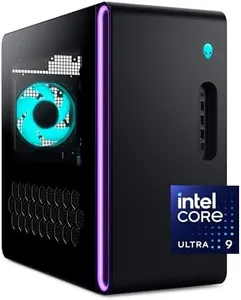
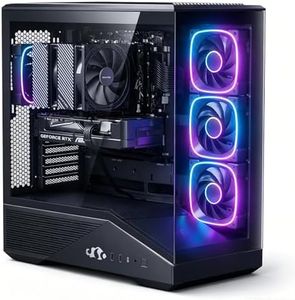
Alienware Aurora Gaming Desktop ACT1250 - Intel Core Ultra 9 285 Processor, Liquid Cooled, NVIDIA GeForce RTX 5080, 32GB DDR5 RAM, 1TB SSD, 1000W Platinum Rated PSU, Windows 11 Home - Clear Panel

Rating
10.0
Processor (CPU)
Graphics Card (GPU)
Cooling System

Most important from
132 reviews

Processor (CPU)
The Intel Core Ultra 9 processor provides remarkable power, making this one of the fastest PCs users have experienced.
Graphics Card (GPU)
The RTX 5080 graphics card delivers exceptional frame rates, boosting Cyberpunk 2077 from 120fps to over 500fps, showcasing impressive AI-driven enhancements like DLSS and frame generation.
Cooling System
The liquid cooling system keeps the desktop quiet and cool during extended gaming sessions, maintaining stable performance without overheating.

The Alienware Aurora ACT1250 is a strong choice for gamers looking for a high-performance desktop. It features the latest NVIDIA GeForce RTX 5080 graphics card, which delivers excellent visuals and smooth gameplay, especially for demanding games or creative tasks. The Intel Core Ultra 9 processor with 24 cores offers plenty of power for gaming, streaming, and multitasking, although its base speed of 1.9 GHz might feel modest compared to some competitors with higher clock speeds.

With 32GB of fast DDR5 RAM and a spacious 1TB SSD, it ensures quick load times and smooth operation for most gaming setups. The liquid cooling system, including a 240mm heat exchanger, helps keep the system cool during long sessions, reducing the risk of overheating. A 1000W Platinum-rated power supply gives reliable and efficient power delivery, making it ready for future upgrades or additional components. The design is stylish with customizable lighting, and the Alienware Command Center software adds useful control over performance and lighting settings.

This PC is on the heavier side and could be pricey, reflecting its premium components. While the specs are impressive, beginners might find some features more advanced than needed if they only play casual games. It is best suited for serious gamers or those who want a powerful machine for gaming and creative work that stays cool and reliable over time.

Rating
10.0
Processor (CPU)
Graphics Card (GPU)
Cooling System

Most important from
132 reviews

Processor (CPU)
The Intel Core Ultra 9 processor provides remarkable power, making this one of the fastest PCs users have experienced.
Graphics Card (GPU)
The RTX 5080 graphics card delivers exceptional frame rates, boosting Cyberpunk 2077 from 120fps to over 500fps, showcasing impressive AI-driven enhancements like DLSS and frame generation.
Cooling System
The liquid cooling system keeps the desktop quiet and cool during extended gaming sessions, maintaining stable performance without overheating.
#3

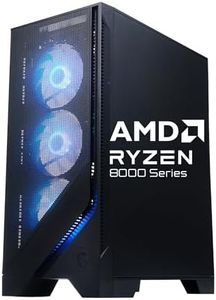
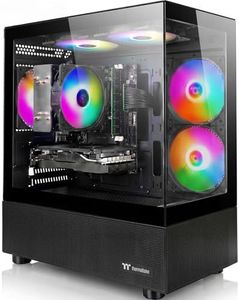
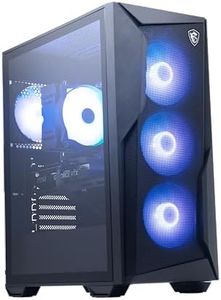
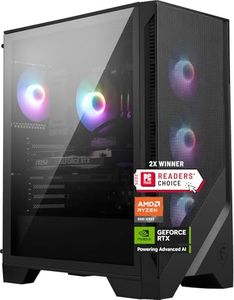
msi Codex Z2 Gaming Desktop: AMD Ryzen R7-8700F, NVIDIA GeForce RTX 5060Ti, 16GB DDR5, 1TB M.2 NVMe SSD, USB Type-C, VR-Ready, Windows 11 Home: A8NVM-671US

Rating
9.7
Processor (CPU)
Graphics Card (GPU)
Cooling System

Most important from
8 reviews

Processor (CPU)
The RTX 5060 Ti paired with the Ryzen 7 8700F delivers smooth, seamless gameplay even on demanding titles like CS2.
Graphics Card (GPU)
The RTX 5060 Ti paired with the Ryzen 7 8700F delivers smooth, seamless gameplay even on demanding titles like CS2.
Cooling System
The system runs quietly and stays cool during extended gaming sessions, thanks to effective cooling solutions.

The MSI Codex Z2 is a solid gaming desktop designed to handle modern games smoothly and efficiently. It comes with a powerful AMD Ryzen 7 8700F processor running up to 5 GHz, which is great for gaming and multitasking. The NVIDIA GeForce RTX 5060 Ti graphics card with 8GB of GDDR7 memory offers strong performance, including support for realistic lighting effects thanks to ray tracing technology. This means you'll get good visuals and smooth gameplay with most popular games. The system includes 16GB of fast DDR5 RAM, which helps with quick loading and running multiple apps without slowing down. A spacious 1TB NVMe SSD provides plenty of storage and fast access to your games and files, reducing wait times significantly.

Cooling is well thought out with four fans and an ARGB air cooler, which keeps the system running quietly and prevents overheating during long gaming sessions. The desktop also supports VR gaming and has a USB Type-C port along with plenty of other connections for modern peripherals. The built-in customizable RGB lighting adds a nice touch for gamers who like to personalize their setup. One thing to note is that while Windows 11 Home is included, users looking for business features might prefer to upgrade to Windows 11 Pro on their own.

The desktop is fairly heavy and large, so it will need a dedicated space. In summary, this MSI Codex Z2 is a good choice for gamers wanting a ready-to-go system with strong performance, fast storage, and effective cooling, though those seeking extreme high-end specs or a compact design might want to look elsewhere.

Rating
9.7
Processor (CPU)
Graphics Card (GPU)
Cooling System

Most important from
8 reviews

Processor (CPU)
The RTX 5060 Ti paired with the Ryzen 7 8700F delivers smooth, seamless gameplay even on demanding titles like CS2.
Graphics Card (GPU)
The RTX 5060 Ti paired with the Ryzen 7 8700F delivers smooth, seamless gameplay even on demanding titles like CS2.
Cooling System
The system runs quietly and stays cool during extended gaming sessions, thanks to effective cooling solutions.

Buying Guide for the Best Gaming Desktop Computers

Choosing the right gaming desktop computer can significantly enhance your gaming experience. It's important to consider various specifications to ensure the computer meets your gaming needs. Here are some key specs to look at and how to navigate them.
Processor (CPU)The processor, or CPU, is the brain of your computer. It handles all the instructions from your games and other software. A powerful CPU can improve game performance and multitasking. CPUs are often divided into segments like dual-core, quad-core, and octa-core. For gaming, a quad-core or higher is recommended as it can handle more tasks simultaneously, leading to smoother gameplay. If you play high-end games or plan to stream, look for CPUs with higher clock speeds and more cores.
Graphics Card (GPU)The graphics card, or GPU, is crucial for rendering images, videos, and animations in your games. A powerful GPU can significantly enhance visual quality and frame rates. GPUs are categorized by their performance levels, such as entry-level, mid-range, and high-end. For casual gaming, a mid-range GPU should suffice, but for playing the latest AAA titles at high settings, a high-end GPU is necessary. Consider the type of games you play and choose a GPU that can handle them efficiently.
RAMRAM, or Random Access Memory, is where your computer stores data that it needs to access quickly. More RAM allows your computer to handle more tasks at once and can improve game performance. Gaming desktops typically come with 8GB, 16GB, or 32GB of RAM. For most games, 16GB is a good balance, but if you play very demanding games or use your computer for other intensive tasks like video editing, 32GB might be better.
StorageStorage refers to where your computer saves data, including your games and files. There are two main types: Hard Disk Drives (HDD) and Solid State Drives (SSD). SSDs are faster and can significantly reduce load times, making them ideal for gaming. HDDs offer more storage space at a lower cost. A combination of both is often recommended: an SSD for your operating system and frequently played games, and an HDD for additional storage. Consider how many games you plan to install and choose accordingly.
Cooling SystemA cooling system keeps your computer from overheating, which can affect performance and longevity. Gaming desktops can generate a lot of heat, especially during intense gaming sessions. Cooling systems can be air-based or liquid-based. Air cooling is generally sufficient for most users, but liquid cooling can be more effective for high-performance setups. If you plan to overclock your CPU or GPU, a robust cooling system is essential.
Power Supply Unit (PSU)The PSU provides power to all the components in your computer. It's important to have a PSU that can handle the power requirements of your system, especially if you have high-end components. PSUs are rated by wattage. For a gaming desktop, a PSU with at least 500 watts is recommended, but higher wattages may be necessary for more powerful setups. Ensure the PSU has good efficiency ratings to save on energy costs and provide stable power.
MotherboardThe motherboard is the main circuit board that connects all the components of your computer. It determines what hardware you can use and how well they can communicate. When choosing a motherboard, consider the CPU socket type, RAM slots, and expansion options for future upgrades. Ensure it supports the latest technologies and has enough ports for your peripherals. A good motherboard can provide a solid foundation for your gaming desktop.

FAQ

Most Popular Categories Right Now