We Use CookiesWe use cookies to enhance the security, performance, functionality and for analytical and promotional activities. By continuing to browse this site you are agreeing to our privacy policy

10 Best Dual Monitor Arms 2026 in the United States
How do we rank products for you?

Our technology thoroughly searches through the online shopping world, reviewing hundreds of sites. We then process and analyze this information, updating in real-time to bring you the latest top-rated products. This way, you always get the best and most current options available.

headphones-stars

Our Top Picks

#1

Winner

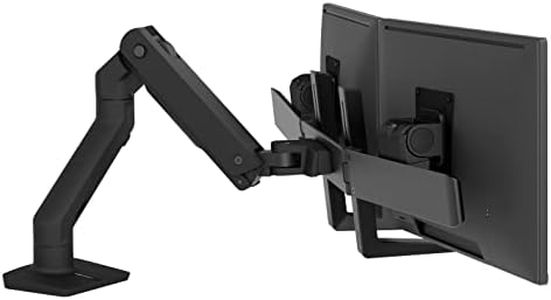
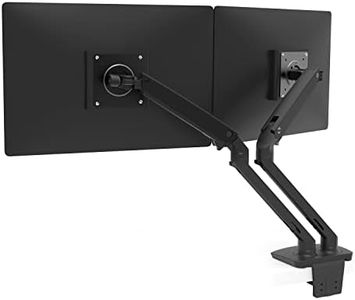
Ergotron – HX Dual Monitor Arm, VESA Desk Mount – for 2 Monitors Up to 32 Inches, 5 to 17.5 lbs Each – Matte Black

Rating
10.0
Chosen by1,200
Weight Capacity
Adjustability
Build Quality

Most important from
127 reviews

Weight Capacity
Holds heavy Apple Studio Displays securely once properly aligned.
Adjustability
Easy to assemble with sturdy metal arms and simple adjustments.
Build Quality
Challenging to align initially, but worth the effort for a stable and reliable setup.

The Ergotron HX Dual Monitor Arm is a versatile and robust option for those looking to support two monitors, each up to 32 inches and weighing between 5 to 17.5 pounds. It stands out with its broad compatibility, fitting VESA patterns of 75x75mm and 100x100mm, and offers multiple mounting options, including a desk clamp and grommet mount, making it suitable for a variety of desk setups.

With 11.5 inches of lift and the ability to raise monitors up to 20.6 inches above the desk, it allows for significant adjustability. You can also rotate each monitor 360 degrees and tilt them up to 75 degrees, providing a comfortable viewing experience and supporting ergonomic needs, especially for tasks that require screen sharing or collaboration. The hinged bow design further enhances dual-monitor ergonomics by allowing the monitors to fold outward independently.

Constructed with professional-grade aluminum, the build quality is solid, ensuring stability and durability, backed by a 10-year warranty and expert tech support. The Ergotron HX is a high-quality, reliable option for dual-monitor setups.

Rating
10.0
Chosen by1,200
Weight Capacity
Adjustability
Build Quality

Most important from
127 reviews

Weight Capacity
Holds heavy Apple Studio Displays securely once properly aligned.
Adjustability
Easy to assemble with sturdy metal arms and simple adjustments.
Build Quality
Challenging to align initially, but worth the effort for a stable and reliable setup.
#2

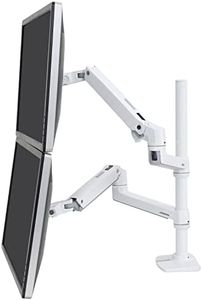
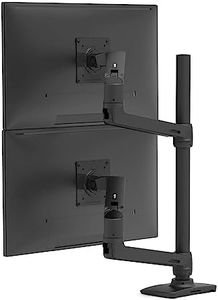
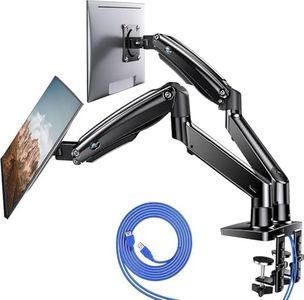
Ergotron – LX Vertical Stacking Dual Monitor Arm, VESA Desk Mount – for 2 Monitors Up to 40 Inches, 7 to 22 lbs Each – Tall Pole, White

Rating
9.4
Weight Capacity
Adjustability
Mounting Options

Most important from
1547 reviews

Weight Capacity
The monitor arm is extremely sturdy and robust, capable of securely holding curved and heavier monitors without sagging or wobbling.
Adjustability
The range of motion is impressive, offering smooth tilt, rotation, and vertical lift, though extremely large monitors near 40 inches can limit positioning options.
Mounting Options
Using the grommet mount option rather than the desk clamp is recommended for maximum range of motion, especially when the desk is positioned close to a wall.
Build Quality
The joints come very stiff out of the box, reflecting high build quality but requiring some effort to maneuver initially.
Cable Management
Cable management is functional but feels like an afterthought compared to other models, providing only basic cord organization.

The Ergotron LX Vertical Stacking Dual Monitor Arm is a solid choice if you want to mount two monitors up to 40 inches each, supporting weights between 7 and 22 pounds. It offers great flexibility with 13 inches of vertical lift and smooth tilt and rotation, so you can easily adjust your monitors for comfortable viewing whether you stack them vertically or set them side by side. The arm supports common VESA mount sizes, making it compatible with most monitors.

Installation is versatile, too, with both a heavy-duty desk clamp and a grommet mount option, fitting a variety of desk thicknesses. One nice feature is the built-in cable management system that keeps cords organized and off your workspace, which helps keep your desk tidy. The build quality is impressive — made from metal and backed by a 10-year warranty, it’s designed to hold your screens steadily without wobbling.

A consideration is that the arm’s relatively tall pole might not fit well under low shelves or cabinets, and it weighs 19 pounds, so it requires a sturdy desk for support. While it’s perfect for two monitors, expanding beyond that needs additional accessories. If you’re looking for a durable, adjustable solution to free up desk space and improve your multi-monitor setup, this dual monitor arm handles the job well.

Rating
9.4
Weight Capacity
Adjustability
Mounting Options

Most important from
1547 reviews

Weight Capacity
The monitor arm is extremely sturdy and robust, capable of securely holding curved and heavier monitors without sagging or wobbling.
Adjustability
The range of motion is impressive, offering smooth tilt, rotation, and vertical lift, though extremely large monitors near 40 inches can limit positioning options.
Mounting Options
Using the grommet mount option rather than the desk clamp is recommended for maximum range of motion, especially when the desk is positioned close to a wall.
Build Quality
The joints come very stiff out of the box, reflecting high build quality but requiring some effort to maneuver initially.
Cable Management
Cable management is functional but feels like an afterthought compared to other models, providing only basic cord organization.
#3

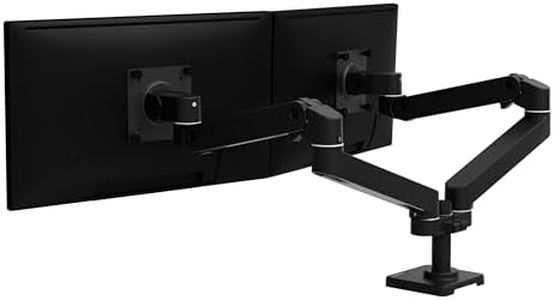
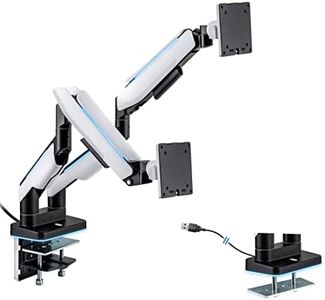
Ergotron – Upgraded LX Pro Premium Dual Monitor Arm, VESA Desk Mount – for 2 Monitors Up to 27 Inches, 4 to 20 lbs Each – Matte Black

Rating
9.1
Weight Capacity
Mounting Options
Build Quality

Most important from
15 reviews

Weight Capacity
The monitor arm provides exceptional stability and strength, holding even heavier-than-rated monitors rock solid without any wobble.
Mounting Options
Installation is straightforward, with well-designed mounting options that accommodate desks with edges or special holes, saving the user from modifications.
Build Quality
The build quality is noticeably superior, crafted from durable materials that contribute to a solid, reliable setup.
Compatibility
Thoughtful engineering includes versatile clamp and bolt-through mounting systems, ensuring compatibility with a wide range of desk types.

The Ergotron LX Pro Premium Dual Monitor Arm is designed for users needing to mount two monitors of up to 27 inches and weighing between 4 to 20 pounds each. Its broad compatibility, with support for VESA patterns of 75x75mm and 100x100mm, ensures it fits a wide range of monitors. The arms offer impressive adjustability, allowing users to raise their monitors up to 19.9 inches and rotate them up to 360 degrees, making it easy to find the perfect viewing angle.

This is particularly beneficial for those who spend long hours at their desks and need flexibility to reduce neck and eye strain. The tilt angle of up to 85 degrees further aids in customization for optimal comfort. Mounting the monitor arm is versatile and can be done using the included desk clamp, which fits desk thicknesses ranging from 0.4 to 2.4 inches. For those needing a grommet mount, an accessory is available separately.

The Ergotron LX Pro stands out for its sleek and modular design, which not only enhances the aesthetics of a workspace but also helps with cable management, keeping the setup tidy. Made of metal, it promises durability and stability, backed by extensive quality testing and a 10-year warranty. However, it’s worth noting that the grommet mount has to be purchased separately, which might be an additional cost for some users. Additionally, at 13.65 pounds, the arm itself is quite sturdy and may be heavier than some other options on the market. This dual monitor arm is ideal for professionals or avid computer users looking for a reliable, flexible, and aesthetically pleasing solution for their dual-monitor setups.

Rating
9.1
Weight Capacity
Mounting Options
Build Quality

Most important from
15 reviews

Weight Capacity
The monitor arm provides exceptional stability and strength, holding even heavier-than-rated monitors rock solid without any wobble.
Mounting Options
Installation is straightforward, with well-designed mounting options that accommodate desks with edges or special holes, saving the user from modifications.
Build Quality
The build quality is noticeably superior, crafted from durable materials that contribute to a solid, reliable setup.
Compatibility
Thoughtful engineering includes versatile clamp and bolt-through mounting systems, ensuring compatibility with a wide range of desk types.

Buying Guide for the Best Dual Monitor Arms

Choosing the right dual-monitor arms can significantly improve your workspace ergonomics and productivity. Dual-monitor arms allow you to position your monitors at the perfect height, angle, and distance, reducing strain on your neck, back, and eyes. When selecting dual-monitor arms, consider the key specifications to ensure they meet your needs and preferences.
Weight CapacityWeight capacity refers to the maximum weight each arm can support. This is important because monitors come in various weights, and you need to ensure that the arms can hold your monitors securely. Typically, weight capacity is divided into light (up to 10 lbs per arm), medium (10-20 lbs per arm), and heavy (over 20 lbs per arm). To pick the right one, check the weight of your monitors and choose arms that can comfortably support them.
AdjustabilityAdjustability refers to the range of motion the arms offer, including height, tilt, swivel, and rotation. This is crucial for achieving the most ergonomic setup. Some arms offer basic adjustability, while others provide full motion capabilities. If you need to frequently change your monitor positions or share your workspace, opt for arms with greater adjustability. Consider your work habits and how often you need to adjust your monitors to determine the best option.
Mounting OptionsMounting options refer to how the arms attach to your desk or wall. Common types include clamp mounts, grommet mounts, and wall mounts. Clamp mounts are versatile and easy to install, grommet mounts provide a cleaner look by using existing holes in your desk, and wall mounts save desk space. Choose the mounting option that best fits your workspace setup and installation preferences.
CompatibilityCompatibility involves ensuring the arms can accommodate the size and VESA pattern of your monitors. VESA patterns are standardized mounting hole patterns on the back of monitors. Most arms support common VESA patterns like 75x75mm and 100x100mm. Check your monitor's specifications for size and VESA pattern, and select arms that match these requirements to ensure a secure fit.
Build QualityBuild quality refers to the materials and construction of the monitor arms. High-quality arms are typically made from durable materials like steel or aluminum, which provide stability and longevity. Look for arms with solid construction and reliable joints to avoid sagging or wobbling. If you plan to use the arms for a long time or have heavy monitors, prioritize build quality to ensure lasting performance.
Cable ManagementCable management features help organize and hide the cables running to your monitors, creating a cleaner and more organized workspace. Some arms come with built-in cable channels or clips. Effective cable management can reduce clutter and make your setup look more professional. If you have multiple cables and want a tidy workspace, look for arms with good cable management solutions.

FAQ

Most Popular Categories Right Now