We Use CookiesWe use cookies to enhance the security, performance, functionality and for analytical and promotional activities. By continuing to browse this site you are agreeing to our privacy policy

10 Best Double Sided Scanner 2026 in the United States
How do we rank products for you?

Our technology thoroughly searches through the online shopping world, reviewing hundreds of sites. We then process and analyze this information, updating in real-time to bring you the latest top-rated products. This way, you always get the best and most current options available.

headphones-stars

Our Top Picks

#1

Winner

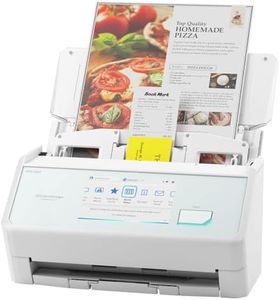
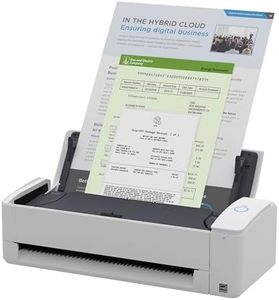
ScanSnap iX2500 Wireless or USB High-Speed Cloud Enabled Document, Photo & Receipt Scanner with Large 5" Touchscreen and 100 Page Auto Document Feeder for Mac or PC, White

Rating
10.0
Chosen by1,459
Scan Speed
Resolution
Software Compatibility

Most important from
125 reviews

Scan Speed
This scanner lives fully up to its reputation with fast, seamless operation that handles large volumes effortlessly.
Resolution
The quality of scans is consistently top-notch, delivering sharp and accurate results every time.
Software Compatibility
It’s incredibly easy to use, even for those who aren’t tech-savvy, making document organization straightforward.

The ScanSnap iX2500 is a strong choice for anyone needing a dependable double-sided scanner, especially in office or home office settings. It offers a fast scan speed of 45 pages per minute, which is excellent for quickly handling large batches of documents. Its 100-sheet automatic document feeder (ADF) means you can load a big pile and walk away, saving you time. The scanner delivers sharp images at up to 600 dpi resolution, suitable for crisp document and photo scans.

Connectivity is versatile with both Wi-Fi 6 and USB-C options, allowing you to connect to PCs, Macs, mobile devices, or even scan directly to cloud services without a computer. This makes it handy for users who want flexibility and easy sharing. Software compatibility covers major operating systems including Windows, macOS, and mobile platforms, and the user-friendly 5" touchscreen lets you customize scan profiles and quickly send scans where you want them.

The iX2500 also includes thoughtful features to prevent paper jams and damage, like a brake roller system and multi-feed sensor, reducing interruptions during scanning. It’s moderately sized and weighs about 7.7 pounds, so it's portable enough to move if needed but designed more for a desktop setup. The price point is higher than simpler scanners, reflecting its advanced features and build quality. Those focused primarily on high-end photo scanning might want to consider specialized photo scanners instead. This scanner suits users who need fast, reliable double-sided scanning with modern connectivity and easy file management, making it a solid tool for busy work environments or home offices.

Rating
10.0
Chosen by1,459
Scan Speed
Resolution
Software Compatibility

Most important from
125 reviews

Scan Speed
This scanner lives fully up to its reputation with fast, seamless operation that handles large volumes effortlessly.
Resolution
The quality of scans is consistently top-notch, delivering sharp and accurate results every time.
Software Compatibility
It’s incredibly easy to use, even for those who aren’t tech-savvy, making document organization straightforward.
#2

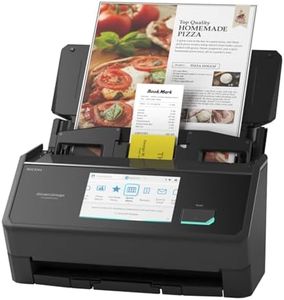
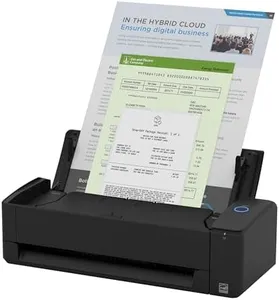
ScanSnap iX2500 Wireless or USB High-Speed Cloud Enabled Document, Photo & Receipt Scanner with Large 5" Touchscreen and 100 Page Auto Document Feeder for Mac or PC, Black

Rating
9.4
Scan Speed
Resolution
Connectivity

Most important from
319 reviews

Scan Speed
Scanning large batches is quick and smooth, with 50-page documents fully OCR’d and ready to use within seconds after scanning.
Resolution
Though not designed for ultra-high resolution photo archiving, it delivers very good scan quality suitable for most office and home needs.
Connectivity
Setup is a breeze with fast, seamless connectivity via Bluetooth, USB, or Wi-Fi, allowing instant scanning without complicated configuration.
Software Compatibility
ScanSnap Home software offers a clean, unified interface that manages documents efficiently and performs OCR faster than any other solution.
Size and Portability
The scanner folds into a compact footprint, saving valuable desk space while delivering high-quality color scans that surpass previous models.

The ScanSnap iX2500 is a solid choice if you need a versatile double-sided scanner that handles lots of pages quickly. It scans at up to 45 pages per minute, which is fast enough for small to medium offices or home use. The 100-sheet automatic document feeder is a big plus, letting you scan batches without constant attention. The 600 dpi resolution is good for clear text and decent photo scans, though it’s not meant for professional photo archiving.

Connectivity options are flexible: you can connect via USB-C or wirelessly using Wi-Fi 6, which is fast and stable. This makes it convenient to scan directly to your computer, mobile device, or cloud services without hassle. The large 5-inch touchscreen lets you customize profiles and send scans where you want with simple taps. The scanner also includes smart features to avoid paper jams and detects misfeeds, saving time and frustration.

It is compact enough to fit on a desk without taking up much space, though it weighs nearly 8 pounds, so it’s not highly portable. The software compatibility covers both Mac and PC, and it helps keep your scanned documents, receipts, and photos organized automatically. If you prioritize speed, ease of use, and wireless convenience, this scanner performs well. However, if you need ultra-high resolution or extreme portability for travel, you might want to look at other options.

Rating
9.4
Scan Speed
Resolution
Connectivity

Most important from
319 reviews

Scan Speed
Scanning large batches is quick and smooth, with 50-page documents fully OCR’d and ready to use within seconds after scanning.
Resolution
Though not designed for ultra-high resolution photo archiving, it delivers very good scan quality suitable for most office and home needs.
Connectivity
Setup is a breeze with fast, seamless connectivity via Bluetooth, USB, or Wi-Fi, allowing instant scanning without complicated configuration.
Software Compatibility
ScanSnap Home software offers a clean, unified interface that manages documents efficiently and performs OCR faster than any other solution.
Size and Portability
The scanner folds into a compact footprint, saving valuable desk space while delivering high-quality color scans that surpass previous models.
#3

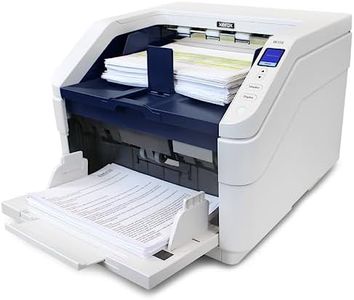
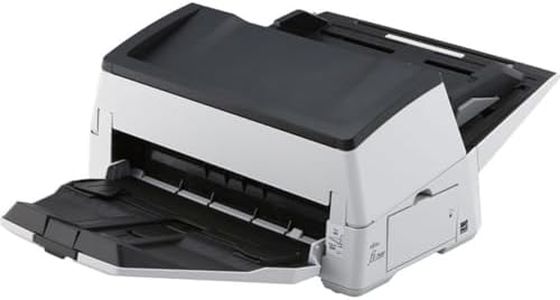
Visioneer Xerox W110 Duplex Production Scanner with Document Feeder

Rating
9.4
Scan Speed
Software Compatibility

Most important from
2 reviews

Scan Speed
Delivers fast and efficient scanning performance suitable for high-volume office tasks.
Software Compatibility
Combines powerful hardware with effective capture software for a seamless scanning experience.

The Visioneer Xerox W110 Duplex Production Scanner is a powerful option for users who need to scan large volumes of double-sided documents quickly. It boasts an impressive scan speed of up to 120 pages per minute, making it suitable for busy office environments. The 500-sheet automatic document feeder (ADF) is large enough to handle substantial scanning tasks without frequent reloads. The scanner offers a solid optical resolution of 600 dpi, which is good for clear text and decent image quality. Connectivity options include USB and Ethernet, providing flexible integration into various setups.

The included Visioneer Acuity software enhances image quality and offers one-touch scanning to streamline workflows, which is helpful for users who want simplicity combined with good software compatibility. However, this scanner is quite heavy at 50 pounds and has a fairly large footprint (over 18 by 17 inches), so it’s less portable and better suited for a dedicated office space rather than mobile use. Its power consumption is also on the higher side, which could be a consideration for energy-conscious users.

While it handles multiple media types such as photos and receipts, it’s primarily designed as a production-level document scanner rather than a casual or home scanner. If you need fast, high-volume duplex scanning with reliable software support and don’t mind the size and weight, the Visioneer Xerox W110 delivers solid performance.

Rating
9.4
Scan Speed
Software Compatibility

Most important from
2 reviews

Scan Speed
Delivers fast and efficient scanning performance suitable for high-volume office tasks.
Software Compatibility
Combines powerful hardware with effective capture software for a seamless scanning experience.

Buying Guide for the Best Double Sided Scanner

Choosing the right double-sided scanner can significantly improve your productivity and efficiency, especially if you frequently handle large volumes of documents. A double-sided scanner, also known as a duplex scanner, can scan both sides of a document simultaneously, saving you time and effort. To find the best fit for your needs, it's important to understand the key specifications and how they align with your specific requirements.
Scan SpeedScan speed refers to how quickly the scanner can process documents, usually measured in pages per minute (ppm). This is important because a faster scan speed can save you a lot of time, especially if you have a large number of documents to scan regularly. Scan speeds can range from around 15 ppm for basic models to over 60 ppm for high-end models. If you only need to scan a few documents occasionally, a lower scan speed may be sufficient. However, if you handle large volumes of documents daily, a higher scan speed will be more beneficial.
ResolutionResolution is measured in dots per inch (dpi) and determines the clarity and detail of the scanned images. Higher resolution results in clearer and more detailed scans, which is important for documents with small text or intricate details. Common resolutions range from 300 dpi to 1200 dpi. For general document scanning, 300 dpi is usually sufficient. If you need to scan high-quality images or detailed documents, you might want to consider a scanner with a higher resolution.
ADF CapacityADF stands for Automatic Document Feeder, and its capacity indicates how many sheets it can hold at once. This is important for batch scanning, as a higher ADF capacity allows you to scan more documents in one go without needing to reload the feeder. ADF capacities can range from around 20 sheets to over 100 sheets. If you frequently scan large batches of documents, a higher ADF capacity will be more convenient and time-saving.
ConnectivityConnectivity options determine how the scanner can be connected to your computer or network. Common options include USB, Wi-Fi, and Ethernet. USB is straightforward and reliable for direct connections to a single computer. Wi-Fi allows for wireless scanning and is useful if you want to place the scanner in a different location or share it among multiple devices. Ethernet is ideal for office environments where the scanner needs to be accessible to multiple users on a network. Choose the connectivity option that best fits your setup and workflow.
Software CompatibilitySoftware compatibility refers to the scanner's ability to work with different operating systems and document management software. This is important because it ensures that the scanner can integrate smoothly into your existing workflow. Check if the scanner is compatible with your operating system (Windows, macOS, etc.) and any specific software you use for document management or OCR (Optical Character Recognition). Ensuring compatibility will help you avoid any technical issues and make the scanning process more efficient.
Size and PortabilityThe size and portability of the scanner are important considerations, especially if you have limited desk space or need to move the scanner frequently. Some scanners are compact and lightweight, making them easy to transport and store, while others are larger and more robust, suitable for a fixed location. If you need a scanner for occasional use or travel, a smaller, portable model may be ideal. For regular, high-volume scanning in a fixed location, a larger, more durable scanner might be a better choice.

FAQ

Most Popular Categories Right Now