10 Best Digital Notepads 2026 in the United States


Related Products

Recommended lists

Digital Note Pads
Our technology thoroughly searches through the online shopping world, reviewing hundreds of sites. We then process and analyze this information, updating in real-time to bring you the latest top-rated products. This way, you always get the best and most current options available.

Our Top Picks
Winner
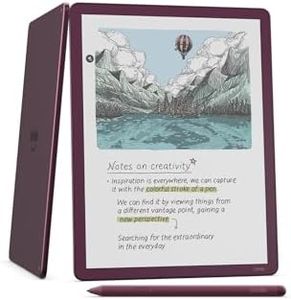
Amazon Kindle Scribe Colorsoft 64GB (newest model) — 11” paper-like color display with front light — One notebook to replace them all — Write in notebooks, docs, and books. Pen included - Fig
Most important from
754 reviews
The Amazon Kindle Scribe Colorsoft is designed to be a versatile digital notepad with an 11-inch color display that feels quite natural and paper-like to write on, thanks to its textured surface and responsive stylus which does not need charging. Its resolution offers clear black-and-white text at 300 ppi and decent color at 150 ppi, making it comfortable for reading and colorful enough for notes or documents without glaring brightness. With 64GB of storage (50GB available to the user), it provides ample space for many notebooks, documents, and books.
Battery life is impressive, lasting up to two weeks for daily writing sessions and up to eight weeks for reading, which is great for extended use without needing frequent charging. Connectivity options include Wi-Fi supporting both 2.4 GHz and 5 GHz networks, allowing easy access to cloud services like Google Drive and Microsoft OneDrive, and it exports notes to Microsoft OneNote, which is handy for users who want to sync their work across platforms. The device runs its own Kindle software which supports a wide range of document formats, but it does not need a computer to download content, making it simple to use. AI-powered tools add convenience by helping find and summarize notes or convert handwriting to text, which can boost productivity.
The color display, while innovative, may appear slightly different in brightness or texture compared to typical e-ink screens, which could take some getting used to. The stylus is included and offers a responsive writing experience, although it does not focus on advanced pressure sensitivity features, so it may not fully meet the needs of users seeking professional-level drawing capabilities. This Kindle Scribe is especially suited for users looking for a lightweight, long-lasting digital notebook primarily for reading, writing, and organizing notes with some color capabilities, rather than for professional drawing or highly detailed color work.
Most important from
754 reviews
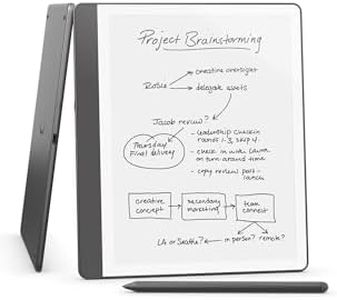
Amazon Kindle Scribe (64GB) - Your notes, documents and books, all in one place. With built-in AI notebook summarization. Includes Premium Pen - Tungsten
The Amazon Kindle Scribe (64GB) is a well-rounded digital notepad that combines reading and writing in one device. Its 10.2-inch Paperwhite display offers a sharp 300 ppi resolution with a glare-free front-lit screen, making it comfortable to use indoors or outside in various lighting conditions. The screen size is spacious enough for detailed note-taking and document markup. The 64GB storage provides plenty of space for books, notes, and imported PDFs, which is great if you want to keep a large library and many documents on hand. The included Premium Pen is highly responsive and feels natural, offering a pen-on-paper experience without needing charging or setup, which is convenient for users new to digital writing.
Battery life is impressive—up to 12 weeks for reading and 3 weeks for writing on a single charge—so you won’t have to worry about frequent recharging. Connectivity-wise, it supports Wi-Fi 5 and Bluetooth 5.2 for easy syncing and wireless document transfer. It works seamlessly with Amazon’s ecosystem and supports various document formats, but it doesn’t run third-party apps like some tablets do, which means it’s focused on note-taking and reading rather than multitasking.
The standout feature is the built-in AI tools that convert handwriting to text and summarize notes, adding a smart layer to managing your work or study material. If you need a device for heavy multitasking or color displays, this isn’t the best fit. It’s ideal for people who want a distraction-free, paper-like writing experience combined with excellent reading capabilities. The Kindle Scribe is a strong choice for students, professionals, or anyone who prefers digital note-taking and reading in one tidy package.
Amazon Kindle Scribe (16GB) - Your notes, documents and books, all in one place. With built-in AI notebook summarization. Includes Premium Pen - Tungsten
Most important from
3661 reviews
The Amazon Kindle Scribe is a compelling choice if you want a digital notepad that also doubles as an e-reader. Its 10.2-inch Paperwhite display offers sharp clarity with 300 ppi resolution, making reading and writing comfortable in various lighting conditions thanks to the built-in front light. The device feels close to writing on paper, especially with the included Premium Pen that doesn’t require charging and offers a natural writing experience. Storage at 16GB gives you room for many books and notes, though options with more space are available if you need it. Battery life is impressive—with reading lasting up to 12 weeks on a single charge under typical use and writing lasting about 3 weeks—which means you won’t have to charge it often during daily use.
It supports common wireless networks, making document import easy via Wi-Fi without needing a computer. The Kindle Scribe also stands out with AI tools that can convert your handwriting to text and summarize notes, which can be very helpful for organizing your thoughts. On the downside, it’s relatively large and a bit heavier than some other digital notepads, which might affect portability. Also, the stylus doesn't require charging but replacing tips can be a small ongoing task.
The device focuses on simplicity and distraction-free use, so if you want a multitasking tablet or apps beyond reading and note-taking, this might feel limited. Its compatibility leans towards Amazon’s ecosystem and file types, which is great if you’re already a Kindle user but less flexible if you want broader app options. For those looking for a straightforward, well-designed digital notepad that excels at reading and writing with smart AI features, the Kindle Scribe is worth considering.
Most important from
3661 reviews
Buying Guide for the Best Digital Notepads
Digital notepads are a fantastic tool for those who want to combine the traditional feel of writing with the convenience of digital technology. They allow you to take notes, sketch, and organize your thoughts in a digital format, which can be easily edited, stored, and shared. When choosing a digital notepad, it's important to consider several key specifications to ensure you get the best fit for your needs. Here are the main specs to look at and how to navigate them.FAQ
Most Popular Categories Right Now


