We Use CookiesWe use cookies to enhance the security, performance, functionality and for analytical and promotional activities. By continuing to browse this site you are agreeing to our privacy policy

10 Best Digital Drawing Tablet For Beginners 2026 in the United States
How do we rank products for you?

Our technology thoroughly searches through the online shopping world, reviewing hundreds of sites. We then process and analyze this information, updating in real-time to bring you the latest top-rated products. This way, you always get the best and most current options available.

headphones-stars

Our Top Picks

#1

Winner

XPPen Magic Drawing Pad 12.2 Inch Standalone Drawing Tablet No Computer Needed with 16384 Pressure Levels X3 Pro Slim Stylus Tilt Support Paper-Like Screen 8GB + 256GB for Digital Drawing Artists

Rating
10.0
Chosen by1,176
Pressure Sensitivity
Connectivity

Most important from
711 reviews

Pressure Sensitivity
The stylus pressure and angles are intuitive and the feel is very natural, producing fantastic results with good software.
Connectivity
Great value for doing design, with a 12-inch screen and some connectivity, making it a viable alternative to more expensive options.

The XP-Pen Magic Drawing Pad is a robust option for beginners venturing into digital art. One of its standout features is the impressive 16,384 pressure levels of the X3 Pro stylus, which offers precise control and a natural drawing feel without needing to charge or pair the stylus. The tablet's 12.2-inch screen uses AG-etched technology, providing a paper-like texture and a high resolution of 2160x1440 pixels, ensuring sharp and vibrant visuals. The TÜV Rheinland certified screen is designed to reduce eye strain, which is beneficial for long drawing sessions.

This standalone tablet operates on Android 12, eliminating the need for a computer and enhancing portability, further supported by its slim and lightweight design at 599g and 6.9mm thickness. The 8GB RAM and 256GB internal storage, expandable up to 512GB, provide ample space and performance for most beginner artists. Equipped with an 8000 mAh battery, the tablet offers up to thirteen hours of uninterrupted use.

Additionally, it includes features like dual cameras, Bluetooth, Wi-Fi, and multiple connectivity options, making it versatile for various multimedia uses. However, some drawbacks include the potential for limited software compatibility strictly running on Android, which might not support all desktop drawing software, and the lack of express keys that can be handy for quick access to tools. Despite these minor limitations, the XP-Pen Magic Drawing Pad presents a solid, user-friendly choice for beginners, blending advanced features with portability and ease of use.

Rating
10.0
Chosen by1,176
Pressure Sensitivity
Connectivity

Most important from
711 reviews

Pressure Sensitivity
The stylus pressure and angles are intuitive and the feel is very natural, producing fantastic results with good software.
Connectivity
Great value for doing design, with a 12-inch screen and some connectivity, making it a viable alternative to more expensive options.
#2

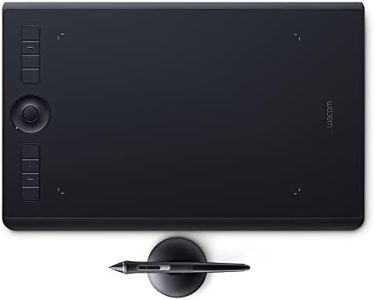
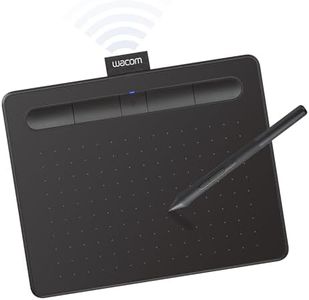
Wacom Intuos Pro Medium Bluetooth Graphics Drawing Tablet, 8 Customizable ExpressKeys, 8192 Pressure Sensitive Pro Pen 2 Included, Compatible with Mac OS and Windows

Rating
9.7
Active Drawing Area
Pressure Sensitivity
Resolution

Most important from
4039 reviews

Active Drawing Area
The small size is perfect for convenience and productivity, fitting well next to an MX Keyboard.
Pressure Sensitivity
The Wacom Pen 2 offers much more sensitivity, making it ideal for detailed digital painting.
Resolution
Switching from an iPad Pro to the Wacom Intuos Pro M for complex illustrations provides the necessary power and control for detailed work.
Stylus Type
The pen is extremely light due to its battery-free operation, which might give the impression of fragility.
Express Keys
Using the tablet as a touch pad is fabulous, with gestures and programmable buttons enhancing productivity.

The Wacom Intuos Pro Medium Bluetooth Graphics Drawing Tablet is a solid choice for beginners looking to delve into digital art. It boasts a generous active drawing area within its compact design, making it portable without compromising workspace. The 8192 levels of pressure sensitivity of the Pro Pen 2 offer precise control and an intuitive drawing experience, which is ideal for detailed work. This battery-free stylus is ergonomic and highly responsive, reducing fatigue over long drawing sessions. The tablet's high resolution ensures sharp and accurate rendering of your artwork.

Connectivity is versatile with Bluetooth and USB options, making it easy to set up across different devices. The eight customizable express keys and touch ring enhance productivity by allowing you to set shortcuts for frequently used functions. It is compatible with both Mac OS and Windows, adding to its flexibility.

For beginners, the multitude of customization options might seem overwhelming initially. Additionally, while the tablet is feature-rich, it comes at a higher price point compared to other entry-level models. In summary, the Wacom Intuos Pro Medium is a feature-packed drawing tablet that provides a professional-grade experience suitable for beginners who are serious about pursuing digital art.

Rating
9.7
Active Drawing Area
Pressure Sensitivity
Resolution

Most important from
4039 reviews

Active Drawing Area
The small size is perfect for convenience and productivity, fitting well next to an MX Keyboard.
Pressure Sensitivity
The Wacom Pen 2 offers much more sensitivity, making it ideal for detailed digital painting.
Resolution
Switching from an iPad Pro to the Wacom Intuos Pro M for complex illustrations provides the necessary power and control for detailed work.
Stylus Type
The pen is extremely light due to its battery-free operation, which might give the impression of fragility.
Express Keys
Using the tablet as a touch pad is fabulous, with gestures and programmable buttons enhancing productivity.
#3

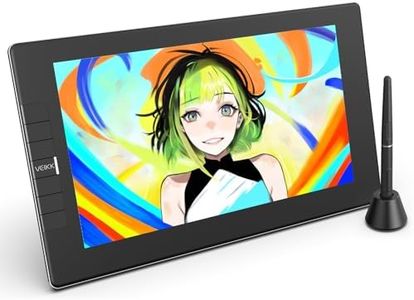
VEIKK VK1200 11.6 inch Drawing Tablet with Screen, 8192 Levels Pressure Battery-Free Pen, Tilt Function, 6 Shortcut Keys, for Artists, Students, and Beginners

Rating
8.8
Active Drawing Area
Pressure Sensitivity
Resolution

Most important from
30 reviews

Active Drawing Area
The 11.6-inch screen delivers bright and steady visuals, making it enjoyable and easy to use for beginners.
Pressure Sensitivity
Setup can require a bit of troubleshooting, such as cleaning ports or adjusting pressure sensitivity to get the best performance.
Resolution
While not the highest precision tablet, it strikes a solid balance of quality and affordability for entry-level digital artists.
Stylus Type
The drawing experience is smooth and responsive, especially with the battery-free pen that captures natural lines and shading effortlessly.
Express Keys
Customizable shortcut keys enhance workflow by providing quick access to essential tools, speeding up the creative process.

The VEIKK VK1200 is a beginner-friendly digital drawing tablet with an 11.6-inch full HD screen that offers clear and vibrant colors, making it suitable for artists and students starting with digital art. Its active drawing area is decent for detailed work without being overwhelming. The tablet’s standout feature is its highly responsive battery-free pen, which supports 8192 levels of pressure sensitivity and a tilt function, allowing you to draw with natural lines and shading effects. Having two pens and extra nibs included is a nice bonus for experimenting with different styles or sharing with a friend.

It connects via USB and HDMI, which means it's easy to hook up to most Windows and Mac computers, covering popular operating systems. The 6 customizable shortcut keys can speed up your workflow by letting you quickly access common tools like undo and zoom. However, the tablet’s active area is smaller than some larger models, which might feel cramped if you prefer big sweeping strokes. Also, while the color gamut is decent for beginners, it may not satisfy advanced users who need more color precision. The tablet's slim design is portable but may feel less sturdy compared to heavier options.

This VEIKK model provides a responsive drawing experience on a bright screen with useful extras, making it a reliable tool for those just starting out in digital art who want an accessible device without a steep learning curve.

Rating
8.8
Active Drawing Area
Pressure Sensitivity
Resolution

Most important from
30 reviews

Active Drawing Area
The 11.6-inch screen delivers bright and steady visuals, making it enjoyable and easy to use for beginners.
Pressure Sensitivity
Setup can require a bit of troubleshooting, such as cleaning ports or adjusting pressure sensitivity to get the best performance.
Resolution
While not the highest precision tablet, it strikes a solid balance of quality and affordability for entry-level digital artists.
Stylus Type
The drawing experience is smooth and responsive, especially with the battery-free pen that captures natural lines and shading effortlessly.
Express Keys
Customizable shortcut keys enhance workflow by providing quick access to essential tools, speeding up the creative process.

Buying Guide for the Best Digital Drawing Tablet For Beginners

Choosing the right digital drawing tablet can be a game-changer for beginners. It's important to find a tablet that matches your needs and helps you grow as an artist. When selecting a tablet, consider the following key specifications to ensure you get the best fit for your creative journey.
Active Drawing AreaThe active drawing area is the part of the tablet where you can draw. It's important because it determines how much space you have to work with. Smaller areas (around 6x4 inches) are more portable and suitable for beginners who are just starting out. Medium areas (around 10x6 inches) offer a balance between portability and space, making them great for more detailed work. Larger areas (12x8 inches and above) provide ample space for professional-level work but can be less portable. Choose a size that fits your workspace and drawing style.
Pressure SensitivityPressure sensitivity refers to how well the tablet can detect variations in pressure from the stylus. This is important because it affects the thickness and opacity of your lines, allowing for more nuanced and expressive drawings. Tablets typically range from 1024 to 8192 levels of pressure sensitivity. Beginners can start with 2048 levels, which is sufficient for most tasks. As you become more advanced, you might prefer higher sensitivity for more detailed work.
ResolutionResolution, measured in lines per inch (LPI), indicates how much detail the tablet can capture. Higher resolution means more precise and detailed drawings. For beginners, a resolution of around 2540 LPI is usually adequate. If you plan to work on highly detailed illustrations or professional projects, consider a higher resolution (up to 5080 LPI). Choose a resolution that matches the level of detail you need in your work.
ConnectivityConnectivity options determine how the tablet connects to your computer or device. Most tablets connect via USB, which is reliable and easy to set up. Some models offer wireless connectivity (Bluetooth), providing more flexibility and reducing cable clutter. Beginners might find USB connections more straightforward, while those who value a tidy workspace might prefer wireless options. Consider your workspace setup and personal preference when choosing connectivity.
Stylus TypeThe stylus is the pen-like tool you use to draw on the tablet. There are two main types: battery-free (electromagnetic resonance) and battery-powered. Battery-free styluses are lighter and don't require charging, making them more convenient for long drawing sessions. Battery-powered styluses may offer additional features like buttons or erasers but need regular charging. Beginners often prefer battery-free styluses for their ease of use and reliability.
Express KeysExpress keys are customizable buttons on the tablet that can be programmed for shortcuts, such as undo, redo, or switching tools. They are important for improving workflow and efficiency. Tablets can have anywhere from 4 to 16 express keys. Beginners might start with fewer keys to keep things simple, while more advanced users might prefer more keys for greater customization. Think about how you work and which shortcuts you use most often when considering express keys.
CompatibilityCompatibility refers to whether the tablet works with your computer's operating system (Windows, macOS, Linux) and your preferred drawing software. It's crucial to ensure that the tablet you choose is compatible with your setup to avoid any technical issues. Most tablets are compatible with major operating systems and popular software like Adobe Photoshop, Illustrator, and CorelDRAW. Check the specifications to ensure compatibility with your devices and software.

FAQ

Most Popular Categories Right Now