We Use CookiesWe use cookies to enhance the security, performance, functionality and for analytical and promotional activities. By continuing to browse this site you are agreeing to our privacy policy

10 Best Compact Photo Printers 2026 in the United States

How do we rank products for you?

Our technology thoroughly searches through the online shopping world, reviewing hundreds of sites. We then process and analyze this information, updating in real-time to bring you the latest top-rated products. This way, you always get the best and most current options available.

headphones-stars

Our Top Picks

#1

Winner

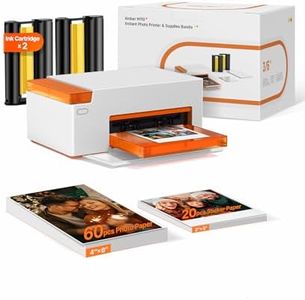
Liene M100 4x6'' Photo Printer, Phone Printer 100 Sheets & 3 Cartridges, Full-Color Photo, Portable Instant Photo Printer for iPhone Android, Thermal Dye Sublimation, Wi-Fi Picture Printer 100 Papers

Rating
10.0
Chosen by1,150
Print Quality
Print Size
Connectivity

Most important from
4174 reviews

Print Quality
Delivers vibrant, sharp photos with impressive print quality that exceeds expectations for its price.
Print Size
Some photos may get cropped instead of fitting perfectly to the 4x6 print size, requiring creative workarounds for ideal framing.
Connectivity
Setup is straightforward and quick, making it easy to start printing from smartphones or PCs without hassle.
Portability
Compact size and portability enable easy use anywhere around the house, especially with a carrying case.
Print Speed
Print speed is reasonable for casual use, though there is a slight delay before printing starts.
Cost of Consumables
Replacing cartridges and photo paper is simple, supporting continuous use during events or gatherings.

The Liene M100 is a compact and portable photo printer designed to print vibrant 4x6 inch photos directly from smartphones and PCs, making it a good choice for anyone wanting quick, on-the-go photo prints. It uses thermal dye sublimation technology, which produces sharp, colorful images with a water- and smudge-resistant finish. This ensures your photos will look great and last longer. The printer connects via Wi-Fi by creating its own hotspot, so you don't need an internet network or cables to print. It supports up to five devices at once, which is convenient for sharing with family or friends. The Liene app lets you customize photos by adding borders, filters, or adjusting brightness, adding creative flexibility.

The print speed is about one page per minute, which may not be ideal if you need many photos quickly. The printer weighs over 6 pounds, making it somewhat bulky for a portable model and potentially limiting how easily you carry it around. Consumables such as proprietary cartridges and photo paper come in a large initial pack, but replacement costs could accumulate over time.

The printer offers borderless printing with a decent 300 dpi resolution, providing good quality for casual or home use. It lacks duplex printing and higher-resolution options that professionals might require. The Liene M100 is well-suited for personal photo printing at home or small social gatherings, delivering easy connectivity and solid print quality in a portable format with some trade-offs in speed and cost.

Rating
10.0
Chosen by1,150
Print Quality
Print Size
Connectivity

Most important from
4174 reviews

Print Quality
Delivers vibrant, sharp photos with impressive print quality that exceeds expectations for its price.
Print Size
Some photos may get cropped instead of fitting perfectly to the 4x6 print size, requiring creative workarounds for ideal framing.
Connectivity
Setup is straightforward and quick, making it easy to start printing from smartphones or PCs without hassle.
Portability
Compact size and portability enable easy use anywhere around the house, especially with a carrying case.
Print Speed
Print speed is reasonable for casual use, though there is a slight delay before printing starts.
Cost of Consumables
Replacing cartridges and photo paper is simple, supporting continuous use during events or gatherings.
#2

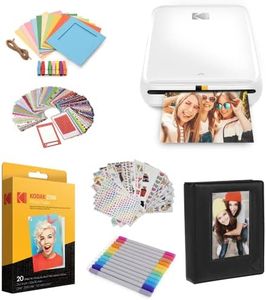
KODAK Step Printer Wireless Mobile Photo Printer with Zink Zero Ink Technology & Kodak App for iOS & Android (White) Gift Bundle

Rating
9.1
Connectivity
Print Quality
Portability

Most important from
2749 reviews

Connectivity
The printer works better than expected and is very easy to connect via Bluetooth, making printing hassle-free.
Print Quality
Photo quality is great for its size, producing memorable prints that are perfect for scrapbooks and keepsakes.
Portability
Its compact, palm-sized design and long battery life make it ideal for on-the-go printing without frequent recharging.
Print Size
Printing multiple sizes is simple, and the retro Kodak look adds a charming touch to the device.

The Kodak Step Printer is a great option if you're looking for a portable compact photo printer that fits easily in your hand or bag. It uses Zink (zero ink) technology, which means you don't need to buy ink cartridges—just special sticky-backed photo paper that is moisture and smudge resistant. This keeps running costs lower and prints more convenient. The printer connects wirelessly via Bluetooth or NFC to your iPhone or Android device, and the free Kodak app lets you edit photos with filters, text, and stickers before printing, adding fun customization options.

Prints come out at a small 2 by 3 inches size, perfect for scrapbooks, decorating laptops, or sharing quick snapshots, but not suited for larger photo prints. While the print quality is decent and durable for its size, it won’t match a traditional photo printer’s sharpness and color depth. The print speed is quite slow, producing about one photo per minute, so it's not ideal if you want many photos quickly. However, the printer itself is lightweight (around 1 pound) and runs on a rechargeable battery that can print about 25 photos on a full charge, making it easy to use on the go without any messy cables.

If you enjoy crafting, social media sharing, or want an easy way to print fun mini photos instantly, Kodak Step offers a user-friendly and affordable solution. Just keep in mind the smaller prints and slower speed might not work well if you need larger photos or fast printing.

Rating
9.1
Connectivity
Print Quality
Portability

Most important from
2749 reviews

Connectivity
The printer works better than expected and is very easy to connect via Bluetooth, making printing hassle-free.
Print Quality
Photo quality is great for its size, producing memorable prints that are perfect for scrapbooks and keepsakes.
Portability
Its compact, palm-sized design and long battery life make it ideal for on-the-go printing without frequent recharging.
Print Size
Printing multiple sizes is simple, and the retro Kodak look adds a charming touch to the device.
#3

Canon PIXMA TR160 Wireless Portable Lightweight Compact Printer, 50-Sheet Paper Tray and 1.44" Display - Print On-The-Go

The Canon PIXMA TR160 is a lightweight and portable compact photo printer designed for users who want to print high-quality documents and photos on the go. It delivers sharp black text and vibrant colors thanks to its 5-color hybrid ink system, supporting various print sizes up to standard letter size (8.5” x 11”). Print quality is excellent for casual photo printing and everyday documents. It’s easy to connect wirelessly using the Canon PRINT app, Apple AirPrint, or Mopria, and it even has a Wireless Direct mode that lets you print without a Wi-Fi network, making it great for travel or outdoor use. The small 1.44” OLED screen helps you keep track of ink levels and printer status without fuss.

With a compact size and weighing just 4.5 pounds, it fits comfortably in a bag or backpack, emphasizing portability. Print speeds are moderate—about 9 pages per minute for black-and-white and 5.5 for color—which is typical for portable inkjets but might feel slow if you print a lot. The maximum paper capacity is 50 sheets, enough for light use but not heavy workloads. It only supports one USB Type-C port and doesn’t offer duplex (double-sided) printing.

While the initial investment is reasonable, keep in mind that ink cartridges can add up over time if you print frequently. This printer suits home users or travelers who prioritize portability and decent photo quality over fast speeds or high-volume printing.

Buying Guide for the Best Compact Photo Printers

Choosing the right compact photo printer can be a rewarding experience, especially if you love capturing and printing your memories on the go. Compact photo printers are designed to be portable and easy to use, making them perfect for travel, events, or even just home use. To find the best fit for you, it's important to understand the key specifications and how they align with your needs. Here are the main specs to consider when selecting a compact photo printer.
Print QualityPrint quality is measured in dots per inch (DPI), which indicates how many dots of ink the printer can place on a square inch of paper. Higher DPI values generally mean better print quality, with more detail and sharper images. For most casual users, a DPI of 300-600 is sufficient for good quality prints. If you are a professional photographer or need extremely high-quality prints, look for printers with a DPI of 1200 or higher. Consider what you will be using the prints for; everyday snapshots may not require the highest DPI, while professional portfolios might.
Print SizePrint size refers to the maximum dimensions of the photos the printer can produce. Common sizes for compact photo printers include 2x3 inches, 4x6 inches, and 5x7 inches. Smaller sizes like 2x3 inches are great for wallet-sized photos and quick prints, while 4x6 inches is the standard size for photo albums and frames. If you need larger prints, ensure the printer supports those dimensions. Think about how you plan to use your prints; for scrapbooking or sharing with friends, smaller sizes might be perfect, but for display purposes, larger sizes are preferable.
ConnectivityConnectivity options determine how you can send photos to the printer. Common methods include USB, Wi-Fi, Bluetooth, and memory card slots. Wi-Fi and Bluetooth allow for wireless printing from smartphones, tablets, and computers, which is very convenient for on-the-go use. USB connections are reliable and often faster but require a physical connection. Memory card slots let you print directly from your camera's memory card without needing a computer. Consider your typical workflow; if you often print from your phone, wireless options are essential, while direct printing from a camera might be useful for photographers.
PortabilityPortability is a key feature of compact photo printers, encompassing size, weight, and battery life. Smaller and lighter printers are easier to carry around, making them ideal for travel or events. Some models come with built-in rechargeable batteries, allowing you to print without needing a power outlet. If you plan to use the printer mainly at home, portability might be less of a concern, but for frequent travelers or event photographers, a lightweight, battery-powered model is a must. Assess how often and where you will be using the printer to determine the importance of portability.
Print SpeedPrint speed indicates how quickly the printer can produce a photo, usually measured in seconds per print. Faster print speeds are convenient if you need to print multiple photos in a short amount of time, such as at events or parties. Typical print speeds for compact photo printers range from 30 seconds to a couple of minutes per photo. If you value speed and efficiency, look for printers with faster print times. However, if you are not in a rush and prioritize quality over speed, a slightly slower printer might still meet your needs.
Cost of ConsumablesThe cost of consumables includes the price of ink cartridges, photo paper, and any other materials needed to print photos. This ongoing cost can add up over time, so it's important to consider when choosing a printer. Some printers use proprietary ink and paper, which can be more expensive, while others allow for third-party options. Calculate the cost per print by dividing the price of the consumables by the number of prints they produce. If you plan to print frequently, look for printers with lower consumable costs to save money in the long run.

FAQ

Most Popular Categories Right Now