10 Best Card Printers 2026 in the United States
Related Products



Our technology thoroughly searches through the online shopping world, reviewing hundreds of sites. We then process and analyze this information, updating in real-time to bring you the latest top-rated products. This way, you always get the best and most current options available.

Our Top Picks
Winner
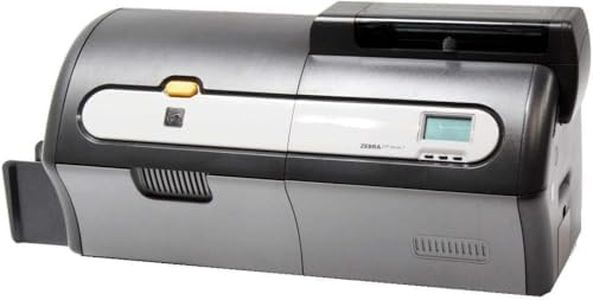
Zebra ZXP Series 7 Dual Sided ID Card Printer USB and Ethernet connectivity Z72-000C0000US00 (Renewed)
The Zebra ZXP Series 7 is a reliable card printer designed primarily for office use, offering dual-sided printing which is handy for producing professional ID cards with information on both sides. It uses dye sublimation and thermal printing technologies, which provide good color quality at a resolution of 900 x 900 dpi, suitable for clear images and text on cards. The printer is relatively fast, capable of printing about 9 cards per minute in black and white, making it efficient enough for moderate workloads. It handles standard card sizes of about 3.37 x 2.125 inches, which fits most ID or membership cards.
Connectivity options include both USB and Ethernet, allowing easy connection to a single computer or a network, which is convenient for office setups. This renewed model offers only basic printing functions without built-in lamination or card encoding features, which may be a drawback if you need extra durability or security features like magnetic stripe or smart chip encoding. Software compatibility is generally good with laptops, and it supports iOS control methods, but it comes with a 90-day limited warranty.
This printer is suitable for users who want a straightforward, moderately fast, dual-sided card printer with network capabilities. However, if lamination or advanced encoding features are required, alternative models may be more appropriate.
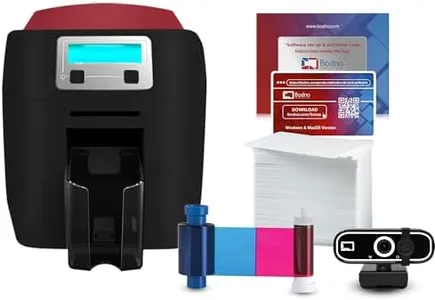
Bodno Magicard 400X Dual Sided ID Card Printer & Complete Supplies Package ID Software - Silver Edition
Most important from
8 reviews
The Bodno Magicard 400X is a solid choice if you need a reliable ID card printer for tasks like employee badges, student IDs, or membership cards. It uses Direct to Card printing technology with a resolution of 300 x 300 dpi, ensuring clear and vibrant color prints thanks to the included YMCKO ribbon. Dual-sided printing is automatic, allowing you to create more detailed cards without flipping them manually. The printer connects via USB, which is straightforward but might feel limiting if you want wireless options.
Print speed is modest—about 3 color cards per minute—making it best suited for small to medium batches rather than high-volume printing. It handles standard card sizes (CR-80) and comes with a 50-card capacity, making it practical for everyday use. One notable advantage is the software package, especially the Silver Edition’s ability to auto-create cards from Excel or CSV files, which can save a lot of time when working with lists of people. Additionally, the 4-year warranty and lifetime software support add good value and peace of mind.
On the downside, it lacks advanced encoding or lamination features, so if you need secure cards with magnetic stripes or RFID, or extra durability via lamination, you would need additional solutions. Also, USB-only connectivity means the printer is less flexible in modern office setups that favor wireless. This makes the Bodno Magicard 400X well-suited for organizations needing straightforward, high-quality dual-sided ID cards without complex extras, especially if you value included supplies and strong software support.
Most important from
8 reviews
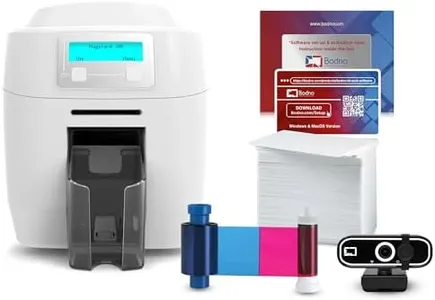
Bodno Magicard 400X Dual Sided ID Card Printer & Complete Supplies Package ID Software - Gold Edition
Most important from
2 reviews
The Bodno Magicard 400X is a solid choice if you're looking for a reliable ID card printer that handles dual-sided printing with ease. It uses direct-to-card printing technology, which delivers good quality images at 300 x 300 dpi resolution—enough for clear employee badges, student IDs, or membership cards. The included 300-print YMCKO ribbon lets you start printing vibrant, full-color cards right away without extra purchases.
The color print speed is about 3 cards per minute, while its monochrome speed is faster, up to 10 cards per minute, suitable for small to medium volume needs. The printer supports standard CR-80 sized cards, common in many ID applications, but it does not include lamination or advanced encoding options, so it may not cover those features. Connectivity is straightforward with USB, making setup simple, though it does not offer wireless options.
The bundled Bodno Gold Edition software with a lifetime license is a notable advantage, offering features like 2D barcode printing, easy integration with popular databases, and automatic face cropping to streamline card design. The 4-year warranty and lifetime software support add confidence in its durability and ongoing usability. Its weight and size make it portable but not very light, so it is better suited for a fixed workspace rather than frequent relocation. This printer is well suited for small businesses or organizations that require an all-in-one package for professional-quality, dual-sided ID cards without complex encoding or laminating functions.
Most important from
2 reviews
Buying Guide for the Best Card Printers
Choosing the right card printer can be a bit overwhelming, but with the right approach, you can find a model that perfectly fits your needs. Card printers are used for printing ID cards, membership cards, loyalty cards, and more. To make an informed decision, you need to consider several key specifications that will determine the printer's suitability for your specific requirements. Understanding these specs will help you navigate through the options and select the best card printer for your needs.FAQ
Most Popular Categories Right Now


