We Use CookiesWe use cookies to enhance the security, performance, functionality and for analytical and promotional activities. By continuing to browse this site you are agreeing to our privacy policy

10 Best Canon Home Photo Printers 2026 in the United States
How do we rank products for you?

Our technology thoroughly searches through the online shopping world, reviewing hundreds of sites. We then process and analyze this information, updating in real-time to bring you the latest top-rated products. This way, you always get the best and most current options available.

headphones-stars

Our Top Picks

#1

Winner

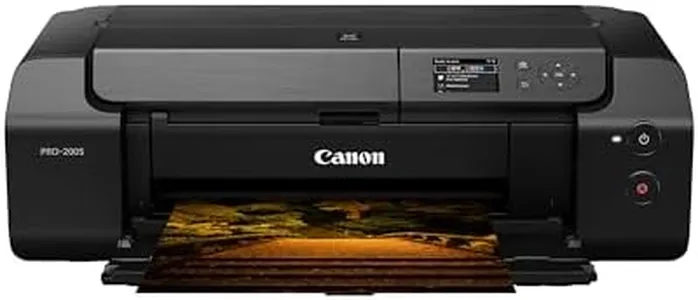
Canon PIXMA PRO-200 Wireless Professional Inkjet Photo Printer

Rating
10.0
Chosen by1,224
Print Resolution
Ink System
Print Speed

Most important from
823 reviews

Print Resolution
The printer produces gorgeous prints with a rich color range that makes it hard to go back to regular printers.
Ink System
The printer comes with a full set of ink cartridges and sample paper, contrary to what some may believe.
Print Speed
The print speed is reasonable, not too fast nor too slow, matching user expectations for high-quality prints.
Connectivity Options
Setup is straightforward, with clear instructions and an easy Wi-Fi connection process.

The Canon PIXMA PRO-200 Wireless Professional Inkjet Photo Printer is designed to deliver high-quality photo prints at home. One of its standout features is the 8-color dye-based ink system, which ensures rich, vibrant prints, ideal for professional-quality photos. The print resolution of 4800 x 2400 dpi further contributes to the sharpness and detail of the prints, making it a great choice for photography enthusiasts. Additionally, its relatively compact design makes it easy to fit into smaller spaces, whether at home or in a studio setting.

The printer is capable of producing bordered A3+ prints in about 90 seconds, which is fairly efficient for high-quality photo prints. Its versatility in handling various paper sizes, including borderless prints up to 13”x19”, is also a significant advantage for those who need flexible printing options. Connectivity is another strong point, with both wired and wireless options available, allowing for convenient printing from various devices, including smartphones. The built-in 3-inch LCD display is a handy feature for monitoring ink levels and performing maintenance tasks, enhancing ease of use.

On the downside, the print speed, capped at 1 ppm for both monochrome and color, is relatively slow, which might not be suitable for users looking for faster print jobs. The printer's weight of 40.5 pounds could also be a drawback for those needing a more portable option. However, the inclusion of Canon’s Professional Print & Layout software simplifies the printing process, allowing users to spend more time on their creative work. The integration with Amazon's Alexa for smart reorders is a useful feature for ensuring you never run out of ink, adding to the printer's convenience. This printer is best suited for photography enthusiasts and professionals who prioritize print quality and versatility over speed.

Rating
10.0
Chosen by1,224
Print Resolution
Ink System
Print Speed

Most important from
823 reviews

Print Resolution
The printer produces gorgeous prints with a rich color range that makes it hard to go back to regular printers.
Ink System
The printer comes with a full set of ink cartridges and sample paper, contrary to what some may believe.
Print Speed
The print speed is reasonable, not too fast nor too slow, matching user expectations for high-quality prints.
Connectivity Options
Setup is straightforward, with clear instructions and an easy Wi-Fi connection process.
#2

Canon PIXMA PRO-200S Professional 13" Wireless Inkjet Photo Printer with 3.0" Color LCD Monitor, 8-Color Dye-Based Ink, Black

Rating
8.5
Print Resolution
Ink System
Connectivity Options

Most important from
154 reviews

Print Resolution
The printer produces vibrant, high-quality prints with excellent color range and quality.
Ink System
The printer comes with a full set of ink cartridges, which is a significant value add.
Connectivity Options
Connectivity via Wi-Fi works well, and the printer supports wireless printing from multiple devices.
Paper Handling
It is a hefty and robust machine, capable of handling various print sizes, including 13x19 inches.

The Canon PIXMA PRO-200S stands out with its 8-color dye-based ink system, which produces vibrant and high-quality photo prints, making it ideal for home photo printing. The ability to handle borderless printing for various sizes, up to 13” x 19”, is a notable advantage, catering to diverse printing needs.

Its compact design offers the convenience of saving space in your home or studio. The printer's high-speed printing capability is impressive, delivering a bordered A3+ print in just 90 seconds and an 8” x 10” print in 53 seconds, which is great for those who need quick outputs. The 3.0” color LCD monitor makes it easy to check ink levels and printer settings, enhancing user experience.

Connectivity via Wi-Fi adds to its convenience, allowing for wireless printing from multiple devices. However, the printer's speed for monochrome and color prints is modest at 2 ppm, which might be a drawback for users who need faster document printing. Additionally, weighing 32 pounds, it might be cumbersome for some users to move or set up. The Canon PIXMA PRO-200S is a solid choice for those primarily focused on high-quality photo printing at home, supported by its user-friendly features.

Rating
8.5
Print Resolution
Ink System
Connectivity Options

Most important from
154 reviews

Print Resolution
The printer produces vibrant, high-quality prints with excellent color range and quality.
Ink System
The printer comes with a full set of ink cartridges, which is a significant value add.
Connectivity Options
Connectivity via Wi-Fi works well, and the printer supports wireless printing from multiple devices.
Paper Handling
It is a hefty and robust machine, capable of handling various print sizes, including 13x19 inches.
#3

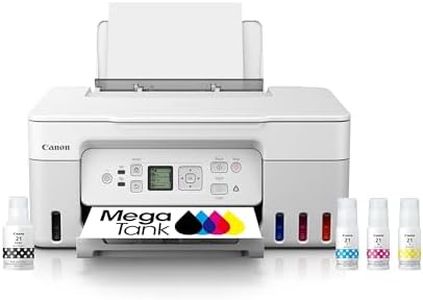
Canon Megatank G3290 All-in-One Wireless Supertank [Megatank] Printer | Print, Copy Scan | Mobile Printing |2.7" LCD Color Touchscreen | Auto Duplex

Rating
8.5
Print Resolution
Ink System
Print Speed

Most important from
601 reviews

Print Resolution
Print quality is impressive for the price, especially when settings are adjusted to Matte Photo Paper.
Ink System
Refillable ink tanks make printing much more cost-effective in the long run.
Print Speed
Print speed is adequate for everyday use, but it slows down with better color density settings.
Connectivity Options
The printer is versatile, working well with both desktop and mobile devices.
Paper Handling
The printer does not have automatic double-sided printing, which can be a drawback for some users.
Additional Features
Setting up the printer using the Windows app is incredibly straightforward and user-friendly.

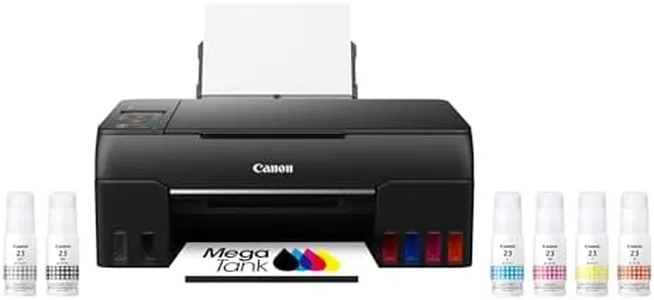
The Canon Megatank G3290 All-in-One Wireless Supertank Printer is a versatile device designed for home photo printing. One of its standout features is the high ink capacity, allowing users to print up to 6,000 black & white and 7,700 color pages with a single set of inks, which can significantly reduce ink costs over time. The printer includes up to 2 years of ink right out of the box, making it a cost-effective choice for heavy users. The wireless capability and mobile printing options add to its convenience, and the 2.7” LCD color touchscreen enhances ease of use.

Auto duplex printing is a valuable feature for saving paper and time, and the borderless printing function is excellent for photo enthusiasts wanting edge-to-edge prints. The maximum print resolution of 1200 dpi ensures good quality prints, suitable for photos and detailed documents. However, there are some drawbacks. The print speeds are relatively slow, with a maximum of 11 ppm for monochrome and only 6 ppm for color, which may be a concern for those needing to print large volumes quickly.

The paper handling could be more robust with only one tray and a 100-sheet output capacity, potentially requiring more frequent refills. Connectivity is decent with Wi-Fi and USB options, but it's limited to one USB port. The printer's weight of 14.2 pounds makes it moderately heavy for a home device, and its dimensions require a fair amount of desk space. While it supports a range of paper sizes and types, the max input sheet capacity is also just 100 sheets, which may not be sufficient for high-volume printing tasks. The Canon Megatank G3290 is a cost-efficient and feature-rich option for home users focused on photo printing and reducing ink costs, though it may not meet the needs of those requiring faster speeds and larger paper handling capabilities.

Rating
8.5
Print Resolution
Ink System
Print Speed

Most important from
601 reviews

Print Resolution
Print quality is impressive for the price, especially when settings are adjusted to Matte Photo Paper.
Ink System
Refillable ink tanks make printing much more cost-effective in the long run.
Print Speed
Print speed is adequate for everyday use, but it slows down with better color density settings.
Connectivity Options
The printer is versatile, working well with both desktop and mobile devices.
Paper Handling
The printer does not have automatic double-sided printing, which can be a drawback for some users.
Additional Features
Setting up the printer using the Windows app is incredibly straightforward and user-friendly.

Buying Guide for the Best Canon Home Photo Printers

Choosing the right Canon home photo printer can be a rewarding experience, especially if you enjoy capturing and printing your memories. The key to finding the best fit for you is understanding the various specifications and how they align with your needs. Here are some important specs to consider when selecting a Canon home photo printer.
Print ResolutionPrint resolution, measured in dots per inch (DPI), determines the clarity and detail of your printed photos. Higher DPI values mean more detailed and sharper images. For high-quality photo prints, look for a printer with at least 4800 x 1200 DPI. If you are a casual user who prints photos occasionally, a lower DPI might suffice, but for professional or high-quality prints, aim for the highest DPI you can find.
Ink SystemThe ink system refers to the number and type of ink cartridges a printer uses. Canon photo printers typically use either a four-color (CMYK) or a more advanced six-color system. The six-color system includes additional colors like light cyan and light magenta, which can produce more accurate and vibrant photos. If you are looking for professional-grade prints, opt for a printer with a six-color system. For everyday photo printing, a four-color system should be adequate.
Print SpeedPrint speed, measured in pages per minute (PPM), indicates how quickly a printer can produce prints. While this might not be as crucial for occasional photo printing, it becomes important if you plan to print large volumes of photos. For home use, a print speed of around 10-15 PPM for color prints is generally sufficient. If you need faster output, look for printers with higher PPM values.
Connectivity OptionsConnectivity options determine how you can connect your devices to the printer. Common options include USB, Wi-Fi, and Bluetooth. Wi-Fi and Bluetooth connectivity allow for wireless printing from your smartphone, tablet, or computer, which can be very convenient. If you prefer a direct connection, USB is a reliable choice. Consider your typical usage and choose a printer with the connectivity options that best suit your needs.
Paper HandlingPaper handling refers to the types and sizes of paper a printer can accommodate. For photo printing, it's important to choose a printer that can handle various photo paper sizes, such as 4x6, 5x7, and 8x10 inches. Some printers also offer borderless printing, which is ideal for photos. If you plan to print a variety of photo sizes, ensure the printer supports them. Additionally, check the paper tray capacity if you plan to print in large quantities.
Additional FeaturesAdditional features can enhance your printing experience. Look for features like an LCD screen for easy navigation, memory card slots for direct printing from your camera, and mobile printing capabilities. Some printers also offer editing tools and filters that can be applied directly from the printer. Consider which additional features will be most useful for your photo printing needs and choose a printer that offers them.

FAQ

Most Popular Categories Right Now