We Use CookiesWe use cookies to enhance the security, performance, functionality and for analytical and promotional activities. By continuing to browse this site you are agreeing to our privacy policy

10 Best Budget Wireless Printer 2026 in the United States

How do we rank products for you?

Our technology thoroughly searches through the online shopping world, reviewing hundreds of sites. We then process and analyze this information, updating in real-time to bring you the latest top-rated products. This way, you always get the best and most current options available.

headphones-stars

Our Top Picks

#1

Winner

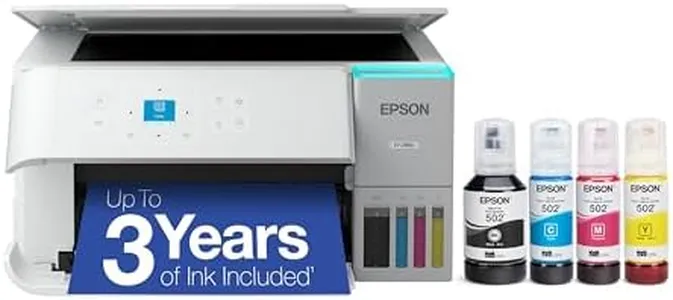
Epson EcoTank ET-2800 Wireless Color All-in-One Cartridge-Free Supertank with Scan and Copy, The Ideal Basic Home Printer - White

Rating
10.0
Chosen by1,459
Print Quality (DPI)
Connectivity Options
Ink or Toner Cost

Most important from
20317 reviews

Print Quality (DPI)
Print quality is excellent, producing bright and vivid photos without any smudges or off-colors.
Connectivity Options
Entering the WiFi password is cumbersome due to the small display.
Ink or Toner Cost
The ink longevity is outstanding, with hundreds of photos printed and the tanks still mostly full.
Multifunction Features
The scanner works great and the keypad is easy to read and use.
Ease of Use
Setup is a breeze with straightforward, step-by-step instructions, taking only about 10 minutes.

The Epson EcoTank ET-2800 is a budget-friendly wireless color all-in-one printer that is well-suited for basic home use. One of its standout strengths is the cartridge-free supertank system, which provides high-capacity ink tanks. This means significant savings on ink costs and fewer interruptions for ink replacements, with enough ink included to print up to 4,500 pages in black and 7,500 in color. This can be particularly beneficial for those who print frequently and wish to reduce their environmental footprint by minimizing cartridge waste.

In terms of print quality, the printer offers a resolution of 5760 x 1440 DPI, which is impressive for this category, producing sharp text and vibrant color images. However, it is worth noting that the print speed is modest, with a maximum of 10 pages per minute (ppm) for monochrome and 5 ppm for color, which may be slower than some users prefer.

Connectivity options are flexible, including both wired and wireless capabilities, and mobile printing is supported, offering convenience for various devices. The inclusion of a built-in scanner and copier further enhances its multifunctional appeal, allowing for high-resolution scanning and easy document management.

Ease of use is facilitated by the color display, which aids in navigation and operation. However, it lacks duplex printing capability, which means manual intervention is required for double-sided prints. Paper handling is basic but sufficient for home use, with a 100-sheet input capacity that should meet the average household's needs.

The printer is lightweight at 8.8 pounds, making it easy to move if needed, and it comes with a 2-year limited warranty for added peace of mind. In summary, the Epson EcoTank ET-2800 offers substantial ink savings and decent print quality, making it an excellent choice for home users who prioritize cost-efficiency and environmental benefits, but it may not be the best option for those needing faster print speeds or automatic duplex printing.

Rating
10.0
Chosen by1,459
Print Quality (DPI)
Connectivity Options
Ink or Toner Cost

Most important from
20317 reviews

Print Quality (DPI)
Print quality is excellent, producing bright and vivid photos without any smudges or off-colors.
Connectivity Options
Entering the WiFi password is cumbersome due to the small display.
Ink or Toner Cost
The ink longevity is outstanding, with hundreds of photos printed and the tanks still mostly full.
Multifunction Features
The scanner works great and the keypad is easy to read and use.
Ease of Use
Setup is a breeze with straightforward, step-by-step instructions, taking only about 10 minutes.
#2

Epson EcoTank ET-2803 Wireless Color All-in-One Cartridge-Free Supertank Printer with Scan, Copy and AirPrint Support

Rating
8.8
Ease of Use
Print Quality (DPI)
Ink or Toner Cost

Most important from
20317 reviews

Ease of Use
Setup is straightforward and can be easily done using a phone, making the initial experience hassle-free.
Print Quality (DPI)
Print quality is excellent, producing sharp, vivid photos and clear black-and-white documents without smudging.
Ink or Toner Cost
The ink tanks last significantly longer than traditional cartridges, offering impressive cost savings and reducing plastic waste.
Connectivity Options
Wireless connectivity can be inconsistent at times, with occasional printer recognition issues and error messages that require manual overrides.
Multifunction Features
While lacking advanced features like automatic document feeder and duplex printing, it covers essential printing, scanning, and copying needs well for home or small office use.

The Epson EcoTank ET-2803 is a solid choice for anyone looking for an affordable wireless printer that goes beyond just printing. It offers good print quality with a high maximum resolution (5760 x 1440 DPI), ensuring sharp and colorful documents and photos. Its print speed is moderate—about 10 pages per minute for black and white and 5 for color—making it better suited for light to medium use rather than heavy office tasks. This model uses refillable ink tanks instead of cartridges, which can save you a lot on ink costs over time and makes it budget-friendly in the long run.

The wireless connectivity options, including Wi-Fi and USB, allow you to print from various devices easily, and it supports AirPrint, which is convenient for Apple users. It handles standard paper sizes well and has a 100-sheet input tray, but it lacks automatic double-sided printing, which might slow things down if you print many two-sided documents. In addition to printing, it also scans and copies, making it a versatile all-in-one for home or small office use. While the printer is simple to set up and control via an app, the absence of an automatic document feeder means scanning multiple pages can be somewhat tedious.

For those seeking low running costs, good print quality, and wireless convenience without the need for high-speed or heavy-duty features, the Epson EcoTank ET-2803 is a practical and economical option.

Rating
8.8
Ease of Use
Print Quality (DPI)
Ink or Toner Cost

Most important from
20317 reviews

Ease of Use
Setup is straightforward and can be easily done using a phone, making the initial experience hassle-free.
Print Quality (DPI)
Print quality is excellent, producing sharp, vivid photos and clear black-and-white documents without smudging.
Ink or Toner Cost
The ink tanks last significantly longer than traditional cartridges, offering impressive cost savings and reducing plastic waste.
Connectivity Options
Wireless connectivity can be inconsistent at times, with occasional printer recognition issues and error messages that require manual overrides.
Multifunction Features
While lacking advanced features like automatic document feeder and duplex printing, it covers essential printing, scanning, and copying needs well for home or small office use.
#3

Brother MFC-J1010DW Wireless Color Inkjet All-in-One Printer, Duplex Printing, Mobile & Cloud Print, Compact Design, 1.8" Color Display, Works with Alexa

Rating
7.6
Print Quality (DPI)
Connectivity Options
Ink or Toner Cost

Most important from
8990 reviews

Print Quality (DPI)
Print quality, including edge-to-edge photo printing, is impressive for a budget printer.
Connectivity Options
Printing from mobile devices is quick and convenient with the Brother Mobile Connect app.
Ink or Toner Cost
Brother's ink subscription service offers a cost-effective solution for low-use printing needs.
Paper Handling
Auto-duplex printing works well, though it may require a bit of adjustment initially.
Multifunction Features
The automatic document feeder is effective and appreciated, especially for scanning and copying multiple pages.
Ease of Use
Setting up the printer is smooth and straightforward, even for those with limited technical skills.

The Brother MFC-J1010DW Wireless Color Inkjet All-in-One Printer is a compact and budget-friendly option suitable for home offices or small office spaces. It offers versatile functionality, including printing, copying, scanning, and duplex (double-sided) printing, all within a compact design. The print quality is quite good with a maximum resolution of 6000 x 1200 dpi for Windows and 3600 x 1200 dpi for Mac, which ensures sharp and clear prints for both text and images.

Its print speed is moderate, with 17 pages per minute for monochrome and 9.5 pages per minute for color, which might be a bit slow for high-volume printing tasks. Connectivity is convenient with options like Wi-Fi, USB, and Ethernet, plus mobile device compatibility through the Brother Mobile Connect app, enabling easy management and operation from smartphones and tablets. The 150-sheet capacity paper tray is decent for small to medium tasks, and the 20-page automatic document feeder adds to the convenience for scanning and copying multiple pages.

Ink costs could be a consideration; however, it supports Amazon Dash Replenishment, which can simplify ordering replacements. The printer's initial setup and operation are user-friendly, making it suitable even for those with limited technical skills. On the downside, the memory capacity is fairly limited at 64 MB, which might not handle complex print jobs as efficiently. Additionally, while it supports auto-duplex printing, the printing speed may not satisfy users who require faster output for large documents. The Brother MFC-J1010DW is a solid choice for individuals or small office environments looking for a reliable, multifunctional, and budget-conscious wireless printer.

Rating
7.6
Print Quality (DPI)
Connectivity Options
Ink or Toner Cost

Most important from
8990 reviews

Print Quality (DPI)
Print quality, including edge-to-edge photo printing, is impressive for a budget printer.
Connectivity Options
Printing from mobile devices is quick and convenient with the Brother Mobile Connect app.
Ink or Toner Cost
Brother's ink subscription service offers a cost-effective solution for low-use printing needs.
Paper Handling
Auto-duplex printing works well, though it may require a bit of adjustment initially.
Multifunction Features
The automatic document feeder is effective and appreciated, especially for scanning and copying multiple pages.
Ease of Use
Setting up the printer is smooth and straightforward, even for those with limited technical skills.

Buying Guide for the Best Budget Wireless Printer

Choosing the right budget wireless printer involves understanding your specific needs and matching them with the printer's features. Whether you need it for home, office, or school use, knowing what to look for can help you make an informed decision. Here are some key specifications to consider when selecting a budget wireless printer.
Print Quality (DPI)Print quality is measured in DPI (dots per inch). This spec indicates how detailed and sharp the printed output will be. Higher DPI means better print quality. For general home use, a DPI of 600x600 is usually sufficient. If you need to print high-quality photos or detailed graphics, look for a printer with a higher DPI, such as 1200x1200 or more.
Print Speed (PPM)Print speed is measured in PPM (pages per minute) and indicates how fast the printer can produce pages. This is important if you need to print large documents frequently. For occasional home use, a speed of 10-15 PPM is adequate. For more frequent or office use, consider a printer with a speed of 20 PPM or higher.
Connectivity OptionsWireless printers offer various connectivity options such as Wi-Fi, Bluetooth, and mobile printing capabilities. Wi-Fi is essential for connecting the printer to your home or office network. Bluetooth is useful for direct printing from nearby devices. Mobile printing features like AirPrint or Google Cloud Print allow you to print directly from your smartphone or tablet. Choose a printer with the connectivity options that match your devices and usage habits.
Ink or Toner CostThe cost of ink or toner can add up over time, so it's important to consider this when choosing a printer. Inkjet printers use liquid ink, which can be more expensive per page but is better for high-quality color prints. Laser printers use toner, which is generally more cost-effective for high-volume printing. Consider how often you'll need to replace the ink or toner and the cost of replacements.
Paper HandlingPaper handling refers to the types and sizes of paper the printer can accommodate, as well as the capacity of the paper tray. If you need to print on different paper sizes or types (like envelopes or cardstock), make sure the printer supports them. A larger paper tray capacity is useful for reducing the frequency of refilling, especially in an office setting. For home use, a standard tray capacity of 100-150 sheets is usually sufficient.
Multifunction FeaturesMany budget wireless printers come with additional features like scanning, copying, and faxing. These multifunction printers can save space and money by combining several devices into one. If you need these additional functions, look for a printer that offers them. If you only need to print, a single-function printer might be a better choice.
Ease of UseEase of use includes factors like setup, user interface, and maintenance. A printer with a straightforward setup process and an intuitive control panel can save you time and frustration. Look for user reviews or demonstrations to get an idea of how easy the printer is to use. Consider features like touchscreen controls, easy access to ink or toner cartridges, and clear instructions.

FAQ

Most Popular Categories Right Now