10 Best Laptop Docking Stations 2026 in the United States

Related Products
Up to 17% off

Our technology thoroughly searches through the online shopping world, reviewing hundreds of sites. We then process and analyze this information, updating in real-time to bring you the latest top-rated products. This way, you always get the best and most current options available.

Our Top Picks
Winner
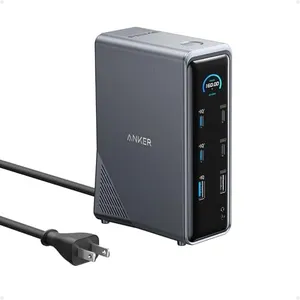
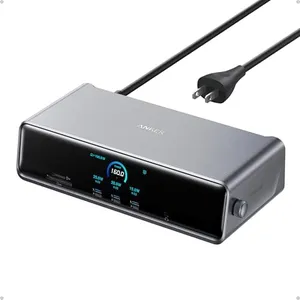
Anker Prime Docking Station, 14-Port with 160W Max Output, 10Gbps Fast Data Transfer, Real-Time Smart Interface, Audio and Ethernet Ports, Dual 4K Displays for Dell, HP, Lenovo and More
Most important from
577 reviews
The Anker Prime Docking Station offers a robust 14-in-1 connectivity solution, making it ideal for users needing to connect multiple devices simultaneously. With a 160W total power output, it can charge up to four devices concurrently, which is impressive. The docking station supports ultra-fast data transfer speeds of up to 10Gbps, ensuring efficient data management across various devices. Display support is another strong point, as it can handle dual 4K displays, although macOS users should note that the external monitors will show identical content.
Compatibility is broad, covering USB-C, USB4, and Thunderbolt connections, and it works with Windows 10/11 and ChromeOS. However, it does not support Linux, which could be a drawback for some users. The smart interface providing real-time feedback on power levels and connections is a useful feature for maintaining device performance. In terms of design, the docking station is compact and well-built, although it weighs a bit at 3.3 pounds. Network connectivity is solid with the inclusion of Ethernet ports.
This docking station is particularly well-suited for professionals needing a reliable and powerful hub for multiple devices but may not be the best fit for Linux users or those using macOS who require different display outputs on multiple monitors.
Most important from
577 reviews
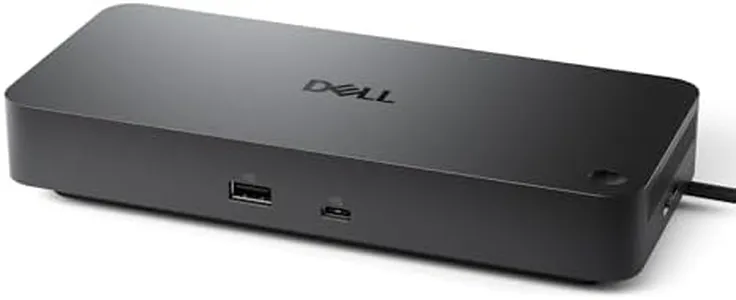
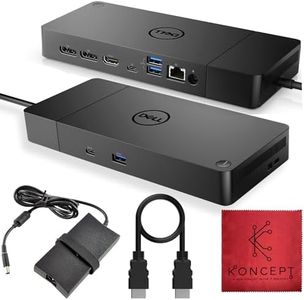
Dell Pro Dock WD25 - USB Type-C with DP Alt Mode Connector, DisplayPort/HDMI/USB 3.2 Gen2 Connectivity, Up to 100-Watt Power delivery - Black
Most important from
166 reviews
The Dell Pro Dock WD25 is a solid choice if you need a docking station that works well with both Dell and non-Dell laptops, offering up to 100W power delivery to keep your laptop charged during busy workdays. It supports multiple display connections, including DisplayPort and HDMI, allowing you to connect up to four high-resolution monitors, which is great for multitasking. The dock includes USB 3.2 Gen 2 ports, meaning faster data transfer speeds for your accessories, and it has reliable network connectivity to keep you online with stable performance.
The design is thoughtful and durable, featuring an ambidextrous USB-C cable that can be routed to either side to suit your desk setup. It also stands out for being environmentally friendly, using recycled materials and reducing power consumption significantly when in standby mode. On the downside, while it supports many modern laptops, its full potential is best unlocked with newer Dell AI PCs, so some older or less common laptop models might see limited compatibility or features.
With an average size and weight, the dock is more suited for a fixed workspace rather than frequent travel. For those seeking a reliable, efficient docking station that balances power, connectivity, and sustainability, the Dell WD25 remains a strong contender.
Most important from
166 reviews
Anker Prime TB5 Docking Station, 14-in-1 Thunderbolt 5 Dock with 120Gbps Max Transfer, Thunderbolt Dock with 140W Max Charging, Cooling System, Up to 8K, Dual Display for TBT 5/4 Laptops
Most important from
362 reviews
The Anker Prime TB5 is a feature-packed 14-in-1 docking station designed for users needing a versatile hub for Thunderbolt 5 or 4 laptops, including MacBooks and compatible Windows models. It offers an impressive array of ports—two Thunderbolt 5 downstream, two USB-C, three USB-A, an SD/TF card reader, an HDMI or DisplayPort 2.1, a 2.5Gbps Ethernet port, and an audio jack—covering most connectivity needs. With a powerful 140W charging capacity on the upstream port and additional 45W shared on the front USB-C ports, it can charge multiple devices quickly, which is great for busy workstations. Display support is strong, allowing up to dual 8K@60Hz monitors on Thunderbolt 5 Windows laptops, though MacBooks with M1, M2, or M3 chips and Windows laptops limited to DisplayPort Alt Mode will only handle one external display, which might be a limitation for some users.
The dock’s built-in active cooling system helps prevent overheating during heavy use, contributing to reliability and longevity. Its compact size and clean gray design fit well on a desk without clutter. The inclusion of a 2.5Gbps Ethernet port ensures faster wired network speeds compared to standard 1Gbps docks, which benefits those needing stable high-speed internet. Some users may find the single HDMI/DisplayPort port a bit limiting, and the dock’s weight is on the heavier side for portability.
This docking station suits professionals or creators who demand fast data transfers, strong charging, and high-resolution multi-monitor support, especially if their laptop supports full Thunderbolt 5 features.
Most important from
362 reviews
Buying Guide for the Best Laptop Docking Stations
Choosing the right laptop docking station can significantly enhance your productivity by expanding the connectivity options of your laptop. A docking station allows you to connect multiple peripherals such as monitors, keyboards, mice, and external storage devices, all through a single connection to your laptop. To find the best docking station for your needs, consider the following key specifications and how they align with your usage requirements.FAQ
Most Popular Categories Right Now


