10 Best Basic Wireless Printers 2026 in the United States




Related Products
Up to 11% off



Recommended lists


Our technology thoroughly searches through the online shopping world, reviewing hundreds of sites. We then process and analyze this information, updating in real-time to bring you the latest top-rated products. This way, you always get the best and most current options available.

Our Top Picks
Winner
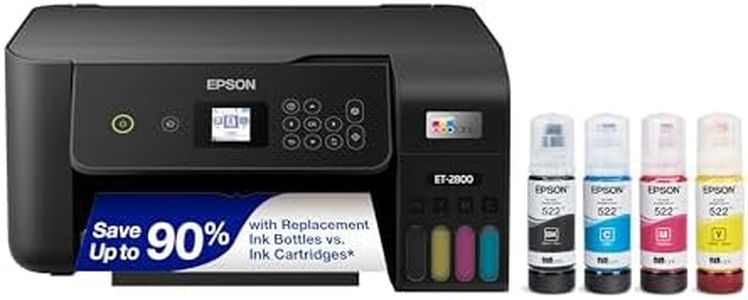
Epson EcoTank ET-2800 Wireless Color All-in-One Cartridge-Free Ink Supertank Printer with Scan and Copy for Home Use, Black
Most important from
7845 reviews
The Epson EcoTank ET-2800 is a solid choice if you want a wireless color printer for home use that keeps ink costs low and is easy to manage. Instead of traditional cartridges, it uses refillable ink bottles, which means you can print thousands of pages before needing a refill—up to 4,500 in black and 7,500 in color—saving you money and hassle over time. Print quality is quite good, with a high maximum resolution of 5760 x 1440 dpi, producing sharp documents and decent photos. It prints black and white pages at about 10 pages per minute, which is reasonable for basic home tasks, though color printing is slower at 5 pages per minute, so it may not be ideal if you frequently print large color documents.
The printer connects easily via USB or Wi-Fi, allowing mobile printing through an app, which adds convenience. Paper handling is straightforward with a single 100-sheet tray, but it only supports simplex printing, so it can’t automatically print on both sides of the paper—something to keep in mind if you want to save paper or create double-sided documents. The flatbed scanner and copier functions add versatility for everyday tasks. Users generally find it easy to set up and operate, especially with the LCD screen and app control.
Epson recommends using genuine ink bottles to maintain print quality and avoid possible damage. If you want a reliable, cost-effective printer for typical home printing needs without the complexity of cartridges, the EcoTank ET-2800 is a fitting option, though it’s not designed for heavy-duty or fast color printing and lacks duplex capability.
Most important from
7845 reviews
Brother DCP-L2640DW Wireless Compact Monochrome Multi-Function Laser Printer with Copy and Scan, Duplex, Mobile, Black & White | Includes Refresh Subscription Trial(1), Works with Alexa
Most important from
3537 reviews
The Brother DCP-L2640DW is a solid choice for anyone needing a compact, black-and-white laser printer with copying and scanning capabilities. It offers sharp print quality at 1200 x 1200 dpi, making text documents clear and professional-looking. Print speed is impressive at up to 36 pages per minute, suitable for small business environments or busy home offices where speed matters. Connectivity options are modern and flexible, including dual-band Wi-Fi, Ethernet, and USB, which means it can easily connect to multiple devices or networks without fuss.
Paper handling is convenient with a 250-sheet input capacity and a 50-page auto document feeder that aids multi-page scanning and copying tasks. Automatic duplex printing helps save paper and effort by printing on both sides without manual intervention. Brother’s mobile app adds ease by allowing remote print and scan management, boosting productivity on the go. One potential downside is that this is a monochrome printer, so it’s not suitable if you need color printing. Also, while toner costs can be managed through Brother's subscription service offering savings, laser toner replacements are generally pricier than inkjet cartridges.
Setup and operation are user-friendly, reinforced by a clear LCD and straightforward controls. If you need a reliable, speedy, and cost-conscious monochrome printer with scanning and copying for basic wireless use, this Brother model fits well—especially for small businesses or home offices focused on black-and-white document handling.
Most important from
3537 reviews
Epson EcoTank ET-2803 Wireless Color All-in-One Cartridge-Free Supertank Printer with Scan, Copy and AirPrint Support
Most important from
3664 reviews
The Epson EcoTank ET-2803 is a wireless all-in-one printer designed for home, school, or small office use, especially if you want to save money on ink. Its standout feature is the cartridge-free EcoTank system, which uses refillable ink bottles that can print thousands of pages before needing a refill—great if you print regularly and want to avoid the high cost of traditional cartridges. The print quality is good, with sharp text and vibrant colors thanks to its high-resolution printing technology, making it suitable for everyday documents and decent color photos.
In terms of speed, it prints about 10 black-and-white pages per minute, which is reasonable for basic tasks, but color printing is slower at around 5 pages per minute. It supports wireless connectivity including Wi-Fi, USB, and can print directly from smartphones via AirPrint or an app, making it convenient for modern use. The paper tray holds up to 100 sheets and handles various paper sizes, but it does not support automatic duplex (double-sided) printing, so you would need to manually flip pages if needed.
The printer includes a flatbed scanner and copier with a color display that eases navigation, adding versatility beyond printing. Setup and ink refilling are user-friendly with easy-fill bottles, though you must use genuine Epson ink to maintain performance and warranty coverage. Power consumption is low, helping keep energy use down. If you need fast color prints or automatic double-sided printing, this model may feel limited. Also, while the upfront price might be higher than cartridge printers, savings come over time with the affordable ink refills. If you prioritize low running costs, solid print quality, and wireless convenience for everyday printing needs, the Epson EcoTank ET-2803 is a smart choice.
Most important from
3664 reviews
Buying Guide for the Best Basic Wireless Printers
Choosing the right wireless printer can be a daunting task, but with the right knowledge, you can find the perfect fit for your needs. Wireless printers offer the convenience of printing from multiple devices without the need for physical connections. To make an informed decision, it's important to understand the key specifications and how they align with your requirements. Here are the essential specs to consider when selecting a basic wireless printer.FAQ
Most Popular Categories Right Now


