We Use CookiesWe use cookies to enhance the security, performance, functionality and for analytical and promotional activities. By continuing to browse this site you are agreeing to our privacy policy

10 Best Automotive Scan Tools 2026 in the United States
How do we rank products for you?

Our technology thoroughly searches through the online shopping world, reviewing hundreds of sites. We then process and analyze this information, updating in real-time to bring you the latest top-rated products. This way, you always get the best and most current options available.

headphones-stars

Our Top Picks

#1

Winner

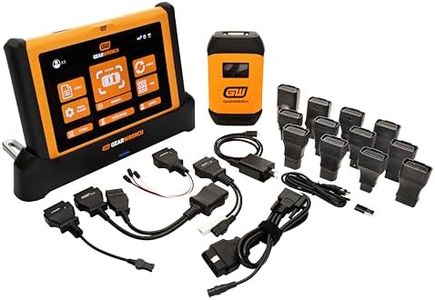
GEARWRENCH 10" Pro Command Wireless Bi-Directional Diagnostic Tablet with Rapid-Charge Dock, Includes 4 Years of Software Updates | GWSMART10

Rating
10.0
Chosen by1,450
Build Quality and Durability
User Interface
Data Storage and Sharing

Most important from
24 reviews

Build Quality and Durability
Designed for heavy daily use, this diagnostic tablet performs reliably across multiple vehicles in professional settings.
User Interface
The 10-inch screen is bright, responsive, and large enough to review data comfortably without constant zooming.
Data Storage and Sharing
Wireless connectivity significantly improves convenience by allowing easy movement around the vehicle without cables.
Functionality
Bi-directional controls enable commanding components and running tests, saving considerable diagnostic time beyond just reading codes.
Software Updates
The software interface is polished and intuitive, with straightforward updates that keep the tool current and efficient.

The GEARWRENCH 10" Pro Command Wireless Diagnostic Tablet is a solid choice for professional mechanics or serious DIYers who need a reliable and powerful scan tool. It supports a wide range of vehicles with universal compatibility and offers over 50 reset and relearn functions, including ABS bleeding and TPMS resetting, which cover many common repair tasks. The tablet’s wireless connection reduces clutter and makes it easy to use around the shop.

It features a large, 10-inch screen running Android 10, providing a user-friendly interface with live data graphs and system mapping to help visualize vehicle issues quickly. The device’s build is rugged enough to handle tough environments and frequent use, and the battery life is designed to last through a full workday. Software updates are included for 4 years, helping keep the tool current with evolving vehicle technology, though after that, they cost $150 per year. Customer reviews are very positive, praising its speed and accuracy.

The initial cost and ongoing update fees might be high for casual users or hobbyists, and while the interface is modern, those less familiar with technology might face a learning curve. The product includes a 2-year manufacturer warranty and support from Apex Tool Group, adding peace of mind. For those who need a robust diagnostic tablet with advanced features and reliable wireless connectivity for professional or heavy use, this GEARWRENCH model is a strong contender.

Rating
10.0
Chosen by1,450
Build Quality and Durability
User Interface
Data Storage and Sharing

Most important from
24 reviews

Build Quality and Durability
Designed for heavy daily use, this diagnostic tablet performs reliably across multiple vehicles in professional settings.
User Interface
The 10-inch screen is bright, responsive, and large enough to review data comfortably without constant zooming.
Data Storage and Sharing
Wireless connectivity significantly improves convenience by allowing easy movement around the vehicle without cables.
Functionality
Bi-directional controls enable commanding components and running tests, saving considerable diagnostic time beyond just reading codes.
Software Updates
The software interface is polished and intuitive, with straightforward updates that keep the tool current and efficient.
#2

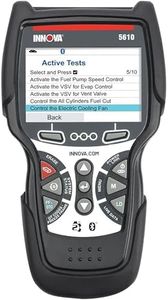
Innova 5610 OBD2 Bidirectional Scan Tool - Understand Your Vehicle, Pinpoint What's Wrong, and Complete Your Repairs with Less Headache, Updates Included, US-Based Technical Support

Rating
8.5
Compatibility
Functionality
User Interface

Most important from
3762 reviews

Compatibility
The tool adapts to different car makes and models, offering enhanced functions based on the vehicle.
Functionality
Exceptional ease of use and a great tool for both home and professional mechanics.
User Interface
The LCD has a bright, large colored screen, making it easy to see.
Data Storage and Sharing
Optional AA battery usage helps in retaining data for later uploads.
Build Quality and Durability
High build quality and fast, immediate connection make it stand out.

The Innova 5610 OBD2 Bidirectional Scan Tool is designed for both casual car owners and professional mechanics looking for reliable diagnostic capabilities. One of its primary strengths is its compatibility with a wide range of vehicles, from 1996 to 2023 models, making it accessible for many users. The bidirectional controls are also a significant advantage, allowing users to perform advanced tests and functions like fuel pump operation and electronic parking brake retraction, giving it a pro-level edge in automotive diagnostics.

The user interface stands out as easy to navigate, supporting multiple languages (English, Spanish, and French), which broadens its usability. With features like live data viewing and enhanced data streams for various systems, the Innova 5610 is suitable for anyone needing in-depth vehicle diagnostics. The inclusion of the RepairSolutions2 app enhances its functionality by providing wireless scanning and access to repair guidance, making it a helpful tool for troubleshooting.

There are a few weaknesses to consider. Some users have pointed out that while the coverage checker is useful, compatibility features may vary across different makes and models. Additionally, while the tool offers a good range of functions, it may not cover every special reset feature available in some vehicles, limiting its effectiveness for advanced users seeking very specific repairs. Lastly, the need for AA batteries could be seen as an inconvenience compared to rechargeable options.

Rating
8.5
Compatibility
Functionality
User Interface

Most important from
3762 reviews

Compatibility
The tool adapts to different car makes and models, offering enhanced functions based on the vehicle.
Functionality
Exceptional ease of use and a great tool for both home and professional mechanics.
User Interface
The LCD has a bright, large colored screen, making it easy to see.
Data Storage and Sharing
Optional AA battery usage helps in retaining data for later uploads.
Build Quality and Durability
High build quality and fast, immediate connection make it stand out.
#3

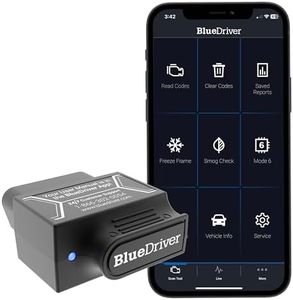
BlueDriver Bluetooth Pro OBDII Scan Tool for iPhone & Android - No Subscription Fee - OBD2 Car Scanner and Code Reader - Diagnose Check Engine, ABS, SRS, Airbag & 7000+ Issues on Vehicles 1996+

Rating
7.9
Compatibility
Functionality
User Interface

Most important from
62957 reviews

Compatibility
Compatible with both iOS and Android, and you can start using it within minutes of setup.
Functionality
This scan tool is a must-have gadget for anyone who wants to understand their vehicle better or save on costly trips to the mechanic.
User Interface
Pairs effortlessly with your smartphone, putting powerful diagnostics right in your hands.

The BlueDriver Bluetooth Pro OBDII Scan Tool is a handy device for anyone looking to manage vehicle diagnostics without the need of a professional mechanic. Its compatibility with all gas-powered vehicles made from 1996 onwards makes it a versatile choice for most users. The ability to read and clear various trouble codes, including ABS and SRS, is a significant advantage, as it provides insights into issues that basic code readers typically miss.

One of the standout features is its user-friendly app available for both iOS and Android. This app not only displays diagnostic information but also provides access to a wealth of repair videos that can help users perform fixes themselves. The wireless Bluetooth connection eliminates the hassle of cords, making it more convenient to use.

While it excels in functionality and ease of use, the BlueDriver is specifically designed for gas vehicles and won't work with diesel or hybrid models. Additionally, it might be overwhelming for complete beginners, as navigating through all the features and interpreting the data can take some time to get used to. The lack of any subscription fees is refreshing, giving users full access to its features without hidden costs.

In terms of build quality, it is compact and lightweight, making it easy to store and carry. However, some users have mentioned that the physical OBDII connector could be more robust for long-term use. For those interested in automotive DIY repairs or just wanting to understand their vehicle better, the BlueDriver offers a compelling package of features, support, and functionality. Just keep in mind its limitations with certain vehicle types and be prepared to spend some time learning how to fully utilize its capabilities.

Rating
7.9
Compatibility
Functionality
User Interface

Most important from
62957 reviews

Compatibility
Compatible with both iOS and Android, and you can start using it within minutes of setup.
Functionality
This scan tool is a must-have gadget for anyone who wants to understand their vehicle better or save on costly trips to the mechanic.
User Interface
Pairs effortlessly with your smartphone, putting powerful diagnostics right in your hands.

Buying Guide for the Best Automotive Scan Tools

Choosing the right automotive scan tool can be a game-changer for anyone who works on cars, whether you're a professional mechanic or a DIY enthusiast. These tools help you diagnose and troubleshoot issues with your vehicle's electronic systems, saving you time and money. To pick the best scan tool for your needs, it's important to understand the key specifications and features that differentiate them. Here's a breakdown of what to look for and how to decide which one is right for you.
CompatibilityCompatibility refers to whether the scan tool can communicate with your vehicle's onboard computer system. This is crucial because not all scan tools work with all vehicles. Generally, scan tools are divided into those that work with OBD-II (for vehicles made after 1996) and those that work with OBD-I (for older vehicles). Make sure the scan tool you choose is compatible with your vehicle's make, model, and year. If you work on multiple vehicles, look for a tool with broad compatibility.
FunctionalityFunctionality encompasses the range of tasks the scan tool can perform, such as reading and clearing error codes, displaying live data, and performing advanced diagnostics. Basic scan tools can read and clear codes, which is sufficient for simple troubleshooting. More advanced tools offer features like ABS/SRS diagnostics, transmission diagnostics, and even bi-directional control, which allows you to interact with the vehicle's systems. Choose a tool based on the complexity of the tasks you need to perform.
User InterfaceThe user interface is how you interact with the scan tool, including the display and navigation system. A clear, easy-to-read display and intuitive navigation can make a big difference in usability. Some tools have simple text-based screens, while others offer color displays with graphical data. If you're not tech-savvy, look for a tool with a straightforward interface. For more detailed diagnostics, a tool with a more advanced display might be beneficial.
Data Storage and SharingData storage and sharing capabilities allow you to save diagnostic information and share it with others. This can be useful for tracking vehicle performance over time or getting a second opinion from another mechanic. Some scan tools have built-in memory, while others use external storage like SD cards. Additionally, some tools offer Wi-Fi or Bluetooth connectivity for easy data transfer. Consider how you plan to use the data and choose a tool that meets those needs.
Software UpdatesSoftware updates ensure that your scan tool remains compatible with new vehicle models and can diagnose the latest issues. Regular updates can add new features and improve existing ones. Some scan tools offer free lifetime updates, while others may require a subscription. If you plan to use the tool for a long time or on a variety of vehicles, look for one with a good update policy.
Build Quality and DurabilityBuild quality and durability refer to how well the scan tool is constructed and how long it will last. A well-built tool can withstand the rigors of a workshop environment, including drops and exposure to dirt and grease. Look for tools with rugged casings and high-quality materials. If you use the tool frequently or in tough conditions, investing in a durable model is essential.
Customer Support and WarrantyCustomer support and warranty are important for resolving any issues you might encounter with your scan tool. Good customer support can help you troubleshoot problems and make the most of your tool's features. A solid warranty provides peace of mind and protection against defects. Check the manufacturer's reputation for customer service and the terms of the warranty before making a purchase.

FAQ

Most Popular Categories Right Now