We Use CookiesWe use cookies to enhance the security, performance, functionality and for analytical and promotional activities. By continuing to browse this site you are agreeing to our privacy policy

10 Best 144 Hz Gaming Monitors 2026 in the United States
How do we rank products for you?

Our technology thoroughly searches through the online shopping world, reviewing hundreds of sites. We then process and analyze this information, updating in real-time to bring you the latest top-rated products. This way, you always get the best and most current options available.

headphones-stars

Our Top Picks

#1

Winner

Alienware AW3423DWF Curved QD-OLED Gaming Monitor - 34-inch Quantum Dot OLED 0.1Ms 165Hz 21:9 Curved Display, 99.3% DCI-P3 Color Gamut, VESA DisplayHDR True Black 400, AMD FreeSync Premium Pro - Black

Rating
10.0
Chosen by1,271
Resolution
Panel Type
Response Time

Most important from
567 reviews

Resolution
The 3440x1440p QD-OLED panel offers exceptional clarity, making even the smallest details in games or movies stand out.
Panel Type
Colors are vivid and vibrant, and the blacks are truly deep, which is where this monitor really shines compared to traditional LED displays.
Response Time
The 0.1ms response time makes a noticeable difference in fast-paced shooters, providing a competitive edge.
Adaptive Sync Technology
The 165Hz refresh rate combined with Adaptive Sync provides a buttery smooth gaming experience with no screen tearing or ghosting.
Connectivity
The monitor’s multiple connectivity options ensure I can plug in all my peripherals without a hitch.
Size and Ergonomics
The 1800R curvature provides an excellent balance between immersion and comfort, drawing me into the action without overwhelming my field of vision.

The Alienware AW3423DWF Curved QD-OLED Gaming Monitor is a 34-inch monitor designed to offer an immersive gaming experience. Its standout feature is the Quantum Dot OLED technology, which enhances color performance and offers true blacks and an infinite contrast ratio. The 21:9 aspect ratio and 3440 x 1440 resolution make it ideal for wide-angle viewing, perfect for gaming and content creation alike.

The 0.1ms response time and 165Hz refresh rate ensure smooth, lag-free gameplay, while AMD FreeSync Premium Pro technology eliminates screen tearing for a seamless experience. However, it's worth noting that the full 165Hz refresh rate is only available via DisplayPort, with HDMI maxing out at 100Hz. In terms of design, the curved 1800R panel and customizable RGB AlienFX lighting add to the monitor's aesthetic appeal. Ergonomically, the monitor is highly adjustable, with options for height, tilt, swivel, and slant adjustments. This makes it easy to set up for comfortable extended use.

For creators, the Creator Mode allows switching between DCI-P3 and sRGB color spaces, providing flexibility based on your needs. The monitor also comes with a 3-year premium warranty that covers OLED burn-in, adding peace of mind regarding its long-term reliability. The monitor is relatively heavy at 20.5 pounds and its price point might be steep compared to other monitors in the market. Nevertheless, for avid gamers and content creators looking for top-notch color accuracy and performance, this monitor is a compelling choice.

Rating
10.0
Chosen by1,271
Resolution
Panel Type
Response Time

Most important from
567 reviews

Resolution
The 3440x1440p QD-OLED panel offers exceptional clarity, making even the smallest details in games or movies stand out.
Panel Type
Colors are vivid and vibrant, and the blacks are truly deep, which is where this monitor really shines compared to traditional LED displays.
Response Time
The 0.1ms response time makes a noticeable difference in fast-paced shooters, providing a competitive edge.
Adaptive Sync Technology
The 165Hz refresh rate combined with Adaptive Sync provides a buttery smooth gaming experience with no screen tearing or ghosting.
Connectivity
The monitor’s multiple connectivity options ensure I can plug in all my peripherals without a hitch.
Size and Ergonomics
The 1800R curvature provides an excellent balance between immersion and comfort, drawing me into the action without overwhelming my field of vision.
#2

Alienware AW2723DF Gaming Monitor - 27-inch (2560 x 1440) 240Hz Display (DP 1.4), 1ms Response Time, NVIDIA G-Sync, Preset OSD Modes, Height/Tilt/Swivel/Pivot Adjustability - Lunar Light

Rating
9.7
Resolution
Panel Type
Response Time

Most important from
448 reviews

Resolution
The 27-inch 1440p display delivers noticeably sharper and more immersive visuals compared to smaller 1080p monitors.
Panel Type
Wide viewing angles and vivid colors from the fast IPS panel contribute to an immersive experience beyond just gaming.
Response Time
The 1ms response time combined with up to 180Hz refresh rate makes it a solid choice for both gaming and productivity tasks.
Adaptive Sync Technology
The monitor's smooth integration with G-SYNC and high refresh rates ensures fluid and tear-free gaming performance.
Size and Ergonomics
Adjusting settings is convenient thanks to an easily accessible joystick, enhancing user experience during gameplay.

The Alienware AW2723DF is a 27-inch gaming monitor that stands out with its sharp 2560x1440 (QHD) resolution, providing clear and detailed visuals ideal for gaming. It features a fast IPS panel, which offers vibrant colors and wide viewing angles, making games look lively and immersive. One of its key strengths is the very quick 1ms response time, which helps reduce blurring and ghosting during fast-paced action.

The monitor supports NVIDIA G-SYNC and is VESA Adaptive Sync certified, which means you get smooth gameplay without annoying screen tearing or stuttering. Another plus is its high refresh rate—240Hz native and up to 280Hz overclocked—well above the 144Hz category minimum, ensuring very fluid motion that can give you an edge in competitive games. The design includes a matte screen to minimize glare and a fully adjustable stand (height, tilt, swivel, pivot) so you can set it up comfortably for long gaming sessions. AlienFX lighting and good cable management add to the gaming atmosphere and neatness of your setup.

On the downside, the monitor is on the heavier side, and while it offers many features for high-end gaming, it might be more than needed for casual gamers or those on a tighter budget. With DisplayPort 1.4 support, it’s well equipped for modern gaming PCs. If you want a high-performance QHD monitor with excellent color, super-smooth gameplay, and strong ergonomics, this Alienware model is a solid choice.

Rating
9.7
Resolution
Panel Type
Response Time

Most important from
448 reviews

Resolution
The 27-inch 1440p display delivers noticeably sharper and more immersive visuals compared to smaller 1080p monitors.
Panel Type
Wide viewing angles and vivid colors from the fast IPS panel contribute to an immersive experience beyond just gaming.
Response Time
The 1ms response time combined with up to 180Hz refresh rate makes it a solid choice for both gaming and productivity tasks.
Adaptive Sync Technology
The monitor's smooth integration with G-SYNC and high refresh rates ensures fluid and tear-free gaming performance.
Size and Ergonomics
Adjusting settings is convenient thanks to an easily accessible joystick, enhancing user experience during gameplay.
#3

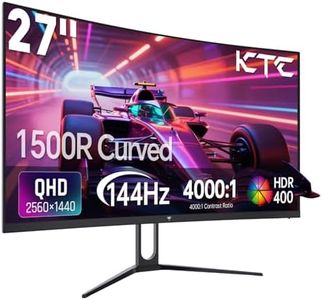
KTC 27 inch Gaming Monitor, 1440P Curved Monitor, 180Hz, 144Hz, 2K, 1500R, 1ms, FreeSync/G-Sync Compatible, DisplayPort/HDMI/USB, Ultrawide PC Vesa/Wall Mount Computer Monitor, H27S17

Rating
8.8
Resolution
Response Time
Size and Ergonomics

Most important from
597 reviews

Resolution
The 27-inch curved display delivers sharp and vibrant visuals with its 2560x1440 QHD resolution, making games and videos look noticeably clearer than standard Full HD.
Response Time
A fast 1ms response time combined with an up to 180Hz refresh rate ensures ultra-smooth motion and minimal blur during fast-paced gaming sessions.
Size and Ergonomics
The 1500R curve enhances immersion by wrapping the screen slightly around your field of view, drawing you deeper into the game world.
Adaptive Sync Technology
Compatibility with both FreeSync and G-Sync effectively eliminates screen tearing and stuttering for a seamless gaming experience.
Panel Type
The VA panel offers deep contrast levels, making darker scenes more detailed and atmospheric, though viewing angles and color accuracy are slightly less than IPS alternatives.
Connectivity
Connectivity includes two HDMI ports, a DisplayPort, and a USB 2.0 port, allowing multiple devices to be connected simultaneously, though USB 2.0 speeds may feel outdated.

The KTC 27-inch curved gaming monitor is a solid choice for gamers looking for a sharp and smooth gaming experience at 1440p resolution. Its 2560x1440 QHD display offers more detail than standard Full HD, making games and videos look clearer and more vibrant. The VA panel provides deep contrast, which is great for darker scenes, and the 1500R curve helps with immersion by wrapping the screen slightly around your view. With a fast 1ms response time and a refresh rate that can go up to 180Hz (higher than the usual 144Hz), it supports very smooth motion, reducing blur and lag in fast-paced games.

The monitor is also compatible with both FreeSync and G-Sync, technologies that sync the monitor's refresh rate with your graphics card to prevent screen tearing and stuttering, which gamers will appreciate. It includes handy features like customizable crosshairs and improved visibility in dark scenes, designed to help improve gameplay. Connectivity options are decent with two HDMI ports, a DisplayPort, and one USB 2.0 port, allowing you to connect multiple devices like a PC and a gaming console. The matte screen finish helps reduce glare, and the adjustable tilt stand and VESA mount support add ergonomic flexibility.

The USB ports are limited to USB 2.0, which is slower than newer standards, and some users might prefer more USB connectivity. While the VA panel offers good contrast, it may not have the same color accuracy or viewing angles as more expensive IPS panels, though with 120% sRGB coverage and HDR10 support, it still delivers vibrant colors. This monitor provides great value for gamers wanting a sharp, fast, and immersive 27-inch curved display with modern features, making it well-suited for FPS, RTS, and racing games.

Rating
8.8
Resolution
Response Time
Size and Ergonomics

Most important from
597 reviews

Resolution
The 27-inch curved display delivers sharp and vibrant visuals with its 2560x1440 QHD resolution, making games and videos look noticeably clearer than standard Full HD.
Response Time
A fast 1ms response time combined with an up to 180Hz refresh rate ensures ultra-smooth motion and minimal blur during fast-paced gaming sessions.
Size and Ergonomics
The 1500R curve enhances immersion by wrapping the screen slightly around your field of view, drawing you deeper into the game world.
Adaptive Sync Technology
Compatibility with both FreeSync and G-Sync effectively eliminates screen tearing and stuttering for a seamless gaming experience.
Panel Type
The VA panel offers deep contrast levels, making darker scenes more detailed and atmospheric, though viewing angles and color accuracy are slightly less than IPS alternatives.
Connectivity
Connectivity includes two HDMI ports, a DisplayPort, and a USB 2.0 port, allowing multiple devices to be connected simultaneously, though USB 2.0 speeds may feel outdated.

Buying Guide for the Best 144 Hz Gaming Monitors

Choosing the right 144 Hz gaming monitor can significantly enhance your gaming experience by providing smoother visuals and reducing motion blur. To make an informed decision, it's important to understand the key specifications and how they align with your gaming needs. Here are the essential specs to consider when selecting a 144 Hz gaming monitor.
ResolutionResolution refers to the number of pixels on the screen, typically measured as width x height (e.g., 1920x1080). Higher resolutions provide sharper and more detailed images. Common resolutions for 144 Hz monitors include Full HD (1080p), Quad HD (1440p), and 4K (2160p). If you have a powerful graphics card and want the best visual quality, a higher resolution like 1440p or 4K is ideal. For competitive gaming where higher frame rates are crucial, 1080p might be sufficient and easier to achieve with mid-range hardware.
Panel TypeThe panel type affects the monitor's color accuracy, viewing angles, and response time. The main types are TN (Twisted Nematic), IPS (In-Plane Switching), and VA (Vertical Alignment). TN panels offer the fastest response times and are often preferred for competitive gaming, but they have poorer color accuracy and viewing angles. IPS panels provide better color reproduction and wider viewing angles, making them great for immersive gaming and content creation, though they may have slightly slower response times. VA panels offer the best contrast ratios and good color accuracy but can have slower response times compared to TN panels.
Response TimeResponse time measures how quickly a pixel can change from one color to another, typically in milliseconds (ms). Lower response times reduce motion blur and ghosting, which is important for fast-paced games. Monitors with a response time of 1ms to 5ms are generally considered good for gaming. If you play a lot of fast-action games like first-person shooters, aim for a monitor with a response time of 1ms to 2ms. For other types of games, a response time of up to 5ms should be adequate.
Adaptive Sync TechnologyAdaptive Sync technologies like NVIDIA G-SYNC and AMD FreeSync help to eliminate screen tearing and stuttering by synchronizing the monitor's refresh rate with the graphics card's frame rate. This results in smoother gameplay. If you have an NVIDIA graphics card, look for a monitor with G-SYNC support. If you have an AMD graphics card, look for FreeSync support. Some monitors support both technologies, providing more flexibility if you switch between different graphics cards.
ConnectivityConnectivity options determine how you can connect your monitor to your computer and other devices. Common ports include HDMI, DisplayPort, and USB-C. DisplayPort is often preferred for gaming due to its higher bandwidth, which supports higher resolutions and refresh rates. HDMI is also widely used and sufficient for most gaming setups. USB-C can be useful for connecting laptops and other devices. Ensure the monitor has the necessary ports to match your gaming setup and any additional devices you plan to connect.
Size and ErgonomicsThe size of the monitor affects your field of view and immersion. Common sizes for 144 Hz gaming monitors range from 24 inches to 32 inches. A larger screen can provide a more immersive experience, but it's important to consider your desk space and viewing distance. Ergonomics, such as adjustable stands for height, tilt, and swivel, can enhance comfort during long gaming sessions. Choose a size that fits your space and provides a comfortable viewing experience, and look for ergonomic features that allow you to adjust the monitor to your preferred position.

FAQ

Most Popular Categories Right Now