We Use CookiesWe use cookies to enhance the security, performance, functionality and for analytical and promotional activities. By continuing to browse this site you are agreeing to our privacy policy

10 Best Vertical Computer Mice 2026 in the United States

How do we rank products for you?

Our technology thoroughly searches through the online shopping world, reviewing hundreds of sites. We then process and analyze this information, updating in real-time to bring you the latest top-rated products. This way, you always get the best and most current options available.

headphones-stars

Our Top Picks

#1

Winner

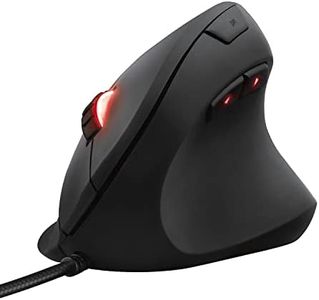
Trust Gaming GXT 144 Rexx Vertical Ergonomic Gaming Mouse, 250-10,000 DPI, 6 Buttons, Black

Rating
10.0
Chosen by1,141
Ergonomics
DPI (Dots Per Inch)
Connectivity

Most important from
2497 reviews

Ergonomics
This mouse delivers the best combination of a vertical ergonomic design with gaming-grade precision, offering smooth tracking and accurate clicks that support serious FPS gaming.
DPI (Dots Per Inch)
The sensor supports up to 10,000 DPI with a stable 1,000 Hz polling rate, providing the responsiveness needed for competitive gaming.
Connectivity
Its wired connection ensures consistent performance without battery concerns, though it limits freedom of movement compared to wireless models.
Buttons and Customization
Its customization software, though somewhat rough, stands out by allowing full button remapping, macros, and adjustable RGB lighting, unlike most vertical mice that only offer presets.
Build Quality and Durability
The mouse’s plastic body feels smooth and can cause hand slippage during intense use, though applying a thin silicone layer greatly improves grip.

The Trust Gaming GXT 144 Rexx is a vertical ergonomic gaming mouse designed to reduce wrist and arm strain with its upright shape and light weight (98 grams). It features a comfortable thumb rest that helps maintain a natural grip, making it a good choice for users seeking better comfort during long gaming or work sessions. The mouse offers a high-precision optical sensor with DPI settings adjustable from 250 up to 10,000, suitable for various gaming and everyday tasks requiring accuracy.

It has six programmable buttons, allowing customization through its software, which also supports macros and RGB lighting effects to personalize your experience. The build is mainly plastic but feels sturdy enough for regular use, supported by a 2-year warranty. Connectivity is wired, ensuring consistent responsiveness without battery concerns, though it limits freedom of movement compared to wireless models. This mouse is compatible with Windows 10 and 11, and while labeled ambidextrous, its ergonomic design is more comfortable for right-handed users.

One downside is that the software and lighting customization might be more appealing to gamers than casual users, and the plastic material may not feel premium. This makes it a solid option if you want an ergonomic vertical mouse with gaming features at a reasonable price, especially if you prefer a wired connection and need customizable buttons.

Rating
10.0
Chosen by1,141
Ergonomics
DPI (Dots Per Inch)
Connectivity

Most important from
2497 reviews

Ergonomics
This mouse delivers the best combination of a vertical ergonomic design with gaming-grade precision, offering smooth tracking and accurate clicks that support serious FPS gaming.
DPI (Dots Per Inch)
The sensor supports up to 10,000 DPI with a stable 1,000 Hz polling rate, providing the responsiveness needed for competitive gaming.
Connectivity
Its wired connection ensures consistent performance without battery concerns, though it limits freedom of movement compared to wireless models.
Buttons and Customization
Its customization software, though somewhat rough, stands out by allowing full button remapping, macros, and adjustable RGB lighting, unlike most vertical mice that only offer presets.
Build Quality and Durability
The mouse’s plastic body feels smooth and can cause hand slippage during intense use, though applying a thin silicone layer greatly improves grip.
#2

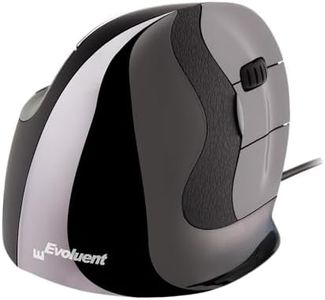
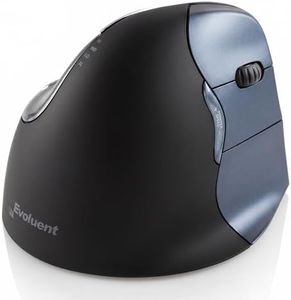
Evoluent – Inventor of The Vertical Mouse – VMDM Ergonomic Vertical Mouse Right Hand Medium Wired USB, Sculpted for Comfort, Reduces Wrist Strain, 4 Speeds, 6 Customizable Buttons in Windows

Rating
9.1
Ergonomics
Connectivity
Buttons and Customization

Most important from
400 reviews

Ergonomics
The most comfortable vertical mouse available, eliminating lateral wrist motion without needing to twist your arm or pinch your fingers.
Connectivity
Battery life is more than adequate, lasting up to 3-4 weeks on a single AA battery.
Buttons and Customization
Six buttons provide great functionality, with easy remapping options through the Evoluent software.
Build Quality and Durability
The mouse looks cool and feels more premium compared to older models, though the high gloss plastic can make gripping difficult for those with sweaty hands.

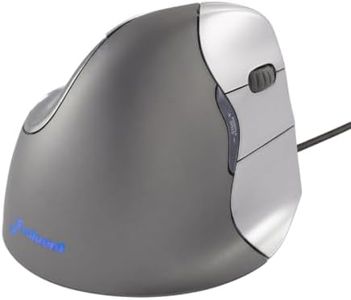
The Evoluent VerticalMouse VMDM is designed with ergonomics in mind, aiming to prevent wrist discomfort by maintaining a neutral hand position. This could be particularly beneficial for users who experience strain with traditional mice. The mouse allows customization through the Evoluent Mouse Manager software, letting you program the buttons to suit different applications, adding a layer of versatility.

The grooved buttons enhance precision, making it easier to control the mouse accurately. Adjusting the pointer speed is straightforward with controls on the side, which can be done without releasing your grip, adding to the ease of use. The mouse supports both wired and wireless connectivity, offering flexibility based on user preference. It is plug-and-play compatible with various operating systems, with additional button customization available through software on Windows and some Mac OS versions. However, users on newer Mac OS versions may need third-party software for full functionality.

The build quality seems solid, with a good customer rating of 4.1 stars based on over 1,300 reviews, suggesting general satisfaction. The Evoluent VerticalMouse VMDM stands out for its ergonomic design and customization capabilities but may have some limitations in compatibility and connectivity options.

Rating
9.1
Ergonomics
Connectivity
Buttons and Customization

Most important from
400 reviews

Ergonomics
The most comfortable vertical mouse available, eliminating lateral wrist motion without needing to twist your arm or pinch your fingers.
Connectivity
Battery life is more than adequate, lasting up to 3-4 weeks on a single AA battery.
Buttons and Customization
Six buttons provide great functionality, with easy remapping options through the Evoluent software.
Build Quality and Durability
The mouse looks cool and feels more premium compared to older models, though the high gloss plastic can make gripping difficult for those with sweaty hands.
#3

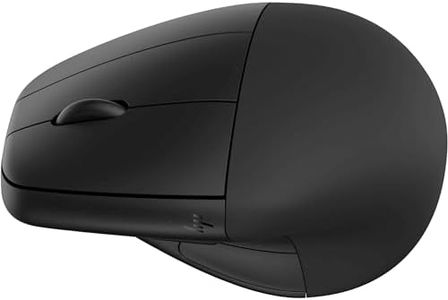
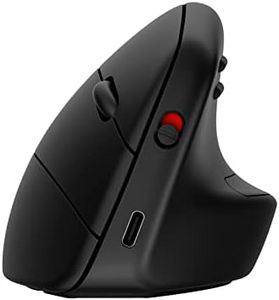
HP 925 Ergonomic Vertical Mouse for Business

Rating
9.1
Build Quality and Durability

Most important from
1 reviews

Build Quality and Durability
The scroll wheel durability raises concerns, as previous models showed wear in less than two years.

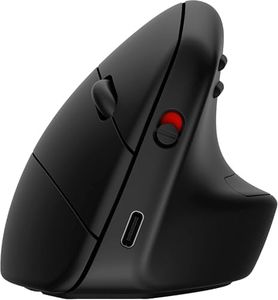
The HP 925 Ergonomic Vertical Mouse is designed to reduce wrist strain by encouraging a more natural hand position, which is beneficial for users who spend long hours at their computer. Its vertical design is comfortable for many looking to avoid repetitive stress injuries. The mouse offers a respectable maximum sensitivity of 4000 DPI, suitable for everyday office tasks and some light graphic work, although it may not meet the needs of gamers or users requiring ultra-precise control.

It connects via Bluetooth, providing a wireless experience with up to a 1-meter effective range, which helps reduce cable clutter and frees up desk space. The battery life averages about 3.7 months using two AA batteries, which is decent but requires periodic replacement. With three buttons, it covers basic navigation needs, though it might feel limited for those seeking more customizable controls for shortcuts or extra functions.

In terms of compatibility, it works well across major operating systems such as Windows, macOS, and Chrome OS, supporting a variety of devices including laptops and tablets. The build quality aligns with HP’s business-focused products—solid and reliable but lacking premium materials. For users looking for a straightforward, ergonomic mouse with wireless convenience and adequate sensitivity for typical office use, the HP 925 is a practical option, though it is not intended for heavy customization or gaming.

Rating
9.1
Build Quality and Durability

Most important from
1 reviews

Build Quality and Durability
The scroll wheel durability raises concerns, as previous models showed wear in less than two years.

Buying Guide for the Best Vertical Computer Mice

Choosing the right vertical computer mouse can significantly improve your comfort and productivity, especially if you spend long hours working on a computer. Vertical mice are designed to reduce strain on your wrist and forearm by promoting a more natural hand position. When selecting a vertical mouse, it's important to consider several key specifications to ensure you get the best fit for your needs.
ErgonomicsErgonomics refers to how well the mouse is designed to fit the natural shape and movement of your hand. This is crucial because a well-designed ergonomic mouse can help prevent repetitive strain injuries and reduce discomfort during extended use. When evaluating ergonomics, consider the shape, size, and contour of the mouse. Small hands may prefer a more compact design, while larger hands might need a bigger mouse. It's also important to check if the mouse supports a natural handshake position, which is the hallmark of vertical mice.
DPI (Dots Per Inch)DPI measures the sensitivity of the mouse. A higher DPI means the cursor will move further on the screen for each inch the mouse is moved. This is important for tasks that require precision, such as graphic design or gaming. DPI settings can range from 400 to over 4000. For general use, a DPI between 800 and 1600 is usually sufficient. If you need more precision, look for a mouse with adjustable DPI settings so you can customize it to your needs.
ConnectivityConnectivity options include wired, wireless, and Bluetooth. Wired mice offer a stable connection and don't require charging, making them ideal for stationary setups. Wireless mice provide more freedom of movement and a cleaner desk setup but need batteries or recharging. Bluetooth mice are convenient for use with laptops and tablets as they don't require a USB port. Choose based on your work environment and preference for mobility versus stability.
Buttons and CustomizationThe number and placement of buttons can affect your productivity. Some vertical mice come with additional buttons that can be programmed for specific functions, such as shortcuts or macros. This is particularly useful for tasks that involve repetitive actions. Consider how many buttons you need and whether they are easily accessible without straining your fingers. Customizable buttons can enhance your workflow, especially in professional or gaming contexts.
Build Quality and DurabilityBuild quality refers to the materials and construction of the mouse. A well-built mouse will last longer and withstand daily wear and tear. Look for mice made from high-quality plastics and with sturdy buttons. Durability is especially important if you use your mouse intensively. Reading reviews and checking warranty information can give you an idea of the mouse's longevity.
CompatibilityEnsure the mouse is compatible with your operating system and any specific software you use. Most mice are compatible with Windows and macOS, but it's always good to check. Some advanced features or customization options might require specific drivers or software, so make sure these are available for your system.

FAQ

Most Popular Categories Right Now