10 Best USB-C Hubs With HDMI 2026 in the United States


Related Products
Up to 24% off



Our technology thoroughly searches through the online shopping world, reviewing hundreds of sites. We then process and analyze this information, updating in real-time to bring you the latest top-rated products. This way, you always get the best and most current options available.

Our Top Picks
Winner
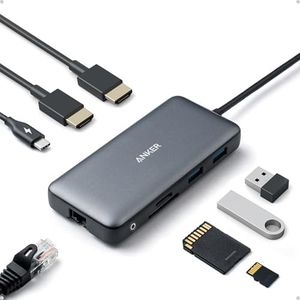
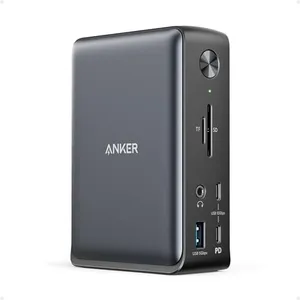
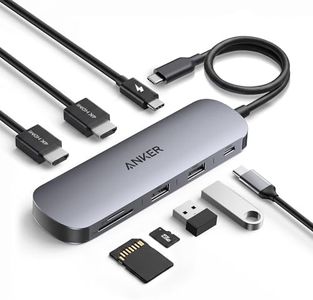
Anker Laptop Docking Station Dual Monitor, 8-in-1 USB C Hub, 4K Dual Monitor with 2 HDMI, 1 Gbps Ethernet Hub, 85W Power Delivery, SD Card Reader, for XPS and More (Charger not Included)
Most important from
6574 reviews
The Anker Laptop Docking Station is a versatile 8-in-1 USB-C hub that caters well to users needing multiple connectivity options. It offers substantial expansion with its USB-C port, two USB-A data ports, dual HDMI ports, an Ethernet port, and SD/microSD card readers. This makes it ideal for those who need to connect various devices and accessories, especially useful for MacBook Pro, XPS, and other USB-C equipped laptops.
The dual HDMI ports enable streaming or mirroring content in 4K resolution, with up to 60Hz on a single display or 30Hz with dual displays. However, macOS users should note that it can only mirror identical content on both external monitors. Power Delivery support up to 85W ensures your laptop stays charged while using the hub, although the 100W PD charger and cable are not included.
Build quality appears robust, and the design is sleek and compact, making it suitable for both office and travel use. Compatibility is broad, covering macOS, Windows, and ChromeOS, but the hub does not support Linux. While the Ethernet port provides reliable Internet connectivity at 1 Gbps, the data transfer speed of the USB-A ports should be sufficient for most peripherals. This hub offers significant functionality and reliability backed by Anker’s reputation, with the main drawbacks being the limited dual monitor functionality for macOS users and the need to purchase a separate PD charger for optimal use.
Most important from
6574 reviews
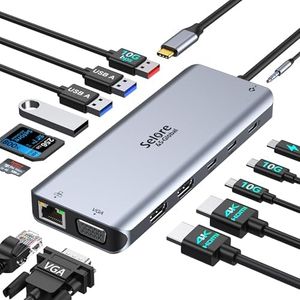
Selore USB C Docking Station Dual Monitor,Laptop Docking Station,14 in 1 Docking Station 3 Monitors with 2 HDMI,VGA,10G USB A/C,100W PD,6 USB A/C Ports,USB C Hub Multiport Adapter for Windows Laptops
The Selore 14-in-1 USB-C Docking Station is a versatile hub suitable for users needing to connect multiple devices and displays, especially Windows laptop owners. It offers a strong port selection with 2 HDMI ports supporting 4K resolution, a VGA port, and a total of 7 USB ports including high-speed USB 3.1 Type A and C, plus SD card readers and an Ethernet port. This makes it a good choice if you want to run up to three monitors at once; Windows laptops can extend or mirror displays, while Macs (with M1/M2 chips) can only mirror.
Power delivery up to 100W ensures your laptop can charge quickly through the hub, though maximum output charging is limited to 87W for safety. Data transfer speeds are solid, reaching up to 10Gbps on USB 3.1 ports, which is great for fast file transfers. Build-wise, it uses a plastic enclosure that keeps it lightweight but might not feel as premium as metal hubs.
Compatibility covers a wide range of popular laptops and tablets, but it’s important to check that your device’s USB-C port supports video output via Thunderbolt or DisplayPort Alternate Mode, otherwise the HDMI and VGA ports won’t work for external displays. USB ports are for data and charging only, not video. For users seeking a comprehensive, plug-and-play docking solution with multiple display options and plenty of ports, this hub delivers well, though Mac users with newer chips should expect some limitations on display modes.
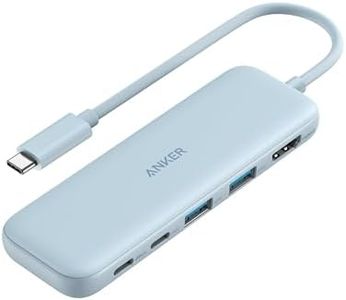
Anker USB C Hub, 5-in-1 USBC to HDMI Hub with 4K Display, 5Gbps USB-C and 2 5Gbps USB-A Data Ports for MacBook Pro, MacBook Air, Dell XPS, Lenovo Thinkpad, HP Laptops and More (Blue)
Most important from
18310 reviews
The Anker 5-in-1 USB-C Hub is a handy accessory for anyone needing to expand their laptop’s connectivity, especially if you use devices like MacBook Pro, MacBook Air, Dell XPS, Lenovo Thinkpad, or HP laptops. It offers a good mix of ports: one HDMI port that supports 4K resolution at 30Hz, one USB-C data port, two USB-A data ports, and a power delivery port that allows you to charge your laptop while using the hub. The pass-through charging supports up to 85W, enough for most laptops, though you’ll need your own charger. Data transfer speeds are solid at up to 5 Gbps on both USB-C and USB-A ports, making file transfers fast and efficient. The hub is compact and lightweight with a simple blue design, which makes it easy to carry around and use on the go.
The HDMI port is limited to a 30Hz refresh rate, which might not be ideal if you want smoother motion for gaming or high-frame-rate video. Additionally, the USB-C data port does not support video output, so it cannot be used to connect another display. If you want a reliable, well-built hub for everyday tasks like connecting to an external monitor, transferring files quickly, and charging your laptop simultaneously, this Anker hub fits the bill nicely.
It is especially useful for professionals and students who need a straightforward, versatile docking solution without extra bulk or complicated setup.
Most important from
18310 reviews
Buying Guide for the Best USB-C Hubs With HDMI
When choosing a USB-C hub with HDMI, it's important to consider your specific needs and how you plan to use the hub. USB-C hubs can expand the functionality of your device by providing additional ports and connectivity options. The HDMI port is particularly useful for connecting your device to external displays, such as monitors or TVs. To make the best choice, you should understand the key specifications and how they align with your requirements.FAQ
Most Popular Categories Right Now


