We Use CookiesWe use cookies to enhance the security, performance, functionality and for analytical and promotional activities. By continuing to browse this site you are agreeing to our privacy policy

10 Best Sticker Printers 2026 in the United States
How do we rank products for you?

Our technology thoroughly searches through the online shopping world, reviewing hundreds of sites. We then process and analyze this information, updating in real-time to bring you the latest top-rated products. This way, you always get the best and most current options available.

headphones-stars

Our Top Picks

#1

Winner

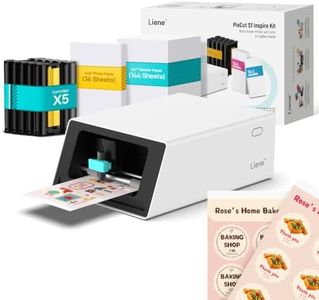
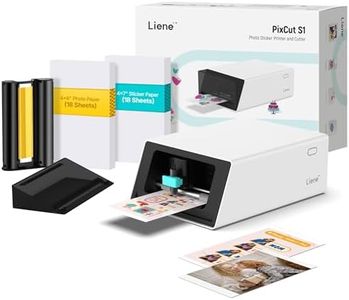
Liene PixCut S1 Inspire Kit - All-in-One Color Sticker Printer & Cutting Machine, Thermal Dye-Sublimation Photo Printer, 300 DPI, Color Label Maker with 180 Sheets (36 Photo + 144 Sticker Paper)

Rating
10.0
Chosen by1,168
Print Resolution
Connectivity Options
Media Compatibility

Most important from
1067 reviews

Print Resolution
The PixCut S1 impresses by combining printing and cutting in one compact device, delivering vibrant, crisp colors that rival professional photo prints.
Connectivity Options
Bluetooth connectivity and the mobile app enable seamless printing and cutting directly from phones or tablets.
Media Compatibility
Sticker paper quality feels premium with a durable, rubbery texture that adheres well and withstands repeated use.
Software and Design Tools
Setup is quick and intuitive, with a user-friendly app that continues to improve and offers fun AI-powered tools for creative projects.
Durability and Build Quality
Stickers maintain their vibrant look and durability even after extensive washing, thanks to the laminated finish.

The Liene PixCut S1 Inspire Kit is a compact all-in-one sticker printer and cutter that suits anyone looking to create custom stickers and labels easily from home or on the go. It prints at 300 dpi using thermal dye-sublimation technology, delivering vibrant, true-to-life colors that make your photos and designs pop. The included 180 sheets of photo and sticker paper mean you can jump right into crafting without worrying about supplies. One handy feature is the integrated cutting machine, which works alongside AI-powered image extraction to cut your stickers precisely around every edge—no manual trimming needed.

You control everything through the easy-to-use Liene app via Bluetooth, allowing editing, printing, and cutting straight from your phone or tablet. The app also offers thousands of free templates, images, and design elements, so you don’t need any experience to make unique creations. Stickers come out durable, waterproof, and scratch-resistant thanks to a special four-layer lamination process.

The print speed is about one page per minute, which might feel limiting if you need large batches quickly. Also, Bluetooth-only connectivity could restrict use with some devices or require being close to your printer. The media size maxes out at 4x7 inches, which fits most sticker needs but is not ideal for larger prints. This printer is well suited for casual users, hobbyists, and creative gift makers who value convenience, quality, and fun design options over speed or industrial volume.

Rating
10.0
Chosen by1,168
Print Resolution
Connectivity Options
Media Compatibility

Most important from
1067 reviews

Print Resolution
The PixCut S1 impresses by combining printing and cutting in one compact device, delivering vibrant, crisp colors that rival professional photo prints.
Connectivity Options
Bluetooth connectivity and the mobile app enable seamless printing and cutting directly from phones or tablets.
Media Compatibility
Sticker paper quality feels premium with a durable, rubbery texture that adheres well and withstands repeated use.
Software and Design Tools
Setup is quick and intuitive, with a user-friendly app that continues to improve and offers fun AI-powered tools for creative projects.
Durability and Build Quality
Stickers maintain their vibrant look and durability even after extensive washing, thanks to the laminated finish.
#2

Liene PixCut S1 Color Sticker Printer & Cutting Machine - All-in-One Sticker Maker for DIY Crafts, Custom Labels & Gifts. Thermal Dye-Sublimation Photo Printer, 300 DPI, Precise AI Auto-Cutting

Rating
8.5
Print Resolution
Print Speed
Media Compatibility

Most important from
1067 reviews

Print Resolution
Print quality is exceptional, producing vibrant, crisp colors that often surpass professional photo prints.
Print Speed
The AI-powered auto-cutting feature adds a fun and efficient touch to crafting by eliminating manual cutting steps.
Media Compatibility
The machine’s laminated sticker output is waterproof and scratch-resistant, perfect for long-lasting personalized creations.
Software and Design Tools
The companion app is intuitive and packed with useful features, including an AI background remover that enhances design flexibility.
Durability and Build Quality
Stickers feel durable and professional, with a rubbery texture and strong adhesion that lasts well on various surfaces.

The Liene PixCut S1 is a compact all-in-one sticker printer and cutting machine designed for DIY crafts, custom labels, and gifts. It uses thermal dye-sublimation technology to produce sharp, vivid 300 dpi prints with over 16 million colors, ensuring your stickers look colorful and professional. A standout feature is its AI-powered auto-cutting that precisely cuts your stickers right after printing, saving time and effort since you don’t need separate devices. Connectivity is straightforward via Bluetooth, allowing you to print and design stickers directly from your smartphone or tablet using the Liene app. The app is beginner-friendly and packed with free design elements and templates, so no design skills are needed. The printer works with photo sticker paper sized up to 4x7 inches, producing durable, waterproof, and scratch-resistant stickers thanks to its four-layer lamination process, making the stickers ideal for long-lasting use on various items.

The print speed is quite slow at about 1 page per minute, so it may not suit users needing fast, high-volume printing. Also, the reliance on Bluetooth limits connectivity options compared to printers that offer USB or Wi-Fi. The build is lightweight and portable but designed mainly for casual home or school use rather than heavy-duty office work. For those seeking an easy, creative way to make personalized stickers and labels with good quality prints and precise cutting, the Liene PixCut S1 offers a solid solution. It is best suited for smaller projects and hobbyists rather than high-speed professional production.

Rating
8.5
Print Resolution
Print Speed
Media Compatibility

Most important from
1067 reviews

Print Resolution
Print quality is exceptional, producing vibrant, crisp colors that often surpass professional photo prints.
Print Speed
The AI-powered auto-cutting feature adds a fun and efficient touch to crafting by eliminating manual cutting steps.
Media Compatibility
The machine’s laminated sticker output is waterproof and scratch-resistant, perfect for long-lasting personalized creations.
Software and Design Tools
The companion app is intuitive and packed with useful features, including an AI background remover that enhances design flexibility.
Durability and Build Quality
Stickers feel durable and professional, with a rubbery texture and strong adhesion that lasts well on various surfaces.
#3

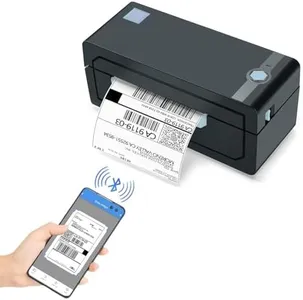
JADENS Bluetooth Thermal Shipping Label Printer – Wireless 4x6 Shipping Label Printer, Compatible with Android, iPhone, Windows & Mac, Widely Used for, Amazon, Shopify, Etsy, USPS(Blue)

Rating
8.5
Connectivity Options
Durability and Build Quality
Print Resolution

Most important from
9114 reviews

Connectivity Options
Setup is quick and straightforward, with seamless Bluetooth connectivity to phones and computers.
Durability and Build Quality
The compact design fits easily on any desk without taking up much space, ideal for small businesses or home shipping stations.
Print Resolution
Print quality is excellent, producing crisp, clear labels with sharp text and barcodes that scan perfectly.
Print Speed
Printing is fast and quiet, making it efficient for handling larger batches of orders.

The JADENS Bluetooth Thermal Shipping Label Printer is a solid choice for small business owners or anyone needing to print shipping labels regularly. It uses a Japanese thermal print head with a resolution of 203 x 203 DPI, producing clear black-and-white labels without needing ink or toner—helpful for avoiding mess and reducing ongoing costs. The printer handles label sizes up to 4x6 inches, compatible with both roll and fanfold labels, providing flexibility for different label types used in shipping or inventory.

The printing speed is reasonable, around 6.5 pages per minute, suitable for typical shipping label volumes but potentially slow for very high-demand environments. Connectivity options include Bluetooth for wireless printing and USB for wired connection, supporting Windows, Mac, Android, and iOS devices. On smartphones, printing via Bluetooth requires the dedicated "Jadens printer" app, which may add an extra step compared to direct printing.

Designed for ease of use, it offers quick setup and calibration tools, plus helpful driver and instruction videos. Its compatibility with major shipping platforms like Amazon, Shopify, and USPS makes it convenient for online sellers. The build quality is decent for an office device, and the 1-year warranty with accessible customer support adds reassurance. While it only prints in monochrome and does not support duplex printing, which limits versatility, and requires calibration when changing label sizes, it remains an economical, no-fuss option ideal for users who value ease of use and clean printing over high-speed output or color labels.

Rating
8.5
Connectivity Options
Durability and Build Quality
Print Resolution

Most important from
9114 reviews

Connectivity Options
Setup is quick and straightforward, with seamless Bluetooth connectivity to phones and computers.
Durability and Build Quality
The compact design fits easily on any desk without taking up much space, ideal for small businesses or home shipping stations.
Print Resolution
Print quality is excellent, producing crisp, clear labels with sharp text and barcodes that scan perfectly.
Print Speed
Printing is fast and quiet, making it efficient for handling larger batches of orders.

Buying Guide for the Best Sticker Printers

Choosing the right sticker printer can be a fun and rewarding experience, especially if you know what to look for. Sticker printers come in various types and with different features, so it's important to understand your needs and how different specifications can meet those needs. Whether you're printing stickers for personal use, business, or crafting, knowing the key specs will help you make an informed decision.
Print ResolutionPrint resolution refers to the level of detail a printer can produce, measured in dots per inch (DPI). Higher DPI means more detailed and sharper images. For basic stickers, a resolution of 300 DPI might be sufficient. However, if you need high-quality, professional-looking stickers, look for printers with 600 DPI or higher. Consider what you will be using the stickers for; if fine details and vibrant colors are important, opt for a higher resolution.
Print SpeedPrint speed indicates how quickly a printer can produce stickers, usually measured in pages per minute (PPM) or stickers per minute. Faster print speeds are beneficial if you need to produce a large number of stickers in a short time. For occasional or hobby use, a slower speed might be acceptable. If you are running a business or need to meet deadlines, look for a printer with higher PPM.
Connectivity OptionsConnectivity options determine how you can connect your printer to other devices. Common options include USB, Wi-Fi, and Bluetooth. USB connections are reliable and straightforward, while Wi-Fi and Bluetooth offer wireless convenience, allowing you to print from multiple devices without being tethered. Consider your workspace and how you prefer to connect your devices. If you need flexibility and ease of use, wireless options might be more suitable.
Media CompatibilityMedia compatibility refers to the types and sizes of sticker paper the printer can handle. Some printers are versatile and can print on various materials like vinyl, glossy, and matte papers, while others may be limited to specific types. Think about the kind of stickers you want to create and ensure the printer supports those materials. If you plan to experiment with different sticker types, choose a printer with broader media compatibility.
Software and Design ToolsSoftware and design tools that come with the printer can greatly enhance your sticker-making experience. Some printers come with their own design software, while others are compatible with popular graphic design programs. Look for user-friendly software that offers templates, customization options, and easy integration with your printer. If you are a beginner, intuitive software can help you get started quickly. For advanced users, compatibility with professional design tools might be more important.
Durability and Build QualityDurability and build quality are important for ensuring your printer lasts and performs well over time. A well-built printer can handle frequent use and produce consistent results. Check for reviews and ratings to gauge the reliability of the printer. If you plan to use the printer heavily, investing in a durable model can save you from frequent repairs or replacements.

FAQ

Most Popular Categories Right Now