We Use CookiesWe use cookies to enhance the security, performance, functionality and for analytical and promotional activities. By continuing to browse this site you are agreeing to our privacy policy

10 Best Shipping Label Thermal Printers 2026 in the United States
How do we rank products for you?

Our technology thoroughly searches through the online shopping world, reviewing hundreds of sites. We then process and analyze this information, updating in real-time to bring you the latest top-rated products. This way, you always get the best and most current options available.

headphones-stars

Our Top Picks

#1

Winner

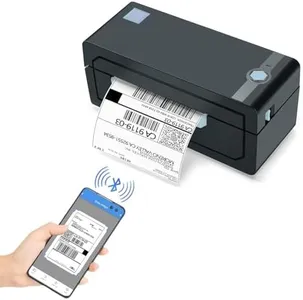
JADENS Bluetooth Thermal Shipping Label Printer – Wireless 4x6 Shipping Label Printer, Compatible with Android, iPhone, Windows & Mac, Widely Used for, Amazon, Shopify, Etsy, USPS(Blue)

Rating
10.0
Chosen by1,322
Print Resolution
Print Speed
Connectivity Options

Most important from
9114 reviews

Print Resolution
Print quality is sharp and clear, with crisp barcodes and text, making it ideal for shipping labels.
Print Speed
The printer handles 4x6 shipping labels quickly without any lag or delays, saving time during busy shipping days.
Connectivity Options
Setup was a breeze; the printer connected seamlessly to both iPhone and Windows laptop via Bluetooth, allowing the first label to be printed within minutes.
Ease of Use
Installation is easy and quick, taking less than 5 minutes to set up and print a test page.
Software Compatibility
Works perfectly with selling platforms like eBay, Shopify, and Etsy, and pairs well with shipping services like USPS, UPS, and FedEx.

The JADENS Bluetooth Thermal Shipping Label Printer is a versatile and economical choice for small business owners who need to print shipping labels. It uses high-tech thermal printing with a 203 DPI resolution, which ensures clear and sharp print quality without the need for ink or toner, making it a clean and cost-effective option. The printer is compatible with various label sizes and can accommodate both fanfold and roll labels, giving you flexibility in your printing processes.

With a maximum print speed of 72 labels per minute, it's efficient for handling moderate to high volumes of shipping tasks. This printer stands out for its wireless capabilities, supporting Bluetooth connections for Windows 8 and later, and for iOS and Android devices through the 'JADENS Printer' app. However, Mac users can only print via USB connection, which might be a limitation for those who prefer wireless printing.

The device is also compatible with major shipping and e-commerce platforms like eBay, Amazon, Shopify, and USPS, making it a good fit for online sellers. The setup is straightforward, with instructional resources provided, and the one-year warranty with customer support adds a layer of reassurance. On the downside, the printer's build is relatively heavy at 2 kilograms, which might be cumbersome for those who need a more portable solution. Additionally, while the print speed is decent, it might not be the fastest option available for high-demand environments. Nonetheless, the JADENS Bluetooth Thermal Shipping Label Printer balances functionality and ease of use, making it a solid choice for small to medium-sized business operations.

Rating
10.0
Chosen by1,322
Print Resolution
Print Speed
Connectivity Options

Most important from
9114 reviews

Print Resolution
Print quality is sharp and clear, with crisp barcodes and text, making it ideal for shipping labels.
Print Speed
The printer handles 4x6 shipping labels quickly without any lag or delays, saving time during busy shipping days.
Connectivity Options
Setup was a breeze; the printer connected seamlessly to both iPhone and Windows laptop via Bluetooth, allowing the first label to be printed within minutes.
Ease of Use
Installation is easy and quick, taking less than 5 minutes to set up and print a test page.
Software Compatibility
Works perfectly with selling platforms like eBay, Shopify, and Etsy, and pairs well with shipping services like USPS, UPS, and FedEx.
#2

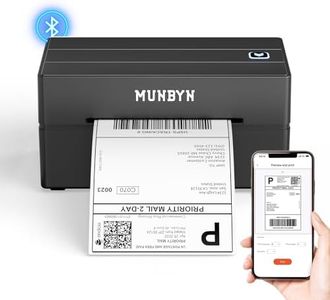
MUNBYN Bluetooth Thermal Label Printer, 130B Wireless 4x6 Shipping Label Printer for Shipping Packages Small Business Office or Home, Compatible with iPhone Android iPad Windows macOS Chrome

Rating
8.8
Print Resolution
Print Speed
Connectivity Options

Most important from
3140 reviews

Print Resolution
Labels come out clear and crisp every time, with quiet operation that doesn’t disrupt the workspace.
Print Speed
Impressive print speed and quality make it ideal for shipping and packaging needs.
Connectivity Options
Printing 4×6 shipping labels is effortless and convenient with wireless Bluetooth connectivity across phones, tablets, and computers.
Label Compatibility
Customizing labels is straightforward, with the printer automatically recognizing label types or allowing quick manual selection through the app.
Ease of Use
Setup is fast and smooth, making it accessible even for users without technical expertise.
Software Compatibility
It works seamlessly with a wide range of devices and platforms including iPhone, Android, Windows, macOS, and popular marketplaces like Etsy and eBay.

The MUNBYN Bluetooth Thermal Label Printer (model 130B) is a solid choice for small businesses or home offices needing reliable shipping label printing. It offers a sharp print resolution of 203 dpi, which ensures clear and readable labels including barcodes and QR codes. The print speed is quite fast at up to 72 pages per minute, helping to reduce waiting times when printing multiple labels. Connectivity is versatile with Bluetooth for wireless use on smartphones, tablets, and laptops, plus USB for desktops without Bluetooth. Setup is straightforward with a dedicated app for iOS and Android, and a browser-based editor for PCs, making it user-friendly even if you aren't tech-savvy.

The printer supports a wide variety of label sizes from 1.57" to 4.3", including standard 4x6 inch shipping labels, and even specialty colorful labels, which adds some creative flexibility. However, for the best print quality and to avoid issues, it’s recommended to use genuine MUNBYN labels, since compatibility with certain UPS thermal papers can be problematic. The build is compact and portable at around 2.3 pounds, suitable for both office desks and mobile use. While it doesn’t print in color (common for thermal printers), its monochrome output is crisp and durable, ideal for shipping and business needs.

It balances ease of use, good quality printing, and compatibility with popular shipping platforms like FedEx, UPS, and USPS, making it well-suited for entrepreneurs looking to handle their own labels without outsourcing. The main downside is the need to stick mostly to MUNBYN’s own label supplies for best results, and it lacks dual-sided or color printing, which may limit some specialized uses.

Rating
8.8
Print Resolution
Print Speed
Connectivity Options

Most important from
3140 reviews

Print Resolution
Labels come out clear and crisp every time, with quiet operation that doesn’t disrupt the workspace.
Print Speed
Impressive print speed and quality make it ideal for shipping and packaging needs.
Connectivity Options
Printing 4×6 shipping labels is effortless and convenient with wireless Bluetooth connectivity across phones, tablets, and computers.
Label Compatibility
Customizing labels is straightforward, with the printer automatically recognizing label types or allowing quick manual selection through the app.
Ease of Use
Setup is fast and smooth, making it accessible even for users without technical expertise.
Software Compatibility
It works seamlessly with a wide range of devices and platforms including iPhone, Android, Windows, macOS, and popular marketplaces like Etsy and eBay.
#3

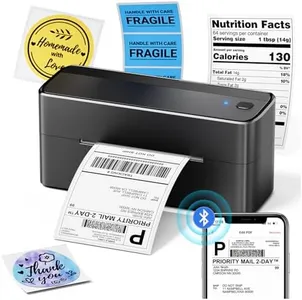
Phomemo Bluetooth Shipping Label Printer, 241BT 4X6 Wireless Thermal Label Printer for Small Business, Labels Printers for Shipping Package, Compatible with iPhone, Android, Amazon, Shopify, Black

Rating
8.8
Print Resolution
Print Speed
Connectivity Options

Most important from
4596 reviews

Print Resolution
Calibration is smartly managed by label marks, ensuring consistent print alignment with minimal fuss.
Print Speed
Print speed is impressively fast, handling both small and large labels with ease and precision.
Connectivity Options
Setup is straightforward and intuitive, with the dedicated app quickly connecting via Bluetooth for seamless printing.
Label Compatibility
The printer’s ability to work with label widths from 1 to 4 inches offers versatile options for various shipping needs.
Durability and Build Quality
The compact, wireless design combined with a user-friendly app makes printing labels convenient and efficient.
Ease of Use
Setup is straightforward and intuitive, with the dedicated app quickly connecting via Bluetooth for seamless printing.
Software Compatibility
Setup is straightforward and intuitive, with the dedicated app quickly connecting via Bluetooth for seamless printing.

The Phomemo 241BT is a compact wireless thermal label printer designed mainly for small businesses needing shipping labels. It offers a decent print resolution of 203 DPI, which is clear enough for barcodes and text on standard 4x6 inch labels. Its printing speed of 150 mm/s (about 72 labels per minute) is quite fast, helping save time during busy shipping days. Connectivity is flexible: it supports wireless printing via Bluetooth for iPhone and Android devices through the dedicated Labelife app, and also a USB connection for Windows, Mac, Linux, and Chrome OS computers. This multi-platform compatibility is a plus, though Bluetooth printing requires using the app rather than a direct device connection, which might add a small learning curve.

The printer handles label widths from 1 to 4.6 inches, covering most shipping label sizes used by services like UPS, USPS, FedEx, Amazon, and Shopify. It prints only in black and white, using thermal technology, so there is no need to buy ink or toner, making it more affordable to run. The device is lightweight and portable, with a solid build that should hold up well in a small office or home setting. It comes with 20 labels, a power adapter, and cables, plus access to customer support via chat, phone, and email during business hours.

On the downside, users must install specific drivers or apps to print, which could be a bit tricky for those unfamiliar with software setup. It also lacks color printing and dual-sided capabilities, limiting it strictly to basic label printing tasks. The printer is designed for print-only use, so it won't scan or copy documents. While the 8 MB memory is sufficient for label printing, it may not handle very complex or large batch jobs. This printer is well suited for small businesses or individuals who require a straightforward, fast, and wireless thermal printer for shipping labels without fussing over ink cartridges. It performs well in speed, connectivity options, and ease of use through its dedicated app but requires some initial setup and is limited to monochrome printing.

Rating
8.8
Print Resolution
Print Speed
Connectivity Options

Most important from
4596 reviews

Print Resolution
Calibration is smartly managed by label marks, ensuring consistent print alignment with minimal fuss.
Print Speed
Print speed is impressively fast, handling both small and large labels with ease and precision.
Connectivity Options
Setup is straightforward and intuitive, with the dedicated app quickly connecting via Bluetooth for seamless printing.
Label Compatibility
The printer’s ability to work with label widths from 1 to 4 inches offers versatile options for various shipping needs.
Durability and Build Quality
The compact, wireless design combined with a user-friendly app makes printing labels convenient and efficient.
Ease of Use
Setup is straightforward and intuitive, with the dedicated app quickly connecting via Bluetooth for seamless printing.
Software Compatibility
Setup is straightforward and intuitive, with the dedicated app quickly connecting via Bluetooth for seamless printing.

Buying Guide for the Best Shipping Label Thermal Printers

Choosing the right shipping label thermal printer can significantly streamline your shipping process, making it faster and more efficient. When selecting a thermal printer, it's important to consider several key specifications to ensure it meets your needs. Understanding these specs will help you make an informed decision and choose a printer that fits your specific requirements.
Print ResolutionPrint resolution refers to the clarity and detail of the printed labels, measured in dots per inch (DPI). Higher DPI means sharper and more detailed prints. For shipping labels, a resolution of 203 DPI is generally sufficient, as it provides clear and readable barcodes and text. However, if you need to print more detailed graphics or smaller text, you might consider a printer with a higher resolution, such as 300 DPI.
Print SpeedPrint speed indicates how quickly the printer can produce labels, usually measured in inches per second (IPS). Faster print speeds can significantly increase your productivity, especially if you need to print a large volume of labels. For small to medium businesses, a print speed of 4-6 IPS is typically adequate. Larger operations might benefit from printers with speeds of 8 IPS or higher to keep up with high demand.
Connectivity OptionsConnectivity options determine how the printer connects to your computer or network. Common options include USB, Ethernet, Wi-Fi, and Bluetooth. USB is suitable for direct connections to a single computer, while Ethernet and Wi-Fi are ideal for networked environments where multiple users need access. Bluetooth is useful for mobile printing solutions. Choose the connectivity option that best fits your workflow and setup.
Label CompatibilityLabel compatibility refers to the types and sizes of labels the printer can handle. Ensure the printer supports the label sizes you need for your shipping requirements. Most thermal printers can handle standard 4x6 inch shipping labels, but if you need to print different sizes, check the printer's specifications. Additionally, consider whether the printer supports both direct thermal and thermal transfer printing, as this can offer more flexibility in label materials.
Durability and Build QualityDurability and build quality are important for ensuring the printer can withstand the demands of your shipping environment. Look for printers made from robust materials that can handle continuous use. Industrial-grade printers are designed for high-volume operations and offer greater durability, while desktop models are suitable for lower volume needs. Assess your usage patterns and choose a printer that can reliably perform under your specific conditions.
Ease of UseEase of use encompasses the printer's setup, operation, and maintenance. A user-friendly printer will have straightforward installation processes, intuitive controls, and easy-to-load label mechanisms. Consider printers with features like automatic label calibration and clear display screens for easier operation. If multiple people will be using the printer, ensure it has a simple interface to minimize training time and errors.
Software CompatibilitySoftware compatibility ensures the printer works seamlessly with your existing systems and shipping software. Check if the printer is compatible with popular shipping platforms and label design software. Some printers come with their own software, which can simplify the printing process. Ensure the printer supports the operating systems you use, whether it's Windows, macOS, or Linux, to avoid any integration issues.

FAQ

Most Popular Categories Right Now