10 Best Printers For Stickers 2026 in the United States





Related Products
Up to 11% off
Our technology thoroughly searches through the online shopping world, reviewing hundreds of sites. We then process and analyze this information, updating in real-time to bring you the latest top-rated products. This way, you always get the best and most current options available.

Our Top Picks
Winner
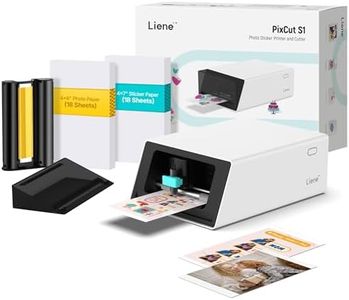
Liene PixCut S1 Inspire Kit - All-in-One Color Sticker Printer & Cutting Machine, Thermal Dye-Sublimation Photo Printer, 300 DPI, Color Label Maker with 180 Sheets (36 Photo + 144 Sticker Paper)
Most important from
1067 reviews
The Liene PixCut S1 Inspire Kit is a solid choice if you're looking for an all-in-one device that both prints and cuts stickers with ease. It uses thermal dye-sublimation technology to produce vibrant, durable prints at 300 dpi resolution, delivering true-to-life colors with waterproof and scratch-resistant finishes. This makes it ideal for personalized stickers, labels, or photo-based designs that need to last. The included 180 sheets of photo and sticker paper give you a generous start without needing immediate refills.
A standout feature is the AI-powered image extraction and precision cutting, which simplifies creating perfectly cut stickers directly from your smartphone via Bluetooth, making it very user-friendly for beginners or hobbyists. The Liene app adds extra value with free design templates and creative tools, removing the need for additional software costs. However, print speed is quite slow at about one page per minute, so it’s not suited for high-volume or commercial sticker production. Media size is limited to 4x7 inches, which is fine for most common sticker sizes but may feel restrictive for larger designs. Connectivity is limited to Bluetooth, so no direct USB or Wi-Fi options are available.
The build is compact and lightweight, making it easy to fit on a desk but perhaps less robust than heavier professional printers. If you want a straightforward, creative sticker printer that handles printing and cutting in one device with good print quality and durable output, the PixCut S1 Inspire Kit offers a convenient and fun option. Keep in mind the slower speed and media size limits if your needs grow beyond casual or small-batch sticker making.
Most important from
1067 reviews
Epson EcoTank ET-2800 Wireless Color All-in-One Cartridge-Free Ink Supertank Printer with Scan and Copy for Home Use, White
Most important from
9872 reviews
The Epson EcoTank ET-2800 is a solid choice for those interested in printers for stickers, especially if you plan to do a lot of printing at home. One of its standout features is the innovative cartridge-free printing, which uses high-capacity ink tanks instead of traditional cartridges. This not only saves money—potentially up to 90% on replacement inks—but also reduces waste, making it environmentally friendly. With the ability to print up to 7,500 color pages and 4,500 black pages, you can print a significant number of stickers without frequent ink changes.
The print quality is impressive, thanks to Epson's Micro Piezo Heat-Free Technology. This means you can expect sharp text and vibrant colors, which is crucial when designing stickers. Additionally, the built-in scanner and copier adds value for users who may need to digitize their designs or perform quick copies.
However, there are a few drawbacks to consider. The maximum print speed is relatively modest, at 10 pages per minute for black and 5 for color, which could be a limitation if you need to print large batches quickly. The connectivity options are versatile, offering both wired and wireless connections, but some users might find the mobile printing capabilities a bit less intuitive compared to competitors. Moreover, while the printer is lightweight at 8.8 pounds, it may still take up a fair amount of space, so consider your setup before purchasing.
Most important from
9872 reviews
Epson EcoTank ET-2400 Wireless Color All-in-One Cartridge-Free Supertank Printer with Scan and Copy for Everyday Home Printing, Black
Most important from
4496 reviews
The Epson EcoTank ET-2400 is a solid choice for those looking to print stickers at home. One of its standout features is the cartridge-free printing system, which uses high-capacity ink tanks instead of traditional cartridges. This not only saves you money—up to 90% on ink costs—but also allows you to print a significant number of pages before needing a refill. With the ability to produce up to 7,500 color pages from the included ink, it's particularly appealing for users who print frequently.
When it comes to print quality, the ET-2400 boasts an impressive resolution of 5760 x 1440 dpi, ensuring that colors pop and details are sharp, making it suitable for vibrant sticker designs. Additionally, its Micro Piezo technology enhances print quality across various paper types, which is essential for sticker printing.
There are some drawbacks to consider. The maximum print speed may be a concern for those needing to produce large quantities quickly—it's rated at 5 pages per minute for color. While this is acceptable for everyday use, it may not suffice for high-volume sticker printing. The manual duplexing feature can also slow down the process if you require double-sided stickers. In terms of connectivity, the ET-2400 supports Wi-Fi and USB, along with wireless printing from smart devices, which is convenient for quick access. The inclusion of a built-in scanner and copier adds value, making it a versatile all-in-one device for home offices. However, users should note that it operates best with genuine Epson ink to maintain warranty coverage and performance.
The Epson EcoTank ET-2400 is a cost-effective and efficient printer for those focusing on sticker printing, particularly for home or small office use. Its low running costs and high-quality outputs make it appealing, despite some limitations in speed and duplex printing.
Most important from
4496 reviews
Buying Guide for the Best Printers For Stickers
When choosing a printer for stickers, it's important to consider several key specifications to ensure you get the best results for your needs. Stickers require high-quality printing, durability, and sometimes specific features like the ability to print on different types of media. Understanding these specifications will help you make an informed decision and select a printer that meets your requirements for sticker printing.FAQ
Most Popular Categories Right Now


