10 Best Point Of Sale Printers 2026 in the United States


Related Products
Up to 10% off
Our technology thoroughly searches through the online shopping world, reviewing hundreds of sites. We then process and analyze this information, updating in real-time to bring you the latest top-rated products. This way, you always get the best and most current options available.

Our Top Picks
Winner
Star Micronics TSP143IIIU USB Thermal Receipt Printer with Device and Mfi USB Ports, Auto-cutter, and Internal Power Supply - White
Most important from
824 reviews
The Star Micronics TSP143IIIU USB Thermal Receipt Printer stands out with its high-speed printing capability, producing 43 receipts per minute (250mm/s). This makes it well-suited for busy retail environments where speed is crucial. The USB connectivity ensures a simple plug-and-print setup, and it's compatible with iOS, Android, and Windows, offering flexibility across various devices and platforms.
The printer's 'Drop-In and Print' clamshell design and 'De-Curl' function make paper loading quick and straightforward, ensuring the receipts are flat and presentable. The small footprint and embedded power supply save valuable counter space, which is an added benefit for crowded work areas. Additionally, it includes certifications from reputable companies like Postmates, Square, Chromebook, and Clover, ensuring reliability and broad compatibility in different business settings.
However, it only supports USB connectivity, which may be a limitation if wireless or network printing options are preferred. The printer is monochrome, which is standard for receipt printers but limits its use if color printing is required. At 3.79 pounds, it is relatively lightweight and easy to move if needed. The inclusion of essential setup components like a wall mount bracket, USB and power cables, and paper guide enhances its ease of use. This printer is a strong candidate for businesses looking for a dependable and fast receipt printer, with its primary drawbacks being the lack of wireless connectivity and color printing.
Most important from
824 reviews
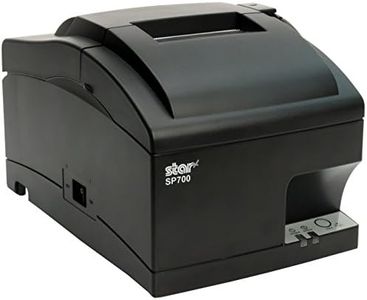
Star Micronics SP742MU USB Impact Receipt Printer with Auto-cutter and Internal Power Supply - Gray
Most important from
42 reviews
The Star Micronics SP742MU is a solid choice for restaurants and retail spots needing a reliable point-of-sale printer that can handle demanding environments like kitchens. It uses impact printing technology, which is great for withstanding heat and humidity without fading, a common issue with thermal printers in such settings. The print speed is moderate, producing about 13 receipts per minute, which should be sufficient for most small to medium businesses without heavy traffic. This printer connects simply via USB, making setup straightforward—just plug it in and start printing, which is ideal if you want to avoid complicated installations. Its clamshell design allows for quick paper loading, saving time during busy hours. The internal power supply and compact size help keep your counter space clear.
This model lacks wireless or Ethernet connectivity, which could be a downside if you want more flexible placement or network printing. Also, with only one USB port and no color printing capability beyond black, it’s quite basic compared to some modern alternatives. The printer is durable and designed to last in tough conditions, but it doesn’t support advanced features like duplex printing or multiple trays.
If your business needs a straightforward, dependable impact printer mainly for kitchen or receipt printing without extra bells and whistles, the SP742MU will serve you well. For users needing faster speeds, network options, or color printing, other models might be more suitable.
Most important from
42 reviews
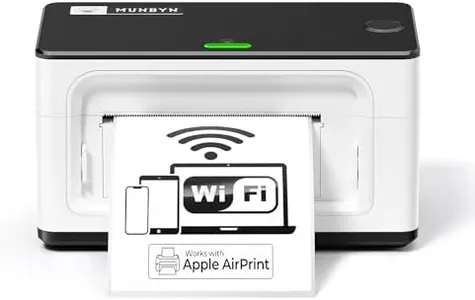
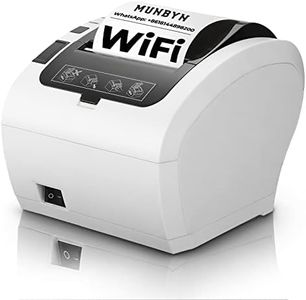
MUNBYN Wireless Wi-Fi Thermal Printer Shipping Label Printer, Compatible with AirPrint iPhone, iPad, MacOS, Android Windows Suit for Small Business,No Ink, Fast & Clear Printing
Most important from
919 reviews
The MUNBYN Wireless Thermal Printer is designed primarily for small businesses needing fast and clear shipping label printing. It uses thermal print technology, which means no ink is needed—just special thermal labels—making it cost-effective and low-maintenance. The print speed is quite good at 150mm per second, allowing you to print around 72 labels per minute, which suits busy environments. It prints in monochrome with a resolution of 203 dots per inch, producing sharp and easily scannable labels.
Connectivity is a strong point, with Wi-Fi that supports multiple devices simultaneously, including iPhones, iPads (via AirPrint), Android, Mac, Windows, and more. This flexibility allows seamless printing from various platforms without complicated setup. The printer is compact and lightweight, making it easy to fit in small spaces or move around if needed. It supports a range of label sizes (from about 1.5" to 4" wide), covering most shipping and office label needs.
On the downside, the printer only prints in black and white, so it’s not suited for color labels. Some users might find occasional compatibility issues with the latest iOS updates, though customer support offers replacement if this happens. The maximum paper capacity is decent but not very large (500 sheets), which might require frequent reloading in high-volume settings. It also lacks duplex printing, but that’s common for thermal label printers. If your business is focused on shipping or barcode labels and you want a reliable, wireless printer that works out of the box with popular apps and devices, this model is a solid choice. However, if you need color printing or a printer built for very heavy daily use, you might want to explore other options.
Most important from
919 reviews
Buying Guide for the Best Point Of Sale Printers
Choosing the right point-of-sale (POS) printer is crucial for ensuring smooth and efficient transactions in your business. A POS printer is used to print receipts, order tickets, and other transaction-related documents. When selecting a POS printer, it's important to consider various specifications to ensure it meets your business needs. Here are some key specs to consider and how to navigate them.FAQ
Most Popular Categories Right Now


