10 Best Office Monitors 2026 in the United States





Related Products
Up to 33% off



Our technology thoroughly searches through the online shopping world, reviewing hundreds of sites. We then process and analyze this information, updating in real-time to bring you the latest top-rated products. This way, you always get the best and most current options available.

Our Top Picks
Winner
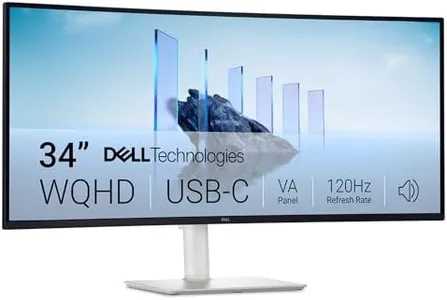
Dell 34 Plus USB-C Curved Monitor - S3425DW - 34-inch (3440 x 1440) up to 120 Hz 21:9 Display, VA Panel, AMD FreeSync Premium, 99% sRGB, 95% DCI-P3, Integrated Speakers, 3000:1 Contrast Ratio
Most important from
459 reviews
The Dell 34 Plus USB-C Curved Monitor is a good choice for office work, especially if you need a large, immersive screen. Its 34-inch size and 21:9 ultrawide format give you plenty of workspace to have multiple windows open side by side, which can boost productivity. The 3440 x 1440 resolution offers sharp text and clear images, making reading and detailed tasks comfortable for long periods. The VA panel ensures strong contrast (3000:1), so dark areas look deep and colors more vivid compared to typical office monitors. Speaking of colors, this monitor covers 99% of the sRGB range and 95% DCI-P3, which means it can display very accurate and vibrant colors, useful if your work involves some photo editing or design.
The refresh rate goes up to 120Hz with AMD FreeSync Premium, which is more common in gaming monitors, but it also makes scrolling and animations smoother during daily use. Response time is very fast, reducing any motion blur. The curved screen adds to viewing comfort by reducing eye movement across the wide display. Connectivity is straightforward with USB-C that supports up to 65W power delivery, helping to reduce cable clutter by charging your laptop and transmitting video through one cable. It also has integrated speakers, which are improved but still might not replace dedicated audio devices for meetings or media.
If you prioritize color accuracy, screen size, and a smooth visual experience, this monitor is a solid pick for office use, though those needing extensive ergonomic options should verify those features specifically.
Most important from
459 reviews
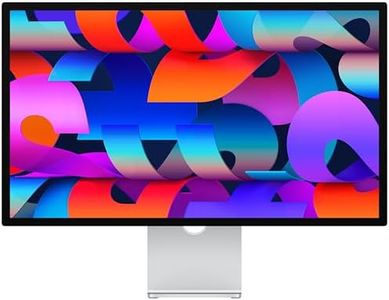
Apple Studio Display: Standard Glass, Tilt-Adjustable Stand
Most important from
39 reviews
The Apple Studio Display is a high-end 27-inch office monitor featuring impressive visual quality with its 5K Retina resolution (5120x2880) and support for over a billion colors using the P3 wide color gamut. This delivers extremely sharp images and vibrant, accurate colors, making it ideal for tasks like photo editing, graphic design, or any work requiring precise color accuracy. The 600 nits brightness ensures the screen remains clear even in brightly lit rooms. Its glossy screen has an anti-reflective coating, and there’s an optional nano-texture glass available for further glare reduction in challenging lighting conditions.
With a standard 60Hz refresh rate common for office use, it is not intended for fast gaming or highly dynamic visuals, which is suitable for most professional tasks. The monitor excels in built-in audio and video features, including a 12MP camera with Center Stage technology for clear video calls, a three-mic array for crisp voice capture, and a six-speaker setup delivering rich sound with spatial audio support. These features are beneficial for users who frequently attend meetings or enjoy media on their desktop.
Connectivity options include two Thunderbolt 5 ports for fast data transfer and charging, along with two USB-C ports for peripherals, providing versatility especially for Mac users. The included tilt-adjustable stand offers some ergonomic adjustment, though height adjustment and VESA mounting require additional purchases, which should be considered if flexible positioning is needed. This premium monitor is best suited for Mac users seeking top-tier image quality and integrated features, though its high price and limited ergonomic options may not fit everyone’s needs for a basic office monitor.
Most important from
39 reviews
Dell 27 Plus 4K USB-C Monitor - S2725QC - 27-inch 4K (3840 x 2160) 120Hz 16:9 Display, AMD FreeSync Premium, sRGB 99%, Integrated Speakers, 1500:1 Contrast Ratio, Comfortview - Ash White
Most important from
701 reviews
The Dell 27 Plus 4K USB-C Monitor (model S2725QC) is a strong choice for office users who want a large, sharp display with vibrant colors. Its 27-inch screen and 4K resolution (3840 x 2160) provide plenty of workspace and crisp detail, ideal for multitasking and detailed documents. The in-plane switching (IPS) panel ensures wide viewing angles and accurate colors, with 99% sRGB coverage making it suitable for tasks that require good color reproduction like photo editing or design work.
The refresh rate of up to 120Hz with AMD FreeSync Premium makes scrolling and animations smooth, which is a nice bonus for reducing eye strain during long hours of use, though this feature is more commonly appreciated in gaming. ComfortView Plus technology reduces blue light emissions, helping reduce eye fatigue while maintaining color accuracy. Connectivity is simple and clean with a USB-C port that can deliver up to 65W power, reducing cable clutter and charging compatible laptops or devices. The matte screen finish helps cut down reflections in bright office environments, which adds to visual comfort.
The monitor includes integrated speakers with improved sound quality, though they may not replace a dedicated audio setup if you need richer sound. This monitor is well suited for professionals looking for a sharp, color-accurate screen with modern connectivity and eye comfort features, especially in an office or home workspace.
Most important from
701 reviews
Buying Guide for the Best Office Monitors
Choosing the right office monitor can significantly enhance your productivity and comfort while working. When selecting a monitor, it's important to consider various specifications that will impact your overall experience. Understanding these key specs will help you make an informed decision that best suits your needs.FAQ
Most Popular Categories Right Now


