We Use CookiesWe use cookies to enhance the security, performance, functionality and for analytical and promotional activities. By continuing to browse this site you are agreeing to our privacy policy

10 Best Mac USB-C Hubs 2026 in the United States
How do we rank products for you?

Our technology thoroughly searches through the online shopping world, reviewing hundreds of sites. We then process and analyze this information, updating in real-time to bring you the latest top-rated products. This way, you always get the best and most current options available.

headphones-stars

Our Top Picks

#1

Winner

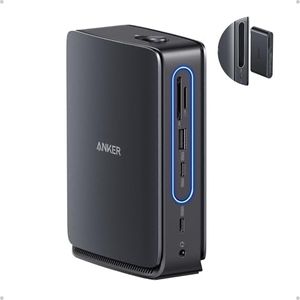
Anker Nano 13-in-1 Laptop Docking Station with Detachable 6-in-1 Hub, USB-C 3 Display Docking (2 HDMI+1 DP), 10 Gbps USB-C, 3 USB-A, Audio, SD/TF, Ethernet, 100W Max PD for Dell/Lenovo/HP Home Office

Rating
10.0
Chosen by1,119
Number of Ports
Power Delivery (PD)
Data Transfer Speed

Most important from
281 reviews

Number of Ports
Displays connect reliably and data transfers are consistently fast, supporting multiple peripherals without a hitch.
Power Delivery (PD)
With a separate power supply, the dock delivers ample power to keep laptops charged while running numerous accessories simultaneously.
Data Transfer Speed
Displays connect reliably and data transfers are consistently fast, supporting multiple peripherals without a hitch.
Build Quality and Design
The build quality is solid and premium, with the unit remaining cool during extended use and maintaining a professional desktop appearance.

The Anker Nano 13-in-1 Laptop Docking Station offers a strong set of ports and features, making it a versatile choice for users who need to connect multiple devices through a single USB-C hub. It includes 2 HDMI ports, 1 DisplayPort, 3 USB-A, 3 USB-C (with one supporting 10Gbps data transfer), Ethernet, audio jack, and SD/TF card slots. This variety allows you to hook up monitors, external drives, wired networks, and audio gear easily. The dock’s standout feature is its detachable design: a 6-in-1 hub can snap off for travel, while the full 13-in-1 station works well at your desk.

With up to 100W power delivery, it can charge most laptops efficiently while running connected accessories. It supports up to three external monitors, but be aware that on Mac computers, these displays will only mirror each other rather than extend your desktop, due to macOS limitations—an important factor if you rely on multiple screens for work. Build quality is solid and setup is plug-and-play, with no drivers needed.

The product mainly targets Windows laptops from Dell, Lenovo, and HP but also supports MacBooks for basic docking needs. If you want a hub that covers nearly every port type, delivers fast charging and data transfer, and offers flexibility for both office and travel, this dock is a strong performer. However, Mac users should consider the mirrored display limitation and confirm their laptop supports full functionality through USB-C before purchasing.

Rating
10.0
Chosen by1,119
Number of Ports
Power Delivery (PD)
Data Transfer Speed

Most important from
281 reviews

Number of Ports
Displays connect reliably and data transfers are consistently fast, supporting multiple peripherals without a hitch.
Power Delivery (PD)
With a separate power supply, the dock delivers ample power to keep laptops charged while running numerous accessories simultaneously.
Data Transfer Speed
Displays connect reliably and data transfers are consistently fast, supporting multiple peripherals without a hitch.
Build Quality and Design
The build quality is solid and premium, with the unit remaining cool during extended use and maintaining a professional desktop appearance.
#2

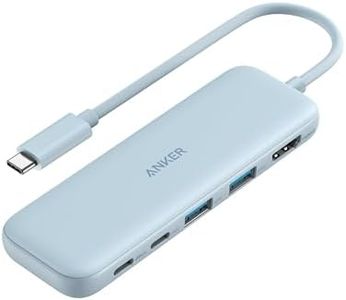
Anker USB C Hub, 5-in-1 USBC to HDMI Hub with 4K Display, 5Gbps USB-C and 2 5Gbps USB-A Data Ports for MacBook Pro, MacBook Air, Dell XPS, Lenovo Thinkpad, HP Laptops and More (Blue)

Rating
10.0
Type of Ports
Power Delivery (PD)
Data Transfer Speed

Most important from
18310 reviews

Type of Ports
The combination of USB-C and USB-A ports supports fast data transfers and immediate device recognition, making connectivity seamless.
Power Delivery (PD)
Powered USB ports prevent draining the laptop’s battery when running peripherals, enhancing overall usability.
Data Transfer Speed
Its 4K HDMI output delivers clear, flicker-free visuals ideal for everyday productivity, though not suited for high-speed gaming.
Build Quality and Design
The hub offers a perfect balance of compactness and functionality, easily fitting into a laptop bag without adding bulk.
Compatibility
Works flawlessly across multiple devices including MacBook and Dell laptops, supporting hassle-free plug-and-play operation.

The Anker 5-in-1 USB-C Hub offers a solid solution for MacBook users who need to expand their device's connectivity. It includes a 4K HDMI port for connecting to an external monitor, one USB-C data port, and two USB-A ports—all supporting fast data transfer speeds of up to 5 Gbps. This means you can quickly move files or connect various USB devices like flash drives or keyboards. The hub also supports pass-through charging up to 85W, which lets you power your laptop while using it, although you’ll need a separate charger for this.

The build is compact and made from durable ABS material, and its blue color stands out from typical hubs. It’s compatible with macOS and Windows laptops like MacBook Pro, MacBook Air, Dell XPS, and Lenovo Thinkpad, making it versatile. One thing to note is the HDMI port supports 4K resolution but only at 30Hz, which is fine for most tasks but not ideal for fast-moving video or gaming. Also, the USB-C ports do not support video output, so the HDMI port is your only option for external displays.

This hub provides a dependable and easy-to-use option for everyday productivity, especially if you want simple video output and reliable USB connections without carrying multiple adapters.

Rating
10.0
Type of Ports
Power Delivery (PD)
Data Transfer Speed

Most important from
18310 reviews

Type of Ports
The combination of USB-C and USB-A ports supports fast data transfers and immediate device recognition, making connectivity seamless.
Power Delivery (PD)
Powered USB ports prevent draining the laptop’s battery when running peripherals, enhancing overall usability.
Data Transfer Speed
Its 4K HDMI output delivers clear, flicker-free visuals ideal for everyday productivity, though not suited for high-speed gaming.
Build Quality and Design
The hub offers a perfect balance of compactness and functionality, easily fitting into a laptop bag without adding bulk.
Compatibility
Works flawlessly across multiple devices including MacBook and Dell laptops, supporting hassle-free plug-and-play operation.
#3

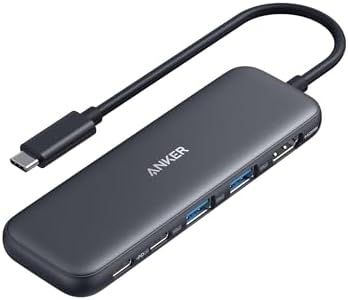
Anker USB C Hub, 5-in-1 USBC to HDMI Splitter with 4K Display, 1 x Powered USB-C 5Gbps & 2×Powered USB-A 3.0 5Gbps Data Ports for MacBook Pro, MacBook Air, Dell and More

Rating
9.4
Power Delivery (PD)
Data Transfer Speed
Build Quality and Design

Most important from
18310 reviews

Power Delivery (PD)
Pass-through charging with up to 85W ensures your laptop stays powered while multitasking.
Data Transfer Speed
File transfers are blazing fast with up to 5 Gbps speeds, saving valuable time.
Build Quality and Design
Compact design and reliable performance with an 18-month worry-free warranty.
Compatibility
Works perfectly across multiple devices including MacBook Pro, Dell XPS, and Lenovo ThinkPad.

The Anker USB-C Hub offers 5-in-1 connectivity which includes a 4K HDMI port, a 5 Gbps USB-C data port, two 5 Gbps USB-A ports, and a 100W PD-IN port for charging. Its powerful pass-through charging supports up to 85W, allowing you to charge your laptop while using the hub, although it requires an additional charger. The data transfer speeds are impressive, with both USB-C and USB-A ports offering up to 5 Gbps, making it easy to move files quickly.

The HDMI port supports up to 4K@30Hz display, which is great for connecting to external monitors for high-definition streaming or mirroring. However, it's important to note that the USB-C data port does not support video output, and the 100W PD-IN port is solely for charging and not for transferring data to devices like headphones or speakers. The hub is compatible with a wide range of devices including MacBooks, Windows laptops, and Chromebooks, but it does not support Linux.

The build quality appears robust with a sleek design that matches modern laptops. It's also lightweight and compact, making it highly portable. Its compatibility with multiple operating systems and devices makes it versatile. Given these features, this hub is an excellent choice for users looking for a reliable and high-performance USB-C hub for their MacBooks and other compatible devices.

Rating
9.4
Power Delivery (PD)
Data Transfer Speed
Build Quality and Design

Most important from
18310 reviews

Power Delivery (PD)
Pass-through charging with up to 85W ensures your laptop stays powered while multitasking.
Data Transfer Speed
File transfers are blazing fast with up to 5 Gbps speeds, saving valuable time.
Build Quality and Design
Compact design and reliable performance with an 18-month worry-free warranty.
Compatibility
Works perfectly across multiple devices including MacBook Pro, Dell XPS, and Lenovo ThinkPad.

Buying Guide for the Best Mac USB-C Hubs

When choosing a USB-C hub for your Mac, it's important to consider your specific needs and how you plan to use the hub. USB-C hubs can expand the functionality of your Mac by providing additional ports for connecting various devices. To make the best choice, you should understand the key specifications and how they relate to your usage requirements.
Number of PortsThe number of ports on a USB-C hub determines how many devices you can connect simultaneously. This is important because it affects your ability to use multiple peripherals at once, such as external hard drives, monitors, keyboards, and mice. Hubs can range from having just a few ports to over a dozen. If you only need to connect a couple of devices, a hub with fewer ports will suffice. However, if you have many peripherals, opt for a hub with more ports to avoid constantly swapping devices.
Type of PortsUSB-C hubs can come with various types of ports, including USB-A, HDMI, Ethernet, SD card slots, and more. The type of ports you need depends on the devices you plan to connect. For example, if you need to connect a monitor, look for a hub with an HDMI port. If you need to transfer files from a camera, an SD card slot is essential. Consider the devices you use regularly and choose a hub that includes the necessary ports to support them.
Power Delivery (PD)Power Delivery (PD) is a feature that allows the hub to charge your Mac while connected. This is important if you want to keep your Mac charged without using a separate charger. PD hubs can vary in their power output, typically ranging from 30W to 100W. If you have a MacBook Pro, which requires more power, choose a hub with higher wattage PD to ensure efficient charging. For lighter devices like MacBook Air, lower wattage PD may be sufficient.
Data Transfer SpeedData transfer speed determines how quickly data can be transferred between your Mac and connected devices. This is crucial for tasks like transferring large files or using external storage. USB-C hubs can support different speeds, such as USB 3.0 (up to 5Gbps) or USB 3.1/3.2 (up to 10Gbps). If you frequently transfer large files or use high-speed storage devices, opt for a hub with higher data transfer speeds to save time and improve efficiency.
Build Quality and DesignThe build quality and design of a USB-C hub can affect its durability and ease of use. A well-built hub made from high-quality materials will last longer and withstand daily wear and tear. Additionally, consider the hub's size and design; a compact and lightweight hub is easier to carry around, while a hub with a longer cable can provide more flexibility in positioning. Choose a hub that matches your lifestyle and usage habits for the best experience.
CompatibilityCompatibility ensures that the USB-C hub works seamlessly with your Mac and other devices. Some hubs may have specific requirements or limitations, so it's important to check if the hub is compatible with your Mac model and operating system. Additionally, consider compatibility with other devices you plan to connect, such as monitors, external drives, and peripherals. Ensuring compatibility will prevent connectivity issues and ensure smooth operation.

FAQ

Most Popular Categories Right Now