We Use CookiesWe use cookies to enhance the security, performance, functionality and for analytical and promotional activities. By continuing to browse this site you are agreeing to our privacy policy

4 Best Laser Cutters 2026 in the United States
How do we rank products for you?

Our technology thoroughly searches through the online shopping world, reviewing hundreds of sites. We then process and analyze this information, updating in real-time to bring you the latest top-rated products. This way, you always get the best and most current options available.

headphones-stars

Our Top Picks

#1

Winner

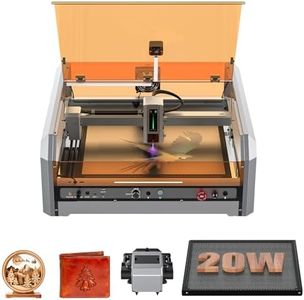
Genmitsu L8 Laser Engraver, 20W (20000mW) Laser Cutter Built-in Acrylic Enclosure with Vent, Air Assist Pump, Honeycomb, Camera, All-in-one Plug and Play Engraving Machine, Safety Class 1

Rating
10.0
Chosen by1,451
Laser Power
Material Compatibility
Software Compatibility

Most important from
106 reviews

Laser Power
The 20W laser meets specifications and performs excellently, particularly with metal and plastic engraving.
Material Compatibility
The Genmitsu L8 Laser Engraver is very capable, cutting cleanly and quickly through materials like 5mm plywood, aluminum, plastic, and steel.
Software Compatibility
Lightburn software integration works very well, enhancing the overall user experience.
Safety Features
The device's safety features, including the complete enclosure, are appreciated, although some concerns about factory testing were raised.

The Genmitsu L8 Laser Engraver stands out with its impressive laser power of over 20W, allowing it to cut through various materials like pinewood, black acrylic, and stainless steel with ease. Its work area size is substantial, providing ample space for various projects. The machine's maximum engraving speed of 40000mm/min is notably higher than many competitors, making it a great option for users seeking efficiency and speed. Precision and accuracy are enhanced by the Lightburn-compatible camera, which simplifies project positioning and reduces trial and error.

This engraver supports multiple materials, making it versatile for different crafting needs. Software compatibility is robust, particularly with Lightburn, which is popular among laser cutter users. The cooling system includes a smart air assist pump and a large honeycomb, ensuring clean and efficient cuts. Safety features are extensive, including a door sensor, emergency stop, child safety lock, and active flame monitor, ensuring user protection during operation.

The machine's weight of 43.4 pounds and its large dimensions (28.15 x 24.45 x 10.28 inches) might be cumbersome for some users, especially those with limited workspace. Additionally, while the device is fully assembled and ready to use, its higher price point may be a consideration for hobbyists or small businesses.

Rating
10.0
Chosen by1,451
Laser Power
Material Compatibility
Software Compatibility

Most important from
106 reviews

Laser Power
The 20W laser meets specifications and performs excellently, particularly with metal and plastic engraving.
Material Compatibility
The Genmitsu L8 Laser Engraver is very capable, cutting cleanly and quickly through materials like 5mm plywood, aluminum, plastic, and steel.
Software Compatibility
Lightburn software integration works very well, enhancing the overall user experience.
Safety Features
The device's safety features, including the complete enclosure, are appreciated, although some concerns about factory testing were raised.
#2

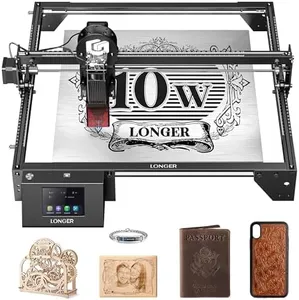
LONGER Laser Engraver Ray5 10W, 60W DIY Laser Cutter and Laser Engraving Machine with 3.5" Touch Screen,0.06mm Laser Spot 10000mm/min, Offline Usage CNC Laser Engravers for Wood Metal Acrylic Glass

Rating
8.8
Laser Power
Material Compatibility
Software Compatibility

Most important from
318 reviews

Laser Power
The 10W laser cut depth exceeded expectations, making it an ideal choice for beginners.
Material Compatibility
Setting up this laser engraver is quick and simple, and it's capable of engraving various materials from wood to glass and metal.
Software Compatibility
The machine performs well right out of the box, with no tweaking needed initially, and works seamlessly with LightBurn software.

The Longer Ray5 10W Laser Engraver is a versatile laser cutter and engraver with several notable features. It boasts a 10W laser power, suitable for cutting and engraving a wide range of materials including wood, metal, acrylic, and glass. The spacious 400x400mm work area offers ample space for various projects, and the precision of 0.01mm with a fine laser spot of 0.06mm ensures detailed and accurate engravings.

The machine supports multiple connectivity options (USB, TF card, WiFi, App) and is compatible with professional software like LaserGRBL and LightBurn, providing flexibility in operation. Safety is well-addressed with features like an emergency stop, motion protection, heat protection, and a protective cover, alongside a hidden active cooling system to maintain performance and longevity.

The machine's weight (9.63 pounds) and size (25.39 x 17.12 x 12.79 inches) might be a consideration for space-constrained work areas. The Longer Ray5 is a reliable and precise laser engraver with robust safety features and easy setup supported by responsive customer service.

Rating
8.8
Laser Power
Material Compatibility
Software Compatibility

Most important from
318 reviews

Laser Power
The 10W laser cut depth exceeded expectations, making it an ideal choice for beginners.
Material Compatibility
Setting up this laser engraver is quick and simple, and it's capable of engraving various materials from wood to glass and metal.
Software Compatibility
The machine performs well right out of the box, with no tweaking needed initially, and works seamlessly with LightBurn software.
#3

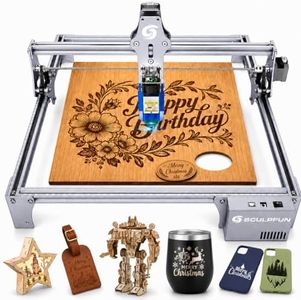
SCULPFUN S6 Pro Laser Engraver, 5500mW Output L-aser Cutter for Beginners, Laser Class 4, Logo Marking Machine, DIY Engraving Machine for Wood, Black Acrylic, Leather, Coated Ceramic...

Rating
7.0
Precision and Accuracy

Most important from
134 reviews

Precision and Accuracy
The machine handles detailed projects well, such as intricate layering on wood, making it ideal for personalized DIY crafts.

The SCULPFUN S6 Pro is a solid choice for beginners interested in laser engraving and cutting. It offers a powerful 5500mW laser capable of cutting materials like wood up to 10mm thick, black acrylic, and plywood, which covers most small DIY projects. The laser’s fine 0.08mm focus ensures precise engraving, even on delicate surfaces like leather, bamboo, and coated ceramics. However, engraving stainless steel requires a bit of extra prep by blackening the surface first, which might not be ideal for all users.

Its work area is suitable for typical small to medium crafts. The machine’s fixed focus lens with a sliding design makes focusing quick and simple, avoiding fiddly adjustments. Safety features include a laser filter cover that blocks most UV light, allowing you to watch the process safely with minimal eye protection, plus an emergency power switch for quick shutdown. Although there isn’t a dedicated cooling system mentioned, the stable aluminum frame supports decent heat management for short to moderate sessions. It supports several popular software options for both Windows and Mac, though Mac users are limited to LightBurn, which is paid.

Assembly is straightforward, usually taking under 20 minutes, making it accessible even for newcomers. The working surface is relatively small and requires an additional purchase if you want a larger honeycomb table for bigger projects. Also, as a Class 4 laser, proper precautions are necessary despite some built-in safety measures. The SCULPFUN S6 Pro provides a user-friendly, affordable laser cutter that balances good power and precision for hobbyists and beginners, especially those focused on wood and acrylic projects.

Rating
7.0
Precision and Accuracy

Most important from
134 reviews

Precision and Accuracy
The machine handles detailed projects well, such as intricate layering on wood, making it ideal for personalized DIY crafts.

Buying Guide for the Best Laser Cutters

Choosing the right laser cutter can be a daunting task, especially if you're new to the world of laser cutting. Laser cutters are versatile tools used for cutting, engraving, and marking various materials such as wood, acrylic, metal, and more. To make an informed decision, it's important to understand the key specifications that determine the performance and suitability of a laser cutter for your needs. Here are some essential specs to consider and how to navigate them.
Laser PowerLaser power, measured in watts, determines the cutting and engraving capabilities of the laser cutter. Higher wattage means the laser can cut through thicker materials and work faster. For hobbyists and small projects, a laser cutter with 20-60 watts may be sufficient. For more demanding tasks or professional use, you might need a machine with 80-150 watts or more. Consider the types of materials you'll be working with and the thickness to choose the appropriate laser power.
Work Area SizeThe work area size refers to the maximum dimensions of the material that the laser cutter can accommodate. A larger work area allows you to work on bigger projects and cut larger pieces in a single pass. If you plan to work on small items like jewelry or small crafts, a smaller work area might be sufficient. For larger projects like signage or furniture components, you'll need a machine with a larger work area. Think about the typical size of your projects to determine the right work area size.
Material CompatibilityDifferent laser cutters are compatible with different materials. Some machines are designed to cut and engrave non-metal materials like wood, acrylic, and leather, while others can handle metals like steel and aluminum. It's important to check the material compatibility of the laser cutter to ensure it can handle the types of materials you plan to work with. If you need versatility, look for a machine that supports a wide range of materials.
Precision and AccuracyPrecision and accuracy are crucial for detailed work and intricate designs. This spec is often measured in terms of the smallest movement the laser can make, usually in microns. Higher precision means the laser cutter can produce finer details and cleaner cuts. If your projects require high detail, such as intricate patterns or fine engravings, look for a machine with high precision and accuracy. For less detailed work, a standard level of precision may be sufficient.
Software CompatibilityLaser cutters typically come with software that allows you to design and control the cutting process. Compatibility with popular design software like Adobe Illustrator or CorelDRAW can be important for ease of use and flexibility. Ensure the laser cutter's software is user-friendly and compatible with the design tools you are comfortable using. If you have specific software preferences, check for compatibility before making a decision.
Cooling SystemLaser cutters generate heat during operation, and a cooling system is essential to prevent overheating and ensure consistent performance. There are different types of cooling systems, such as air cooling and water cooling. Water cooling systems are generally more efficient and suitable for higher-powered lasers. Consider the cooling system based on the laser power and your usage frequency. For heavy use or high-power lasers, a robust cooling system is necessary.
Safety FeaturesSafety features are important to protect the user and the machine. Look for features like emergency stop buttons, safety interlocks, and proper ventilation systems. These features help prevent accidents and ensure safe operation. If you are new to laser cutting or plan to use the machine in a shared space, prioritize models with comprehensive safety features to ensure a safe working environment.

FAQ

Most Popular Categories Right Now