We Use CookiesWe use cookies to enhance the security, performance, functionality and for analytical and promotional activities. By continuing to browse this site you are agreeing to our privacy policy

10 Best iPad-Compatible Styluses 2026 in the United States
How do we rank products for you?

Our technology thoroughly searches through the online shopping world, reviewing hundreds of sites. We then process and analyze this information, updating in real-time to bring you the latest top-rated products. This way, you always get the best and most current options available.

headphones-stars

Our Top Picks

#1

Winner

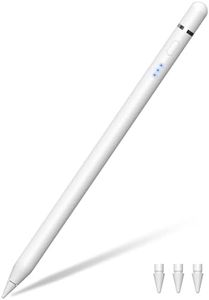
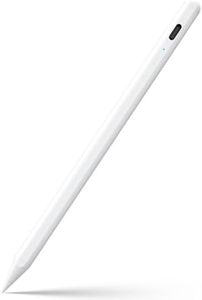
Stylus Pen for Apple iPad 2018–2026, Wireless Charging iPad Pencil 2nd Generation &1st Generation with Tilt Sensitivity& Palm Rejection, 2X Fast Charge Pencil for iPad A16 Pro 11/12.9/13, Air, Mini

Rating
10.0
Chosen by1,493
Battery Life
Palm Rejection
Tip Material and Replaceability

Most important from
326 reviews

Battery Life
Battery life is impressive, supporting extended use, and the fast charging feature adds great convenience.
Palm Rejection
Palm rejection works effectively, allowing a natural hand position without unwanted marks on the screen.
Tip Material and Replaceability
Comes with extra durable tips, ensuring consistent performance over time without needing to replace the entire pen.
Additional Features
Delivers excellent quality and performance at a price point that makes it a strong alternative to Apple’s own Pencil.

This stylus pen is designed to work with a wide range of iPad models from 2018 to 2026, including various iPad Pro, Air, Mini, and standard iPads, making it a versatile choice if you have a recent iPad. It supports advanced features like tilt sensitivity, which allows for natural shading and varied line thickness, and palm rejection, so you can rest your hand on the screen while writing or drawing without unwanted marks. The pressure sensitivity and pixel-level precision provide a smooth, responsive experience similar to Apple’s own Pencil.

Battery life is solid, offering up to 12 hours of continuous use, and it charges quickly—fully in just about 15 minutes. Charging options include both magnetic wireless charging and direct USB-C charging, but wireless charging only works with certain iPad models. The stylus comes with three durable, replaceable 1.0mm tips made from polymer, which helps keep performance consistent over time and means you won’t have to buy a new pen if the tip wears down.

One nice convenience is that it doesn’t require Bluetooth or app pairing—just pick it up and start writing, making it straightforward for students, professionals, or creatives. While it supports many iPad models, it is not compatible with iPads released before 2018 or other devices. Also, magnetic and wireless charging features depend on your specific iPad model, so not all charging options may be available to you. It uses a battery type that’s included but may eventually need replacing. This stylus offers performance comparable to Apple’s own pencils, especially if you want good performance at a likely lower cost, with fast charging and handy features suitable for note-taking, drawing, and everyday digital tasks.

Rating
10.0
Chosen by1,493
Battery Life
Palm Rejection
Tip Material and Replaceability

Most important from
326 reviews

Battery Life
Battery life is impressive, supporting extended use, and the fast charging feature adds great convenience.
Palm Rejection
Palm rejection works effectively, allowing a natural hand position without unwanted marks on the screen.
Tip Material and Replaceability
Comes with extra durable tips, ensuring consistent performance over time without needing to replace the entire pen.
Additional Features
Delivers excellent quality and performance at a price point that makes it a strong alternative to Apple’s own Pencil.
#2

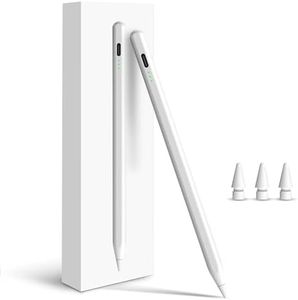
Penlike Pencil for Apple iPad A16 10th, Fast Charge Stylus Pen for 2026-2018 iPad A16/11-6th, Air 11"/13" M4/M3/M2/5th-3rd, Pro 13/11/M4/12.9, Mini A17 Pro/6/5th Palm Rejection Tilt Sensitivity

Rating
9.1
Palm Rejection
Additional Features
Battery Life

Most important from
3665 reviews

Palm Rejection
The palm rejection feature significantly improves comfort and accuracy by allowing the hand to rest naturally on the screen without interference.
Additional Features
The stylus connects easily, charges quickly, and works smoothly for drawing, writing, and app use, making it a solid and affordable option for kids and casual users.
Battery Life
The pen arrives charged and maintains battery life well, often requiring no immediate recharging after initial use.
Compatibility
It works flawlessly with the latest iPad Mini models and is especially convenient for note-taking on the go, such as during flights.

The Penlike Pencil is a solid choice for iPad users looking for a versatile and responsive stylus compatible with a wide range of iPads from 2018 through 2026 models. It supports tilt sensitivity, which helps create natural shading and varied line thickness by changing the pencil angle, a great feature for drawing and detailed work. Palm rejection allows you to rest your hand on the screen while using the stylus, making writing or sketching more comfortable and natural. Its 1.5mm tip offers precise and smooth input, and it comes with extra replacement nibs, which is convenient for long-term use.

Battery life is quite good, lasting up to 9 hours on a 15-minute fast charge, and there are indicator lights to show remaining power, so you won’t be caught off guard by a dead stylus. It magnetically attaches to compatible iPads for easy storage but does not support magnetic charging like the Apple Pencil 2, so you’ll need to plug it in for charging. The stylus is easy to use without needing Bluetooth or complex setup—just a tap to turn on, making it friendly for non-tech users.

If you want an affordable stylus that covers the key drawing and writing features with quick charging and broad iPad support, the Penlike Pencil is worth considering, especially if you prefer something straightforward and effective without extra bells and whistles.

Rating
9.1
Palm Rejection
Additional Features
Battery Life

Most important from
3665 reviews

Palm Rejection
The palm rejection feature significantly improves comfort and accuracy by allowing the hand to rest naturally on the screen without interference.
Additional Features
The stylus connects easily, charges quickly, and works smoothly for drawing, writing, and app use, making it a solid and affordable option for kids and casual users.
Battery Life
The pen arrives charged and maintains battery life well, often requiring no immediate recharging after initial use.
Compatibility
It works flawlessly with the latest iPad Mini models and is especially convenient for note-taking on the go, such as during flights.
#3

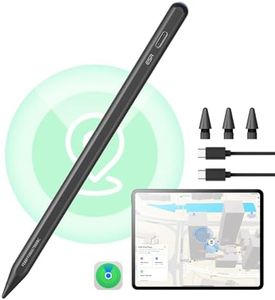
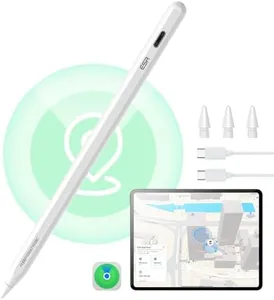
ESR Geo Digital iPad Pencil Findmy Compatible with Apple iPad 2018-2026,with Easy Shortcuts for Apple iPad A16/10/9/8 & Air 13/11 & Pro 12.9/13/11 & Mini 7/6/5,Black(No Wireless Charging)

Rating
8.5
Pressure Sensitivity
Battery Life
Compatibility

Most important from
3241 reviews

Pressure Sensitivity
Delivers a writing and navigation experience that closely mirrors the original Apple Pencil, combining comfort with familiarity.
Battery Life
Charges rapidly via Type-C in about 20 minutes, ensuring minimal downtime compared to other styluses.
Compatibility
Seamlessly connects and sticks to compatible iPads, maintaining reliable performance during daily tasks.
Additional Features
Features a built-in Find My function that provides peace of mind by making it easy to locate if misplaced.

The ESR Geo Digital iPad Pencil is a solid choice for anyone using iPads released in 2018 or later, including the latest 2026 models. It offers broad compatibility with many iPad versions, making it versatile if you have or plan to upgrade various iPads. One of its standout features is the Find My function, which helps you locate the stylus if you misplace it—a handy feature not common in many styluses.

The pencil supports tilt sensitivity, allowing you to create natural shading and line thickness changes, making it suitable for drawing and detailed writing. It also features quick shortcuts via Bluetooth, such as tapping to return to the home screen or double-tapping for task management, adding convenience during use. Battery life is strong with fast charging, taking only about 20 minutes to fully charge via a Type-C cable; however, it does not support wireless charging, which some users might miss.

The stylus uses an aluminum body, making it lightweight and durable. This stylus is ideal for iPad users looking for a responsive, well-compatible alternative to Apple's own Pencil, especially if you value fast charging and helpful extras like Find My and shortcut taps. However, those who rely heavily on wireless charging or require detailed palm rejection might want to consider these limitations before buying.

Rating
8.5
Pressure Sensitivity
Battery Life
Compatibility

Most important from
3241 reviews

Pressure Sensitivity
Delivers a writing and navigation experience that closely mirrors the original Apple Pencil, combining comfort with familiarity.
Battery Life
Charges rapidly via Type-C in about 20 minutes, ensuring minimal downtime compared to other styluses.
Compatibility
Seamlessly connects and sticks to compatible iPads, maintaining reliable performance during daily tasks.
Additional Features
Features a built-in Find My function that provides peace of mind by making it easy to locate if misplaced.

Buying Guide for the Best iPad-Compatible Styluses

Choosing the right iPad-compatible stylus can significantly enhance your digital experience, whether you're an artist, student, or professional. The right stylus can make drawing, note-taking, and navigating your iPad more intuitive and enjoyable. To find the best fit for you, it's important to understand the key specifications and how they align with your needs and preferences.
Pressure SensitivityPressure sensitivity refers to how well the stylus can detect variations in pressure applied to the screen. This is crucial for artists and designers who need to create lines of varying thickness and opacity. Styluses with higher pressure sensitivity levels (e.g., 2048 levels or more) offer more precision and control, making them ideal for detailed artwork. For general note-taking or casual use, lower pressure sensitivity may suffice.
Tilt RecognitionTilt recognition allows the stylus to detect the angle at which it is being held, enabling more natural and varied strokes, especially for shading in drawing apps. This feature is particularly important for artists who want to mimic traditional drawing techniques. If you plan to use the stylus primarily for writing or basic navigation, tilt recognition may not be as critical.
Palm RejectionPalm rejection technology prevents the iPad from registering your hand or wrist resting on the screen while using the stylus. This is essential for a comfortable and natural writing or drawing experience, as it allows you to rest your hand on the screen without causing unwanted marks. If you frequently take notes or draw, look for a stylus with reliable palm rejection.
Battery LifeBattery life determines how long the stylus can be used before needing a recharge. Longer battery life is beneficial for extended use, such as long drawing sessions or taking notes throughout the day. Some styluses offer quick charging features, which can be convenient if you need to recharge in a hurry. Consider your usage patterns to determine the importance of battery life for you.
CompatibilityCompatibility refers to whether the stylus works with your specific iPad model. Not all styluses are compatible with every iPad, so it's important to check the manufacturer's specifications to ensure it will work with your device. Compatibility is crucial to ensure full functionality and avoid any connectivity issues.
Tip Material and ReplaceabilityThe tip material affects the feel and durability of the stylus. Common materials include plastic, rubber, and metal. A smoother tip can provide a more natural writing experience, while a more textured tip can offer better control. Additionally, consider whether the tips are replaceable, as this can extend the life of your stylus and maintain its performance over time.
Additional FeaturesSome styluses come with additional features such as shortcut buttons, erasers, or customizable settings. These can enhance your productivity and make the stylus more versatile. Think about what extra features might be useful for your specific tasks, whether it's quick access to certain functions or the ability to customize the stylus to your workflow.

FAQ

Most Popular Categories Right Now