We Use CookiesWe use cookies to enhance the security, performance, functionality and for analytical and promotional activities. By continuing to browse this site you are agreeing to our privacy policy

10 Best Innova Car Code Scanners 2026 in the United States
How do we rank products for you?

Our technology thoroughly searches through the online shopping world, reviewing hundreds of sites. We then process and analyze this information, updating in real-time to bring you the latest top-rated products. This way, you always get the best and most current options available.

headphones-stars

Our Top Picks

#1

Winner

Innova 5610 OBD2 Bidirectional Scan Tool - Understand Your Vehicle, Pinpoint What's Wrong, and Complete Your Repairs with Less Headache, Updates Included, US-Based Technical Support

Rating
10.0
Chosen by1,377
Compatibility
Diagnostic Functions
User Interface

Most important from
3762 reviews

Compatibility
The tool’s ability to adapt its functions based on the car’s make, model, and year makes it highly versatile, though it’s important to verify specific compatibility.
Diagnostic Functions
Innova 5610 is a must-have for those who tinker with cars, providing capabilities beyond basic OBD2 scanners, especially for modern vehicles full of control modules.
User Interface
The bright, large colored screen is easy to read, although the lack of backlit keys can be a minor inconvenience in dimly lit areas.
Update Capability
Free updates and lifelong license add to the value, ensuring the tool remains up-to-date without recurring costs.
Connectivity
A great tool for both home and professional ASE mechanics, offering exceptional ease of use and an in-depth repair app that connects seamlessly via Bluetooth.

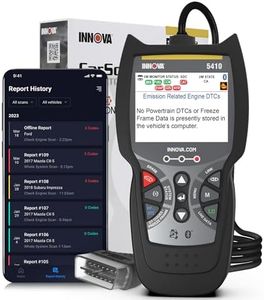
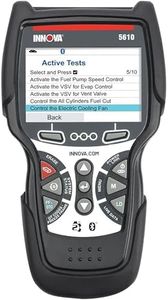
The Innova 5610 OBD2 Bidirectional Scan Tool is a reliable and versatile diagnostic tool designed to help both professional and amateur mechanics maintain peak performance and safety in their vehicles. It is compatible with most vehicles from 1996 to 2023, and 2024 compatibility is forthcoming. It covers OBD2 and OEM live data, making it a robust choice for comprehensive vehicle diagnostics. The enhanced data stream functionality allows users to view live data for advanced systems such as ABS, SRS, transmission, and engine, which can be very useful for identifying specific issues efficiently.

Additionally, its bidirectional controls enable users to send commands to test functions like fuel pump on/off or retracting the electronic parking brake, enhancing its utility for more in-depth diagnostic work. The user interface supports English, Spanish, and French, making it accessible to a broader audience. Furthermore, the tool is designed for ease of use with straightforward navigation and operation. The included RepairSolutions2 app pairs wirelessly with the scanner and provides ongoing updates without subscription fees, ensuring the tool remains up-to-date with the latest vehicle diagnostics.

Connectivity is further facilitated through iOS and Android compatibility, allowing integration with various devices. However, it's important to verify vehicle coverage using Innova's Coverage Checker since the features may vary across different makes, models, and years. While the tool offers significant diagnostic capabilities, some users may find the advanced features a bit overwhelming if they are not familiar with automotive diagnostics. Despite this, the ASE-Certified support can offer assistance if needed. This scanner is ideal for those looking for a professional-grade diagnostic tool without recurring costs, making it a valuable investment for long-term vehicle maintenance.

Rating
10.0
Chosen by1,377
Compatibility
Diagnostic Functions
User Interface

Most important from
3762 reviews

Compatibility
The tool’s ability to adapt its functions based on the car’s make, model, and year makes it highly versatile, though it’s important to verify specific compatibility.
Diagnostic Functions
Innova 5610 is a must-have for those who tinker with cars, providing capabilities beyond basic OBD2 scanners, especially for modern vehicles full of control modules.
User Interface
The bright, large colored screen is easy to read, although the lack of backlit keys can be a minor inconvenience in dimly lit areas.
Update Capability
Free updates and lifelong license add to the value, ensuring the tool remains up-to-date without recurring costs.
Connectivity
A great tool for both home and professional ASE mechanics, offering exceptional ease of use and an in-depth repair app that connects seamlessly via Bluetooth.
#2

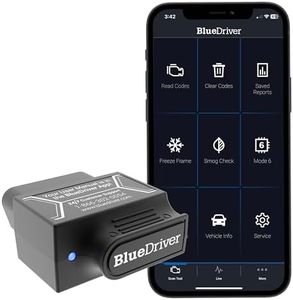
BlueDriver Bluetooth Pro OBDII Scan Tool for iPhone & Android - No Subscription Fee - OBD2 Car Scanner and Code Reader - Diagnose Check Engine, ABS, SRS, Airbag & 7000+ Issues on Vehicles 1996+

Rating
9.4
Diagnostic Functions
User Interface
Connectivity

Most important from
62957 reviews

Diagnostic Functions
It has saved more than its cost by avoiding diagnostic fees and speeding up repairs with precise code information.
User Interface
Setup is effortless: just plug it in, open the app, and start scanning or monitoring live data immediately.
Connectivity
The Bluetooth connection is reliable and pairs seamlessly with Android phones, ensuring smooth wireless operation.
Update Capability
No subscription fees or hidden costs — a one-time purchase grants full access to all features and updates.

The BlueDriver Bluetooth Pro OBDII Scan Tool is a solid choice for car owners who want professional-level diagnostics without the complexity. It works with most gas-powered vehicles from 1996 onwards sold in North America, covering major brands like Ford, Toyota, Honda, and BMW. Its diagnostic functions go beyond basic check engine codes to include ABS, Airbag, and TPMS issues, which many simple scanners don’t offer.

The tool connects wirelessly to your phone or tablet via Bluetooth, making it easy to use without dealing with cables. The free app provides a user-friendly interface with detailed repair reports, live data monitoring as you drive, and helpful repair videos. Updates come through the app, ensuring your scanner stays current without extra fees or subscriptions. One of the biggest pluses is the absence of ongoing costs — you pay once and get full access. BlueDriver offers strong customer support available 24/7 through phone or chat, which is great for users who may need guidance.

However, it only supports gas vehicles sold in North America, so if you have a diesel or import car from elsewhere, this might not be the right tool. Also, it requires a smartphone or tablet to use, so it’s less suitable if you want a standalone scanner device. Data storage and reporting are handled within the app but might be limited compared to higher-end tools with built-in memory. BlueDriver is well-suited for everyday drivers and DIYers who want deeper insight into their vehicle’s health with easy-to-understand reports and no extra subscription fees.

Rating
9.4
Diagnostic Functions
User Interface
Connectivity

Most important from
62957 reviews

Diagnostic Functions
It has saved more than its cost by avoiding diagnostic fees and speeding up repairs with precise code information.
User Interface
Setup is effortless: just plug it in, open the app, and start scanning or monitoring live data immediately.
Connectivity
The Bluetooth connection is reliable and pairs seamlessly with Android phones, ensuring smooth wireless operation.
Update Capability
No subscription fees or hidden costs — a one-time purchase grants full access to all features and updates.
#3

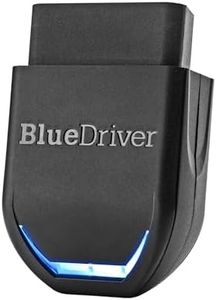
BlueDriver Pro Next Gen OBD2 Scanner – No Subscription, Bluetooth Car Code Reader for iPhone & Android – Diagnose 8000+ Issues, ABS SRS TPMS, Repair Reports, Vehicles 1996+

Rating
8.5
Diagnostic Functions
User Interface
Compatibility

Most important from
62957 reviews

Diagnostic Functions
The scanner saves money and time by pinpointing exact trouble codes and repair suggestions, often allowing you to order parts ahead and avoid unnecessary diagnostic fees.
User Interface
Setup is straightforward and the app guides users smoothly, making it accessible even for those without technical expertise.
Compatibility
Compatibility is seamless across Android devices, and it’s not limited to a single vehicle, allowing use on multiple cars without issues.
Data Storage and Reporting
It stores diagnostic history on your phone, which can be exported or shared easily with mechanics or friends.

The BlueDriver Pro Next Gen OBD2 Scanner is a smart choice for car owners who want professional-level diagnostics without complicated tools or ongoing fees. It works wirelessly via Bluetooth with iPhone or Android devices, turning your phone into a powerful scanner. This means no messy cables or bulky equipment. It covers gas vehicles from 1996 onward, including many popular makes like Ford, Toyota, Honda, and select trucks, though it’s best suited for most everyday cars rather than specialized vehicles.

The scanner reads and clears a wide range of codes, including check engine, ABS, airbags, TPMS, and transmission issues, giving you more detailed insight than basic code readers. One standout feature is the technician-verified repair reports linked to your specific vehicle, saving you from guessing what a code means or how to fix it. You can also monitor live data while driving, which helps track ongoing vehicle health.

The app is user-friendly and keeps improving with free updates, plus you get 24/7 customer support from real experts. Since it relies on your smartphone, you must have your device handy and charged. It supports mainly gasoline vehicles and select light trucks, so diesel or older models might not be compatible. Data storage and detailed reporting are app-based, so you’ll need the BlueDriver app to access these features. This product suits car owners who want reliable, easy-to-understand diagnostics without subscription costs, especially if you prefer a wireless setup and value expert-backed repair info.

Rating
8.5
Diagnostic Functions
User Interface
Compatibility

Most important from
62957 reviews

Diagnostic Functions
The scanner saves money and time by pinpointing exact trouble codes and repair suggestions, often allowing you to order parts ahead and avoid unnecessary diagnostic fees.
User Interface
Setup is straightforward and the app guides users smoothly, making it accessible even for those without technical expertise.
Compatibility
Compatibility is seamless across Android devices, and it’s not limited to a single vehicle, allowing use on multiple cars without issues.
Data Storage and Reporting
It stores diagnostic history on your phone, which can be exported or shared easily with mechanics or friends.

Buying Guide for the Best Innova Car Code Scanners

When it comes to picking the right Innova car code scanner, it's important to understand what features and specifications will best suit your needs. Car code scanners are essential tools for diagnosing and troubleshooting vehicle issues. They can save you time and money by identifying problems before they become serious. To make an informed decision, you should consider several key specifications that will determine the scanner's compatibility, functionality, and ease of use.
CompatibilityCompatibility refers to whether the scanner can work with your specific vehicle make and model. This is crucial because not all scanners are universal. Some are designed to work with a wide range of vehicles, while others are more specialized. To navigate this, check the scanner's compatibility list, which is usually provided by the manufacturer. If you own multiple vehicles or plan to use the scanner on different cars, a more universal model might be the best fit. However, if you have a specific vehicle, ensure the scanner supports it to avoid any issues.
Diagnostic FunctionsDiagnostic functions refer to the range of issues the scanner can detect and diagnose. This can include basic functions like reading and clearing error codes, to more advanced features like live data streaming, ABS/SRS diagnostics, and emission testing. Basic scanners are suitable for simple tasks like checking engine lights, while advanced scanners are better for comprehensive diagnostics. Consider what level of detail you need. If you're a DIY enthusiast or a professional mechanic, advanced functions will be more beneficial. For casual users, basic functions might suffice.
User InterfaceThe user interface is how you interact with the scanner. A good user interface is intuitive and easy to navigate, which is important for efficient use. Scanners can have different types of displays, from simple monochrome screens to full-color touchscreens. If you prefer a straightforward, no-frills approach, a basic interface will do. However, if you want more detailed information and easier navigation, look for a scanner with a more advanced interface. Your comfort with technology can guide you here; choose an interface that you find easy to use.
Update CapabilityUpdate capability refers to the scanner's ability to receive software updates. This is important because vehicle technology is constantly evolving, and updates ensure your scanner remains compatible with new car models and diagnostic protocols. Some scanners offer lifetime free updates, while others may require a subscription. If you plan to use the scanner for many years or on newer vehicles, a model with regular updates is a wise choice. For occasional use on older vehicles, this might be less critical.
ConnectivityConnectivity options determine how the scanner communicates with other devices. This can include wired connections, Bluetooth, or Wi-Fi. Wired connections are generally more reliable but can be less convenient. Bluetooth and Wi-Fi offer more flexibility and can allow you to use your smartphone or tablet as a display. If you value convenience and modern features, look for a scanner with wireless connectivity. For those who prefer a straightforward, plug-and-play approach, a wired connection might be more suitable.
Data Storage and ReportingData storage and reporting capabilities refer to the scanner's ability to save diagnostic data and generate reports. This is useful for tracking vehicle performance over time or sharing information with a mechanic. Some scanners have internal memory, while others can save data to an external device. If you need to keep detailed records or share diagnostics easily, look for a scanner with robust data storage and reporting features. For simple, one-time diagnostics, this may be less important.

FAQ

Most Popular Categories Right Now