We Use CookiesWe use cookies to enhance the security, performance, functionality and for analytical and promotional activities. By continuing to browse this site you are agreeing to our privacy policy

10 Best Handheld Label Makers 2026 in the United States
How do we rank products for you?

Our technology thoroughly searches through the online shopping world, reviewing hundreds of sites. We then process and analyze this information, updating in real-time to bring you the latest top-rated products. This way, you always get the best and most current options available.

headphones-stars

Our Top Picks

#1

Winner

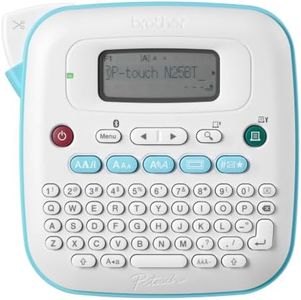
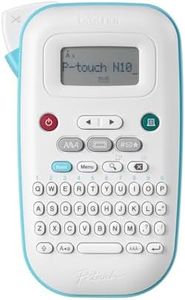
Brother P-Touch PT-N25BT Personal Connected Label Maker, Bluetooth, Design&Print2 app, Portable, Handheld and Prints with P-Touch Btag½â€ (12mm) Wide Color Label Tapes

Rating
10.0
Chosen by1,202
Print Resolution
Label Tape Compatibility
Power Source

Most important from
799 reviews

Print Resolution
The label maker excels for occasional, light-duty labeling tasks with clear, crisp print quality.
Label Tape Compatibility
A wide variety of colorful tape combinations make it easy to create eye-catching labels.
Power Source
The device requires six AAA batteries or an optional wall charger, which must be purchased separately and is not clearly stated upfront.
Durability
Labels adhere well and remain durable on containers, making it ideal for home organization projects.

The Brother P-Touch PT-N25BT is a compact and portable handheld label maker that offers a good balance of convenience and creative options. It prints labels using thermal technology at 180 dpi, providing clear and readable text suitable for everyday labeling tasks. The device features a QWERTY keyboard, making typing straightforward and familiar for most users. It exclusively uses Brother Btag label tapes that are 12mm wide and come in a variety of 17 colors, allowing for colorful and eye-catching labels. However, tape choices are limited to this specific type, so if you want wider or different tapes, this model won’t support those.

Power-wise, it runs on six AAA batteries or an optional adapter, giving flexibility to use it anywhere without being tied to a power outlet, though batteries need to be purchased separately. The label maker connects via Bluetooth to your smartphone or tablet, enabling more design options through Brother’s free Design&Print2 app. This adds to the device’s customization capabilities with extra fonts, symbols, and frames beyond what’s built-in. It also has a small screen that shows up to 16 characters for previewing before printing, helping reduce mistakes and wasted labels.

Memory-wise, it can save up to 10 favorite labels for quick reprinting, which is handy if you frequently create similar labels. While its build is lightweight and portable, it’s designed for light to moderate home, school, or office use rather than heavy industrial environments. The PT-N25BT is user-friendly and excellent for personal or small office labeling needs, especially if you value color options and app-based design. Just keep in mind its tape compatibility is limited and you’ll need to manage battery power separately.

Rating
10.0
Chosen by1,202
Print Resolution
Label Tape Compatibility
Power Source

Most important from
799 reviews

Print Resolution
The label maker excels for occasional, light-duty labeling tasks with clear, crisp print quality.
Label Tape Compatibility
A wide variety of colorful tape combinations make it easy to create eye-catching labels.
Power Source
The device requires six AAA batteries or an optional wall charger, which must be purchased separately and is not clearly stated upfront.
Durability
Labels adhere well and remain durable on containers, making it ideal for home organization projects.
#2

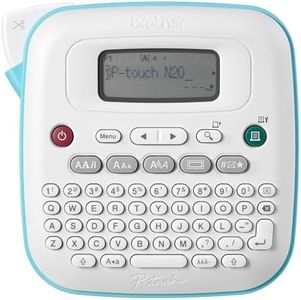
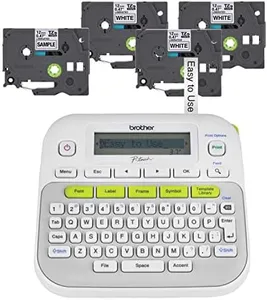
Brother P-Touch PT-N20 Personal Desktop Label Maker, Portable, Handheld and Prints, P-Touch Btag ~½” (12mm) Wide Color Personalized Label Tapes

Rating
8.8
Print Resolution
Keyboard Layout
Label Tape Compatibility

Most important from
2172 reviews

Print Resolution
The print quality is clear and the adhesive sticks well, making labels durable and reliable for home use.
Keyboard Layout
The QWERTY keyboard simplifies typing, but the companion app offers a smoother and more intuitive labeling experience.
Label Tape Compatibility
Wide variety of vibrant tape colors and print combinations allow for personalized and colorful labels that peel on and off cleanly.
Power Source
The device requires six AAA batteries or an optional wall charger, which is not clearly stated upfront and can surprise new users.
Durability
The lightweight design makes it easy to handle, though durability concerns prompt some users to invest in protective cases.

The Brother P-Touch PT-N20 is a compact and user-friendly handheld label maker designed for home, school, and office use. It features a full QWERTY keyboard, which makes typing labels straightforward and faster compared to alphabetical layouts. The device uses thermal printing technology with a print resolution of 180 dpi, which is sufficient for clear and readable labels but not suited for high-detail graphics. It supports Brother’s exclusive Btag label tapes that are 12mm wide, available in 17 vibrant colors, allowing you to create colorful and personalized labels that easily peel on and off without damage.

This label maker can print up to two lines of text with a combined height of 9mm per label and offers creative options like multiple fonts, styles, frames, and symbols, making it ideal for users who want expressive and decorative labels. It stores up to 10 labels for quick reprinting, helping save time if you often label the same items. The label preview on its 16-character display helps reduce mistakes and waste. Powered via USB, it is portable but requires connection to a power source or computer for operation, which could limit mobility compared to battery-powered models. The built-in cutter ensures clean label edges for a neat finish.

Although it lacks advanced connectivity options like Bluetooth or Wi-Fi and does not support dual-sided printing, its durability and lightweight design (just over 1 pound) make it convenient for everyday use. This model is best suited for those wanting a straightforward, colorful labeling solution without complex features or high-resolution printing needs.

Rating
8.8
Print Resolution
Keyboard Layout
Label Tape Compatibility

Most important from
2172 reviews

Print Resolution
The print quality is clear and the adhesive sticks well, making labels durable and reliable for home use.
Keyboard Layout
The QWERTY keyboard simplifies typing, but the companion app offers a smoother and more intuitive labeling experience.
Label Tape Compatibility
Wide variety of vibrant tape colors and print combinations allow for personalized and colorful labels that peel on and off cleanly.
Power Source
The device requires six AAA batteries or an optional wall charger, which is not clearly stated upfront and can surprise new users.
Durability
The lightweight design makes it easy to handle, though durability concerns prompt some users to invest in protective cases.
#3

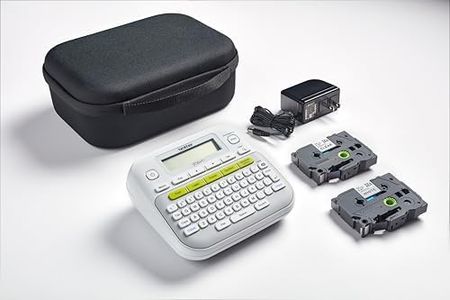
Brother PT-D210SV Monochrome Label Maker Bonus Bundle Comes with a Protective Carrying case, an Adapter, and Two Sample Genuine TZe Label Tapes for Added Value.

Rating
8.5
Keyboard Layout
Print Resolution
Label Tape Compatibility

Most important from
337 reviews

Keyboard Layout
Easy to operate with a straightforward keyboard layout, making label creation quick even for beginners.
Print Resolution
Produces clean, smudge-free labels with crisp, easy-to-read text.
Label Tape Compatibility
Tape cutter placement causes some tape waste, but overall tape consumption is still reasonable.
Power Source
Battery option helps preserve label text temporarily, though full setting memory retention is lacking.
Memory and Storage
Does not retain font and margin settings after powering off, requiring users to reset preferences each time.
Durability
Offers a practical, high-quality solution suitable for both home and professional labeling needs.

The Brother PT-D210SV is a handheld label maker designed for users who want versatile and durable labeling for home, office, or school use. It prints with a clear resolution of 180 dpi, which ensures neat and readable black-and-white labels. Its keyboard layout is straightforward and easy to use, making label creation quick even for beginners. This model supports Brother’s genuine TZe laminated label tapes, which come in various widths and styles, including extra adhesive and fabric iron-on options, allowing you to choose the best tape for different surfaces and needs. The included bundle adds value with a protective carrying case, an adapter for power, and two sample tapes, so you can start labeling immediately without extra purchases.

It stores up to 30 labels for fast reprinting, saving time if you label similar items regularly. The device connects via USB, which is simple but limits wireless options. Its thermal printing technology requires no ink, which is convenient and cost-effective. The labels produced are smudge- and fade-resistant, suitable for both indoor and outdoor use, showing good durability. On the downside, it prints only in monochrome, so it lacks color label options. Also, the absence of wireless connectivity might be a drawback for those wanting to print directly from mobile devices. The memory capacity, while enough for basic use, might feel limited for more advanced labeling projects.

This label maker represents a practical and user-friendly choice for most everyday labeling tasks, especially if durability and ease of use are prioritized over advanced connectivity or color printing features.

Rating
8.5
Keyboard Layout
Print Resolution
Label Tape Compatibility

Most important from
337 reviews

Keyboard Layout
Easy to operate with a straightforward keyboard layout, making label creation quick even for beginners.
Print Resolution
Produces clean, smudge-free labels with crisp, easy-to-read text.
Label Tape Compatibility
Tape cutter placement causes some tape waste, but overall tape consumption is still reasonable.
Power Source
Battery option helps preserve label text temporarily, though full setting memory retention is lacking.
Memory and Storage
Does not retain font and margin settings after powering off, requiring users to reset preferences each time.
Durability
Offers a practical, high-quality solution suitable for both home and professional labeling needs.

Buying Guide for the Best Handheld Label Makers

Choosing the right handheld label maker can make organizing your home, office, or workspace much easier. These devices are designed to be portable and user-friendly, allowing you to create labels on the go. When selecting a handheld label maker, it's important to consider several key specifications to ensure you get the best fit for your needs. Here are the main specs to look out for and how to navigate them.
Print ResolutionPrint resolution refers to the clarity and sharpness of the text and images produced by the label maker. It is usually measured in dots per inch (DPI). Higher DPI values result in clearer and more detailed labels. For basic labeling tasks, a lower DPI (around 180 DPI) may suffice. However, if you need high-quality labels with fine details, look for a model with a higher DPI (300 DPI or more). Consider what you will be labeling and choose a resolution that meets your clarity needs.
Keyboard LayoutThe keyboard layout on a handheld label maker can significantly impact ease of use. Common layouts include QWERTY (like a standard computer keyboard), ABC (alphabetical order), and dual-function keys. A QWERTY layout is generally faster for those familiar with typing, while an ABC layout might be simpler for beginners. Dual-function keys can save space but may require more time to get used to. Think about your typing habits and comfort level when choosing the keyboard layout.
Label Tape CompatibilityLabel tape compatibility refers to the types and sizes of label tapes that the device can use. Some label makers are compatible with a wide range of tape widths and materials, such as plastic, fabric, or heat-shrink tubing. Others may be limited to specific types. Consider what you will be labeling and the environments the labels will be exposed to. If you need versatile labeling options, choose a model that supports various tape types and widths.
Power SourceHandheld label makers can be powered by batteries, rechargeable batteries, or an AC adapter. Battery-powered models offer portability but require regular battery replacements or recharging. Models with an AC adapter can be more convenient for stationary use but limit mobility. Some models offer both options. Consider where and how often you will use the label maker. If you need it for on-the-go labeling, a battery-powered model might be best. For frequent, stationary use, an AC adapter could be more practical.
Memory and StorageMemory and storage capabilities allow you to save frequently used labels and templates for quick access. Some label makers have built-in memory to store a limited number of labels, while others offer more extensive storage options. This feature is particularly useful if you create labels with repetitive information. If you plan to use the label maker for various projects, look for a model with ample memory to save time and effort.
Connectivity OptionsConnectivity options, such as Bluetooth or USB, enable you to connect the label maker to other devices like smartphones, tablets, or computers. This can expand the functionality of the label maker, allowing you to design labels using software or apps. If you prefer creating labels on a computer or need to print complex designs, choose a model with connectivity options. For basic labeling needs, a standalone model without connectivity might be sufficient.
DurabilityDurability refers to the build quality and robustness of the label maker. A durable model can withstand drops, bumps, and regular use without breaking down. This is particularly important if you plan to use the label maker in a workshop, construction site, or other demanding environments. Look for models with sturdy construction and positive user reviews regarding durability. If you need a label maker for light, occasional use, durability might be less of a concern.

FAQ

Most Popular Categories Right Now