We Use CookiesWe use cookies to enhance the security, performance, functionality and for analytical and promotional activities. By continuing to browse this site you are agreeing to our privacy policy

10 Best Computers For College 2026 in the United States

How do we rank products for you?

Our technology thoroughly searches through the online shopping world, reviewing hundreds of sites. We then process and analyze this information, updating in real-time to bring you the latest top-rated products. This way, you always get the best and most current options available.

headphones-stars

Our Top Picks

#1

Winner

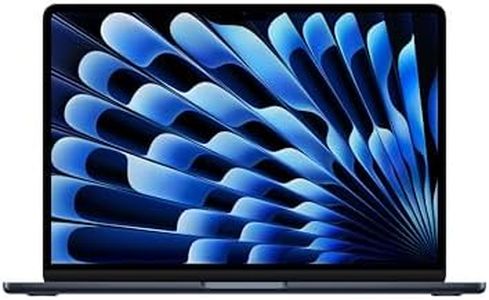
Apple 2026 MacBook Air 13-inch Laptop with M5 chip: Built for AI, 13.6-inch Liquid Retina Display, 16GB Unified Memory, 512GB SSD, 12MP Center Stage Camera, Touch ID, Wi-Fi 7; Midnight

Rating
10.0
Chosen by1,383
Processor (CPU)
Battery Life
Display Size and Quality

Most important from
826 reviews

Processor (CPU)
The MacBook Air with the M5 chip delivers seamless multitasking and handles heavy workloads without any lag.
Battery Life
Battery life comfortably lasts a full day, supporting long study sessions or work without interruptions.
Display Size and Quality
The 13.6-inch Liquid Retina display is exceptionally crisp, bright, and vibrant, enhancing every visual experience.
Weight and Portability
Its ultra-lightweight and thin design make it incredibly easy to carry around campus or on the go.
Operating System
macOS provides a smooth, snappy user interface with all necessary tools pre-installed, enriching productivity.
Durability and Build Quality
The build quality impresses with a refined feel and stunning finishes, making it both durable and stylish.
Keyboard and Trackpad
Typing is comfortable and efficient thanks to the backlit Magic Keyboard, perfect for extended writing.

The Apple 2026 MacBook Air with the new M5 chip is a strong choice for college students needing a lightweight yet powerful laptop. It offers a fast 10-core CPU and an 8-core GPU, which handle multitasking and creative apps smoothly. With 16GB of unified memory and a 512GB SSD, it provides speedy performance and enough storage for most student work and media. The 13.6-inch Liquid Retina display is bright, sharp, and shows rich colors, making it great for viewing documents, videos, or design projects. At just 2.7 pounds, it's highly portable and easy to carry around campus.

Battery life is impressive, with up to 18 hours of usage, so you can go through a full day without needing to recharge. macOS offers a user-friendly environment with built-in security and seamless integration if you use other Apple devices like an iPhone. Connectivity includes Wi-Fi 7, Bluetooth 6, two Thunderbolt 4 ports, a headphone jack, and MagSafe charging, covering most student needs. The backlit Magic Keyboard and Force Touch trackpad make typing and navigation comfortable. The build quality is solid and environmentally conscious, using recycled materials.

It has only two Thunderbolt ports, which might require adapters if you have many peripherals. Also, the price is typically on the higher side compared to Windows laptops with similar specs. The integrated graphics are good for everyday tasks and light creative work but aren’t made for heavy gaming or professional 3D rendering. This MacBook Air suits students who prioritize portability, battery life, and a smooth, reliable user experience within the Apple ecosystem.

Rating
10.0
Chosen by1,383
Processor (CPU)
Battery Life
Display Size and Quality

Most important from
826 reviews

Processor (CPU)
The MacBook Air with the M5 chip delivers seamless multitasking and handles heavy workloads without any lag.
Battery Life
Battery life comfortably lasts a full day, supporting long study sessions or work without interruptions.
Display Size and Quality
The 13.6-inch Liquid Retina display is exceptionally crisp, bright, and vibrant, enhancing every visual experience.
Weight and Portability
Its ultra-lightweight and thin design make it incredibly easy to carry around campus or on the go.
Operating System
macOS provides a smooth, snappy user interface with all necessary tools pre-installed, enriching productivity.
Durability and Build Quality
The build quality impresses with a refined feel and stunning finishes, making it both durable and stylish.
Keyboard and Trackpad
Typing is comfortable and efficient thanks to the backlit Magic Keyboard, perfect for extended writing.
#2

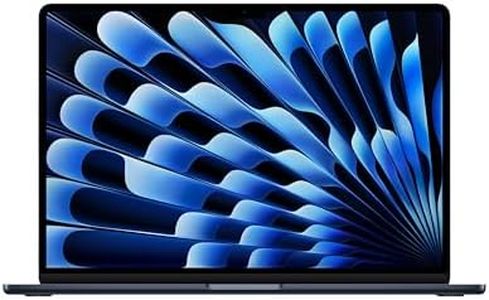
Apple 2026 MacBook Air 15-inch Laptop with M5 chip: Built for AI, 15.3-inch Liquid Retina Display, 16GB Unified Memory, 512GB SSD, 12MP Center Stage Camera, Touch ID, Wi-Fi 7; Midnight

Rating
10.0
Processor (CPU)
Memory (RAM)
Battery Life

Most important from
426 reviews

Processor (CPU)
The M5 chip delivers incredibly responsive performance, handling multitasking and demanding workloads effortlessly with instant application launches.
Memory (RAM)
With 16GB unified memory, running multiple applications simultaneously feels fluid and smooth, providing confidence during heavier workloads.
Battery Life
Battery life impressively lasts through full workdays, eliminating frequent charging worries even under heavy usage.
Display Size and Quality
The 15.3-inch Liquid Retina display offers vibrant colors, deep blacks, and sharp text, making multitasking and content creation a pleasure without adding bulk.
Weight and Portability
Despite its larger screen, the laptop remains slim, lightweight, and easy to carry, combining premium design with portability.
Operating System
macOS remains polished and user-friendly, optimized for Apple hardware with smooth animations, quick launches, and robust security features.
Connectivity and Ports
Connectivity is future-proofed with Wi-Fi 7 and Bluetooth 6, ensuring fast, reliable wireless performance and seamless peripheral connections.
Keyboard and Trackpad
Typing on the backlit Magic Keyboard is comfortable and quiet, ideal for long writing sessions with precise and responsive keys.

The Apple 2026 MacBook Air 15-inch with the new M5 chip is a strong choice for college students who need a powerful yet portable laptop. It packs a 10-core CPU with integrated graphics and 16GB of unified memory, which means it handles multitasking and creative apps smoothly, especially those benefiting from AI features. The 512GB SSD offers fast storage but might feel tight if you store lots of files locally, though cloud storage could help. Battery life is impressive—up to 18 hours—so it can last through long study sessions or classes without frequent charging. The 15.3-inch Liquid Retina display delivers sharp, vibrant visuals, great for reading, video calls, or media projects.

Weighing just 3.3 pounds, it’s light enough to carry around comfortably, a real plus for students on the go. macOS provides a user-friendly experience, especially if you use other Apple devices, as it offers seamless integration. Connectivity includes two Thunderbolt 4 ports, MagSafe charging, and Wi-Fi 7 for fast, reliable internet, but the limited ports might require adapters for some peripherals. The backlit Magic Keyboard and large Force Touch trackpad are comfortable and responsive, supporting long typing sessions and precise control. Build quality is solid with recycled materials, and the laptop includes advanced cameras and microphones for clear video calls.

The main drawback is the higher price typical of Apple products, which might stretch a student budget. Also, the integrated graphics are fine for everyday tasks and light creative work but aren’t meant for heavy gaming or high-end 3D rendering. This MacBook Air suits college users who want a stylish, durable, and high-performance laptop that excels at general productivity, media consumption, and AI-powered tasks, as long as they prioritize portability and ecosystem integration.

Rating
10.0
Processor (CPU)
Memory (RAM)
Battery Life

Most important from
426 reviews

Processor (CPU)
The M5 chip delivers incredibly responsive performance, handling multitasking and demanding workloads effortlessly with instant application launches.
Memory (RAM)
With 16GB unified memory, running multiple applications simultaneously feels fluid and smooth, providing confidence during heavier workloads.
Battery Life
Battery life impressively lasts through full workdays, eliminating frequent charging worries even under heavy usage.
Display Size and Quality
The 15.3-inch Liquid Retina display offers vibrant colors, deep blacks, and sharp text, making multitasking and content creation a pleasure without adding bulk.
Weight and Portability
Despite its larger screen, the laptop remains slim, lightweight, and easy to carry, combining premium design with portability.
Operating System
macOS remains polished and user-friendly, optimized for Apple hardware with smooth animations, quick launches, and robust security features.
Connectivity and Ports
Connectivity is future-proofed with Wi-Fi 7 and Bluetooth 6, ensuring fast, reliable wireless performance and seamless peripheral connections.
Keyboard and Trackpad
Typing on the backlit Magic Keyboard is comfortable and quiet, ideal for long writing sessions with precise and responsive keys.
#3

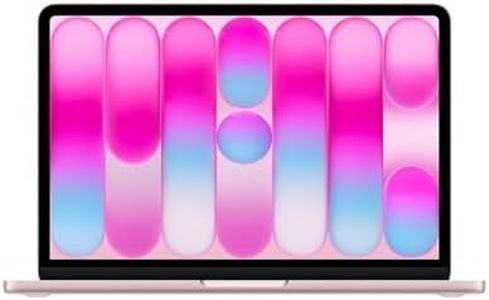
Apple 2026 MacBook Neo 13-inch Laptop with A18 Pro chip: Built for AI and Apple Intelligence, Liquid Retina Display, 8GB Unified Memory, 512GB SSD Storage, 1080p FaceTime HD Camera, Touch ID; Blush

Rating
10.0
Processor (CPU)
Storage (HDD/SSD)
Battery Life

Most important from
962 reviews

Processor (CPU)
The MacBook Neo powers through a full workday with ease, handling multiple apps and creative tasks without any lag.
Storage (HDD/SSD)
Storage space of 512GB is ample for daily use, accommodating plenty of files, media, and apps.
Battery Life
Battery life impresses by lasting through long sessions with minimal recharging needed.
Display Size and Quality
The vibrant and sharp display delivers crisp visuals, enhancing everything from browsing to photo editing.
Weight and Portability
Its lightweight and thin design makes it extremely portable and comfortable to carry around all day.
Durability and Build Quality
Build quality feels premium and solid, matching Apple’s reputation even at this price point.
Keyboard and Trackpad
Despite lacking a backlit keyboard, the screen’s illumination and smart key placement make typing at night effortless.

The Apple 2026 MacBook Neo is a strong choice for college students looking for a compact, reliable laptop. Its 13-inch Liquid Retina display offers sharp visuals with vibrant colors, making it great for reading, watching videos, and working on projects. Powered by the new A18 Pro chip with 6 cores and built-in AI capabilities, it handles everyday tasks like note-taking, web browsing, and basic photo editing smoothly. The 8GB of unified memory is adequate for most student needs but may feel limiting if you tend to run many apps at once or more demanding software. The 512GB SSD offers fast storage and enough space for assignments, media, and apps. Battery life is excellent, promising up to 16 hours of use, which means it can easily last through a full day of classes and study sessions without recharging. Weighing just 2.7 pounds, its lightweight aluminum body is portable and sturdy enough to carry around campus comfortably.

Running macOS, it integrates seamlessly with iPhones and other Apple devices, which is convenient if you're already in the Apple ecosystem. Connectivity includes two USB-C ports and a headphone jack, though the limited number of ports might require adapters for some users. The keyboard and trackpad are well-designed for comfortable typing and navigation. While its price might be higher than some budget laptops, the MacBook Neo offers a premium build, solid performance, and security features like Touch ID that many students will appreciate. If you prioritize portability, display quality, and a smooth user experience in a Mac environment, this laptop fits well. However, if you need more memory or more port options, you might want to consider other models.

Rating
10.0
Processor (CPU)
Storage (HDD/SSD)
Battery Life

Most important from
962 reviews

Processor (CPU)
The MacBook Neo powers through a full workday with ease, handling multiple apps and creative tasks without any lag.
Storage (HDD/SSD)
Storage space of 512GB is ample for daily use, accommodating plenty of files, media, and apps.
Battery Life
Battery life impresses by lasting through long sessions with minimal recharging needed.
Display Size and Quality
The vibrant and sharp display delivers crisp visuals, enhancing everything from browsing to photo editing.
Weight and Portability
Its lightweight and thin design makes it extremely portable and comfortable to carry around all day.
Durability and Build Quality
Build quality feels premium and solid, matching Apple’s reputation even at this price point.
Keyboard and Trackpad
Despite lacking a backlit keyboard, the screen’s illumination and smart key placement make typing at night effortless.

Buying Guide for the Best Computers For College

When choosing a computer for college, it's important to focus on how you'll actually use it. Are you mainly taking notes, doing research, writing papers, or will you need to run demanding software for design, programming, or engineering classes? Portability, performance, and reliability should be your top priorities, as a college computer needs to be easy to carry, powerful enough for school tasks, and durable for years of use. Pick a device that meets your academic requirements while also fitting your lifestyle, study habits, and campus environment.
Processor (CPU)The processor is the brain of your computer, handling all the instructions it receives from hardware and software. For basic tasks like browsing, word processing, and streaming, entry-level or mid-range CPUs will usually suffice. More demanding applications—such as programming, video editing, or 3D modeling—require a more powerful processor. Generally, CPUs can be categorized into entry-level (suitable for light tasks), mid-range (good for multitasking and standard college work), and high-performance (needed for specialized fields). Consider your major and the kinds of programs you'll use: arts and humanities students are often fine with entry to mid-level, while engineering, design, and science majors may benefit from a faster CPU.
Memory (RAM)RAM determines how many tasks your computer can handle at once. More RAM allows for smooth multitasking and running heavier applications. For typical college use, 8 GB is generally recommended as a minimum; this is enough for a web browser, document editing, and light media. For students working with data-intensive or creative software, 16 GB or more will provide extra headroom and a smoother experience. Choose more RAM if you expect to run several programs at once or use advanced tools.
Storage (HDD/SSD)Storage is where your files, applications, and the operating system live. Solid State Drives (SSDs) are much faster and more reliable than traditional Hard Disk Drives (HDDs). Having an SSD means your computer will start up quickly and load files rapidly, which is very helpful in a fast-paced academic setting. Storage sizes generally range from 128 GB to 1 TB or more. For most students, 256 GB or 512 GB SSD provides enough space for documents, applications, and some media. Choose higher storage if you plan to keep lots of large files, such as videos, photos, or design projects.
Battery LifeBattery life tells you how long your laptop can run on a single charge. Longer battery life means you can use your computer in class or at the library without constantly searching for an outlet. Laptops typically offer anywhere from 4 to over 12 hours of battery life. If you’ll be moving between classes or studying outside your dorm, aim for a model with at least 8 hours to make sure you get through the school day without interruptions.
Display Size and QualityThe screen size affects how portable and comfortable your computer is to use. Smaller displays (11-13 inches) make for lightweight and easy-to-carry laptops, while larger screens (15-17 inches) are better for multitasking and visual tasks but are heavier. Screen quality (resolution, brightness) also matters—higher resolutions (Full HD or better) make text and images sharper, which is helpful for long study sessions. Choose a screen size and quality that match your need for portability versus workspace.
Weight and PortabilityWeight plays a big role in portability, which is crucial if you’ll be carrying your computer around campus a lot. Ultralight laptops typically weigh under 3 pounds and are easiest to move, while heavier machines may offer more performance but can be a burden over time. If your routine involves a lot of walking or commuting, look for a lighter option that fits easily in your bag.
Operating SystemThe operating system—such as Windows, macOS, or Chrome OS—determines the software your computer can run and your overall user experience. Choose one that best fits both your personal comfort and your college’s requirements. Some majors or colleges specify certain systems for compatibility, while others are more flexible. Consider your familiarity and any specific software you know you'll need to use.
Connectivity and PortsConnectivity options like USB ports, HDMI, SD card readers, and headphone jacks support connecting to external devices and accessories. Consider what you’ll need to plug in: flash drives, monitors, projectors, and more. Having the right ports means less need for adapters, so check your usual habits or school requirements—especially if you expect to make presentations or use external devices.
Durability and Build QualityA durable computer will withstand everyday use, unexpected drops, and travel between home, class, and library. Look for sturdy materials (like metal or reinforced plastic) and spill-resistant keyboards if you’re prone to accidents. Durability is particularly important if you expect to move around campus a lot or use your computer in active settings.
Keyboard and TrackpadA comfortable keyboard and responsive trackpad make long typing sessions and navigation easier. If you’ll be writing lots of papers or taking notes directly on your computer, test out the feel of the keyboard and ensure the trackpad is accurate. Comfort can seriously impact productivity, so pick what feels most natural for you.

FAQ

Most Popular Categories Right Now