10 Best Computer Cameras For Streaming 2026 in the United States

Related Products
Up to 10% off
Our technology thoroughly searches through the online shopping world, reviewing hundreds of sites. We then process and analyze this information, updating in real-time to bring you the latest top-rated products. This way, you always get the best and most current options available.

Our Top Picks
Winner
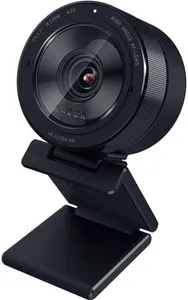
Razer Kiyo Pro Ultra 4K Webcam: Large Sensor - Auto Light Correction - Built-in Mic and Shutter - Pro Grade Content Creation, Streaming, Gaming, Video Calls - Works with OBS, Xsplit, PC, Zoom, Teams
Most important from
233 reviews
The Razer Kiyo Pro Ultra is a high-quality webcam designed for streaming, gaming, and professional video calls. It shines with its 4K resolution and a large 1/1.2" Sony STARVIS 2 sensor, which captures more light and detail than many typical webcams. This means you get sharp, vibrant images with true-to-life colors, thanks to HDR technology. Its custom F/1.7 aperture lens and large pixel size help deliver clear video even in low-light environments, making it a good pick if your room isn’t brightly lit. The camera also features AI-powered autofocus and face tracking, which keeps your image sharp and well-exposed without needing you to adjust settings constantly.
Portrait mode-like background blur adds a professional touch by keeping you in focus while softening the background, all without extra software. It supports smooth video at 4K 24 FPS or 1080p 60 FPS, offering flexible frame rates depending on your streaming needs. The built-in microphone is convenient for casual use but may not replace a dedicated mic for higher audio quality. Connectivity is straightforward with USB, and mounting options include a detachable stand, making setup simple. However, it’s optimized mainly for Windows users who want full access to advanced settings; Mac users get basic plug-and-play functionality without extra software features. The webcam is compact but relatively heavier than some others.
While it offers many pro-level features, its price and advanced functions may be more suited for serious content creators or streamers than casual users. Choosing the Kiyo Pro Ultra means getting a sharp, well-lit image with professional video quality and flexible settings, especially in dimmer environments, though a separate microphone might be needed for the best audio.
Most important from
233 reviews
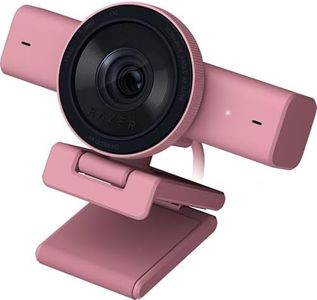
Razer Kiyo V2 Streaming Webcam: 4K 30 FPS, 1080p 60 FPS - AI Powered Auto-Framing - Built-in Microphone - Ultrawide Angle Lens - Privacy Cover - Works with OBS, Xsplit, Discord, Zoom, Teams - Pink
Most important from
142 reviews
The Razer Kiyo V2 is a strong choice for streamers looking for clear, high-quality video. It offers 4K resolution at 30 frames per second or 1080p at 60 frames per second, so your video can be both sharp and smooth. The ultrawide lens lets you show more of your space without distortion. One standout feature is the AI-powered auto-framing which keeps you centered in the shot, making your streams look professional without extra effort. It also performs well in low light thanks to automatic exposure and noise reduction, so your image stays clear even in dim rooms.
The built-in microphone is convenient for casual use, although serious streamers might prefer a dedicated mic for better sound quality. Connectivity is simple via USB, and the universal mount allows you to attach it to monitors or tripods with ease, giving flexibility in setup. On the downside, it lacks image stabilization, so any camera movement might appear shaky. There's also no water resistance, so it needs careful handling.
The software lets you tweak settings like ISO and shutter speed, which is helpful but might be a bit complex for beginners. If you want a compact, versatile webcam with excellent video quality and smart framing for streaming, the Kiyo V2 is a solid pick, especially if you stream in varied lighting conditions and want a stylish pink option.
Most important from
142 reviews
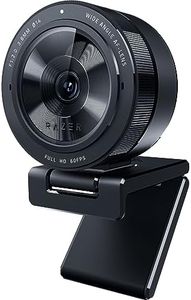
Razer Kiyo Pro Webcam for Streaming, Gaming, Video Calls: Full HD 1080p 60FPS - Adaptive Light Sensor - HDR Enabled - Wide Angle Lens with Adjustable FOV - Works with OBS, Xsplit, Twitch, Zoom, Teams
Most important from
5709 reviews
The Razer Kiyo Pro is a strong choice for anyone looking for a high-quality webcam primarily for streaming, gaming, or video calls. It offers uncompressed Full HD 1080p video at a smooth 60 frames per second, which means your video will look clear and fluid without lag or blurriness. The adjustable field of view (103°, 90°, and 80°) lets you control how much of your background or surroundings appear, making it flexible whether you want just your face or a bit more space visible.
One of its standout features is excellent low-light performance. Thanks to its adaptive light sensor, it reduces graininess and keeps your image sharp even in darker rooms—better than many other webcams that require extra lighting equipment. The HDR option is a bonus for vibrant, balanced colors, although it works at 30fps, which is slightly lower than the main 60fps video. Audio-wise, the built-in microphone delivers standard quality with 16-bit 48 kHz sound, suitable for casual use but not a replacement for a dedicated mic if professional audio is needed. Connectivity is straightforward with a USB 3.0 connection, ensuring fast and reliable data transfer without compression, but it requires a compatible USB port to get the most out of its performance.
Mounting options are typical for webcams, easily attaching to monitors or tripods, allowing flexible placement. The camera is plug-and-play and works well with popular streaming software such as OBS, Twitch, and Zoom. The autofocus performance is expected to be solid based on Razer’s reputation, though it may not excel in very fast-moving scenes. The included 1.5-meter cable may limit placement options if the camera needs to be positioned far from the PC. It is priced higher than basic webcams, making it better suited for users who prioritize higher image quality and superior low-light performance.
Most important from
5709 reviews
Buying Guide for the Best Computer Cameras For Streaming
When choosing a computer camera for streaming, it's important to consider several key specifications to ensure you get the best quality for your needs. Streaming requires a camera that can deliver clear, high-quality video and handle various lighting conditions. Understanding these specs will help you make an informed decision and enhance your streaming experience.FAQ
Most Popular Categories Right Now


