We Use CookiesWe use cookies to enhance the security, performance, functionality and for analytical and promotional activities. By continuing to browse this site you are agreeing to our privacy policy

10 Best Brother Mono Laser Printers 2026 in the United States

How do we rank products for you?

Our technology thoroughly searches through the online shopping world, reviewing hundreds of sites. We then process and analyze this information, updating in real-time to bring you the latest top-rated products. This way, you always get the best and most current options available.

headphones-stars

Our Top Picks

#1

Winner

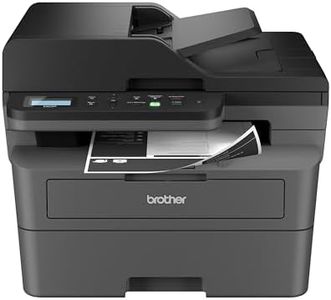
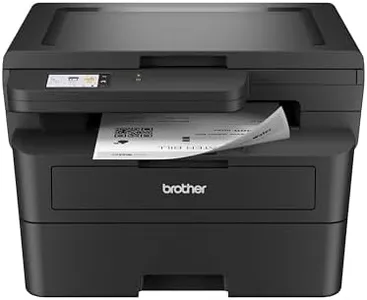
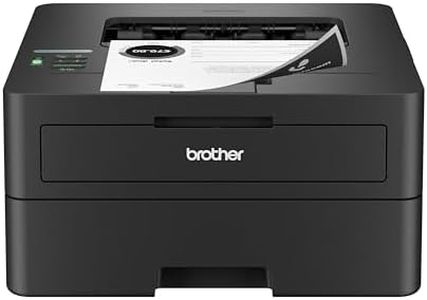
Brother DCP-L2640DW Wireless Compact Monochrome Multi-Function Laser Printer with Copy and Scan, Duplex, Mobile, Black & White | Includes Refresh Subscription Trial(1), Works with Alexa

Rating
10.0
Chosen by1,340
Print Quality
Connectivity
Cost of Consumables

Most important from
3546 reviews

Print Quality
Print speed and quality are impressive, with documents coming out crisp and professional.
Connectivity
Connectivity options are robust, and the wired connection is a lifesaver for those who struggle with wireless setups.
Cost of Consumables
The cost of toner is reasonable, especially if purchased in multipacks, making it economical for regular use.

The Brother DCP-L2640DW is a versatile monochrome laser printer designed with small businesses in mind. One of its standout features is its high print speed, reaching up to 36 pages per minute, which makes it efficient for busy work environments where quick document turnaround is essential. The inclusion of a 50-page auto document feeder further enhances productivity by streamlining multi-page scanning and copying tasks. Print quality is reliably high, producing clear and professional documents, suitable for most standard business needs.

The printer also supports duplex printing, which helps save paper and reduce printing costs over time. However, it's worth noting that this model only prints in black and white, which might be a limitation if color printing is occasionally needed. Connectivity is robust, with options for Wi-Fi, Ethernet, and USB, ensuring it can integrate seamlessly into various office setups. The Brother Mobile Connect app adds remote management convenience, allowing users to print, scan, and monitor their printer from mobile devices. This is particularly useful for on-the-go tasks.

Brother printers are generally known for their reliability and durability, making them a good choice for moderate to heavy use. Cost of consumables is manageable, especially with the option to use Brother's Refresh EZ Print Subscription Service, which can save up to 50% on toner costs. The printer's compact size and relatively light weight make it easy to place in a home office or small workspace. While the printer excels in most tasks, it does not offer color printing, which could be a drawback for businesses that require it. Additionally, the initial setup might be slightly complex for non-tech-savvy users. The Brother DCP-L2640DW is a reliable, fast, and efficient monochrome laser printer that offers great value for small businesses with high-volume black and white printing needs.

Rating
10.0
Chosen by1,340
Print Quality
Connectivity
Cost of Consumables

Most important from
3546 reviews

Print Quality
Print speed and quality are impressive, with documents coming out crisp and professional.
Connectivity
Connectivity options are robust, and the wired connection is a lifesaver for those who struggle with wireless setups.
Cost of Consumables
The cost of toner is reasonable, especially if purchased in multipacks, making it economical for regular use.
#2

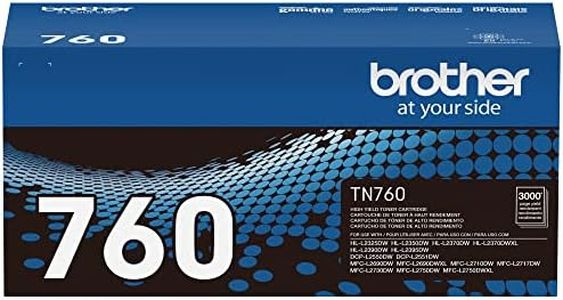
Brother Genuine TN760 High Yield Black Toner Cartridge, (for use with MFC-L2710DW MFC-L2750DW HL-L2350DW HL-L2370DW HL-L2395DW HL-L2390DW DCP-L2550DW Printers) (Pack of 1)

Rating
9.4
Print Quality
Cost of Consumables

Most important from
34591 reviews

Print Quality
Delivers sharp, consistent print quality that meets professional standards over time.
Cost of Consumables
Offers a high page yield that lasts significantly longer than cheaper alternatives, making it more economical in the long run.

The Brother TN760 High Yield Black Toner Cartridge is designed for use with select Brother mono laser printers, offering strong value for both home and office users who print mainly in black and white. It delivers clear, sharp text prints that maintain their quality over time, making it suitable for professional documents. The cartridge has a high page yield of about 3,000 pages, which means fewer replacements and less frequent purchases, helping keep the cost of consumables reasonable.

Being a genuine Brother product, it integrates smoothly with compatible printers for consistent performance and includes an environmentally responsible disposal option. Since this is just a toner cartridge, it does not directly affect print speed or paper handling, which depend on the printer model. It supports only simplex (single-sided) printing, so users needing automatic double-sided printing should verify their printer's capabilities.

For owners of compatible Brother mono laser printers seeking reliable, high-volume black toner, the TN760 balances print quality and cost effectively, making it a dependable choice.

Rating
9.4
Print Quality
Cost of Consumables

Most important from
34591 reviews

Print Quality
Delivers sharp, consistent print quality that meets professional standards over time.
Cost of Consumables
Offers a high page yield that lasts significantly longer than cheaper alternatives, making it more economical in the long run.
#3

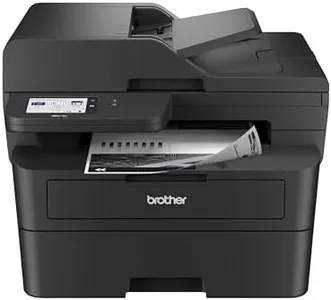
Brother DCP-L2640DW Wireless Compact Monochrome Multi-Function Laser Printer with Copy and Scan, Duplex, Black & White Output | Includes Refresh Subscription Trial(1), (Renewed Premium)

Rating
9.1
Print Speed
Print Quality
Paper Handling

Most important from
3659 reviews

Print Speed
Delivers fast, clear printing with sharp text and handles various paper types including envelopes and vouchers smoothly.
Print Quality
Delivers fast, clear printing with sharp text and handles various paper types including envelopes and vouchers smoothly.
Paper Handling
Delivers fast, clear printing with sharp text and handles various paper types including envelopes and vouchers smoothly.
Connectivity
Wireless setup is straightforward and reliable when using the printer's console buttons to connect to the network, enabling seamless printing from multiple devices.
Cost of Consumables
Replacement toner cartridges are reasonably priced, and the machine allows easy adjustment of print density and toner saving features.

The Brother DCP-L2640DW is a solid choice for small businesses or home offices needing a reliable monochrome laser printer that also scans and copies. It offers a fast print speed of up to 36 pages per minute, which helps keep busy workdays efficient. Print quality is sharp with a resolution of up to 1200 x 1200 dpi, good enough for clear text and basic graphics. Paper handling is convenient thanks to a 250-sheet input tray and a 50-page automatic document feeder, allowing you to manage multi-page jobs with ease. It also supports automatic duplex printing, saving paper by printing on both sides.

Connectivity is flexible, including dual-band Wi-Fi, Ethernet, and USB, so you can easily connect multiple devices or print wirelessly from smartphones and tablets using the Brother Mobile Connect app. The printer is designed for moderate use with a reasonable duty cycle and includes an energy-efficient design. Consumable costs are kept in check by using Brother Genuine toner cartridges, and the optional Refresh EZ Print Subscription can help avoid running out of toner while saving money.

Some downsides include its weight and size, which may be bulky for very small spaces, and while print quality is solid for text, it may not be ideal for detailed images. This model effectively balances speed, quality, and convenience for its category.

Rating
9.1
Print Speed
Print Quality
Paper Handling

Most important from
3659 reviews

Print Speed
Delivers fast, clear printing with sharp text and handles various paper types including envelopes and vouchers smoothly.
Print Quality
Delivers fast, clear printing with sharp text and handles various paper types including envelopes and vouchers smoothly.
Paper Handling
Delivers fast, clear printing with sharp text and handles various paper types including envelopes and vouchers smoothly.
Connectivity
Wireless setup is straightforward and reliable when using the printer's console buttons to connect to the network, enabling seamless printing from multiple devices.
Cost of Consumables
Replacement toner cartridges are reasonably priced, and the machine allows easy adjustment of print density and toner saving features.

Buying Guide for the Best Brother Mono Laser Printers

Choosing the right Brother mono laser printer involves understanding your specific needs and matching them with the printer's features. Mono laser printers are ideal for those who primarily need to print black and white documents, offering high speed and efficiency. To make an informed decision, consider the key specifications that will impact your printing experience.
Print SpeedPrint speed, measured in pages per minute (ppm), indicates how quickly a printer can produce documents. This is important for high-volume printing environments where time efficiency is crucial. Print speeds can range from around 20 ppm to over 50 ppm. If you need a printer for occasional use or small office tasks, a lower ppm may suffice. For larger offices or frequent printing, a higher ppm will ensure faster output and better productivity.
Print QualityPrint quality is determined by the printer's resolution, measured in dots per inch (dpi). Higher dpi values result in sharper and more detailed prints. Common resolutions for mono laser printers range from 600 dpi to 1200 dpi or higher. If your primary need is printing text documents, a lower dpi will be adequate. For printing detailed graphics or images, opt for a higher dpi to ensure clarity and precision.
Paper HandlingPaper handling refers to the printer's capacity to manage different paper sizes and types, as well as its input and output tray capacities. This is crucial for offices that require printing on various media or need to handle large print jobs without frequent reloading. Look for printers with multiple paper trays and higher input capacities if you have diverse printing needs or high-volume requirements. For standard office use, a single tray with moderate capacity will be sufficient.
ConnectivityConnectivity options determine how you can connect the printer to your devices. Common options include USB, Ethernet, and Wi-Fi. Some printers also offer mobile printing capabilities via apps or cloud services. If you need to share the printer among multiple users or prefer wireless printing, look for models with robust Wi-Fi and network connectivity. For direct, single-user connections, USB may be adequate.
Duty CycleThe duty cycle is the maximum number of pages a printer can handle per month without experiencing issues. This is important for understanding the printer's durability and suitability for your workload. Duty cycles can range from a few thousand pages to over 100,000 pages per month. Assess your average monthly print volume and choose a printer with a duty cycle that comfortably exceeds this number to ensure reliability and longevity.
Cost of ConsumablesThe cost of consumables includes toner cartridges and other replaceable parts. This impacts the overall cost of ownership. Toner cartridges vary in yield, with higher-yield cartridges offering more prints per cartridge and potentially lower cost per page. Consider the frequency of your printing and choose a printer with affordable consumables that match your budget and printing volume to keep long-term costs manageable.

FAQ

Most Popular Categories Right Now